Questions & Answers
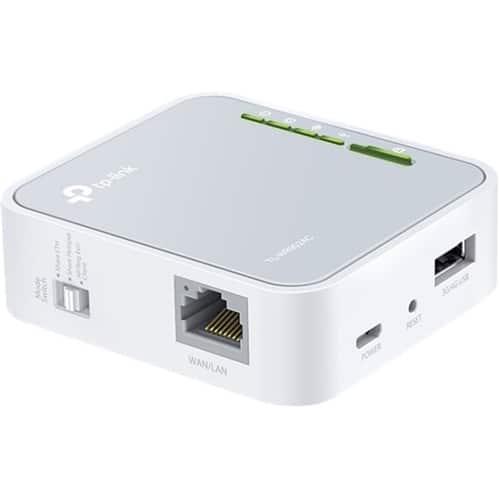
- Model:
- TL-WR902AC
- |
- SKU:
- 11521443
$90.71$90.71
Page Showing 61-70 of 70 questions
Q: QuestionDo I have to pay monthly to use this router
Asked by Tony.
- A:Answer This unit requires an existing internet connection, AND wireless router, or wireless cable modem, if you have that, you don't need this. Now if you have a really generous neighbor with in 1,000 feet of your computer. And that neighbor is willing to share their connection, this is perfect!
Answered by RogerD1959
Q: QuestionWould I be able to connect online to my PS4 with out issues with this device alone ?
Asked by Jaydiaz.
- A:Answer The router alone cannot provide Internet services. You will need to connect the router to an Internet source, such as a modem, for Internet connectivity. Once connected to an Internet source, you can connect devices such as your PS4 to the router via WiFi or Ethernet. Regards, TP-Link Support
Answered by TPLinkSupport

Q: Questiondo i need wifi already to set up this router?
Asked by kypie4.
- A:Answer No; however you will need an active Internet subscription and connect it to the router via Ethernet cable if you want to access the Internet through the router. Regards, TP-Link Support
Answered by TPLinkSupport

Q: QuestionWhat are the data plans on this
Asked by Mankie.
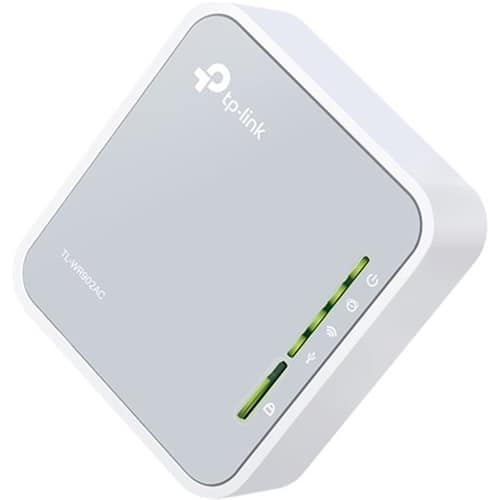
- A:Answer This is a device to boost the signal provided by traditional WIFI, or free Public WIFI. If you have cable internet, T-1 Service, Optical Internet, or Satellite internet, this device would extend the range out and away from the service in your home. Kind of like this, you live in a 7,500 sq. ft. 4 level home. The service to the residence enters the office 3 floors down and 5,000 feet away from the 4 floor Solarium. You would follow the existing service to its weakest point where a stable laptop connection can be achieved, install this, and hopefully it will boost the signal enough for a stable connection in the Solarium. It can also provide a secure connection to public WIFI.
Answered by RogerD1959
Q: QuestionWill this router work if its left on 24/7? Will it overheat? I'm looking for something that will fit in a 300sqft trailer, but can be left on constantally for months at a time without worrying.
Asked by RANA.
- A:Answer Yes. Just don't leave it somewhere hot or where there is no air circulation.
Answered by TheFightingChicken
Q: QuestionIf You Have No Wifi In Your Car Or Data On Your Phone, Can You Get Wifi In Your Car By Using This Wireless Wifi Router?
Asked by ThatGuyBryce101.
- A:Answer No, you have to have some kind of data connection.
Answered by DukeyJW
Q: QuestionWould I have to add internet service from a provider to be able to get WiFi on my vehicle or how does it work?
Asked by Internet.
- A:Answer Yes, you would need an internet connection.
Answered by CommunityAnswer
Q: QuestionIs it possible to use this to change Wi-Fi hotspot to and ethernet cable?
Asked by Bismarckboy.
- A:Answer If you're referring to using the TL-WR902AC to receive an existing WiFi signal as an Internet source, then create a new, separate WiFi network, then Hotspot Router Mode may be what you're looking for. If you're unsure, please email [email protected] and we'll gladly assist you. Regards, TP-Link Support
Answered by TPLinkSupport

Q: QuestionWhat is the range on this router? How far away from it can you get before loosing signal?
Asked by RANA.
- A:Answer WiFi range may vary due to several factors including, but not limited to: placement of the router, how far from the router your devices are and how many physical obstructions (i.e. walls) are between the router and the wireless devices. To ensure the best possible signal, it's important to make sure placement is as optimal as possible. Reducing obstructions and placing the router in a central location will help ensure your signal reaches the areas you need. Regards, TP-Link Support
Answered by TPLinkSupport

Q: QuestionIs the router Optimum Online compatible?
Asked by Lorena.
- A:Answer Yes, as long as you have an existing source of Internet via Ethernet (i.e. modem) that can be connected to the router to provide it with Internet. Regards, TP-Link Support
Answered by TPLinkSupport

Top Rated
- $119.99$119.99The price was $149.99
- $149.99$149.99The price was $192.99
- $279.99$279.99The price was $299.99
- $139.99$139.99The price was $229.99
- $88.99$88.99The price was $99.99
- $199.99$199.99The price was $229.99
- $89.99$89.99The price was $99.99
- $159.99$159.99The price was $179.99
- $178.99$178.99The price was $199.99
- $449.99$449.99The price was $499.99
- $99.00$99.00The price was $138.99