“Hooking up to a wireless routing? Has anyone hooked up one of these to a wireless router? I would like to do this as a alternative to the wife storing all her photos on her laptop since she has already used up the entire 125 Gig storage.”
Answer This Question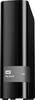
1-6 of 6 Answers
I have hooked this up to a wireless router. You will need to configure your router settings for a harddrive via USB. It will then tell you how you can access the drive. Instead of using a drive letter you typically use the IP address of the router and whatever name you give the drive. The router will let you know when you set it up.
Sorry, there was a problem. Please try again later.Yes. I have it connected to a Netgear wireless router via the router's USB 3.0 port. Netgear lets me place the drive out on the network as a stand-alone device. I am using it as a media server, storing 3.5 TB worth of video and audio media. I can access the drive from any PC in the house, including 3 laptops via wi-fi.
Sorry, there was a problem. Please try again later.You will be better served if you implement two of them. All hard drives fail at some point regardless of their quality, brand or price. If you use this for storage of important "stuff" you should have a send drive of similar capacity used exclusively for backup. This would be the bare minimum backup scenario as a surge or fire could harm both drives. That said, the above scenario is probably the least expensive solution with reasonably durable results.
Sorry, there was a problem. Please try again later.If your wireless router is setup to support a USB device then yes the laptop via wireless can access the USB. Follow the routers manual for USB setup and then establish a network drive letter on the laptop.
Sorry, there was a problem. Please try again later.I have mine hooked up to a usb 3 port on an n7000 router from netgear. It works great as a media server and backup location.
Sorry, there was a problem. Please try again later.The Book is very easy to install and the software that is needed is included in the unit. This will hold many more pictures for your wife.
Sorry, there was a problem. Please try again later.