Customer Ratings & Reviews















- Model:
- ADO951800F144
- SKU:
- 6366175
to a friend
Customers are saying
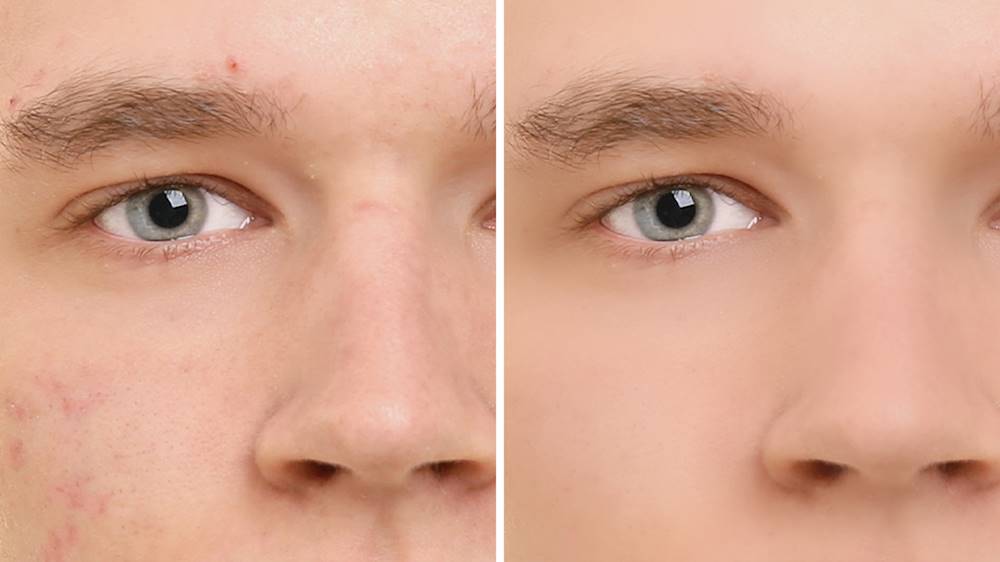
Customers recognize Photoshop Elements 2020 as being easy to use and having powerful photo editing tools. Many appreciate the numerous features, particularly the object removal and skin smoothing capabilities, while some note a learning curve for new users. The software's interface and performance are also generally well-received, with positive comments on its price point.
This summary was generated by AI based on customer reviews.
- Pros mentioned:Ease of use, Object removal, Skin smoothing

Photo Edits Made Simple
|Posted .This reviewer received promo considerations or sweepstakes entry for writing a review.---SETUP--- The setup of Adobe Photoshop is quick. After going to the indicated website, enter your activation code and download the software. I recommend you create an Adobe account so that you can have it registered under your email of choice, allowing you to install from one computer and reinstall in another when needed. This also keeps your activation code on file in case you lose it. ---FEATURES--- The key feature of Adobe Photoshop Elements 2020 is the guided options for those new to photo-editing and the advanced features for those who have more experience. This product does not require any subscription for use. This product works on Mac and Windows PC. I installed in on a Mac Book Pro. ---PERFORMANCE--- The performance of Adobe Photoshop is great. Some of the newest features include automatic colorization of photos (not just color-correct, but changing colors to things in photos), one-click subject selection (for easy removal or transfer to another photo), automatic smooth skin feature (for a perfect look), and newer auto creations. Additionally, the performance is faster and has expanded support for HEIF and HEVC files. The guided options take you step by step for things you want to do with the help of automaticity. ---EXPECTATIONS--- The product meets my expectations. I enjoy photo editing and I started my passion for it with an older version of Adobe Photoshop. Now, in the 2020 version, things that I had to learn how to do manually are automatic and will make you feel like a pro. What I find most impressive is the removal of unwanted objects or people. With 1 click, people are gone and your photo looks natural. If you have the time, you can improve the results with easy to use tools in the guided section of the program. ---VALUE--- The price for Adobe Photoshop is a great price if you aren’t looking to pay for a monthly subscription to the cloud-based programs. ---APPROVAL--- I highly recommend this product for people who want to edit photos but don’t know where to begin. The guided features will welcome you. As you learn, you can move over to the advanced mode and feel more confident if you are ever ready to try the monthly subscription version.
I would recommend this to a friend - Pros mentioned:Ease of use
Christmas gift for my 7 year old daughter
||Posted . Owned for 7 months when reviewed.This reviewer received promo considerations or sweepstakes entry for writing a review.I purchased this item for my 7 year old daughter for Christmas. I am a photographer and I use Lightroom and Photoshop for my editing. My daughter also takes photographs and enjoys editing with PS Elements. It is a little simpler than Photoshop Classic. I highly recommend it. I will attach an image my daughter took and edited with this program.
I would recommend this to a friend - Pros mentioned:Object removal, Skin smoothing
More helpful; more features; more gifts.
|Posted .This reviewer received promo considerations or sweepstakes entry for writing a review.I’ve been playing with Adobe’s Photoshop Elements 2020 (APE) for well over a decade even though I would never be considered a heavy user. This newest version adds only a few more features to last year’s version, although it sure seems somewhat more helpful and more generous with its useful tools. Auto Creations has matured to being a premier feature. Just opening up the program this week to see what I should comment on, I got gifted with 3 beautiful and unusual photo tricks for my consideration using MY pictures. I got 3 of my photos turned into great pictures without breaking a sweat. Wow. Now, that’s both useful and inviting. Who do I thank for the gifts? What’s new (that I care about)? Like I just noted, those Auto-creations are sweet. I’m tempted to keep quitting the program to see if they offer me some new gift photo trickery upon re-opening. The Smart Tagging is great, mostly automated but ultimately tedious if you want to use it effectively. There’s the automatic skin smoothing which may prove useful. Step-by-step guides have been added in object removal, which I put to immediate use. Pretty nice. I tend to use recomposing a lot, and being able to protect spaces or people makes the process less effort. Photo color changes used to be time consuming but now Auto-photo colorization makes it less of a chore. I’ve rediscovered panoramas and find them easier to use with more control over the outcome. In the space of a few hours I created a stack of photos for visiting relatives. All of them were special and unique. The list of added features is not long, but the range and usefulness of these easy-to-use tools is truly awe inspiring. There are now 55 step-by-step Guided Edits and I find the need for most of them at some point in my amateur photography, Whether its removing that intruder into my scene, or creating more dynamic looking photos or just fixing closed eyes, I know I’ve got a tool box for it all in Photoshop Elements. My recent photo activity yielded a few “painterly” effects, looking like I spent hours of effort on each photo. Aggravating stuff: I’ve disliked “Organizer” forever (on the Mac). Only this new iteration and it’s personalized auto-creations have allowed me to forgive …. a little. Upon initial Startup, Organizer starts loading in my photos with no guidance to how long (more than an hour for a few thousand photos) and while it’s in its processing you can’t move it, you can’t close the window, you can’t get any feedback about what’s happening and how long it will go on. Have I locked up? When it’s finished, all that organizing results in a very very long list of folders. In a different view, I still can’t really explain what I’m looking at. Contextual descriptions are not Adobe’s thing. I still find it easier to initiate editing and photo manipulation by finding my pictures in my more familiar PHOTOS App on my Mac. I don’t need to use Organizer at all, which for me is a good thing. Instead, I can go into Mac’s PHOTO APP, select a photo, and in the top MENU, go to IMAGE drop-down and choose EDIT WITH . . . . There is PhotoShop Elements (or I can look for it) and immediately there is my picture sitting in an APE window ready for all those tricks. SUMMARY: All-in-all, the added features are not extensive, but if you haven’t purchased the last couple of versions, you’re going to be pleasantly shocked by the huge array of easy-to-use tools. As a person with last year’s version, I’m still willing to applaud the few goodies that have been added. I’m less aggravated with Organizer (because I usually skirt around it) and all those automated and/or Guided Edits make Adobe’s Photoshop Elements still special.
I would recommend this to a friend - Pros mentioned:Ease of use, Features
Wonderfully Straightforward Photo Editor
|Posted .This reviewer received promo considerations or sweepstakes entry for writing a review.Photoshop elements 2020 is a wonderfully straightforward photo editor for the “common” person. This software is a well thought out photo editor/enhancer for most users. At $99.00 this software is a great deal. It has tons for features to aid one in enhancing, editing, and fixing their photos. It accomplishes this using an interfaced that lets the user decide what they want to do and how they want to do it. Quick mode is for basic photo fixing actions, Guided mode is a wizard-driven interface for a wide array of photo editing functions. It has so many functions, they are subdivided into categories – Basics (basic photo editing functions), Color (a few color functions), Black & White (color effects dealing with Black and White), Fun Edits (a set of fun edits – such a meme maker, Speed Effect, puzzle effect, and much more), Special Edits (special edits for your photos including frames, background swaps, old photo restoration and crack and blemish repairs), and Photomerge (thing stitching/merging/panoramas, and adding or removing objects). These wizards allow one to select a picture or many and work magic on the photos. During the execution of a wizard, one is guided through the steps – both mandatory and optional ones to get one to a result to your desire. Expert mode lets you take the wheel and use the wide array of layers, effects, filters, styles, graphics and more to edit and enhance your photos. Installation is straightforward and requires an Adobe account, but this software is not sold under the same subscription model that the higher end photoshop and other creative cloud applications are sold under. This product retails for $99.99 when bought alone and for $149.99 when bundled with Premier Elements 2020 (a similar product for video editing). My testing focused on the Guided method of making edits to one’s photos. Please see the accompanying images for a sample guided edit and examples of the work I did to prepare for this review. For the Panorama example - I took the 3 pictures on the left and used the panorama photomerge to make one new photo shown under the 3 originals. The Black and White conversion example, you can see before and after on a conversion to black and white. Finally, you can see a Black and White with a color pop enhancement. Overall, I like the interface and the capabilities of this product and believe that this can be a nice addition to one’s editing suite of tools for photos. The wizards can help you do some amazing enhancements and photo fixes to your photos. As one’s experience increases and other needs arise you can shift to expert mode to add even more finesse to your photo edits. Pros: does the job it was intended to do. Modes of operation help make tasks easier. MSPR of $99.99 seems right. Cons: None Noted.
I would recommend this to a friend - Pros mentioned:Object removal
There is no competition.
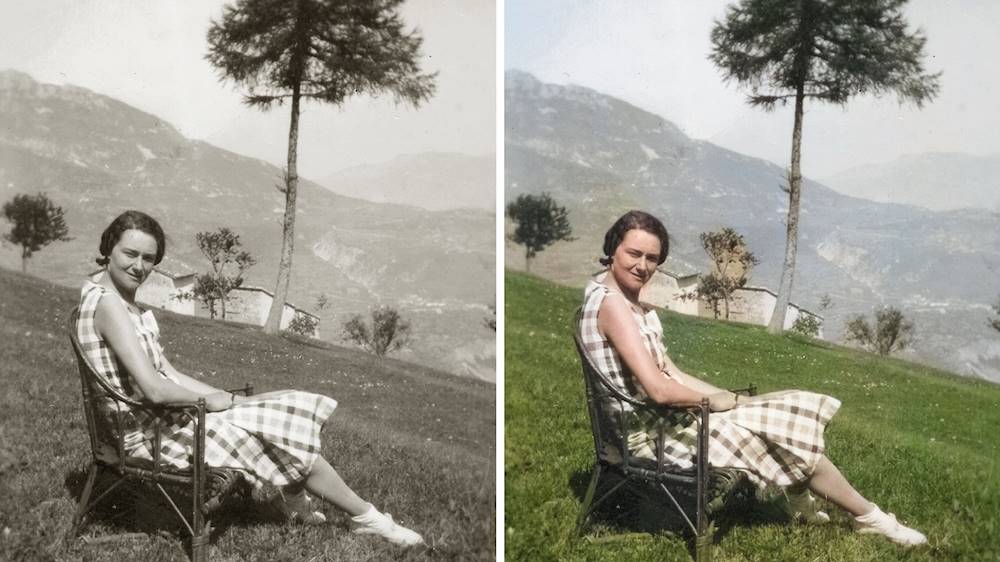
|Posted .This reviewer received promo considerations or sweepstakes entry for writing a review.I first used Adobe Photoshop 26 years ago and have used various Adobe photo and video editing ever since. I eventually moved on to the Adobe Creative Cloud for the full suite of Adobe’s professional software. For most people, Adobe’s high end professional products are way too much for everyday use due to the steep learning curve. That is where Adobe Photoshop Elements comes in. I reviewed the Adobe Photoshop Elements 2019 last year and was very pleased with it. Adobe Photoshop Elements 2020 does not disappoint as well, bringing over a lot of the same features from 2019 and adding a few it ( hence my review will be similar.) Don’t worry about this being a stripped-down version of Photoshop that is going to leave you wanting for something more powerful. There are a lot of reviews here that are very comprehensive and long so I am not going to go into the nitty, gritty details and all the capabilities. What I am going to discuss is the basics of practical use and what I like. Interface – clean as always. One of the issues with Adobe products years ago is you had menu overload. Adobe eliminated this problem by having a graduated menu of options: quick, guided and expert. Quick is the minimalistic, basic menu for fast editing of the most commonly used tools. Not a lot of tools on the basic (intentionally,) just the basic to get you up and running fast. Guided takes you through which tools to use for what you are trying to accomplish, and expert is the full breadth of all the tools available. It really is an interesting approach that I liked in Adobe Photoshop Elements 2019. Simple tools – In Photoshop Elements, it is thought as not as powerful as Photoshop CC but that is not the case. This is a very comprehensive, powerful photo editor. You have drawing/editing tools, layers , enhancements etc– really everything you need. Take a close look at the enhance tab, you have every auto correct tool you can think of and they all work great. I speak of some of the new functions in what I like. Learning curve – Fast to moderate. For anything less than expert, it does not take much. For myself who has experience with Adobe products, I was able to use everything in expert mode relatively fast. What’s new that I like : Auto Creations : This are just cool features. There are a few options here: Black & White Selection, Pattern Brush, Painterly and Depth of Field. I loved the Black and White Selection, it lets you have an object that is black and white while the rest of the picture is color. It gives that professional, jumping out of color look. For example, It gives you the ability to have roses red while everything else is grey. Automatically colorize photos – While this feature may not be for the younger crowd for black and white pictures, I think it is fantastic. I tried this out on several old black and white photos I have and it does an amazing job. It’s not always perfect but it very impressive and most of time on point. It is not limited to black and white photos; you can change the color of objects in any picture. It really is impressive. I’ve attached before and after photos of Steve Jobs. Easy way to remove objects. Gone are the days of tracing and cutting out an object and filling in the background to make it look like it was never there. Remove unwanted objects, brush on fun patterns and more to get exactly the look you want with the help of Guided Edits AS with last years version, you get a lot for your money and these programs is so powerful. For the most part, this program will cover most people’s needs. There is simply no true competition at this price point and feature set. In general, Adobe is the gold standard in every category. I was not thrilled when Adobe went to subscription-based services for most of their top line products so I was happy to see that Photoshop Elements 2020 is a buy it and use program, a onetime purchase—no subscription needed. There is not another competitor out there than can give you this level of power in full photo editor. I cannot really find any flaws – it’s a great value and fantastic to use. Bottom line, whether you are a casual user or a semi pro starting out, you cannot go wrong Photoshop Elements 2020. I recommend the programs completely.
I would recommend this to a friend - Pros mentioned:Ease of use, Object removal, Skin smoothing
In a Class By Itself
|Posted .This reviewer received promo considerations or sweepstakes entry for writing a review.Adobe Photoshop Elements consistently raises the bar for photo editing software. The new release every year brings exciting new innovative capabilities. 2020 is certainly no exception. By contrast, the mega-powerful Adobe Photoshop is the standard bearer for the professional editing software user, but is challenging for the rest of us who do not use the software daily & who want to quickly edit photos without learning a complex system. The great thing is: Photoshop Elements contains most of the Photoshop features, yet is easy to use. The 2020 version adds automatic skin smoothing, object removal, pattern brush, automatic photo colorization, one-click subject selection & other features. I often open the subject photo in each of the 3 modes: Quick Edit, Guided Edit, and Expert Edit. Quick Edit lets you see how a basic edit will look; Guided Edit introduces enhanced capabilities in a step-by-step approach & Expert Edit, offers a manual workflow, similar to Photoshop. I love that you can toggle back-and-forth between all three tabs! It is a smooth transition & offers 3) separate approaches to achieve the best edit. This software is presented by digital download & was effortless to install on my Mac Pro; it would be a similar easy install on a Windows computer. The faster your internet speed, the less time to download. The only concern: if you have a slow internet speed, prepare for an extended download. CONCLUSION: Photoshop Elements 2020 offers an abundance of new capabilities - I found the case for upgrading to be overwhelming. This cutting edge software earns my Highest recommendation!
I would recommend this to a friend - Pros mentioned:Ease of use, Features, Photo editing
Photoshop is my favorite photo editor
|Posted .This reviewer received promo considerations or sweepstakes entry for writing a review.As a photography hobbyist, PS Elements is the perfect editor for me. It has essentially all of the features of the professional version of Adobe Photoshop, except for functionality such as batch production. I have been using Photoshop since 2006, and every year there are new features that make certain kinds of photo edits easier and cleaner. For 2020, what hasn’t changed is the basic layout. There are 3 modes of photo editing: quick, guided, and expert. I use quick mode for most of my photos from travel and special events, such as holidays and parties. I find using the Print command produces images from my inkjet that are better than from other photo editors. Adobe recognizes that there can be an intimidating learning curve to become familiar with all of the features of the program. Guided mode helps the user work through a specialized task with ease. Expert mode is of course where there are all the editing features. Layers, histogram analysis, selection options and transformations are all there. Usually, there are several ways of performing the same task, because the result with one tool may be better than with another. New features for 2020 give the user even simpler options for selection of the main subject of a photo, removing unwanted objects (basically selecting those parts of the picture that are unwanted and cloning the defect with the surrounding image), a very clever way of replacing closed eyes with open ones, and improved, fast facial smoothing. If you already have PS Elements 2019, you may want to look at the new features in 2020 to see if they are useful to you. If you are new to Photoshop, you may want to consider buying an older version at a discount, and then working through video tutorials on how to use all the features. On the other hand, anyone who has been working regularly with an older version of PS Elements would not go wrong with upgrading now to the 2020 version. PROS: - Full-featured photo editor, IMHO best in class for consumers - Fun and very satisfying to use - Multiple options for fine-tuning all aspects of the digital image - Excellent printing options - New features for 2020 work well and are useful CONS: - With flexibility comes complexity, and it takes some time to learn the fine points - Program should be downloaded to the single device that you will use for photo editing - Works best on high-end computers; fast CPU, >8Gb RAM, hi-res display The pictures shown here are of my granddaughter- a terrible picture that I would have just discarded, but I tried the “eye opening” and some “facial feature” tweaking. It took me less than 30 seconds to do this:
I would recommend this to a friend - Pros mentioned:Skin smoothing
A Better, More User Friendly Experience
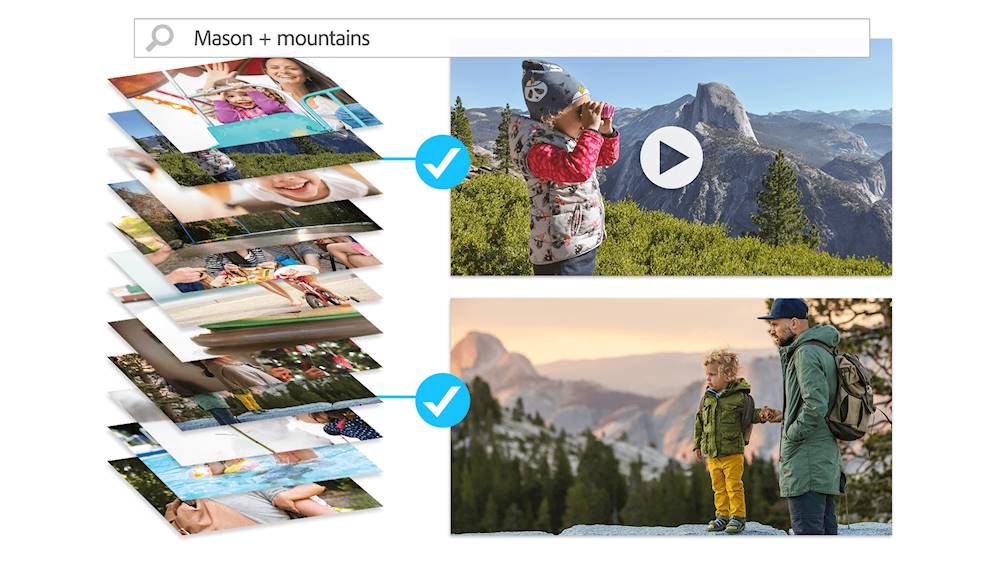
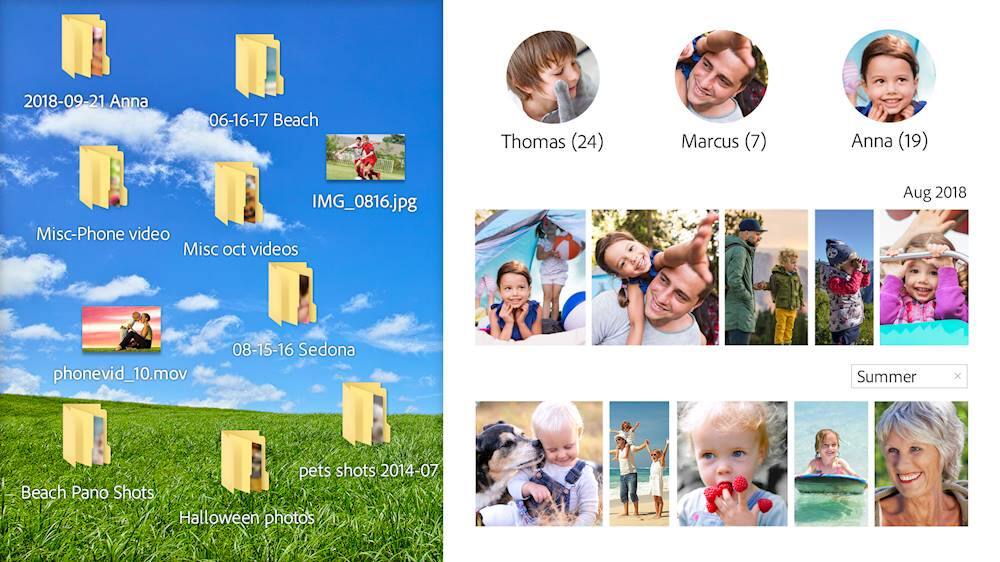
|Posted .This reviewer received promo considerations or sweepstakes entry for writing a review.Photoshop Elements 2020 is a better version of an already polished product. There's a stigma with Elements that it is a stripped version of Photoshop. While it doesn't have all the advanced features, you can really do a lot with Photoshop Elements, and with Elements 2020, you can do even more. I use Elements to design book covers for independent authors, create prints for my family, and restore old photos. For me, Photoshop Elements has been more than enough. If you're new to Elements, you will find more tools than you would expect. You can adjust colors, fine tune lighting, and crop your image. You can crop subjects out of one picture and place them in another. You can remove fine blemishes or scratches. You can create layers and blend photos to create something new entirely. Some of the new / improved features this year include one click subject selection, colorize for black and white pictures, smooth skin to remove blemishes and wrinkles, and creative patterns that won't obscure your photo's subject. It all works surprisingly well. The subject selection is pretty good for a one step feature. If you find yourself wanting to fine tune the selection, Elements lets you add or subtract from the selection with a click. For instance, I have a picture of my dog, Copper. With the one step selection, I was able to adjust the background and add stickers that don't obstruct Copper. In my experience, it worked pretty well. However, I found myself wanting to fine tune the selection just a bit to incorporate a few poorly defined areas around his joints. Colorize works well enough. It won't give you color photos that look like a regular photo from today, but as a way to stylize older photos, it's a neat touch. For instance, in my photos below, I took a black and white photo of a woman in front of leaves. I inverted the subject selection tool and colorized the background. One feature I wasn't too sure about was the remove blemish feature. I was afraid the tool would make my subject's faces look too smooth. Thankfully, that wasn't the case. I can still see pores. I can still see a few fine details. But, it does remove a few acne blemishes or scars. Curator works well. It organizes your library and provides a way to search through or group photos. The launch screen even provides users with demonstrations and tips. I found them to be very informative, but if you want more training, YouTube is a great source. I like Elements 2020. I didn't use 2019, but 2018 worked well. This version works better. It has been more stable and many of the selection tools are just easier and more effective. With Elements 2020, Adobe has provided some great new tools for owners of previous versions while also providing a lot of tools for those new to the program. This is easily the best version of Elements and I highly recommend it.
I would recommend this to a friend - Pros mentioned:Ease of use
Surprised by the Features
|Posted .This reviewer received promo considerations or sweepstakes entry for writing a review.I been fiddling around with the Adobe’s latest version of its entry level Photoshop suite, Photoshop Elements 2020. This is my first time using an Adobe product, aside from Acrobat, so I am a definite newbie to this software. The Elements 2020 license is a one-time purchase compared to the full suite version (Photoshop Creative Cloud) that is subscription based. Photoshop CC is targeted at the prosumer crowd of users with high level functions/plug-ins and broader capability. It also carries a steeper price-tag via subscription - $240/yr. Elements, on the other hand, is targeted at the hobbyist and amateur photo editing crowd. It has a limited feature set aimed more at quick edits and more common photo editing needs. Its meant to be an easier to use version that includes everything needed for some light photo editing up to some decently advanced stuff. You can get Elements one of 2 ways, physical disc or download. This version comes with the physical disc, so if you have a disc drive, you are in luck! However, if you are one of the many who does not have a disc drive you can download the software from Adobe’s website and activate using the license code on the DVD case sleeve. Download size 3.4gb, so prepare to wait if you have a slow connection. Install time for me took about 8 minutes onto an NVME SSD using Windows 10, so not too bad. Photoshop Elements 2020 allows you to install the software on up to 2 machines – which I have successfully done. If you want to move the software to a new machine, you need to deactivate it one of your other installs before activating on the new machine. If you want to remove your install from a machine, make sure to deactivate before uninstalling. If you don’t, you will have to reinstall to deactivate. Onto using the software. I’ve used some photo editing software in the past – Corel mostly. It wasn’t always the most user friendly, so I wanted to find my way around the menus first. There are 3 tabs at the top to get you started. Quick, Guided, and Expert. Quick tab has a narrowed feature list, and a lot of auto-optimizations. I can see this tab being used the most just because it focuses on a lot of simple edits people are likely to make. The Guided tab is great because it acts like an explanation section for each of the tools and how they are used. If there is an edit you want to make, just select it start editing. This is the first tab you should go to if you are unfamiliar with any photo editing – it’s a good resource. The Expert tab gives you a fuller menu with more manual control of the software. This tab has features that allow you to target your edits to certain regions of the photo, and not just a sweeping wizard feature that is available on the Quick tab. I started out mostly just touching up some older pictures of my kids just to get a feel for the software. Honestly, I’ve found myself just playing around on the guided tab. I really like the tutorial aspect and how you can focus your edit type. I’ve only tried a few of the different edit types, but so far, I think my favorite is the B&W Selection. This was a really easy and intuitive tool to use. I included a picture of my son when he was little with this review. I liked the way it came out enough to send to grandparents, and maybe even have it printed. For my uses, I think the guided tab is probably as far as I will progress for some time. I don’t think I’m ready to jump over to the expert tab because I am still unfamiliar with the tools. I’m fairly good with programs, so I should get there eventually. One of the harder things to do now is to go back through old pictures and see which ones I want to mess with. For a very tech savvy Photoshop newbie, I can attest to the ease of use of the software. The quick and guided tabs made it pretty accessible to me and allowed me to get a feel for editing. For more seasoned users I can see the guided tab still being pretty useful because it does a good job of organizing the type of edits you can do. I originally thought this would be more limited in editing scope, based on its target audience, but I can see that Adobe really did load in a lot of functionality. I have only mild photo editing dreams, so some of it will be lost on me. That may change in the future as I use the software more. Overall, I had very little trouble getting started with Elements – mastering it is a different story. The only issue I’ve come across is getting my 3D Connexion Space Mouse to work with Elements. I cannot get it to zoom and pan like it should, and when it does it is unbearably slow moving. This is a pretty niche issue, so I won’t hold it against them.
I would recommend this to a friend - Pros mentioned:Ease of use
Almost ready to let go of Picasa
|Posted .This reviewer received promo considerations or sweepstakes entry for writing a review.The feature I am looking for is extremely hard to find, yet so simple, I cannot understand why more apps don't include it. Even in this great tool, it is only partly available. I simply need to export pictures to a designated spot and have them arranged/organized by date taken in individual folders. In Elements Organizer, it only allows this if you are exporting from an external card/camera, but not from the various locations on your computer. This is a crucial feature for my archiving, and it is the sole reason why I docked off one star as I still have to use another program to accommodate this. Now that that's out of the way, Elements in itself is amazing. So many Photoshop tools simplified to use without the complicated set-up. It still has a bit of a learning curve, but once I got used to the flow, it was very simple to play with different options to get the most from my photos. Like Google Photos, I also found AI suggestions for imported photos/videos that greeted me each time I opened the program. Great moments with added effects that I may have never thought of. The tutorials are also very simply laid out and informative. I used to have to buy a book to get these tricks! Removing objects is tricky. If it is a simple background, it's flawless, but once the details kick in, "cloning" becomes harder. Not impossible, but not as simple as they would have you to believe. Color pops work great, and I am satisfied with the restoration tools. There was one other issue I can't figure out. When i plug-in my cellphone, it is recognized, but when I try to import, the program simple hangs until given an error. This related to my first paragraph. If this worked, I'd halfway get the feature I desire, but since I have to copy from my phone to PC first, it becomes moot. Phone is unlocked and in the correct transfer mode. Hopefully, this can be patched and repaired. All in all, I would definitely recommend the program to those looking to "play with" and sort their photos and videos. My desire may be more narrow than most, so I would not let my want get in the way of experiencing the tools this program has to offer. Still very impressed!
I would recommend this to a friend - Pros mentioned:Ease of use
Elements 2020 is a huge hit!
|Posted .This reviewer received promo considerations or sweepstakes entry for writing a review.Adobe has released a new revision of Elements - the 2020 version. I used a download link in order to get the product. It came with a PRODUCT KEY so I could have a registered and fully active version. DISCLAIMER: I have never used Photoshop Elements before; however, I have used Adobe Photoshop extensively over the last decade along with Adobe Premiere and other video editing software. I have included some examples of some simple creations to this review. PROS: ----------- * Setup was easy; however, you will want a fast internet connection as the download is slightly over 3.5GB. * I thought it was really cool how the program would automatically make some picture creations of pictures I was already working with. Not only did it show me more capabilities of the program, but you are able to open the .PSD file it creates and see the edits/masks within the .PSD editor on the right side of the screen in case you want to learn how to use those edits on other photos. I would call it indirect training within the program. I think it's a nice perk. * It has the ability to show your original photo and edited photo side-by-side so you can see how the new version looks compared to the original. * When using the CROP function, you can maintain the original photo length ratios or change to 16:9, or even basic predetermined photo sizes. * Facial blemishes can be a thing of the past should it be needed. I was able to do this in regular Photoshop, but with Elements, it was easier. * A nice feature is the "B&W Color Pop" function where you can pick which color you want to see while everything else is black and white. You can pick from red/yellow/blue/green or your own custom color. It is nice functionality with more editing within this feature. * Double-exposure function works well with creating some interesting superimposed pictures on top of others. This feature may take a bit more imagination but I did one for my son's homecoming group/dates and it turned out great. Those may require a bit more planning to get the right double-exposure you're looking for. * You have the ability to export the photo directly to Social Networks Twitter or Flickr after making edits. Facebook and Instagram would be good additions to have on there but they are currently not there. * You have the ability to export any final creation to Fujifilm for Adobe Photoshop Elements and have specialized products made (ie: Paper/canvass Prints, coffee mugs, phone cases, metal/mounted prints, etc). This is a great feature if you want a more personalized gift to give someone. CONS: ----------- * I found it a bit odd to have more than one interface with Elements 2020. A HOME screen pops up first, then I finally figured out that you need to open either the Organizer or the Photo Editor to do more. This feature is probably "normal" but new to me and is taking some getting used to. Normally, I know what I want to edit and just open the picture directly into Photoshop. * In PREFERENCES, under Email, I was unable to configure the email client I already have installed on my PC - Mozilla Thunderbird. The only option was Microsoft Outlook. OTHER OBSERVATIONS: ----------------------------------- * When using the function to remove something in the picture you don't want, I found that if that image is touching part of the picture that you want to keep, this function doesn't work well since there is a bit of "what is behind this person" algorithm-ing going on. Sometimes, I would try and remove another person off to the side of the main subject, but that other person is behind the target slightly, so the merging of colors didn't work well for the new background to be created. CONCLUSION: =================== To me, this program is really more about special effects than real photo editing though it does have that capability to a lesser extent vs regular Photoshop. I found the ability to fix facial skin a huge plus as we have a teenager. Random days of a breakout can happen and this can help make the picture better. I am still working through some of the editing functions, but overall I have found it an easy transition to make picture changes for the better using the 2020 Elements package. I can see where this would be good for creating a scrapbook or involved picture storybook for presentation purposes or for personal product creations (mugs, phone cases, etc.). I'm sold. I like it quite a bit.
I would recommend this to a friend - Pros mentioned:Ease of use, Photo editing
Beginner tool, advanced results
|Posted .This reviewer received promo considerations or sweepstakes entry for writing a review.I am relatively new to photo editing, so was excited to try out this software. The download process for Windows is easy, follow steps, enter code, install. One thing to note, this is a large file, just under 3.5 GB, which took my rural internet about 30 minutes to download. Upon opening Elements you get a landing page where you can import photos, open photo editor, check out suggested new features / inspirations, or look at custom photo items for purchase. Upon going into the photo editor you see three options: quick, guided, and expert. Quick houses your basic options - cropping, lighting, balance, frames, etc. The stuff you can find in a lot of basic photo editing software. For me, guided was my starting point, where I learned how to remove objects, photo merge, and numerous fun editing (meme makers, photo text, shape overlay <see photo example>, replace background). This is where I was able to do some of the more exciting things that your basic photo editor lacks. The expert option is for those who know exactly what you want to do, with what tool, and how. It has a toolbar of options and allows for free range editing, as a beginner, it's a bit more than I needed, but within a few days of using the guided options I was comfortable in being able to use the expert options without relying on templates and guides. I'm primarily using this to edit photos for photo book presents, and find the software to be user friendly and intuitive to find the needed tools quickly. I highly recommend this for the intermediate hobbyist who needs a solid software.
I would recommend this to a friend new AI tools are good for Photoshop Amateurs
|Posted .This reviewer received promo considerations or sweepstakes entry for writing a review.Honestly, I'm the least sophisticated when it comes to using Photoshop. Photoshop Elements 2020 is perfect for someone like me and across my family for when we want to edit a photo and know what we want but not exactly how to do it. As the unofficial family historian, I also have a lot of photos that need to be touched up, cleaned up, or otherwise edited so that they don't look as aged and damaged. One of the things I was really excited for in this version of Photoshop Elements is the AI Colorization tool, the thought of making some of the old black and white photos I have look more modern really excited me. I've included 2 examples of photos were Photoshop Elements AI Color tool has been applied. These are photos I downloaded off the internet as I didn't really want to share personal photos here (ha!). As you can see from the images, the colorization isn't perfect but it isn't bad either. When the photo features people it definitely gives the photo more humanity and as a side effect it cleans up some of the image noise. I think this Photoshop Elements 2020 is worth the upgrade. I hope Adobe continue to bring more AI tools to the software.
I would recommend this to a friend- Pros mentioned:Ease of use
Adobe AI tech is a game changer
|Posted .This reviewer received promo considerations or sweepstakes entry for writing a review.I use all Adobe photoshop versions as a hobby. This Adobe Photoshop Elements 2020 is way easier than any version Adobe has released in the past. AI tools by which I edit and add effects easily when the system automates the editing process in a smart way. I found the automatic tools that add effects even for those who feel beginners at this program such as photo colorizing, select objects, select unwanted objects, and change picture backgrounds. I was amazed by how I colorized a picture of the 1906 San Francisco earthquake. It brings B/W pictures to life in one click. Smooth and easy to use.
I would recommend this to a friend - Pros mentioned:Ease of use, Features
Great Photo Editing Program for the Non-Pro
||Posted . Owned for 1 month when reviewed.This reviewer received promo considerations or sweepstakes entry for writing a review.I've used Photoshop in the past, but not enough to justify the Creative Cloud subscription, even though I continue to do some beyond basic image editing. Photoshop Elements was just what I was looking for. I haven't found anything I want to do that Elements doesn't do. I just jump into Expert mode and it's like Photoshop CS3 or even 6. In fact it has new features since then! For anyone that needs the power of Photoshop but not on a consistent basis, or all of the features, this is the product to have. I wish I would have bought it years ago.
I would recommend this to a friend - Pros mentioned:Ease of use
Photoshop Elements still the best
||Posted . Owned for 1 month when reviewed.This reviewer received promo considerations or sweepstakes entry for writing a review.I’ve used several photo editing programs and home and work over the years. Photoshop Elements is still the best. It handles so many tasks that we used to have to do by hand and took hours. It has three editing levels: quick edit, guided edits, and expert. Color correct, get rid of 'red eye', resize, and mor in just minutes. Photoshop makes even beginners look like pros.
I would recommend this to a friend - Pros mentioned:Ease of use, Features
Uninstall and Reinstall
||Posted . Owned for 1 month when reviewed.This reviewer received promo considerations or sweepstakes entry for writing a review.if your first go around of installation results in a program that freezes, shuts down, won't load...uninstall and reinstall! I had to do lot of self help research and this worked! Now I get to fully enjoy the editing software! Easy to use for newbies but enough features for those more advanced.
I would recommend this to a friend - Pros mentioned:Ease of use, Photo editing
Meets our family's photo editing needs
||Posted . Owned for 1 month when reviewed.This reviewer received promo considerations or sweepstakes entry for writing a review.Elements is a very slick version of Photoshop's basic editing features which more than meets our family photo editing needs. The learning curve for Elements is much easier than that of Photoshop itself yet much of Photoshop's power remains. Very pleased.
I would recommend this to a friend - Pros mentioned:Ease of use, Features
Great New Features
||Posted . Owned for 1 month when reviewed.This reviewer received promo considerations or sweepstakes entry for writing a review.I updated my Photoshop Elements 13 to 2020. I like the new features including ordering photo gifts and prints right from the program. Even though my previous version was older, the new program works very similarly so there wasn't a big learning curve.
I would recommend this to a friend - Pros mentioned:Ease of use
Good for amateurs and advanced enthusiasts
||Posted . Owned for 1 month when reviewed.This reviewer received promo considerations or sweepstakes entry for writing a review.I have been using Photoshop Elements for years. It is very powerful and you still can purchase it outright unlike the full Photoshop which is available by subscription only. I have only ever found one feature that the full version does that Elements doesn't do. I find the organizer a bit cumbersome but that maybe because I have over 70,000 images with some intentional duplication. I would recommend a high end computer or it can seem slow. I would recommend getting a book or take a course. I just started one and even though I have using it for years I have learned new things I can do. It can used in a simplified, guided or expert modes. So for those of you who are looking for something to fix problems it will do it almost automatically. The expert mode gives you tremendous control over the results.
I would recommend this to a friend