Customer Ratings & Reviews










- Model:
- B0BP9SNVH9
- SKU:
- 11821429
Rating by feature
- Value
Rating 4.8 out of 5 stars
- Quality
Rating 4.8 out of 5 stars
- Ease of Use
Rating 4.8 out of 5 stars
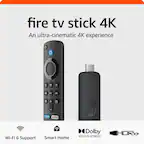
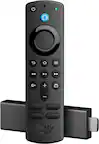
amazon fire stick 4k
||Posted . Owned for less than 1 week when reviewed.This reviewer received promo considerations or sweepstakes entry for writing a review.this amazon 4k fire stick is the best , clear picture and great movie apps
I would recommend this to a friendUpgrade
||Posted . Owned for 1 month when reviewed.This reviewer received promo considerations or sweepstakes entry for writing a review.Had a really old one, just needed an updated one and this did the trick - faster, easier to use
I would recommend this to a friendAwesome Amazon Firestick!
||Posted . Owned for 1 month when reviewed.This reviewer received promo considerations or sweepstakes entry for writing a review.I think this Amazon Firestick is really neat! it has game apps, works smoothly on a slower wifi, you can watch live channels as well as having a whole bunch of apps!! There was just a few issues, one was the set up at first because it made me do it through my phone instead of manually setting up the remote. The second issue was when i went somewhere and used it on a different TV and came back and plugged it back into mine, the remote would not work, i had to try every crazy thing Google threw at me to get it back to working condition, other than that, i would most definitely recommend this product!!
I would recommend this to a friendGreat price
||Posted .This reviewer received promo considerations or sweepstakes entry for writing a review.GOOD QUALITY AND PRICE . ALREADY HAVE 2 . THIS ONE IS FOR AN ADDICTION ROOM TV
I would recommend this to a friendBetter Stream!
||Posted . Owned for 1 month when reviewed.This reviewer received promo considerations or sweepstakes entry for writing a review.This was a purchase to step up to a better fire stick with more features. I have been satisfied with this product so far.
I would recommend this to a friendTurn any old tv into a new one
||Posted . Owned for 2 weeks when reviewed.This reviewer received promo considerations or sweepstakes entry for writing a review.Super simple super easy to use and install. Worth every penny.
I would recommend this to a friendFirestick 4k
||Posted . Owned for 1 month when reviewed.This reviewer received promo considerations or sweepstakes entry for writing a review.I had the older version and upgraded because it was lagging. This upgraded my tvs picture quality and its fast.
I would recommend this to a friendYay Fire!
||Posted . Owned for 2 weeks when reviewed.This reviewer received promo considerations or sweepstakes entry for writing a review.Great product…easy to install & use. It provides great screen resolution/viewing as well.
I would recommend this to a friendRecommend to have.
||Posted .This reviewer received promo considerations or sweepstakes entry for writing a review.Best control you can buy easy to set up and use. I highly recommend.
I would recommend this to a friendFire stick
||Posted . Owned for 1 week when reviewed.This reviewer received promo considerations or sweepstakes entry for writing a review.Good and I really really really really love it. Best thing I ever had and love
I would recommend this to a friendFIRE STICK 4K MAX GOOD DEAL
||Posted . Owned for 1 month when reviewed.This reviewer received promo considerations or sweepstakes entry for writing a review.it was more expensive but the device gives us more service so it's well worth it.
I would recommend this to a friendSometimes faulty.
||Posted .This reviewer received promo considerations or sweepstakes entry for writing a review.The additional storage on this firestick is fantastic. The screen frequently appears in a picture-in-picture mode without warning, which I don't understand because I've owned multiple firesticks and they never done that.
No, I would not recommend this to a friendBrand response from Amazon Devices Customer Support
Posted .Hello, CrazyK. Thank you for taking the time to leave a review on the Fire TV Stick 4K Max. I'm glad to hear you're enjoying the additional storage on this device! I'm sorry to hear about the unexpected picture-in-picture mode appearing on your screen. Here are some troubleshooting steps that may help resolve this issue: 1. Check if you have any apps running in the background that support picture-in-picture mode, as some streaming apps can trigger this feature automatically. 2. Go to Settings > Display & Sounds > Picture-in-Picture and review your settings to ensure the feature is configured to your preferences or disabled if you don't wish to use it. 3. Try restarting your Fire TV Stick 4K Max by unplugging it from power, waiting 30 seconds, then plugging it back in. 4. Ensure your device has the latest software update by going to Settings > My Fire TV > About > Check for Updates. If these steps don't resolve the picture-in-picture issue, please contact Amazon Customer Support at 1-888-280-4331. They're available 24/7 and can provide additional technical assistance to help you customize your viewing experience. Thank you for your feedback, and I'm glad the enhanced storage is working well for you!

Five star for Amazon FireTV Stick.
||Posted .This reviewer received promo considerations or sweepstakes entry for writing a review.Overall the device is great. Would recommend to someone who wants to have easy overall experience.
I would recommend this to a friendBedroom firestick
||Posted . Owned for 4 months when reviewed.This reviewer received promo considerations or sweepstakes entry for writing a review.Love it! I would highly recommend it! Fast speed and good picture quality.
I would recommend this to a friendGreat
||Posted . Owned for 3 weeks when reviewed.This reviewer received promo considerations or sweepstakes entry for writing a review.Easy to install. Works great with Alexa and the 16 gb memories permeated install multiple apps
I would recommend this to a friendBought this for tv
||Posted .This reviewer received promo considerations or sweepstakes entry for writing a review.Great product! I bought it for IPTV and it works great!
I would recommend this to a friendMy TV must have!!!
||Posted . Owned for 1.5 years when reviewed.This reviewer received promo considerations or sweepstakes entry for writing a review.Love it!!!! A must have for movie lovers…. Great value and lots of savings …. Great value…. A must have for all households!!!
I would recommend this to a friendSatisfied
||Posted . Owned for 3 weeks when reviewed.This reviewer received promo considerations or sweepstakes entry for writing a review.As usual i am mot disappointed with this firestick. The speed and picture quality are excellent. The workers at bestbuy were also very helpful.
I would recommend this to a friendCar Roku
||Posted . Owned for 1 month when reviewed.This reviewer received promo considerations or sweepstakes entry for writing a review.with Internet in my car, this roku is wonderful to use in the car kids love it
I would recommend this to a friendFire stick
||Posted . Owned for 3 weeks when reviewed.This reviewer received promo considerations or sweepstakes entry for writing a review.The fire stick is saving me so much money! A great purchase!
I would recommend this to a friend