Customer Ratings & Reviews


- Model:
- B0CJM1GNFQ
- SKU:
- 11120474
Rating by feature
- Value
Rating 4.8 out of 5 stars
- Quality
Rating 4.8 out of 5 stars
- Ease of Use
Rating 4.8 out of 5 stars
Amazing
||Posted . Owned for 3 weeks when reviewed.This reviewer received promo considerations or sweepstakes entry for writing a review.Great item have no complaints at all will replace my cable box
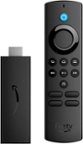
I would recommend this to a friendfire stick stock
||Posted .This reviewer received promo considerations or sweepstakes entry for writing a review.best price in the product and good service for pickup in the store
I would recommend this to a friendNA
||Posted . Owned for 3 weeks when reviewed.This reviewer received promo considerations or sweepstakes entry for writing a review.Perfect upgrade and the price was right! Fast set up & easy to use.
I would recommend this to a friendBirthday Present
||Posted . Owned for 1 week when reviewed.This reviewer received promo considerations or sweepstakes entry for writing a review.This is a gift for me and I am loving it. I am able to watch a number of networks.
I would recommend this to a friendAmazinf
||Posted . Owned for 3 weeks when reviewed.This reviewer received promo considerations or sweepstakes entry for writing a review.Great product really enjoy and like the way is working
I would recommend this to a friendFaster
||Posted . Owned for 2 months when reviewed.This reviewer received promo considerations or sweepstakes entry for writing a review.Awsome. Easy plug. Replaced an older addition. Much faster
I would recommend this to a friend5
||Posted . Owned for 2 months when reviewed.This reviewer received promo considerations or sweepstakes entry for writing a review.I love they are so fast my tv looks fantastic I recommend it
I would recommend this to a friendLove it!
||Posted . Owned for 3 weeks when reviewed.This reviewer received promo considerations or sweepstakes entry for writing a review.I love it….no more issues with lagging while streaming!
I would recommend this to a friendAmazing
||Posted . Owned for 3 weeks when reviewed.This reviewer received promo considerations or sweepstakes entry for writing a review.Awesome and I love it so much..Best in the business
I would recommend this to a friendThe best fire stick
||Posted . Owned for 1 month when reviewed.This reviewer received promo considerations or sweepstakes entry for writing a review.I love them so much. I have seven of them. The ease of connecting them and the quality is great.
I would recommend this to a friendBest Device Available
||Posted . Owned for less than 1 week when reviewed.This reviewer received promo considerations or sweepstakes entry for writing a review.Best available, ease of use, very responsive and consistent!
I would recommend this to a friendOverheated
||Posted . Owned for 1 month when reviewed.This reviewer received promo considerations or sweepstakes entry for writing a review.The devise is easy to use and performs good. At times it stops working and has to be reloaded again.
I would recommend this to a friendBrand response from Amazon Devices Customer Support
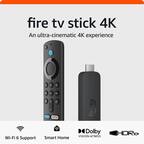
Posted .Hello SAMM! Thank you for your feedback on the Fire TV Stick 4K Plus. I'm sorry to hear that you're experiencing overheating issues and intermittent performance problems with your device.
The overheating and need to reload the device are concerns we take seriously. Here are comprehensive troubleshooting steps to help resolve these issues:
Addressing Overheating:
Ensure the Fire TV Stick has adequate ventilation and isn't enclosed in a tight space behind your TV
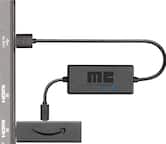
Use the HDMI extender cable that came with your device to position it away from heat sources and allow better airflow
Avoid stacking other devices on top of or directly next to the Fire TV Stick
Keep the device away from direct sunlight or other heat-generating electronics
Resolving Performance and Reload Issues:
Check that your device has a strong, stable internet connection - weak Wi-Fi can cause streaming interruptions
Restart your Fire TV Stick by unplugging it from power, waiting 30 seconds, then plugging it back in
Ensure your Fire TV Stick is running the latest software by going to Settings > My Fire TV > About > Check for Updates
Clear cache from problematic apps by going to Settings > Applications > Manage Installed Applications, selecting the app, and choosing Clear Cache
If issues persist, consider a factory reset: Settings > My Fire TV > Reset to Factory Defaults (note this will erase all downloaded content and settings)
Power Supply Considerations: Make sure you're using the original Amazon power adapter that came with your Fire TV Stick 4K Plus, as third-party adapters may not provide adequate power, leading to performance issues and overheating.
If these steps don't resolve the overheating and performance issues, Amazon Customer Service is available 24/7 for assistance. You can reach them at 1-888-280-4331. They can help determine if a replacement may be needed.
Thank you for bringing this to our attention, and I hope these solutions help improve your streaming experience!
It’s neat
||Posted . Owned for 1 month when reviewed.This reviewer received promo considerations or sweepstakes entry for writing a review.It’s simple to Install and watch any show like smart tv.
I would recommend this to a friendTV Funstick
||Posted . Owned for 1 month when reviewed.This reviewer received promo considerations or sweepstakes entry for writing a review.I am really enjoying streaming shows I have been missing out on for years.
I would recommend this to a friendGood product
||Posted . Owned for 1 month when reviewed.This reviewer received promo considerations or sweepstakes entry for writing a review.Good products , working great, I will buy more in the future
I would recommend this to a friend123 Stream!
||Posted . Owned for 3 weeks when reviewed.This reviewer received promo considerations or sweepstakes entry for writing a review.The Amazon - Fire TV Stick was easy to set up and start streaming.
I would recommend this to a friendWorth the Price
||Posted . Owned for 1 month when reviewed.This reviewer received promo considerations or sweepstakes entry for writing a review.Works well, and it was a great price! Definitely best comparison price!
I would recommend this to a friendGreat
||Posted . Owned for 2 weeks when reviewed.This reviewer received promo considerations or sweepstakes entry for writing a review.Great firestick it is easy to download apps. I would definately recommend.
I would recommend this to a friendExcellent
||Posted . Owned for 1 month when reviewed.This reviewer received promo considerations or sweepstakes entry for writing a review.This Firestick is great. I love everything about it. The setup was easy.
No, I would not recommend this to a friendAmazon fire stick hd4k
||Posted . Owned for 1 week when reviewed.This reviewer received promo considerations or sweepstakes entry for writing a review.I love this item i can do alot and watch my favorite stuff
I would recommend this to a friend