Customer Ratings & Reviews





- Model:
- BIT940800F153
- SKU:
- 6156902
Rating by feature
- Value
Rating 4.2 out of 5 stars
- Quality
Rating 3.9 out of 5 stars
- Ease of Use
Rating 3.8 out of 5 stars
Customers are saying
Customers are enthusiastic about the BOX 2 Smart Home Cybersecurity Hub for its enhanced security features that provide ample protection for connected devices. The easy setup process is also widely appreciated. Some users find the parental control feature useful. While the performance of the device as a protection tool is highly regarded, a few customers express concerns about the annual subscription requirement and compatibility issues with certain devices.
This summary was generated by AI based on customer reviews.
- Pros mentioned:Parental controls, Security, Setup

Pretty much everything connects to the internet.
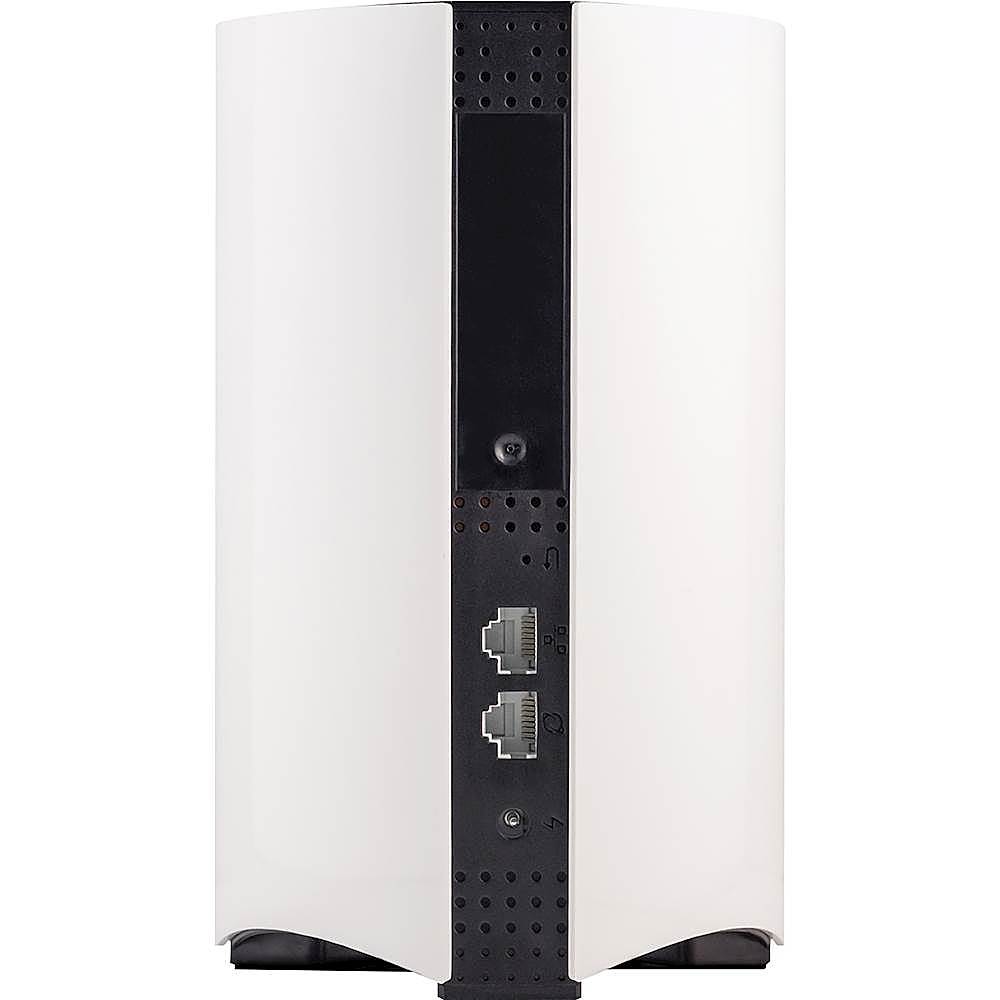
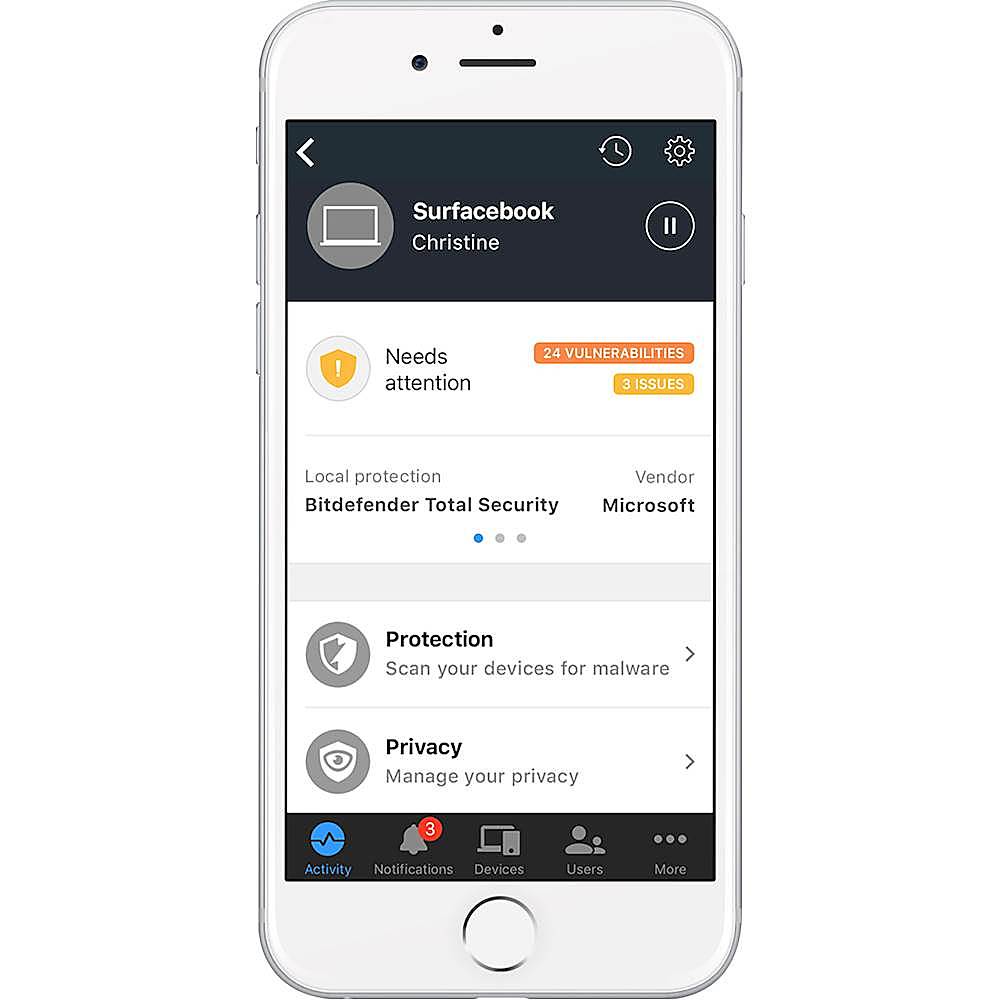
|Posted .This reviewer received promo considerations or sweepstakes entry for writing a review.If you have a household of internet connected devices, like cell phones, laptops, computers, cameras, security systems, tablets, vacuum cleaners, TVs, Stereos and oh so much more, then this is the best way to keep the wrong people from taking advantage of vulnerabilities of those things. The Bitdefender Box 2 is meant to sit between your Internet Service Provider and your network and monitor all traffic that goes out to the world wild web. As I have a modem and a router the setup was fairly simple. Using the Bitdefender Central app it required moving 2 cables from the router to the box and box to the router and it was up and running. However, in order for the Box 2 to actually see all the devices on the network, the router had to be changed to a bridge, which is also fairly simple on most modern routers. If you don’t already have a router, or your modem is the router, the Box 2 can provide router functions. The one thing I don’t like is that you don’t get to control many of the network features you normally do of a typical router, such as controlling your channels and guest networks. So, my router still provides the individual device connectivity. Your network IP is also then controlled by the Box 2, which I can’t find any way to change back, so I have just adapted. All of the control of the Box 2 is performed through the Bitdefender Central app with no local web interface. The app provides details of every device that is connected and for the most part identified the devices perfectly, providing their network names and device type. All devices that aren’t a computer or an Android device were identified as “Protected” while all the other devices showed as “Needing attention.” When checking the computers and phones it states that they are protected, but only on my home network and recommends installing local protection. If the device is not the device that you are currently using, then it will ask for an email to send you a link to the Bitdefender Antivirus Software for that device, otherwise you can choose to install locally if you are logged into the central site on a PC. As for protection it has notified me that it has blocked dangerous URLs, one in particular I still have no idea what it is and why my TV is trying to get to it, but others were on purpose and the site just showed a Bitdefender splash page that showed it was dangerous. Through the app I could allow the site, though it isn’t very clear where it goes when you allow it if you do it by accident. You have to go into the Settings > Whitelist if you want to remove it again. You can also pause a devices internet connection preventing them from using your internet all together. In addition to having local network protection you also get a year’s subscription to Bitdefender Internet Security for unlimited devices. This includes antivirus, optimizer and parental controls. All of these features can be monitored through the Central app and site as well. The software can be found through other reviews, but for the price, if you have more than 5 devices it is well worth the annual subscription. One feature I did not notice till I tried it with the Box 2 is the parental controls, once installed on the devices, allow for easy control and monitoring of your child’s devices. This can help limit what they can search for, who they contact, and the times or amount of internet they are allowed to use. However, it seemed to bog my son’s phone down a good bit and when I went to change the bed time hours, after hours, it would not give him access till we uninstalled parental controls. With the parental controls you do get to see more of what traffic is being used by them, but that is only devices being controlled. Though I’m not much of a major paranoid type person, the one thing I don’t like is the fact that I have another party that now sees every single thing we do on the internet. It was bad enough my ISP could do it, and even Bitdefender software pushes their VPN to help protect privacy. However, the Box 2 is seeing your traffic before it is put behind a single IP and using their cloud to help determine what is safe and what is bad. Though I do feel comfortable that some random hacker may be adverted and my kids will be safer, I just don’t like knowing they can see stuff and they aren't showing me what they get to see. Like it shows per day how much traffic is “protected” but what was in that traffic.
I would recommend this to a friend - Pros mentioned:Parental controls, Security, Setup
For complete cyber-security
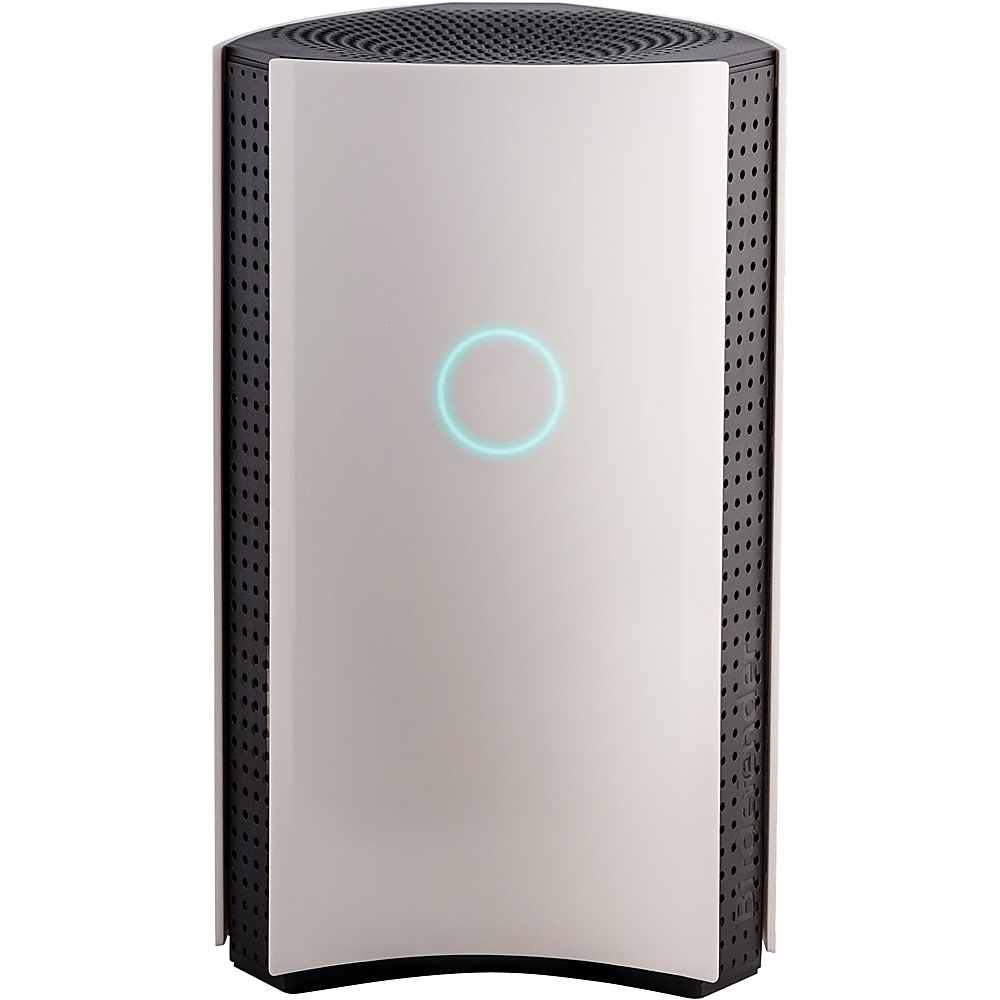
|Posted .This reviewer received promo considerations or sweepstakes entry for writing a review.I feel more secure that all of my smart connected home devices are protected. This device would prevent a hacker from entering your home network through any of your internet connected device. Nowadays there are tons of connected devices besides computers, smartphones, and tablets that use the internet, such as TVs, game consoles, printers, security system and cameras, refrigerators, garage door opener, lighting fixtures/bulbs, and etc… The Bitdefender BOX has a nice clean and futuristic look. With the Quick Start Guide, the setup is easy and straightforward. You will need to download an app and create an account, the app will guide you through the rest of the setup process. The app will instruct you to plug the power cord into the device and the wall outlet, then wait for the LED. Next, connect the box to your Wi-Fi network, this step has three options (1) use the Wi-Fi router from your internet service provider (ISP), (2) use your own personal Wi-Fi router or (3) use the Bitdefender box as a standalone Wi-Fi router. My setup was very easy without an issue; for my setup, I used my Wi-Fi router. One excellent feature of this device is that if you encounter any issue during a setup you may call the 24/7 free setup assistance number. Once everything is set up, the Bitdefender scans all connected devices and continuously search for any weakness. The app will let you know of ongoing events and this will help prevent security threats. It really blocks suspicious links and blocks them; they can be phishing attempts. If you are certain that a link is safe, you can simply allow it with the Bitdefender Central app. Nowadays it is very important to protect our data, such as family photos, digital documents, and credit card bank information. If your network is not protected you have a possible cyber vulnerability. The device includes the Bitdefender Total Security software to remotely protect your computers. The subscription is for one-year and is for unlimited devices. The device also includes various parental safety controls, such as setting content filtering, manage daily internet usage, blackout potential harmful persons, and monitor texts. To close, I highly recommend Bitdefender to protect your home network with a complete cybersecurity.
I would recommend this to a friend - Pros mentioned:Parental controls
Enterprise defense for the house
|Posted .This reviewer received promo considerations or sweepstakes entry for writing a review.The Good: 1. An intrusion detection system device with behavioral analysis feature (means it will automatically learn network traffic in and out of your house for all your devices and will block something out of the normal behavior such as an accidental click to a phishing email that will go to a malicious site) 2. Connect many devices, I have over 20 devices connected includes all my Internet of Things or smart devices like TV, Alexa, IP cameras. I don't know the limit. 3. All devices connected to the Box will be able to download Bit Defender's Antivirus and malware program (so that means I do not need to go buy another program for Antivirus and malware detection) 4. Remote manage your Box from outside the house with ease using the mobile app. 5. Block devices for minors with the Box like restricting when devices can go online. 6. There is a network vulnerability scan feature to detect threats which is a plus. 7. Pairs greatly with my Linksys Velop mesh router and I am sure it will pair easily with other mesh type routers too. 8. Can become a primary router and replace your current router if needed. The Bad: 1. Not easy to setup for an novice computer person (so don't wait to call support). 2. Reboot device when needing to change the configuration. 3. The mobile app was not easy to navigate at first and takes some time to get used to.
I would recommend this to a friend - Pros mentioned:Ease of use, Internet speed
Business Protection-Feel Right At Home
|Posted .This reviewer received promo considerations or sweepstakes entry for writing a review.Works great, easy to set up and use, and looks like a cool mini oscillating desk fan. If you're a super basic user like I am, you just open the box, plug everything in, download the app, and set up things based on the prompts. It's really easy, and the protection you get reminds me of how one would be at a business but without over the top complexities to deal with. This supposedly doesn't throttle your internet speed and it doesn't seem to be so far (if it is, it's unnoticeable). The inclusion of a 1 year subscription to Bitdefender Total Security 2018 is a nice addition as well, but after the first year it will be $99/year, which is pretty steep for virus protection. I don't think this is needed in order to use your BOX 2 but it supplements it nicely. Defenitely take advantage of getting this while it includes the Bitdefender subscription.
I would recommend this to a friend Totally worth it!!
|Posted .This reviewer received promo considerations or sweepstakes entry for writing a review.In the age of Internet of Things (IoT), old concept of software based anti-virus or security solutions is not sufficient. How do you make sure that your new fridge connected to your wifi is not vulnerable to hackers? That's where this Box comes into picture and secures ALL your devices by monitoring the internet traffic. The setup was easy but took a bit of time. I already have a velop 3 node wifi system which I wanted to keep, so I followed steps provided in the installation guide and everything went fine. I had to restart my ISP modem and then restart the box. After the setup, it scanned all the devices connected to the network and provided recommendations. Note: you might need to restart some of the devices (e.g. I have a WD MyCloud backup drive which could not retrieve new IP. But after the restart all worked fine). It also comes with Bitdefender Total Security antivirus software for an unlimited number of PCs, Macs, smartphones and tablets. I installed that on all my computers and smart phones and tablets. It found a number of malware on my son's computer which were not detected by Windows Defender and that computer works much faster now. I have heard that it might slow down your internet speed a bit but I haven't really faced any issues. All my streaming devices still stream without any issues/buffering and browsing on computers and phones/tablets is fast. It has a very sleek design. Overall, I am really happy with this box. It gives me a big peace of mind knowing that all the devices in my network are secured and being monitored. I totally recommend this.
I would recommend this to a friend- Pros mentioned:Security
Good all inclusive network security system
|Posted .This reviewer received promo considerations or sweepstakes entry for writing a review.When it comes to Cyber Security I didn’t really give much thought to securing my network or smart devices. Thankfully, Bitdefender came up with a network based solution to fix an issue, I didn’t even know I had. Inside the package I found the Box, power cord, network cable and instructions. The installation for me was fairly simple, however, I can see how it could be a little difficult for someone that is not tech savvy. I download the app, created a Bitdefender account on my phone, followed the instructions, plugged it in between the modem and router, and set my router as a bridge. There were a few steps I skipped but all that info is in the instructions. After install and poking around in the app, I could see that this box has a lot of cool network security features, which are very useful, such as the Device listing, vulnerability scanner and the ability to cut internet access to a device and the rest of the total security suite.. As far as performance, I didn’t notice any slowdown of my network or devices. The only negative I have about it, is the fact that there’s a subscription tied to it.
I would recommend this to a friend - Pros mentioned:Security
Great Protection for the Whole House
|Posted .This reviewer received promo considerations or sweepstakes entry for writing a review.I never thought I would have to protect my printer, thermostat, or Google Home from viruses and Trojans, but after a casino had gigabytes of data stolen through a hacked fish tank, I can understand why a whole house monitoring system is important. Bitdefender is one of the top three antivirus software programs, so I thought I could benefit from another layer of protection. I read how the original Box was difficult to set up, but hoped this version fixed the problem. The directions seem straightforward, but I had a couple of hiccups during installation. It is important to note that you should first disable mobile data on the device you plan to use to set up the Box. The first problem I encountered was the Box could not connect to the Internet, and exiting out caused me to have to perform a hard reset (hold the reset button for 10 seconds). I wish Bitdefender allowed a retry instead of requiring a manual installation or this reset. The second problem I ran into was changing my connection type to bridge mode for a Linksys router using the directions provided by Bitdefender. I have my house set up to continue to use my current router, but you can also replace your router with this device and do not have to complete this step. For newer Linksys routers, you need to go to ConnectivityInternet SettingsConnection Type (select edit)then select Bridge Mode. After the setup was complete, I was impressed by how easy the app was to use. It automatically scans my devices on the network and even gives me advice to better secure my data. I expected my internet speed to slow down a little, but I ended up taking over a 25% decrease in download speed (see photo for details). However, I feel this is a small trade-off for the added protections, and I have not noticed any differences while playing online games. With the increase in sensitive data we transmit over the internet, it is more important than ever to prevent you from becoming an identity theft victim. I believe this device is worth every penny, even though it does limit how fast my download speeds can be, and would recommend it for just about every household.
I would recommend this to a friend A nice layer of security
|Posted .This reviewer received promo considerations or sweepstakes entry for writing a review.I received this in the mail and instantly tore open the packaging to install it. I initially did not feel this product was not too necessary for most homes so long as you use antivirus on your devices and practice safe browsing habits but I figured there are a lot of smart devices in my home that do not get protection or routine security updates… so it couldn't hurt. Upon unboxing the device appeared much smaller than I expected! It looks nice in any room and just makes things look extra high tech wherever you put it. The box has a start up guide, the unit, a CAT6 cable and the AC adaptor. Setup was a bit of a headache for me. I was planning on installing it with my existing router. I use FiOS so there is no modem box, just the ethernet going straight to my router. To set it up you must download the Bitdefender connect app, plug it in, connect to it on your phone via wifi directly, log in, set up your router in bridge mode, let it configure and gtg! Well, it wasn’t so painless for me. I was able to follow up to setting up the router… this was no problem from the side of bitdefender but my router I use did not support bridge mode! I was amazed by this seeing as how it is a high end router. I switched to my backup router which did indeed support bridge mode. I set it up but had to start over. The reason is that the bitdefender box uses a IP address starting with 172 when most home routers use a IP address starting with 192. Well I did not set up a static IP address in my router so I was unable to further configure it unless I put the IP range and Subnet mask to match. A rookie mistake yes but I am sure lots of consumers that prefer to not mess with such settings might have a hard time. Anyways, I did a factory reset on the Bitdefender Box 2 and my router to start over and after the reset, the Bitdefender Box 2 did not seem to allow me to enter any kind of setup. Turns out the solution was to erase the app from my phone and reinstall since logging in and out had no effect. Ok… so after getting it properly set up after a few hours… it worked just fine! I did not see any real noticeable performance hit. I pay for 150 mbps down and 150 mbps up. It was a tiny bit slower in my downlink but my uplink was pretty much on spot. My ping was a ms or two higher but again, nothing I would notice. It is hard to review how effective it is since unless something happens you probably won’t know, but… I visited a few sites that are meant to test your antivirus solutions and the results seemed good. First, the device gives you unlimited access to Bitdefender on your computer so the software was first to warn me of the sites to which I continued on. The Bitdefender Box 2 then blocked the website and gave me a message. I checked the app on my phone which told me I had had 6 malware attempts blocked so that was nice! The app also gives you an overview of how secure your network is. If there is a pc, tablet of phone that has bitdefender software available that is not installed it will offer to help you get it on your device (again, unlimited downloads for a year!). I think I will keep it as part of my networks as it adds piece of mind and does not affect performance to any noticeable effect. Plus… it looks cool! My only reason I deducted starts was for the painful setup process. Otherwise it is a great product!
I would recommend this to a friendToo many unknowns
|Posted .This reviewer received promo considerations or sweepstakes entry for writing a review.When i first began using the Box i was impressed. It was easy to set up. It was easy to install the app. It was all very easy to use. However, after some time of really digging into what the product was actually doing i began to form a sour taste in my mouth. In my opinion this item is equal to a hardware version of an antivirus software... with more bells and whistles. Sure it claims to be a cyber hub... but how can one really measure that? The only real way to directionaly monitor that claim is by looking at the potential harmful traffic that this item is claiming to stop. Nevertheless, claims aside there are good aspects to this product. It eliminates the need to use the the app as suggested by my router... which is nice to me. Less apps on my phone is an immediate win. All other antivirus products that i have used in the past have all been software... this innovative approach give me an extra sense of security..even though it is probably on par with other programs i have used. All in all id say there is work to be done to improve this product, however; a tangible antivirus product is a paradigm shifting way to provide cyber security.
No, I would not recommend this to a friend- Pros mentioned:Security
Not bad...
||Posted . Owned for 3 weeks when reviewed.This reviewer received promo considerations or sweepstakes entry for writing a review.So, I bought this device primarily to help protect my various IoT devices. The fact that it can protect everything on the network and you get BitDefender's software to install on unlimited devices was a bonus. There is mixed information out there on this device working with mesh networks. It works with mine. I have the first version of the Linksys mesh network. Everything works as expected and the Box 2 is very quick at blocking sites even for our mobile devices. I just turned off the wireless on the Box 2 itself as I don't use it. I do have a few gripes with the unit, but they are not deal breakers for me. First, you don't get much in the way of configuration for the router portion of the Box 2. You can set your IP range, name it, configure the wireless. That's really about it. I also had a weird issue when I started creating users to assign devices to. For whatever reason, the accounts I created initially completely blocked internet devices from connecting for those accounts. I didn't know this at first and thought my mesh network was not working properly. Once I figured out it was the accounts, I simply deleted them and recreated them. Everything worked fine after that. My biggest complaint about the Box 2 is that when I hooked it up and tested it on the shields up website, almost all of the ports were closed instead of stealth. Really, this isn't a bad thing as they don't respond to requests, but they are still there which gives the impression that there is something there to attack. However, someone trying to get in would have no idea what is there and the Box 2 should continue to ignore any requests on the ports. I didn't care for it though and wanted everything stealth. I had another Linksys router I could use, so my cable modem is hooked up to a Linksys router that stealths all the ports, then the Box 2 is connected to that as a second network. From there, my Linksys mesh network is in bridge mode providing my wired and wireless network connection for my devices. It works great and still allows the Box 2 to provide protection for all my connected devices. Personally, I would rather have more control over everything, but I didn't really want to deal with an enterprise setup at home. Just too much maintenance. This is quick, easy, and gets the job done. If you want to protect your network it doesn't seem to be a bad choice.
I would recommend this to a friend - Pros mentioned:Security
Simple quick setup
||Posted . Owned for 1 month when reviewed.This reviewer received promo considerations or sweepstakes entry for writing a review.Overall I really do like the bitdefender box. It seems like the most capable and supported home network security solution as of writing this. FYI it seems that CUJO has no support so do avoid buying this. Both of the ones I bought had the same problems leading me to believe the devices are not defective but that the service is no more. As far as the bit defender box I don’t like that you still need to download software on every device for maximum protection. The only other real issue I had with this device was it did lack a few features and as a WiFi router, mesh options would be great. That or the ability to extend the network.
I would recommend this to a friend - Pros mentioned:Ease of use, Security
Peace of mind
||Posted . Owned for 3 weeks when reviewed.This reviewer received promo considerations or sweepstakes entry for writing a review.I feel my internet is much secure after installing bitdefender box2. I installed this in bridge mode with my google wifi and it gives me regular updates on traffic monitoring that's really satisfying. The installation was super easy if you read the instructions carefully and takes ony 10 min. The box is a good looking device that really attracts attention. I am also planning to add premium VPN to add another layer of protection.
I would recommend this to a friend - Pros mentioned:Security
Peace of mind
||Posted . Owned for 1 month when reviewed.This reviewer received promo considerations or sweepstakes entry for writing a review.First attempt at installation was a bust. The installation directions are not written correctly. You need to unplug your gateway and while unplugged, plug in your bitdefender box. (this is where installation went badly on first attempt) You then have to plug your gateway back in and let it COMPLETELY reset before proceeding. If you don't, the bitdefender will not work. Second attempt was successful. Other than the install going sideways, it works great. Have seen hundreds of blocked attempts on my network. Peace of mind, secure system now. I recommend. Review would have been 5 star if not for the mix-up in installation steps.
I would recommend this to a friend - Pros mentioned:Security
Great Internet Protector
||Posted . Owned for 1 month when reviewed.This reviewer received promo considerations or sweepstakes entry for writing a review.First of all, Ive had all kinds of problems with internet issues. Had to call the provider, had a tech come to my house. Wifi constantly being compromised. I did my research and found BitDefender Box 2, so I thought of giving it a try. There are 3 ways to hook it up to your Wifi at your preferences. When the tech arrived, he hooked up to provided 3 Wifi connections. So that if some of the electronics would better off with 2.4 ghz rather than the 5g, I have the option, plus on the 3rd, which is 2.4 ghz without protection. So I could try each of them to see which one worksl well with each equipment. On the 2.4 and 5g Wifi BitDefender Protected, It blocks all kinds of bad sites, phished, malware, Wifi highjacking, virus before it enters my home. I would rather be over protected and gives you the option to scale it down and allows which ones you choose to accept. Complete control. Well worth the price.
I would recommend this to a friend - Pros mentioned:Ease of use, Security
Must have
||Posted .This reviewer received promo considerations or sweepstakes entry for writing a review.Bitdefender Box is a must-have for anyone concerned about internet security. Reasonably easy to set up. Protects all devices in your home that access the internet.... phones, TV etc.
I would recommend this to a friend - Pros mentioned:Security
Great Product
||Posted .This reviewer received promo considerations or sweepstakes entry for writing a review.Anyone who has family & friends connecting to their network this is a must. With this being new technology, did need to contact support - but support is EXCELLENT. They were even familiar with my printer. Xfinity connected my new modem as active but somehow did not disable their modem so Bitdefender was 'confused'. Support zeroed in on the issue & worked with me for hours to get all cleared up. Bitdefender Box has already saved me from accessing several 'infected' web pages & from accessing 'infected' emails. McAfee never did that for me.
I would recommend this to a friend - Pros mentioned:Security
Protection for the whole network
||Posted . Owned for 11 months when reviewed.This reviewer received promo considerations or sweepstakes entry for writing a review.I purchased this because I have to many devices to keep track of. In addition to the Box protecting the network you can still install local protection on individual devices.
I would recommend this to a friend - Pros mentioned:Security
Good would love more control
||Posted . Owned for 3 weeks when reviewed.This reviewer received promo considerations or sweepstakes entry for writing a review.This product does as advertised currently manages my internal network very well. Have a few drops but I believe it’s my Verizon Fios service and it seems to conceal my data. Good buy got it on sale
I would recommend this to a friend - Pros mentioned:Parental controls, Security, Setup
Wonderful!
|Posted .This reviewer received promo considerations or sweepstakes entry for writing a review.What's Included --------------- Bitdefender BOX 2 Smart Home Cybersecurity Hub Getting Started Guide Network cable Power adapter Summary ------- These days, every other thing in your house is connected to the internet. you name it, Alexa, Google mini, your smart tv, Roku, Amazon Fire, Xbox, your light bulbs, sprinker system. So, on how many devices can you really have anti-virus software running? May be 20% of those, namely, your smartphones, tablets and your computer. Every smart device has your personal information saved in it. In the Era of using alexa or a google to order a pasta sauce, think about it, its almost becoming like publicly available information to a smart hacker unless you put in something like the bit defender box to safegaurd your entire home network. So how does it do? i think it does a great job protecting your network also more importantly notifying you of what and why it blocked something. In addition, you also get parental controls which is a good plus. I wish it did not have the yearly fee of 99$ for unlimited devices which will kick in the 2nd year. 1st year is free for unlimited devices. Looks ----- it is a slightly large box, kind of similar to the router, so i did have to make some additional space to my router, modem setup which i try to hide out from public in my family room , so i have one more thing to hide now, the box. Setup ----- Setup will take you about 30 minutes and you will need to download the bitdefender central app on your phone available on both android and playstore. You can connect it in one of the 3 ways - to the built in modem router, connect to your router which in turn is connected to the modem or connect to the modem which means your bitdefender box will act a router. Most people will chose the 2nd option like i did. They also have a youtube video to help you setup How does it work ---------------- Once setup is complete, bitdenfender box scans your network and gives you a run down of the devices connected to the network. Once on it, you can test it out using your smartphone or computer and try one of the shady sites, it will actually block you and show a message on your computer or smartphone. If you go to the bitdefender central app, it will also show you more details on what was blocked and why. It will also let you create user profiles. I tried one of the things, when my son was constantly on the fire tablet, i actually blocked his access through the app which i think is pretty cool. One of the frature that i did not try and they claim it works is trying to send sensitive information in an insecure channel or website and bitdefender box blocking it. The Bitdefender box also will let you add exceptions to anything that is automatically blocked enabling you to continue at your own risk which i think is good because it gives you that human override feature. Tbe best feature is the parental control which will let you rationing of internet, which i know some of the more expensive router do provide but this one comes with complete network protection which is a good combination.
I would recommend this to a friend - Pros mentioned:Security
Good protection for the whole house
||Posted .This reviewer received promo considerations or sweepstakes entry for writing a review.I've been using the Box 2 for almost a year and have no complaints. I like the security that every device in the house is protected in addition to the Internet Security software that is available for your computers and smart phones. I haven't noticed any performance hit to the network since it has been set up.
I would recommend this to a friend