Customer Ratings & Reviews
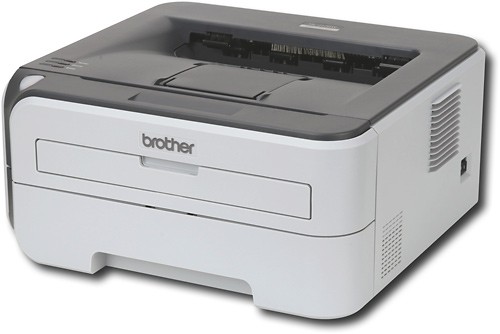
- Model:
- HL-2170W
- |
- SKU:
- 8661806
Customer reviews
Rating 4.3 out of 5 stars with 104 reviews
(104 customer reviews)to a friend
Customers are saying
Customers admire the excellent print quality and wireless ease of use of this printer. Many found setup to be quick and straightforward, also praising its compact size and affordability. A minor drawback mentioned by some users was the printer's noise level during operation.
This summary was generated by AI based on customer reviews.
- Pros mentioned:Price, Print quality, SizeCons mentioned:Noise level
Rated 5 out of 5 stars
Worth the price I paid.
Posted .This reviewer received promo considerations or sweepstakes entry for writing a review.I found out the hard way that Vista64 is not compatible with some older printers like my trusty ten-year-old network NEC SuperScript. NEC won't provide any 64 bit drivers for this printer because "it's at the end of its service life" (NOT!), nor would they supply the source code so I could recompile to x64 and make my own driver. NEC and I are finished doing business. I did my homework and decided on this printer mainly because of price and small size. I paid a whole lot less than the listed price now. I'm glad I bought it when I did. I set this one up as a local printer for my Vista64 machine using USB without any problems. Not all software installs automatically - I had to sniff around the CD to find some of the utilities that enable toner saving and other good stuff. When printing this thing is noisy - I thought it was falling apart the first time I used it. That's just the way it is. Print quailty is exceptional considering the price. I use it for printing reports and it does the job just fine using 600x600 resolution. It's interesting that the replacement drum unit costs more than the printer does! Disposable printer? I don't know how durable this printer is. Only time will tell that. It's fast, and if you can get it for what I paid, it's a real bargain.
I would recommend this to a friend - Pros mentioned:Price, Print quality, WirelessCons mentioned:Noise level
Rated 4 out of 5 stars
Fast and affordable
Posted .This reviewer received promo considerations or sweepstakes entry for writing a review.I bought this printer for my home office about two weeks ago. I totaly love it, coming from a junk ink-jet this thing has increased my productivity to where I can actually work from home on a regular basis. Wireless easy to set up, just follow directions and use the temp. ethernet cable method. As fast as the big printer at the office! I have printed about 75 pages and still on the original toner that came with it, I have it set to toner save mode but everything looks great! Sleep mods works well, I have it set for 15 min, when a job is sent to it while asleep takes less than 10 seconds for it to print the first page. It's sort of loud but all laser's I've used are. Does not come with ethernet cable just so you know. I am very satisfied with my purchase, especialy since it was on sale here for $89.00.
I would recommend this to a friend - Pros mentioned:Ease of use, Print quality, Wireless
Rated 5 out of 5 stars
Best $100 I've Spent in a Long Time
Posted .This reviewer received promo considerations or sweepstakes entry for writing a review.I was looking for a laser printer with a few basics: wireless built in, ease of setup, an actual tray to load a stack of paper, an optional manual-feed tray, speed and the ability to print high quality. This product meets all those expectations and exceeds them in speed, quality, ease of setup, and price. I was printing wirelessly from my laptop within 20 minutes of opening the box. Adding the drivers (and wireless-ready config) on additional computers takes less than 5 minutes each. The "starter" toner cartridge provides a reasonable 1000 prints (replacements offer 1500 or 2500). Perfection at a great price! Now we'll just see if it lasts.
I would recommend this to a friend - Pros mentioned:Ease of use, Print quality
Rated 5 out of 5 stars
Nice Printer
Posted .This reviewer received promo considerations or sweepstakes entry for writing a review.I bought this printer about 5 days ago. I wanted wireless capability because I had no choice other than to put the router and printer in separate rooms. Set up was easy. Just temporarily hook up the network cable, and follow the instructions from the CD. The software found my SSID, so all I had to enter was the WEP encription key. I was printing wirelessly in just minutes. The printer is really fast, with only a slight delay from pushing print to having the print job waiting for me at the printer. The print quality for text documents is great. It rivals some of the laser printers at work. The fan is a little noisy, but the printer is in another room, so I am not there to hear it. Viewing and adjusting the settings is quite easy too. Just click the printer icon in the task bar and select printer home page and change any settings you want. The task bar icon will also let you view any messages sent from the printer such as low toner, or error messages like paper jams. Aside from the fan noise, the printer is great for its price. It is great to print from my laptop from anywhere in the house.
I would recommend this to a friend - Pros mentioned:Print quality, Size, Wireless
Rated 5 out of 5 stars
cheap, fast, small laser -- and it's wireless
Posted .This reviewer received promo considerations or sweepstakes entry for writing a review.Fast & inexpensive laser, i suppose there are lots of those. but this one's wireless, which puts it ahead of the pack. small form factor allows it to be put anywhere there is a power outlet. mine is on a closet shelf. silent when not in use, responds instantly when print jobs are routed to it. One piece of advice, use the manual. I tried to ad lib the setup. I got very close, but never got anything more than the test page. Once I opened the manual, I had the printer setup and on our wireless network in 5 minutes. Note that my router is an older Apple Airport, so I needed to use the manual setup with an ethernet cable. So I can't report on the automated setup that newer wireless routers support. We've had the printer in service a month, has worked flawlessly. Recommend highly.
I would recommend this to a friend - Pros mentioned:Print quality, Wireless
Rated 5 out of 5 stars
Fantastic printer with no hassles!
Posted .This reviewer received promo considerations or sweepstakes entry for writing a review.This printer is perfect! The quality is exactly what one would expect form a laser printer and the speed is more than adequate. You have to connect to the printer on a LAN with a Cat5 cable to setup the Wireless part, but it's very simple to do. The only complaint is when the printer thinks the Toner is low it stops printing until you replace the Toner. I put this to the test and put a piece of tape over the on the side of the Toner cartridge and sure enough I have printed over 400 more pages that are absolutely perfect and there are no signs the Toner is on empty. That means the Toner that came with the printer will print well over 1,000 pages (the advertised amount). Best Buy sells the replacement Toner cartridges in two sizes. When I truly run out of Toner I will replace it with the bigger cartridge that advertises 2,300 pages. With some luck maybe I will get at least 3,000 out of it by taping the hole on the side!
I would recommend this to a friend - Pros mentioned:Ease of use, Price, Print quality
Rated 5 out of 5 stars
Great Value
Posted .This reviewer received promo considerations or sweepstakes entry for writing a review.Setup is a breeze in both USB and wireless modes, as long as you follow the directions. Prints beautifully and quickly locally and on the network. Couldn't believe the features for the price!
I would recommend this to a friend - Pros mentioned:Price, Print quality, Wireless
Rated 5 out of 5 stars
buy it
Posted .This reviewer received promo considerations or sweepstakes entry for writing a review.I love this printer, very fast, and the price is right. All my computers in my house is setup to use it. the wi-fi is setup to use the wireless router, so all the Wired Lan computers can still use it wireless. I have not Wires attached to this printer. you will need to attach to a computer by wire the first time setting and manual config the ip address, dont use the DHCP, because if the power goes out, it will have problems reconnecting, once setup is finished, disconnect the wires and put this printer anywhere in the house. By the way in your router, use the mac address to keep it paired, by use of Wireless Card Access List.
I would recommend this to a friend - Pros mentioned:Price, Wireless
Rated 5 out of 5 stars
Great printer value so far
Posted .This reviewer received promo considerations or sweepstakes entry for writing a review.First non-HP printer. Replacing HP laser that was wearing out. Setup was reasonable. Works very well wirelessly on network with (4) Vista laptops, (2) MAC Snow Leopard and (1) MAC Tiger laptop, and (2) Dell Windows XP desktops. Not sure what MAC issues others had, but pretty straight forward. Difficult to find comparable features anywhere else near this price point. Great for home use, would need more long term experience before could recommend for business. Read setup instructions carefully and pick one method. Pages tend to curl slightly. Probably better choices for graphics. Really like this printer value so far.
I would recommend this to a friend Rated 4 out of 5 stars
Great replacement for a HL2040
Posted .This reviewer received promo considerations or sweepstakes entry for writing a review.I have been using Brother laser printers for many years and I am very happy with their performance. I don't need them for any sophisticated or complex printing (kids homework, assays, internet pages, maps, the usual home use). This was a replacement for a brother HL2040 which I had for few years. The drum light started blinking and when I went to get the replacement drum, I learned that it costs almost 120$. I saw this newer wireless model for 119$ on sale. For the same price, I got a faster printer with a new drum and a "starter" toner. The sad part is that high price of the drum compared to the price of a newer printer, encourages people to discard, throw away or recycle equipment that is still functioning.
I would recommend this to a friend- Pros mentioned:Print quality
Rated 5 out of 5 stars
Fantastic value
Posted .This reviewer received promo considerations or sweepstakes entry for writing a review.I had originally set out to purchase ink cartridges for my color ink jet, but when I compared the ink prices with the then-current sale price, for about $20 more, it was a no-brainer to purchase this printer. I find this printer a terrific value even at the regular price compared to any other offerings currently available. considering that 95% of my printing is black and white, the value is even greater. Installation went smoothly for both Windows XP, 2000 and CUPS for Linux. The Status Monitor works more reliably for Windows 2000 than XP, but I have never had the printer fail to print (as long as I had it turned on!). Linux CUPS does not have this exact model listed, but I found one for a similar laser printer that works perfectly. This printer has a very quick warm up time. From its sleep stage, I can print a one or two page document, and by the time I get up and cross the bedroom, it has finished printing. The output is sharp and clear, even down to 6 pt, I have not tried it below that. Gray scale seems pretty decent. If I had any real wish, it would be for automatic duplex capability. I was spoiled by my ink-jet having that, but the Brother does have clear instructions on using the manual duplexing capability. Having said this, Brother may have just began ushering in a new era of affordable quality monochrome laser printers for the average home user and small business that does not need to do a lot of color printing.
I would recommend this to a friend - Pros mentioned:Print quality, Size, Wireless
Rated 5 out of 5 stars
Great Printer
Posted .This reviewer received promo considerations or sweepstakes entry for writing a review.I got this printer on sale a few months ago. It is used with our wireless network and was easy to set up. The printer is fairly compact in size for a laser and doesn't take up as much space as our old one. It is very quiet and fast. For the price, this is definitly a good printer. I love the wireless capability and it is hard to find all these features at this price range.
I would recommend this to a friend - Pros mentioned:Price, Print quality, Wireless
Rated 5 out of 5 stars
Great Printer A workhorse
Posted .This reviewer received promo considerations or sweepstakes entry for writing a review.Love this printer. It is a workhorse, it doesn't let crinkled paper get stuck, it works fast, it came with an toner cartridge that lasted 1,000 pages. Brother is always there to help me when I have a problem with the printer, which happened on installation. They walked me through it. This a wireless printer that works on computers all over the house. If you want a black and white printer that is inexpensive and works great, get this one!
I would recommend this to a friend - Pros mentioned:Print quality, Wireless
Rated 5 out of 5 stars
Effortless setup, no regrets!
Posted .This reviewer received promo considerations or sweepstakes entry for writing a review.Very affordable printer and outstanding performance. I'm running Mac OS 10.5.2. Wireless install took me about 10-15 minutes. Instructions were very simple. Just remember to turn on your Firewall after the setup. Printed over 500 pages about 3 hours right after installing. I'm no longer tied to a printer since I use a laptop and this can be placed anywhere within range of my network. My first Brother printer. Good print quality too.
I would recommend this to a friend - Pros mentioned:Ease of use, Print quality, Wireless
Rated 5 out of 5 stars
*****
Posted .This reviewer received promo considerations or sweepstakes entry for writing a review.I took the advice of others and followed the wireless installation instructions as described. I used the ethernet cable initially between the printer and router as suggested which resulted in a flawless setup. I now have my desktop and my wife's laptop connected wirelessly. I have test printed from the upstairs bedroom and also the kitchen with no problems. This will be perfect for my wife whenever she works from home.
I would recommend this to a friend - Pros mentioned:Print quality, Wireless
Rated 5 out of 5 stars
Great Performance, Wireless easy to setup
Posted .This reviewer received promo considerations or sweepstakes entry for writing a review.This printer was the best value in small desktop lasers, when I conducted a recent search. I was somewhat hesitant by some other comments on wireless setup, but found that reading the directions carefully, it was very easy to setup, and working within about 10 minutes. No problems whatsoever. My network is NOT a "one button" setup network - we have a hidden SSID, use WPA2 with AES encryption, so I went with the "network cable" initial setup, then once configured, use it wireless. Installing the print drivers on the various machines in our house went great - each machine was printing within 3 minutes of putting in the installation CD. So far, this is one of the easiest wireless products to add to the network, and print quality is great. I am impressed with Brother's documentation and software. Nice work. I had ordered an extra toner cartridge with the printer - in hindsight, I would probably order the TN-360 cartridge (large capacity) instead of the TN-330 cartridge, but it's just a cost-saving - no functional difference.
I would recommend this to a friend - Pros mentioned:Ease of use, Print quality
Rated 5 out of 5 stars
Meets all my needs
Posted .This reviewer received promo considerations or sweepstakes entry for writing a review.This set-up is very easily. I have a PC connected via USB and then used the wireless feature to connect it to my home network (since I did not have an extra wired connection where I placed the Printer). My router supported the Automatic Wireless setup that this printer used which allowed me to have it on the network in 5 mintues. I then went into my router and made the IP address, on the printer static, (so, it would not change and potentially cause a problem for the other pcs in my home connected to this printer via the network). Currently have 4 PCs sharing this printer with no problems... Print quality and speed is perfect. This is my first Brother printer and I am very impressed.
I would recommend this to a friend - Pros mentioned:Print quality
Rated 4 out of 5 stars
Great printer for the money
Posted .This reviewer received promo considerations or sweepstakes entry for writing a review.While this printer was well worth the sale price; I would also consider purchasing it at its full price. The most significant benefit of this printer is its inclusion of wireless networking. If you need a small office or home B/W laser in a location that is difficult to string CAT cable, this printer should be on your short list. Once out of the box, it took me about ten minutes to get this printer fully connected to my network via 802.11g wireless conenction using a Buffalo AOSS compatible router. The easy setup with AOSS (and I'm assuming SecureEasySetup and Wi-Fi Protected Setup) is straight forward and very easy to use. If you have a newer router made by Buffalo (AOSS), LinkSys (SecureEasySetup), or whatever devices are certified for Wi-Fi protected setup, it should be as easy as using the CD to start the setup, pressing a button on the printer and another one on the router to initiate communications, and follow the onscreen prompts to finish the driver installation. If you have an older router, I'm not sure how easy or difficult it would be to setup without using one of these automated routines, but the instruction guide seems to be pretty straightforward. The print quality is on par with what I've typically seen from B/W lasers. It's a bit faster than the laser it replaced (an HP 1012); howeevr, it's also a bit noiser -- neither the speed nor the noise increase were enough to make me consider one printer over another. My only hesitation with this model is because of some negative experiences with Brother laser printers in the past. I'm an IT professional by trade, and I've seen Brother lasers have a tendency to develop print issues after a couple of years. However, this printer is replacing an HP that died after two years, so I guess many of the laser printers in this price range aren't made to last more than a few years.
I would recommend this to a friend - Pros mentioned:Print quality
Rated 4 out of 5 stars
good printer but ...
Posted .This reviewer received promo considerations or sweepstakes entry for writing a review.In most respects this is a very good printer. One recurring annoyance for me - I use different papers a lot and therefore like to be able to feed paper manually rather than change the paper in the tray all the time - is that it's hard to get the paper in the manual feed slot so that it feeds straight through, that is, without going off a little to one side or the other and then coming out with the text printed crooked on the page. Also, the paper guides on the manual feed slot are hard to adjust - there are no "clicks" for when you get them set for standard sizes of paper. This printer is faster than the last one I had, but the manual feed deficiencies are definitely a drawback.
No, I would not recommend this to a friend - Pros mentioned:Ease of use, Print quality
Rated 5 out of 5 stars
Highly recommended
Posted .This reviewer received promo considerations or sweepstakes entry for writing a review.Formerly more an HP person I have become a big fan of Brother printers. I have an MFC-8860DN at home and in the office. I was looking for a second printer for home that can be directly attached to the laptop in my home office but also works wirelessly whenever I carry the laptop around. This printer fits the bill perfectly. It is obviously no frills but print quality and speed are excellent. Setup for USB and wireless was very easy. The only snag I ran into was that the drivers that can be downloaded from the Brother support site (I always prefer to install the latest drivers not the ones that come with the device) did not allow me to do the wireless setup. I had to use the installer that was on the CD instead.
I would recommend this to a friend