Customer Ratings & Reviews
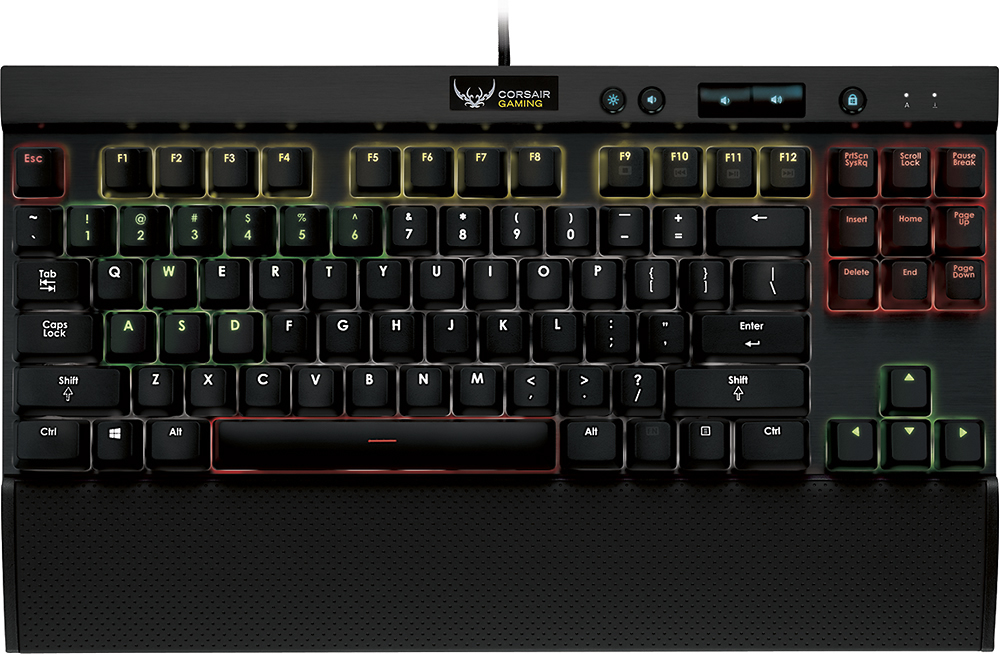
- Model:
- K65 RGB
- |
- SKU:
- 7547002
Customer reviews
Rating 4.6 out of 5 stars with 247 reviews
(247 customer reviews)to a friend
Customers are saying
Customers recognize the high quality, RGB lighting, and satisfying key feel of the Gaming K65 RGB Mechanical Keyboard, frequently praising its compact size and ease of use. However, some users experienced challenges with the keyboard's software and the need for two USB ports. The audible click of the keys during typing was also noted by a few users.
This summary was generated by AI based on customer reviews.
- Pros mentioned:Keyboard quality
Rated 5 out of 5 stars
Wicked Keyboard!
||Posted .This reviewer received promo considerations or sweepstakes entry for writing a review.Corsair does not disappoint! Beats the heck out of the keyboard competition, to name a few companies.. Logitech and Razer! Bought at my local Best Buy on sale for $99, that deal was just really hard to pass up. Keyboard construction is top notch stuff! Aluminum body/frame (since the keyboard has an aluminum face, fingerprints don't show up as easily and is overall very durable). Cherry MX Red mechanical switches are top of the line, and the hand rest is pretty comfortable! The mechanical keys are solid and direct; due to the keys being easily removable, it makes cleaning a breeze. Coming from those regular soft key keyboards, mechanical keys just feel leaps and bounds better, not to mention the feedback they give is amazing! The only downside i can think of (which isn't really a con, but might be for some), the mechanical keys are much louder when typing down on the cherry mx switches compared to normal soft keys. I myself actually like the loud clicks it gives off. The USB cord is thick with thick braided insulation, very tough stuff! Comes with 2 USB male plugs, 1 for PC connectivity and the other to power the RGB LED's. The RGB LED's on the keyboard are bright and very colorful, very easy on the eyes as well! It comes with a gang of default color schemes to use, you may also create your own color schemes through the Corsair application which you download through their website "Corsair.com". The Corsair program works like a dream! It works great on my PC and is very easy to use and navigate! Corsair never disappoints with their quality of products. In the future I will definitely be purchasing more Corsair products as they are rated TOP Tier in the gaming keyboard/mice realm!
I would recommend this to a friend - Pros mentioned:Key feel
Rated 5 out of 5 stars
Spacesaver
||Posted .This reviewer received promo considerations or sweepstakes entry for writing a review.I was looking for a mechanical keyboard with a limited amount of space to work in. This is the perfect fit for me. I don't need the 10 key pad as a use a wireless Kmashi for that function. This gives me the room I need, and the click the keys produce is perfect. Not to mention all the possibilities available with the color schemes and customization possible. A++
I would recommend this to a friend - Pros mentioned:Key feel, Keyboard quality
Rated 5 out of 5 stars
I like it a lot
||Posted .This reviewer received promo considerations or sweepstakes entry for writing a review.Going from a normal membrane keyboard to a mechanical is like the difference between snowboarding on groomed and snowboarding on powder. It's not really going to make you a better snowboarder, but it feels a lot better, and I miss a lot less keys. So yeah maybe. If you got the razer orbweaver chroma and or the firefly, you may want the deathsomething tournament edition. Other then that I absolutely love this keyboard.
I would recommend this to a friend - Pros mentioned:Keyboard quality
Rated 5 out of 5 stars
Corsair is the BEST!
Posted .This reviewer received promo considerations or sweepstakes entry for writing a review.Corsair does not disappoint! Beats the heck out of the keyboard competition, to name a few companies.. Logitech and Razer! Bought at my local Best Buy on sale for $99, that deal was just really hard to pass up as seeing this same keyboard here on Amazon listed for almost $200! Best Buy obviously had the "Best" buy! Keyboard construction is top notch stuff! Aluminum body/frame (since the keyboard has an aluminum face, fingerprints don't show up as easily and is overall very durable). Cherry MX Red mechanical switches are top of the line, and the hand rest is pretty comfortable! The mechanical keys are solid and direct; due to the keys being easily removable, it makes cleaning a breeze. Coming from those regular soft key keyboards, mechanical keys just feel leaps and bounds better, not to mention the feedback they give is amazing! The only downside i can think of (which isn't really a con, but might be for some), the mechanical keys are much louder when typing down on the cherry mx switches compared to normal soft keys. I myself actually like the loud clicks it gives off. The USB cord is thick with thick braided insulation, very tough stuff! Comes with 2 USB male plugs, 1 for PC connectivity and the other to power the RGB LED's. The RGB LED's on the keyboard are bright and very colorful, very easy on the eyes as well! It comes with a gang of default color schemes to use, you may also create your own color schemes through the Corsair application which you download through their website "Corsair.com". The Corsair program works like a dream! It works great on my PC and is very easy to use and navigate! Corsair never disappoints with their quality of products. In the future I will definitely be purchasing more Corsair products as they are rated TOP Tier in the gaming keyboard/mice realm!
I would recommend this to a friend - Cons mentioned:Software
Rated 4 out of 5 stars
Taking Some Getting Used To
||Posted .This reviewer received promo considerations or sweepstakes entry for writing a review.I've always liked Corsair products, so when they came out with this new mechanical keyboard I was intrigued. First, it's taken some getting used to not having a number pad. When I first purchased the keyboard, I figured that I wouldn't miss it but I have. That said, I still have the number row so it hasn't been terribly difficult to adjust my habits. Second, the keys are MUCH softer than I am used to. What I mean is: it takes far less pressure to depress the keys than I am used to. In my research, this has to do with the type of key switch Corsair used, and in my experience it hasn't been a bad thing, per se. It just means that I need to adjust to the less resistance from the keys, and that hasn't been too difficult, either. Lastly, the program is kind of terrible. I'm a technical person and it even took me a little bit to explore the application and get familiar with it; it's just not intuitively laid out. Even so, it's extremely powerful! You can create application-specific color combinations that auto-switch the color scheme on your keyboard based on the game or application you're currently using; really cool stuff! All in all, I really like this keyboard. I'm not shy about returning things that I don't like or find satisfactory, but despite all of its quirks, this one is a keeper!
I would recommend this to a friend - Pros mentioned:Keyboard quality, Rgb lighting
Rated 5 out of 5 stars
Great for gaming
||Posted .This reviewer received promo considerations or sweepstakes entry for writing a review.It is a bit pricey, but well worth the money. I like being able to customize the colors, especially since I have trouble seeing blue, purple, and green-lit keys. The feel is great for gaming, and the space bar is pretty sensitive. For general typing it is ok, but I would use another keyboard for typing long papers. A deciding factor for me was the size. My keyboard tray is not very wide, and this keyboard does not have a number pad. Side notes: download the software and update the firmware Uses 2 USB ports
I would recommend this to a friend - Pros mentioned:Keyboard qualityCons mentioned:Software
Rated 4 out of 5 stars
A great Tenkeyless... With One Flaw
||Posted .This reviewer received promo considerations or sweepstakes entry for writing a review.If you're looking for bright LED-backlit tenkeyless with infinite color possibilities, this is the board for you. The lighting is amazing, as every single key can be set to shine any color of the rainbow, with four levels of brightness (including off). It's solidly built by one of the most respected manufacturers in PC components today. The MX Cherry Reds are a good choice for an all-around mechanical switch; decent for typing and gaming, but not excelling in one at the expense of the other. The included detachable wrist rest is a useful bonus. A possible downside is that the keycaps are non-standard, so if you like to play dress-up with your board, you might come away disappointed in the lack of options. However, there is one large problem with this keyboard that prevents me from giving it five stars (I'd almost like to give it a 3.5), and that's the Corsair Utility Engine software. When launching certain programs or games (or even randomly, after your PC has been on for a few hours), the software will crash: the board reverts to the lighting scheme that you've set as the onboard default, and any lighting effects freeze. Closing and relaunching the software doesn't even do the trick; a complete system reboot is the only way to "un-stick" the lighting. Corsair swears to be working on it, but I haven't seen an update in a while. Regardless, this keyboard has function to go with the flash. I also own a KBC, a Ducky, a WASD and a Deck keyboard, and I'd put the K65 right along side all of them in terms of overall quality.
I would recommend this to a friend - Pros mentioned:Keyboard quality, Rgb lighting
Rated 5 out of 5 stars
Great Mechanical Keyboard
||Posted .This reviewer received promo considerations or sweepstakes entry for writing a review.The first thing I noticed about this keyboard is the phenomenal build quality. All of the parts feel durable and nothing has that cheap plasticy feel you get on a lot of electronics these days. That being said, with the price tag that comes with a keyboard like this, I wouldn't expect anything less than top notch quality. Fortunately Corsair does not fail to deliver in this aspect. The RGB lighting is really cool and is completely customizable which is really cool. The only problem I initially had with this keyboard is the feeling of the keypress. I came from mx blue switches on a cooler master storm mechanical keyboard. The blue switches were much louder than the red switches on the K65, but they felt much more satisfying and tactile to press. Overall, I would say this keyboard is worth the money. It certainly is premium and high priced for a keyboard, but in my experience, it is worth it in this case if you are looking for a high-end mechanical gaming keyboard that looks awesome.
I would recommend this to a friend - Pros mentioned:Keyboard qualityCons mentioned:Usb ports
Rated 4 out of 5 stars
Nice keyboard, 2 USB ports required though
||Posted .This reviewer received promo considerations or sweepstakes entry for writing a review.I purchased the K65 because I have limited space on my desk and it was the perfect fit (being that it is tenkeyless). The Cherry MX red switches were also perfect for me being that I have fairly strong fingers. The multicolor lighting is cool, but requires this keyboard to take up 2 USB connections at all times which could potentially be an issue if free USB ports are scarce. Overall, this keyboard seems to be very well built and, at least for me, very comfortable to use.
I would recommend this to a friend - Pros mentioned:SizeCons mentioned:Switch noise
Rated 4 out of 5 stars
great mechanical keyboard with major customization
||Posted .This reviewer received promo considerations or sweepstakes entry for writing a review.this a great keyboard and has many customization capabilities both with the programming software for keys and macros as well as colors. it is also not wide and allows your hands to be positioned properly and allows better positioning if you use HOTAS for flight and space sims and put them on your desk. the only potential downside, depending upon your environment, is that it does make noise while typing due to the light key press.
I would recommend this to a friend - Pros mentioned:Keyboard quality, Size
Rated 5 out of 5 stars
Best gaming keyboard here's why:
||Posted .This reviewer received promo considerations or sweepstakes entry for writing a review.This key board is so perfect for gaming because you can program each key to be any color you want which helps find the key faster during a fast paced game. It is also very small which makes it much easier to fit on your desk or if your like me and have your PC hooked up to your living room tv this key board fits very nicely on your lap. The color changing effects seem endless and if you want you can spend hours changing the colors and patterns and all these amazing features. The last thing I'm going to say is that this keyboard is crazy well built it is made out of a light metal with a nice brushed finished look. It would be idea for LAN parties or just anyone looking to have the best keyboard.
I would recommend this to a friend - Pros mentioned:Keyboard quality, Rgb lighting
Rated 4 out of 5 stars
Coolest desk ornament ever
||Posted .This reviewer received promo considerations or sweepstakes entry for writing a review.Seriously, the amount of different light patterns this is capable of is baffling. Mine's set to replicate a thunderstorm, but there's a pattern for EVERYTHING. Pros: PRETTY. Keys feel great. Pretty. Super customizable. Great, sturdy feel to it. Cherry MX Red. Preeeeeeeeeeetty. Cons: some corners cut. The volume dial from its big brother, the K70, is gone and sorely missed, as are the media controls.
I would recommend this to a friend - Pros mentioned:Key feel, SizeCons mentioned:Software
Rated 5 out of 5 stars
Excellent
||Posted .This reviewer received promo considerations or sweepstakes entry for writing a review.Nice key feel (Cheery MX Red). Strong metal construction. Shorter (tenkeyless), so more room for mouse nearby. Software for lighting profiles sometimes does not automatically switch as it should when entering or leaving a game, so sometimes need to manually switch profile in taskbar.
I would recommend this to a friend - Pros mentioned:Keyboard qualityCons mentioned:Software
Rated 4 out of 5 stars
Great, For the size
||Posted .This reviewer received promo considerations or sweepstakes entry for writing a review.I love this keyboard. Cherry MX Reds are hands-down my favorite switch, as they're the only one with absolutely no tactile feedback, a smooth, linear path of acctuation, yet still provides the absolutely excellent mechanical feel. I only have 2 complaints. One of them is more of an opinion than a complaint: First off, I really wish I had gotten the k70 RGB, because I didn't realize how much I relied on the 10 key that is missing with this board until I went to use it several times throughout the day and didn't have it. Second, and this is more just an opinion than a complaint, but the software bundled with this keyboard to change the color scheme is a bit complicated. However, it's a SWEET tool. Love this keyboard and would definitely recommend it to anyone looking for color choice and a small form factor.
I would recommend this to a friend - Pros mentioned:Key feel, Keyboard quality
Rated 5 out of 5 stars
Great keyboard
||Posted .This reviewer received promo considerations or sweepstakes entry for writing a review.I had a logitech and razer keyboards before this. The logitechs work good, but most of their gamer series one's are quite large. I had the Razer blackwidow ultimate 2014 before this as my first mechanical keyboard. And as I will say there was nothing like the feel of typing on that keyboard, it was way to loud. It gave me a migraine. Then comes the k65. It's got a great size for smaller desk and keyboard pullouts. I can now keep my keyboard and mouse on the pullout easily. Also the quality is great. The metal finish is nice, the keys are soft and the lights are bright. The softward took some learning, but once you understand it, it's great. I have it set to different profiles that I can load up easily and have an away profile and home. All in all, I'm very happy with this keyboard. I'm also happy to see keyboard getting smaller after years of as many G keys as you can fill.
I would recommend this to a friend - Pros mentioned:Ease of use, Keyboard quality, Rgb lighting
Rated 5 out of 5 stars
Very Solid Build
||Posted .This reviewer received promo considerations or sweepstakes entry for writing a review.Feels solid and sturdy. Keys are well spaced and have a very definitive action. I have definitely noticed a difference in ease of MMO gaming. Lighting software has slightly higher learning curve. But lighting also enhances ease of use for gaming.
I would recommend this to a friend - Pros mentioned:Key feel, Keyboard quality, Rgb lighting
Rated 5 out of 5 stars
Perfect Keyboard!
||Posted .This reviewer received promo considerations or sweepstakes entry for writing a review.This is one of the best keyboards you can buy if you're a heavy gamer. It's got solid weight and the keys feel lovely. This uses red mechanical keys so there's NO CLICK. Very quiet to play on and still gives precision input. The RGB is a nice touch.
I would recommend this to a friend - Pros mentioned:Key feel, Keyboard quality
Rated 5 out of 5 stars
Love this keyboard
||Posted .This reviewer received promo considerations or sweepstakes entry for writing a review.I have had this for a little bit now. The software works fine for me. I have not used it to make macros, but changing my colors works perfect for sure. I like the mechanical key feel. It is solid. You will not go wrong wit this purchase if you are a gamer that doesn't need the 10 key on the keyboard. This helps keel the gaming right in front of my monitor.
I would recommend this to a friend - Pros mentioned:Key feel, Rgb lighting
Rated 5 out of 5 stars
Great for gaming and looks nice
||Posted .This reviewer received promo considerations or sweepstakes entry for writing a review.I have both this keyboard and the razer chroma; I do enjoy them both. Although I like the feel of this one better, i feel as if the razer chroma does give me a better clicky noise for a mechanical keyboard and the lighting is definitely better on the razer. Would recommend this one if you are looking for a better feel and portability.
I would recommend this to a friend - Pros mentioned:Rgb lighting
Rated 5 out of 5 stars
Amazing mech kb
||Posted .This reviewer received promo considerations or sweepstakes entry for writing a review.This mechanical is really amazing. I don't use it much for gaming (I use a Logitech G13 gamepad for that), so I use this mech keyboard for typing. The keys are cherry mx switches and they are really easy to actuate. I'm a very light typer so on other keyboards, my key presses sometimes don't register because I don't press down far enough. However, with the K65 RGB, the slightest touch registers the key. I just have to tap the top of the key lightly and it'l register. The led function is also amazing. There are lots of options so you can create almost any design you want. You can go to the official corsair forums and browse the different keyboard profiles people have posted. There are a lot of cool ones there, such as a Knightrider profile with a scrolling LED pattern and even a mario one-up mashroom that scrolls across the keyboard. Someone even made a pac-man design as well as a triforce. If you're looking for new keyboard, definitely check this one out. Your local Best Buy should have this out on display for you to test.
I would recommend this to a friend