Customer Ratings & Reviews
- Model:
- K70
- |
- SKU:
- 9089085
Customer reviews
Rating 4.8 out of 5 stars with 344 reviews
(344 customer reviews)Rating by feature
- Ease of Use4.9
Rating 4.9 out of 5 stars
Customers are saying
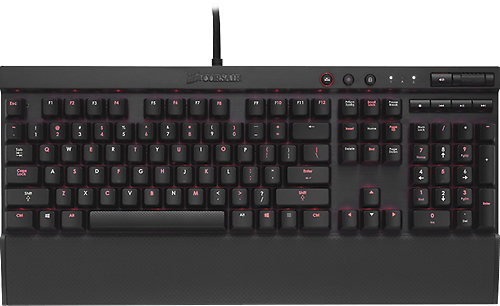
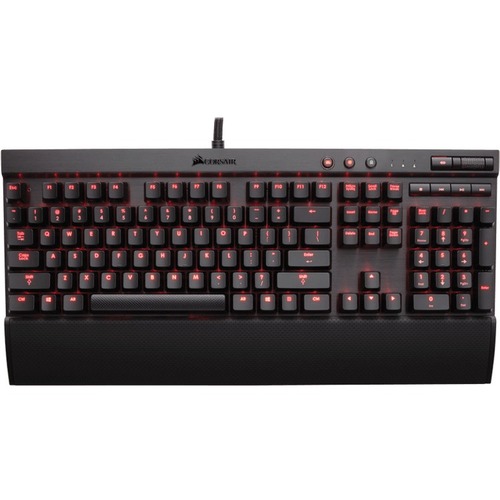
Customers highly value the K70 RGB Mechanical Gaming Keyboard's build quality, citing its sturdiness and positive overall impression. The responsive keys and comfortable wrist rest are also frequently praised, enhancing the typing experience. Many appreciate the ease of use and cleaning. Positive feedback also highlights the customizable lighting options and sleek design.
This summary was generated by AI based on customer reviews.
- Pros mentioned:Key feel
Rated 4 out of 5 stars
great keyboard
||Posted .This reviewer received promo considerations or sweepstakes entry for writing a review.so far i love my k 70 i have a few things i dislike about it but it is alot better then my old thermaltake posiden the thermaltake was VERY clicky u could hear that thing from down the hall it had the jap version of blues in it however the keys were very responsive this has cherry mx reds now when i did research on keyboards i went with this cause it had what i wanted red leds great true cherry mx keys and solid reviews across the board. now i would have given this keyboard a 5 star however the red keys that come with the board are a little eh to me i can type very quickly with the posiden and now miss hit keys however i find myself on this one hitting the wrong keys or the one under to the left alot it may be the more set back effect of the keyboard or the fact im not use to it yet which is also likely i've only had it a month but other then that its my only complaint other then the added "gaming keys" the wasd is fine but 123456 should have the same over lay as the normal keys there is no !@#$%^ on the red keys now if ur ok with switching them out or mentally can remember what those keys have there then sure go for it but it was an annoyance when typing sometimes and needing to remember what the hell was actually there so i had to switch back to the stock keys all and all though the keyboards great easy to clean responsive like i said only complaint is because im a fast typer the keys seem to be to easily pressed sometimes but other times it's spot on and the added red keys would have been nice if the numbers had the !@#$%^ symbols on them as well so no confusion could be had when needing to know what was there originally
I would recommend this to a friend - Pros mentioned:Keyboard quality
Rated 5 out of 5 stars
Killer Keyboard
||Posted .This reviewer received promo considerations or sweepstakes entry for writing a review.I love it. Everything about it rocks. The feel of the keys, the sensitivity, the color n lights, durability and quality an A+ and for the price i think its a great buy!
I would recommend this to a friend - Pros mentioned:Key feel, Keyboard qualityCons mentioned:Usb
Rated 5 out of 5 stars
One of the best gaming keyboards I've ever used
||Posted .This reviewer received promo considerations or sweepstakes entry for writing a review.I was skeptical using Cherry MX Red switches until I finally got my hands on this Corsair K70 beauty. The response and fluidity of the keyboard is excellent. The handy features which allow you to light up specific keys is great. I love how it comes with the option to change a few of the keys with keys that have a different texture (ex: W, A, S, D). It has definitely swayed me away from using anymore Razer gaming keyboards (they have opted to use their own rendition of switches that are manufactured in China) Pros: Excellent build (aluminum finish). Very thick and sturdy cord. Customizable backlit keys (except for color, only comes in red lighting). All keys are mechanical. Very sturdy. Volume roller is fantastic. Throughput 2.0 USB (too bad it's not 3.0) Cons: This model only has red backlit keys. Only W, A, S, D, 1-6 textured keys were provided rather than a few more (like F, C, Shift, etc.), USB throughput connection is on the back instead of the side, no headphone jack
I would recommend this to a friend - Pros mentioned:Key feel, Keyboard quality, Wrist rest
Rated 5 out of 5 stars
It's good
||Posted .This reviewer received promo considerations or sweepstakes entry for writing a review.It's a good keyboard. I like the MX red switches. They are smooth and not as bad for typing as I was lead to believe they are. I put orings under the key caps to reduce noise. Lighting is nice. Solid build. Heavy. Wrist rest is nice. Overall I really like this thing. Would buy again
I would recommend this to a friend Rated 5 out of 5 stars
Great Aesthetics and Functions (Red Cherry MX)
||Posted .This reviewer received promo considerations or sweepstakes entry for writing a review.Pros +Heavy, premium feel to the whole build. Metallic body has a nice brushed finish and feels very sturdy. +On-board mute and volume wheel. +HARDWARE Windows lock key, very much preferred over software. +Includes a key-puller and gamer style WASD and 123456 keys that still allow the red LED light to pass through. +Keys feel very nice to type (red switches on my version). +Red LEDs can get very bright with three settings (low, med, and high brightness). +Option to light your own preferred keys with the second lighting setting (hold the light mode setting for a couple seconds, press the keys you want to light up and hold the mode button again to set it). +Comes with a wrist rest that has nice rubberized finish to it. +USB (2.0?) pass-through. +BIOS setting switch for older BIOS that changes the polling frequencies +Nice, thick braided cable for the USB connections, and also the USB pass-through is on the same braid as the keyboard plug, so no need for two USB cords coming out of the board itself. Cons: -Rubber feet on my unit don't grip as much as I'd like. May be my keyboard tray is oily or something. Other thoughts: +I like the media keys as I do use them -LED theme on this board is red. Why are the Num, Caps, and Scroll lock LEDs white? I recently replaced my CM Storm Trigger (blue Cherry MX switches) for this beauty, mainly because I didn't need all the macro keys, so the Trigger was much wider than I really needed it. With my setup, I need as much room for my mouse to travel, and with the Trigger, it was causing me to bump into it during gaming. Coming from blue switches, it took some getting used to the reds, since the reds are easier to actuate. But I have to admit, I miss that clicky feedback the blues gave me, but anyone else in the room would get kind of annoyed by the sound. When it comes to blues vs reds, I'd have to go with either blues or browns next time. When it comes to the sensitivity of the reds, I like to rest my thumb on space bar, andI find it way too easy to accidentally hit it during gaming, which normally results in me jumping. A gripe some other people may point out, is the F key row may be too low and close to the number row. I honestly find this OK, so the keyboard doesn't waste any space. One thing to note, the red LED lighting is great, as the keys themselves are sort of "floating" or give the illusion that they're floating, so it allows the lighting to bounce back onto the metal to give off a cool effect. I also can't review the Corsair software as I never downloaded it.
I would recommend this to a friend- Pros mentioned:Key feel, Keyboard quality
Rated 5 out of 5 stars
Great keyboard
||Posted .This reviewer received promo considerations or sweepstakes entry for writing a review.Got the keyboard during a 15% off sale and haven't regretted it. With Cherry MX Red switches, expect a reasonable amount of noise when you type so you might annoy those you're on a VoIP with, but the feeling is great and as a gamer I haven't regretted the purchase, although I really wanted the RGB version of this -- I couldn't justify the cost (dang near $200) It also comes with a key removal tool and replacement keys for 1-6 and WASD that have a different texture to them and some are also slanted I assume for gaming. I don't use them, but I did give them a try at first but they felt too weird for me. You can also have the keyboard only illuminate certain keys if you wish and ther are 4 brightness levels: OFF, low, medium, high. There's also a button to disable the Windows key, which is great. Plus -- this is all hardware based so you don't have to fiddle around with any junk keyboard software.
I would recommend this to a friend - Pros mentioned:Key feel, Wrist rest
Rated 5 out of 5 stars
Perfect for gaming AND everyday use
||Posted .This reviewer received promo considerations or sweepstakes entry for writing a review.If you play a lot of PC games, this keyboard is an excellent choice -- it's durable, looks gorgeous, and the key-presses feel absolutely amazing. This is the first mechanical keyboard I've owned, and the friends of mine that have tried mine out say that it's one of the best they've ever experienced. I use it primarily for playing Counter-Strike: Global Offensive and I've noticed that my play has improved substantially since I bought this keyboard. I would recommend this to anyone who's looking to either upgrade their keyboard or buy a really really solid gaming keyboard. Added note: the wrist-rest that comes with the keyboard is EXCELLENT. Make sure you install it, as it's made prolonged gaming sessions as well as general computer use feel much less draining.
I would recommend this to a friend - Pros mentioned:Key feel, Keyboard quality
Rated 5 out of 5 stars
Solid performing keyboard for various uses
||Posted .This reviewer received promo considerations or sweepstakes entry for writing a review.I primarily use this keyboard for typing at work. The keys are easy on the fingers and very responsive. The backlighting can be activated/deactivated for individual keys, but is limited to red (for this model). Volume roller is solid and is very nice for a variety of situations. The wrist rest seems a bit small and doesn't provide a whole lot of support for me, but it isn't a huge complaint. Overall, this keyboard is an attractive addition for my desk and has improved my productivity (compared to rubber domes).
I would recommend this to a friend - Pros mentioned:Key feel, Keyboard quality
Rated 5 out of 5 stars
I opted for this keyboard instead of the RGB one
||Posted .This reviewer received promo considerations or sweepstakes entry for writing a review.This keyboard is amazing it feels so great and I Iove the textured keys that you can put on them, and the space bar the wrist rest is so nice it feels so comfortable! The keyboard is very ergonomic and the Cherry MX red switches are an absolute dream to type on and play games on! there's a button you can press down for 3 seconds to set the keys you want to light up for a certain games scheme of controls and then hold it down again and it'll stay that way. three levels of brightness! the keyboard looks phenomenal in the dark but you can even see it in a low light environment! love it!!
I would recommend this to a friend Rated 5 out of 5 stars
Awesome keyboard
||Posted .This reviewer received promo considerations or sweepstakes entry for writing a review.Using it for past couple of weeks. I didn't even know the difference between normal and mechanical keyboards until I read all about cherry MX keys. Tried this keyboard and the only words that came to mind were "This is what I am talking about"! The backlighting is great. Response and feel of the keys are superb. Not very noisy really. I would love to evaluate brown cherry MX next time. This is Red Cherry MX.
I would recommend this to a friend- Pros mentioned:Key feel, Keyboard quality
Rated 5 out of 5 stars
Best mechanical keyboard for the price
||Posted .This reviewer received promo considerations or sweepstakes entry for writing a review.This Corsair mechanical keyboard is by far the best out of all the mechanical gaming keyboards at this moment. It built perfectly for long hours of gaming and comes with replacement W, A, S, D keys because as gamers we are going to wear those out quickly. The keys feel very tactile and responsive and the overall craftsmanship of the keyboard is superb. I can't recommend the keyboard enough.
I would recommend this to a friend - Pros mentioned:Key feel, Keyboard quality
Rated 5 out of 5 stars
Best gaming keyboard experience.
||Posted .This reviewer received promo considerations or sweepstakes entry for writing a review.I absolutely adore this keyboard. Everything from the brushed steel look of the keyboard's body to the satisfying Cherry MX Red keys screams quality. Other gaming keyboards I've tried are unnecessarily clunky and just plain ugly-looking on the desk. Corsair really nailed the aesthetics here. The adjustable, red backlighting is just icing on the cake.
I would recommend this to a friend - Pros mentioned:Keyboard quality
Rated 5 out of 5 stars
Mechanical Keyboards are Love
||Posted .This reviewer received promo considerations or sweepstakes entry for writing a review.I've long wanted a mechanical keyboard, and now that I got one, I could not be more pleased. I played around for a while with the mechanical keyboards laid out, but the Corsair grabbed my attention. Their is no need to install any programs, no need for any complicated back-lighting set-up. (Though you can customize which one's light up, again without a program.) The keyboard itself is sturdy, the cords are very durable braided fiber, solid and thick. The keyboard is Air-brushed Aluminum so it has a nice cool feel to it. It comes with a Key-puller and extra rough feeling keys for wasd and 12345 especially nice if you play FPS games. Simple Multimedia keys and a interesting volume control. Their are no Macro Keys on it, but I knew that when I bought it. Overall the keyboard is more than worth it's price. 10/10
I would recommend this to a friend - Pros mentioned:Key feel
Rated 5 out of 5 stars
Amazing Mechanical Keyboard for Gamers
||Posted .This reviewer received promo considerations or sweepstakes entry for writing a review.I read a bunch of reviews about different mechanical keyboards before purchasing this at my local Best Buy. The keys are crisp with a great response and feel. The LED back lighting is perfect and can be adjusted with three different brightness levels. There is an option to have only select keys lit up for when you are gaming as well which a great option. The keyboard also includes a group of keycaps that you can switch out for a different feel, they are the WASD and 1-6 keys. They have a great texture to them and are great for extended gameplay sessions. The keyboard also has a USB Passthrough port on it which is great for charging a phone or to have a webcam hooked up through it for Twitch streaming. It also includes a removable wrist pad which is a nice addition that you can use or not use depending on your preference. If you are looking for a great keyboard to improve your gaming experience, I would highly recommend the Corsair K70 to you as an option.
I would recommend this to a friend - Pros mentioned:Key feel, Keyboard quality
Rated 5 out of 5 stars
Amazing Keyboard
||Posted .This reviewer received promo considerations or sweepstakes entry for writing a review.I bought this keyboard after building a gaming PC and it works great. The keys feel nice, the keyboard itself looks great, and I've had no problems with it. Definitely recommend this keyboard to anyone who is building or already has built a gaming PC.
I would recommend this to a friend - Pros mentioned:Key feel, Keyboard quality
Rated 5 out of 5 stars
Nice backlit keyboard
||Posted .This reviewer received promo considerations or sweepstakes entry for writing a review.I like the feel of the keys and the backlighting makes the keys very easy to see in a low light setting. This is the second one of these keyboards I have purchased. My wife liked my keyboard so much that I bought her one for her birthday,
I would recommend this to a friend - Pros mentioned:Key feel, Keyboard qualityCons mentioned:Usb
Rated 3 out of 5 stars
very noisy, 1 color, no macros
||Posted .This reviewer received promo considerations or sweepstakes entry for writing a review.very solid keyboard. Keys feel good and is well made. It uses up 2 available usb ports which i didn't expect. Raised keys makes it easy to clean. Typing on it is just way too loud. It was driving my wife crazy every time I typed. Also there is no macros and no software with this version, and you can't change the colors from the default red.
No, I would not recommend this to a friend - Pros mentioned:Keyboard quality
Rated 5 out of 5 stars
Nice solid keyboard
||Posted .This reviewer received promo considerations or sweepstakes entry for writing a review.I bought this for my son for FPS gaming and he loves it. He feels that the key clicks are much more precise and accurate than his old membrane-switch keyboard. The size of the keyboard is nice also, it is a full keyboard with number pad and multimedia buttons but the footprint of the keyboard is not too large. For myself, I could not use this keyboard due to the red backlighting which is harder for my older eyes to deal with. I have a low profile keyboard with blue/white backlighting that I find much easier to see in low light. However, my son really likes the red backlighting and I admit it looks cool. If you do not have older eyes and want mechanical switches, I think you will love this keyboard. However if you have older eyes you may not like it quite as much due to the red lighting.
I would recommend this to a friend Rated 4 out of 5 stars
A good keyboard
||Posted .This reviewer received promo considerations or sweepstakes entry for writing a review.This is an excellent keyboard if you get the right one. First off, they are heavy, with aluminum base and cover. The keys are can be lit with red LEDs if you wish. The Corsairs are available with different mechanical switches. The Cherry Reds are designed for gamers with a smooth stroke until the key bottoms out. Unfortunately, they are not designed for general typing. For that you should get either the Cherry Brown or even the Cherry Blue for a IBM type of feel. The Browns is a compromise between the Red and Blue switches. The keyboards requires the use of two USB ports with two braided cables. It comes with a detachable hand rest. The Corsairs have been ranked as the best mechanical keyboards since they have been released. Just make sure you get the right switches for the right use. They are rather expensive but are about the goinf price for similar type of keyboards...
I would recommend this to a friend- Pros mentioned:Key feel
Rated 5 out of 5 stars
Great Keyboard
||Posted .This reviewer received promo considerations or sweepstakes entry for writing a review.I recently purchased the Corsair k70 keyboard from my local Best Buy and all I can say is I made the right decision! I have been using ergonomic keyboards and they typically wear out quickly while gaming or doing work for long periods of time. With the K70 keyboard I barely have to press the keys for it to register and while gaming it's easy to hear the keys click to know its registering while my headphones are on. The K70 has a adjustable LED back light to choose your desired brightness level which I have set to dim during the day and then the brightest at night so it's easier for me to see since I have bad vision. I recommended this to a couple of friend and they love the keyboard! A must have for a gamer or someone who uses or goes through keyboards non stop!
I would recommend this to a friend