Customer Ratings & Reviews
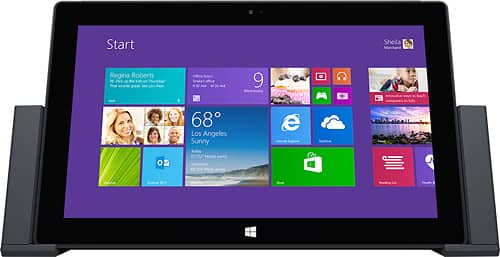
- Model:
- G5Y-00001
- |
- SKU:
- 2266225
Customer reviews
Rating 4.6 out of 5 stars with 95 reviews
(95 customer reviews)to a friend
Customers are saying
Customers commend the docking station's ease of use and the availability of USB and other ports, finding it convenient for connecting additional devices and creating a desktop-like experience. They also appreciate its ability to charge their Surface Pro while docked and its compatibility with their devices. However, some customers find the price to be relatively high.
This summary was generated by AI based on customer reviews.
- Pros mentioned:Ease of use, Usb
Rated 5 out of 5 stars
Super Convenient!
||Posted .This reviewer received promo considerations or sweepstakes entry for writing a review.I love my Surface Pro but I would get frustrated because it would only plug one USB port at a time so with the docking station I can plug multiples in and its way more efficient when trying to move files from one USB plugin to another. Its is very simple to use and it works great to charge your tablet while playing games or getting work done.
I would recommend this to a friend - Pros mentioned:Ports
Rated 4 out of 5 stars
Does what it says it does
||Posted .This reviewer received promo considerations or sweepstakes entry for writing a review.I was using an HP 3005 port replicator for my Surface Pro. The power cord for the Surface wasn't always charging it so I went to buy another power cord. My local Best Buy was out, but they had this dock marked down to almost the price of the power cord, so I bought it. It works, but so do others. Now that the price is under $100, it makes more sense to look at this product for adding additional ports, monitor, etc. to your Surface Pro.
I would recommend this to a friend - Pros mentioned:PortsCons mentioned:Price
Rated 5 out of 5 stars
Very nice dock
||Posted .This reviewer received promo considerations or sweepstakes entry for writing a review.The Microsoft Surface dock is very nice. It securely locks in your Surface and provides ample ports for connecting external devices. A little expensive when not on sale, but, still, a very nice addition to your Surface.
I would recommend this to a friend - Pros mentioned:Usb
Rated 4 out of 5 stars
Good, but a little pricey
||Posted .This reviewer received promo considerations or sweepstakes entry for writing a review.I got this to expand the number of ports from the single USB 3.0 available on the Surface. Buildwise, it feels very solid, and the sliding mechanism appears to work well. Four USB ports generally are enough for most of my uses (external hard drive, wireless keyboard/mouse, iPhone/iPod, and an available port for other devices). As far as the USB ports, the only negative is that only 1 of the 4 ports supports USB 3.0. The ethernet port is surplussage for me, as I'm always connected via wireless. The only real downside is the monitor situation - the docking station only provides a single mini DisplayPort, which precludes (1) multi-monitor setups through the docking station, and (2) the ability to plug in a monitor without either the HDMI or VGA adapters.
I would recommend this to a friend Rated 4 out of 5 stars
Love this Docking Station
||Posted .This reviewer received promo considerations or sweepstakes entry for writing a review.I visit a client three days a week where I need to bring my own computer. Carrying my Surface Pro is great since it is so small and light. I leave the docking station at my Client hooked up to a monitor, keyboard, mouse and network. I just drop in the Surface and I'm ready to work. The performance has been flawless. It's great since I can take the Surface out and go to other users when required and just drop it back in the docking station when I return to my desk. The only area I feel could be improved is the unit is rather chunky to travel with. I think it should fold flat to fit in a briefcase.
I would recommend this to a friend- Pros mentioned:Charging, Usb
Rated 5 out of 5 stars
Docking Station
||Posted .This reviewer received promo considerations or sweepstakes entry for writing a review.I really like the docking station. The added USB portions are a plus. I also like that I can charge my surface, too.
I would recommend this to a friend - Pros mentioned:Charging, Usb
Rated 5 out of 5 stars
this is great
||Posted .This reviewer received promo considerations or sweepstakes entry for writing a review.allows my surface 2 pro to charge, have usb drives always attached to have instant access. wired Ethernet. great design
I would recommend this to a friend - Pros mentioned:Ease of use
Rated 5 out of 5 stars
A Win in my book ... (pun intended)
||Posted .This reviewer received promo considerations or sweepstakes entry for writing a review.Anything you don't have to fiddle much with after the initial installation and setup gets a win in my book. It looks pretty, really functional and easy to dock tablet in and out of. I really expect highly repeated actions to be painless and this fits the bill. What would be cool is if it can adjust/tilt to almost flat to where you can draw on it while at the same time using a bigger monitor - like the traditional Wacom tablet. Cause sometimes you just need a bigger monitor to see what you are drawing in detail.
I would recommend this to a friend - Pros mentioned:Ease of use
Rated 4 out of 5 stars
Simple but effective
||Posted .This reviewer received promo considerations or sweepstakes entry for writing a review.This docking station is very easy to use. It's very easy to dock the device. I have used Dell and HP docking stations with my previous laptops and have never felt the docking was as smooth as it should be. With this docking station, just drop in the Surface Pro 2 and slide in the connections on the side. I never had any problems. The wired network port provided by the docking station is helpful.
I would recommend this to a friend - Pros mentioned:Usb
Rated 5 out of 5 stars
lighten ur load, road warrior; one for the office
||Posted .This reviewer received promo considerations or sweepstakes entry for writing a review.I keep this at the office where it is attached to a usb keyboard, display port to vga, and ethernet. Pair your surface pro with a lightweight touch cover and bluetooth arc mouse, and you'll find yourself double-checking your bag on the train, because you won't believe your surface pro can be that light.
I would recommend this to a friend - Pros mentioned:Ease of use
Rated 4 out of 5 stars
very good to use
||Posted .This reviewer received promo considerations or sweepstakes entry for writing a review.it is very good to use. but I do not like the APPs all show up. too much informaiton
No, I would not recommend this to a friend - Pros mentioned:Ease of use, Usb
Rated 5 out of 5 stars
A MUST for added connectivity
||Posted .This reviewer received promo considerations or sweepstakes entry for writing a review.I have my surface connected to a 32" Visio flat panel on my desk. The docking station makes it simple to go from a bunch of connected components to a portable tablet. Also have a 1TB hard drive and a DVD writer permanently attached to the dock, along with a USB hub to add more PORTS! The TV is connected through the HDMI interface. Everything works seamlessly - also have wireless headphones for when I need to be considerate...
I would recommend this to a friend - Pros mentioned:Charging, Ease of use, Ports
Rated 5 out of 5 stars
Docking station works great. A must have.
||Posted .This reviewer received promo considerations or sweepstakes entry for writing a review.Simple to use. Provides multiple ports for additional equipment and charges Surface while docked.
I would recommend this to a friend - Pros mentioned:Usb
Rated 5 out of 5 stars
Great way to make it my home computer
||Posted .This reviewer received promo considerations or sweepstakes entry for writing a review.Great to have everything plugged in and just place the tablet there. Then it all of a sudden becomes my home computer....plugs right into a larger screen as well.
I would recommend this to a friend Rated 5 out of 5 stars
Great for Home Office
||Posted .This reviewer received promo considerations or sweepstakes entry for writing a review.I recently needed to upgrade my computer system due to age and performance issues. This docking station is the perfect complement to my Surface Pro 2 system.
I would recommend this to a friend- Cons mentioned:Price
Rated 5 out of 5 stars
Surface pro docking station
||Posted .This reviewer received promo considerations or sweepstakes entry for writing a review.Works great, sturdy, exactly as pictured. A bit expensive for an accessory. I bought this as a gift for a friend and no complaints.
I would recommend this to a friend - Pros mentioned:Ease of use
Rated 5 out of 5 stars
Perfect accessory, works as you expect
||Posted .This reviewer received promo considerations or sweepstakes entry for writing a review.This device is simple and a great accessory. I keep this docking station at work and it enables me to carry my surface into meetings and home at night without having to fuss with cables. I also keep the screen on for a second touchscreen experience that compliments my mouse/keyboard work.
I would recommend this to a friend - Pros mentioned:Usb
Rated 5 out of 5 stars
Lawrence
||Posted .This reviewer received promo considerations or sweepstakes entry for writing a review.Having 4 extra USB ports (one being 3.0) and an Ethernet port has been excellent. This was a great addition to my work desk.
I would recommend this to a friend - Pros mentioned:Ease of use
Rated 5 out of 5 stars
Works great!
||Posted .This reviewer received promo considerations or sweepstakes entry for writing a review.This docking station works well with connecting my Surface Pro into my home system.
I would recommend this to a friend - Pros mentioned:Usb
Rated 4 out of 5 stars
Better then non OEM
||Posted .This reviewer received promo considerations or sweepstakes entry for writing a review.I like this better then other bands, mostly as it keeps the Surface in an dock and all connections are made when its locked in vs pluging in usb ports.
I would recommend this to a friend