Skip to contentGo to Product SearchGo to Footer
Main Content

Customer Ratings & Reviews
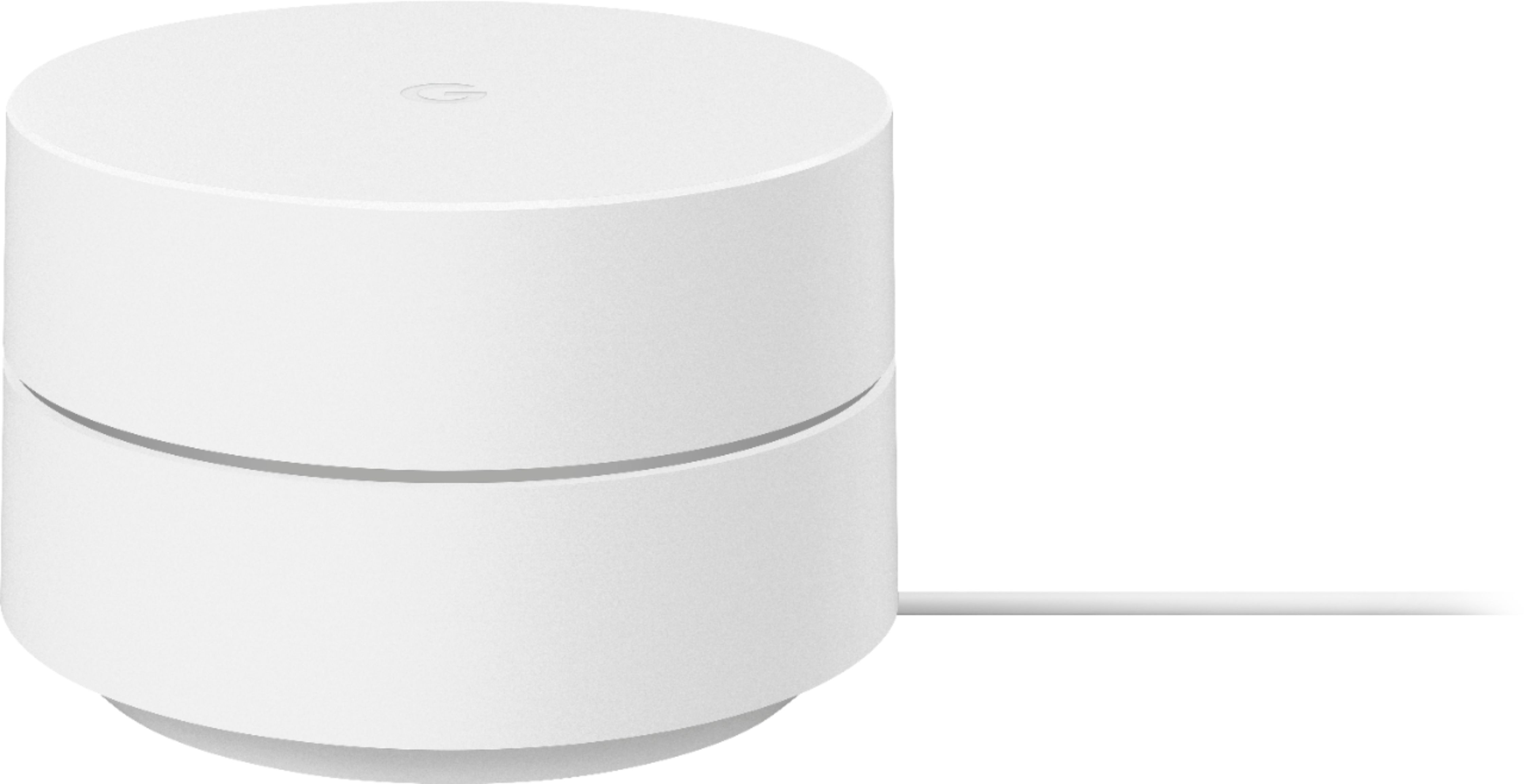
Your price for this item is $59.99
The comparable value price is $99.99

Customer reviews

Rating 4.7 out of 5 stars with 685 reviews

Rating Filter

Rating by feature

  • Setup

    Rating 4.8 out of 5 stars

  • Range

    Rating 4.7 out of 5 stars

  • Signal Strength

    Rating 4.7 out of 5 stars

95%
would recommend
to a friend
The vast majority of our reviews come from verified purchases. Reviews from customers may include My Best Buy members, employees, and Tech Insider Network members (as tagged). Select reviewers may receive discounted products, promotional considerations or entries into drawings for honest, helpful reviews.
Page 33 Showing 641-660 of 685 reviews
  • Rated 5 out of 5 stars

    Wifi

    |
    |
    Posted . Owned for 1 month when reviewed.
    This reviewer received promo considerations or sweepstakes entry for writing a review.

    Works perfectly. Our WiFi reaches all of the apt now.

    I would recommend this to a friend
  • Rated 5 out of 5 stars

    Does the job

    |
    |
    Posted . Owned for 1 month when reviewed.
    This reviewer received promo considerations or sweepstakes entry for writing a review.

    Great additional unit for my network to extend coverage

    I would recommend this to a friend

  • Rated 5 out of 5 stars

    PERFECT MESH SYSTEM

    |
    |
    Posted . Owned for 3 weeks when reviewed.
    This reviewer received promo considerations or sweepstakes entry for writing a review.

    Amazing product with amazing wifi extensinf qualites

    I would recommend this to a friend

  • Rated 5 out of 5 stars

    Simple

    |
    |
    Posted . Owned for 1 month when reviewed.
    This reviewer received promo considerations or sweepstakes entry for writing a review.

    Needed the on line tutrial to understand how it works

    I would recommend this to a friend

    • Brand response from Google Team
      Posted .

      Hi there, we appreciate you for posting a review about Google Wifi. We’ll be using your feedback to work on improving our products and services, including our online support articles. Besides having online help available at Google Nest Help center, we also have a dedicated team of specialists always ready to provide assistance through our support channels here: https://support.google.com/googlenest/gethelp madebygoogle

  • Rated 5 out of 5 stars

    Excellent product at a great price!

    |
    |
    Posted . Owned for 5 months when reviewed.
    This reviewer received promo considerations or sweepstakes entry for writing a review.

    This router works excellent. The price was great!!!

    I would recommend this to a friend

  • Rated 3 out of 5 stars

    Get the three of your trying to expand your wifi

    |
    |
    Posted . Owned for 3 weeks when reviewed.
    This reviewer received promo considerations or sweepstakes entry for writing a review.

    Works great but if you are trying to further expand your wifi dont wastw your time and spend the extra money on fhe 3pack. One has tk stay cpnnected to the mode via ethernet so it wont expand your range that far. I made the mistake of thinking that this connects via wifi. I repeat one needs to connect to the modem to then expand youe wifi. Had to return this for the three pack

    I would recommend this to a friend

    • Brand response from Google Team
      Posted .

      Hi Gabriel, thanks for sending in your review. We're sorry to hear that your experience with your Google Wifi has been less than ideal and that you needed to replace your device with the 3 pack. Yes, the Google Wifi needs to be connected to the modem via Ethernet, but the succeeding Google Wifi devices can be connected wirelessly. If you need further assistance with the setup or have additional questions, please don't hesitate to contact us on our Google Help page here: https://support.google.com/googlenest/gethelp madebygoogle

  • Rated 2 out of 5 stars

    It’s ok

    |
    |
    Posted . Owned for 1 month when reviewed.
    This reviewer received promo considerations or sweepstakes entry for writing a review.

    Ok at best. Seems to drop and cut out a lot. Pretty sure there are better options out there.

    No, I would not recommend this to a friend
  • Rated 4 out of 5 stars

    A worthwhile purchase

    |
    |
    Posted . Owned for 3 weeks when reviewed.
    This reviewer received promo considerations or sweepstakes entry for writing a review.

    Met my expectations to give Wi-Fi coverage thru our different areas of our home.

    I would recommend this to a friend
  • Rated 2 out of 5 stars

    Bad Connectivity

    |
    |
    Posted . Owned for 1 week when reviewed.
    This reviewer received promo considerations or sweepstakes entry for writing a review.

    Bought to help fix connectivity issues with my smart home devices and does not seem to help at all.

    No, I would not recommend this to a friend
    • Brand response from Google Team
      Posted .

      Hi ChefRich, thanks for taking the time to share your feedback . We’re sorry to hear that Google Wifi didn't meet your expectations. We recommend` performing these troubleshooting steps and see if this will improve your experience.

      - Check your cables and connections. Sometimes loose, disconnected or damaged cables can cause connection issues.
      - Disconnect power from all of your network devices, including your modem and your Google Wifi. Wait until all of the LED lights on the devices you unplugged are off.
      - Reconnect power to your modem first then followed by your Google Wifi router and then your Google Wifi points.
      - If you continue to have connection issues, factory reset your Wifi devices. See this step by step guide here: https://support.google.com/wifi/answer/6246619

      If the issue remains after the reset, we'd like to take a look at your Google Wifi and work with you so we can help you in the best way possible. Please reach out to our support team here: https://support.google.com/wifi/gethelp madebygoogle

  • Rated 1 out of 5 stars

    Not worth the price of admission.

    |
    |
    Posted . Owned for 3 months when reviewed.
    This reviewer received promo considerations or sweepstakes entry for writing a review.

    This device is completely useless. The service comes with a router. That lets you use any extender. I couldn't even get this thing to make any noticable difference.

    No, I would not recommend this to a friend
    • Brand response from Google Team
      Posted .

      Hi there, ChrisJ. Thanks for sharing your insights. We’re sorry to hear about your experience with Google Wifi.

      Google Wifi is a home mesh Wi-Fi system that replaces your traditional router and provides seamless, reliable Wi-Fi coverage throughout your home. You’ll still need an Internet Service Provider (ISP) and a modem to connect to the internet. Traditional routers weren’t designed for all the different ways we use Wi-Fi today. Walls and distance make it difficult for a single router to send a strong signal to every room in your home, resulting in slow Wi-Fi and dead zones. It keeps your signal strong by transitioning you to the best Wifi point as you move throughout your home and the right Wi-Fi channel to avoid congestion.

      The placement of your Wi-Fi router and points is vital to have reliable Wi-Fi throughout your home. As a general rule, points work best when they’re no more than two rooms away from each other. For example, if the far end of your house has weak Wi-Fi, don’t put a Wifi point in that exact spot. Instead, put it part way in that direction. Try to place it in an elevated position like on a shelf.

      You can also try these steps below that may help:
      - Move the connected device closer to your Wifi router or point.
      - Repositioning the points to avoid obstructions like walls, doors, and aquariums can improve performance.
      - Make sure all unused devices are off and not draining bandwidth with large downloads.
      - Check for possible sources of interference such as microwave ovens, refrigerators or other equipment.
      - Run a mesh test to confirm placement of your Wifi points.

      If additional help is needed, don’t hesitate to contact us here: https://support.google.com/googlenest/gethelp madebygoogle

  • Rated 1 out of 5 stars

    DO NOT BUY

    |
    |
    Posted .
    This reviewer received promo considerations or sweepstakes entry for writing a review.

    i bought this "mesh" so that i could boost my wifi back up to over 300mbps... hooked ot up and tried it out, im not even 50 feet away and the test on my speed connection said 20mbps.. my old wifi extender(only goes to 2.4ghz) to 90 mbps and was pnly 40 dollars. returning this piece of crap

    No, I would not recommend this to a friend
    • Brand response from Google Team
      Posted .

      Hi kyle, thanks for sharing the details of your feedback on Google Wifi, and we’re sorry to learn of your poor experience with the Wi-Fi speed connection. We can imagine how disappointing this can be, and we understand your decision to return it.

      If you’re willing, try checking the placement of your Wi-Fi router and Google Wifi points, which is vital to have reliable Wi-Fi throughout your home. As a general rule, points work best when they’re no more than two rooms away from each other. For example, if the far end of your house has weak Wi-Fi, don’t put a Wifi point in that exact spot. Instead, put it part way in that direction. Try to place it in an elevated position like on a shelf. It may be helpful to try the following steps to see if the signal will improve. Here are some simple steps that might help:

      - Repositioning the points to avoid obstructions like walls, doors, and aquariums can improve performance.
      - Make sure all unused devices are off and not draining bandwidth with large downloads.
      - Check for possible sources of interference such as microwave ovens, refrigerators or other equipment.
      - Restart your network.

      Also, Google Wifi uses the Band Steering feature to guide your connected devices based on their capabilities, and attempt to select the band that will deliver the best performance. Both frequency bands are active simultaneously and Google Wifi keeps it simple by automatically choosing the band that gives the best Wi-Fi connection.

      We’re hoping for an opportunity to help improve your experience. Please consider reaching out to our support team and we’ll help you the best way we can: https://support.google.com/googlenest/gethelp madebygoogle

  • Rated 2 out of 5 stars

    Google router review

    |
    |
    Posted .
    This reviewer received promo considerations or sweepstakes entry for writing a review.

    Not very useful, don't see how this router is better than others.

    No, I would not recommend this to a friend
    • Brand response from Google Team
      Posted .

      Hi jimmyreviewer, thanks for taking the time to share a review about the Google Wifi, and we’re sorry that you find it not very useful. We’re hoping to learn more about your feedback and see how we can provide a better experience for you. If you’re willing to share more details about your concern, you may speak with our specialists available through our support channels here: https://support.google.com/googlenest/gethelp madebygoogle

  • Rated 4 out of 5 stars

    Google Wifi-Meash Router

    |
    |
    Posted . Owned for 3 weeks when reviewed.
    This reviewer received promo considerations or sweepstakes entry for writing a review.

    I love the product and it works well for my family,

    I would recommend this to a friend

  • Rated 1 out of 5 stars

    Worst

    |
    |
    Posted . Owned for 2 weeks when reviewed.
    This reviewer received promo considerations or sweepstakes entry for writing a review.

    Worst and overpriced product . Lower rates are avaiable

    No, I would not recommend this to a friend
  • Rated 1 out of 5 stars

    Google Home?

    |
    |
    Posted . Owned for 1.5 years when reviewed.
    This reviewer received promo considerations or sweepstakes entry for writing a review.

    Doesnt let me change the channel. Poor reception. I would not recommend.

    No, I would not recommend this to a friend
    • Brand response from Google Team
      Posted .

      Hi there, DavidM. We appreciate your feedback regarding Google Wifi. We're sorry to hear that you're encountering poor signal strength with your devices.

      It's important to note that Wi-Fi signal strength can be influenced by various factors, including Wi-Fi interference and physical barriers that may limit the range and slow down your internet connection. To improve signal reception, we recommend placing your printer in direct line of sight with your Nest Wifi Router. As a general guideline, Google Wifi points work best when they are positioned approximately 2 to 3 rooms apart. For instance, if you have weak Wi-Fi at the far end of your house, it's better to place a Google Wifi Point halfway in that direction. Elevated positions, such as shelves, are also ideal for placement. If needed, you can consider adding one or more Nest Wifi Points to enhance Wi-Fi coverage in your home. For more information, please refer to this help guide: https://support.google.com/googlenest/answer/7182840.

      Additionally, Google Wifi devices are designed to simplify the process by automatically selecting the band that offers the best Wi-Fi performance. Devices like smartphones, tablets, and laptops typically connect to a single radio band at a time. Google Nest Wifi and Google Wifi make efforts to choose the band that provides optimal performance for your specific device. We value your input, and we'll ensure your feedback is relayed to the appropriate team.

      If you have any other support needs or questions related to your Google Wifi, please don't hesitate to reach out to our support team via this link: https://support.google.com/googlenest/gethelp madebygoogle

  • Rated 3 out of 5 stars

    It’s okay

    |
    |
    Posted . Owned for 6 months when reviewed.
    This reviewer received promo considerations or sweepstakes entry for writing a review.

    Great product overall but if you’re looking to greatly improves speeds, I would recommend getting something a little stronger.

    I would recommend this to a friend

    • Brand response from Google Team
      Posted .

      Hi XtAlpha, thanks for sending in your review. We're sorry to learn that your experience with your Google Wifi has been less than ideal when it comes to the performance of the device. We advise that you reach out to our support specialists so we can help identify the cause of the issue and provide you with troubleshooting steps that may improve your overall experience. You can contact us on our Google Help page here: https://support.google.com/googlenest/gethelp madebygoogle

  • Rated 1 out of 5 stars

    Did not work

    |
    |
    Posted . Owned for 2 months when reviewed.
    This reviewer received promo considerations or sweepstakes entry for writing a review.

    The product was not faulty, it did not work with my wifi

    No, I would not recommend this to a friend

    • Brand response from Google Team
      Posted .

      Hello there, Dylan! Thank you for bringing the issue with your Google Wifi to our attention. We apologize for any inconvenience you may have experienced. To provide you with the best assistance, we recommend reaching out to our support team. They will be able to closely examine the issue and guide you through the troubleshooting process. You can contact our support team by visiting the following link: https://support.google.com/googlenest/gethelp madebygoogle

  • Rated 1 out of 5 stars

    Hey World! Check out every single thing I do!

    |
    |
    Posted . Owned for 10 months when reviewed.
    This reviewer received promo considerations or sweepstakes entry for writing a review.

    Google makes products that allow others to easily infiltrate your network. Would not recommend.

    No, I would not recommend this to a friend

    • Brand response from Google Team
      Posted .

      Hi WhistleblowSCO, we appreciate your feedback. We´re sorry to hear about your concerns with the security for your Google Wifi.

      Google Wifi has several built-in security measures to protect you and your online world. Here are some security features:
      - Firewall. Your Google Wifi firewall creates a barrier between your Wi-Fi network and the Internet, protecting your data from unsolicited connections or connection attempts. It’s a stateful firewall, meaning it keeps track of connections (Transmission Control Protocol (TCP) streams, User Datagram Protocol (UDP) communication) traveling across it. Only data associated with a known active connection is allowed through the firewall.
      - WPA2 and WPA3 security. Google Wifi secures your Wi-Fi network with either WPA2 protocol or the newer WPA3 protocol. Using WPA3 protocol makes your Wi-Fi network highly resistant to security risks like offline dictionary attacks.
      - Automatic updates. Google Wifi receives automatic software updates to make sure you always have the latest security features and protection from recently discovered security threats. These updates may include open source components and go through several rigorous reviews.

      If you are experiencing any form of issue or security breach with your Google Wifi, we recommend contacting our support team so we can diagnose the issue and work on improving your experience. You may reach out to us here: https://support.google.com/wifi/gethelp madebygoogle

  • Rated 1 out of 5 stars

    Big D

    |
    |
    Posted . Owned for 1 year when reviewed.
    This reviewer received promo considerations or sweepstakes entry for writing a review.

    Not good coverage in my house so I returned them to the store

    No, I would not recommend this to a friend

    • Brand response from Google Team
      Posted .

      Hi Biggie, we appreciate the feedback and are sorry to hear that your experience with your Google Wifi's coverage was less than ideal. If you're willing to give the device another go in the future and if you have questions about the Google Wifi, please don't hesitate to reach us on our Google Help page. You can contact us through the link here: https://support.google.com/googlenest/gethelp madebygoogle

  • Rated 1 out of 5 stars

    Returning it

    |
    |
    Posted .
    This reviewer received promo considerations or sweepstakes entry for writing a review.

    Was supposed to be cordless. This does no good if have to plug into the router

    No, I would not recommend this to a friend