Customer Ratings & Reviews
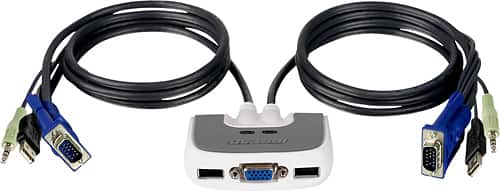
- Model:
- GCS632U
- |
- SKU:
- 6191569
Customer reviews
Rating 4 out of 5 stars with 143 reviews
(143 customer reviews)Rating by feature
- Ease of Use4.2
Rating 4.2 out of 5 stars
Customers are saying
Customers frequently mention the ease of use and the convenient USB connectivity of the MiniView Micro 2-Port USB Plus KVM Switch. Many appreciate its compact size and the included cables' length. However, some users experienced compatibility issues, particularly with certain operating systems and keyboards. A few reported instances of the product malfunctioning after a period of use.
This summary was generated by AI based on customer reviews.
- Pros mentioned:Cable length, Ease of use
Rated 4 out of 5 stars
Nice KVM
||Posted .This reviewer received promo considerations or sweepstakes entry for writing a review.Good cable length. Plug and Play on old XP and newer 7 desktops. Drivers auto loaded without issue on both. Only complaint is that there is no physical button to toggle between computers. My not be an issue since the double hit of Scroll Lock is working well so far. Just can't change if one computer is off to watch startup.
I would recommend this to a friend - Pros mentioned:Ease of use
Rated 5 out of 5 stars
Perfect solution
||Posted .This reviewer received promo considerations or sweepstakes entry for writing a review.Simplicity at its best. I've used other boxes to switch the monitor, mouse and keyboard between computers, and this is by far the best. If you have a need to run two computers and don't want two keyboard, mice and monitors -- this is the way to go. The built-in cables make setup easy, and the configurable keyboard switching prevents desktop clutter. I've had this in use for over a month and haven't had a glitch yet. IOGEAR got it right.
I would recommend this to a friend - Pros mentioned:UsbCons mentioned:Compatibility
Rated 4 out of 5 stars
Excellent KVM
||Posted .This reviewer received promo considerations or sweepstakes entry for writing a review.I had an older IOGear KVM and tried to use it to switch between my old PC with its PS/2 mouse and keyboard ports and a new PC with only USB ports. It did not work with the new PC even after I had purchased USB to PS/2 adapters. My annoyance went away when I got the new one because it also switches my outboard speakers between the two PCs. Also, the mouse and keyboard USB cables share a single USB connection saving a port on each machine.- nice!
I would recommend this to a friend - Pros mentioned:Ease of use
Rated 4 out of 5 stars
Switch
||Posted .This reviewer received promo considerations or sweepstakes entry for writing a review.Works great, its doing just what I wanted it to do
I would recommend this to a friend Rated 4 out of 5 stars
very handy
||Posted .This reviewer received promo considerations or sweepstakes entry for writing a review.this unit is very handy and switches from one tower to the other tower with no lag time after you get it set up. if you switch keyboards to the one that came with a new tower, you might have to use your old key board to finalize the set up to work with the new keyboard, other than that hiccup the unit works great, one with windows XP and other with windows 10...
I would recommend this to a friend- Pros mentioned:Ease of use
Rated 5 out of 5 stars
Easy Set-up
||Posted .This reviewer received promo considerations or sweepstakes entry for writing a review.I was worried about hooking this up on my computer, but it really was very simple and easy to do. The cables were easy to connect, and switching from one computer to the other is very simple.
I would recommend this to a friend - Pros mentioned:Ease of use
Rated 5 out of 5 stars
Works Great
||Posted .This reviewer received promo considerations or sweepstakes entry for writing a review.Found this little gadget to be very usefull - I use it at work where I can plug in my laptop and desktop and switch back and forth with ease.
I would recommend this to a friend - Pros mentioned:Usb
Rated 5 out of 5 stars
Great For Setup
||Posted .This reviewer received promo considerations or sweepstakes entry for writing a review.I have begun working from home and this has allowed me to setup my work and home computer.
I would recommend this to a friend - Pros mentioned:Ease of use
Rated 4 out of 5 stars
Pretty good
||Posted .This reviewer received promo considerations or sweepstakes entry for writing a review.It works pretty well. There seems to be some quirks to it. The switching is done via the keyboard. Sometimes it doesn’t seem to wake up the other computer. I’ve changed the configuration around a few times and that solved the other issues I had with it. Overall it does what I wanted it to.
I would recommend this to a friend - Cons mentioned:Compatibility
Rated 4 out of 5 stars
Works great!
||Posted .This reviewer received promo considerations or sweepstakes entry for writing a review.We use this to switch between 2 sets of monitors in a clinical area. With one of the programs the double scroll lock tap minimizes our image if we do not click off the program. The previous model did not do this. Overall, it works.
I would recommend this to a friend - Cons mentioned:Compatibility
Rated 3 out of 5 stars
Issues using a wireless keyboard
||Posted .This reviewer received promo considerations or sweepstakes entry for writing a review.issues using a wireless keyboard with this product. works fine with a hard wired keyboard.
I would recommend this to a friend - Pros mentioned:UsbCons mentioned:Keyboard
Rated 5 out of 5 stars
Easy setup and use. Save space in shared area.
||Posted .This reviewer received promo considerations or sweepstakes entry for writing a review.We use this in an area where two people work on alternating days. It is great, as each person now uses their own PC and we have a huge amount of free desktop now. Two monitors and keyboard confusion are a thing of the past.
I would recommend this to a friend - Cons mentioned:Compatibility
Rated 3 out of 5 stars
unkowon
||Posted . Owned for 1 month when reviewed.This reviewer received promo considerations or sweepstakes entry for writing a review.make sure to read which computers can be connected because I upgraded from a windows 7 to a windows 10 was advised this IOGEAR would be the one , when I tried everything to connect the 2 computers only the windows 7 worked so I then read the papers & after finding the small print which said will connect a windows 7 to a 8 so I had to take back to find the proper switch that IOGEAR does not have the GEEK SQUAD checked on line and found the match that meant I had to order on line from NEWEGG
I would recommend this to a friend - Pros mentioned:UsbCons mentioned:Keyboard
Rated 5 out of 5 stars
Works great. Easy to use.
||Posted .This reviewer received promo considerations or sweepstakes entry for writing a review.This allows use of two PCs using the same mouse and keyboard and monitor. I had trouble with my Logitech keyboard, but used a standard HP keyboard and it worked great.
I would recommend this to a friend - Pros mentioned:Ease of use
Rated 5 out of 5 stars
Easy way to switch between computers
||Posted .This reviewer received promo considerations or sweepstakes entry for writing a review.Easy way to share monitor, keyboard, mouse, and speakers between two computers. No software to install, just plug in all your cables. Two taps on the keyboard's scroll lock key switches from one computer to the other. That easy! The only issue I've seen is that when you switch, the computer has to detect your mouse again. With a wired mouse I tried, it was almost instantaneous. With the MS wireless mouse I use regularly, it takes 10 or 15 seconds before the mouse is functional. This is probably the fault of the mouse driver but I wanted to point it out.
I would recommend this to a friend - Pros mentioned:Ease of use
Rated 5 out of 5 stars
worked exactly as needed
||Posted . Owned for 3 weeks when reviewed.This reviewer received promo considerations or sweepstakes entry for writing a review.My old computer "wore out" but the games I liked to play still worked. However, copyright restrictions prevented them being transferred to my new computer. The Mini View Micro 2-Port USB Plus KVM switch with Built-in 6' cables enabled me to keep the old computer and switch back and forth between it and my new computer to play the games that couldn't be transferred to my new computer. Perfect!!!!
I would recommend this to a friend Rated 5 out of 5 stars
Works Great
||Posted .This reviewer received promo considerations or sweepstakes entry for writing a review.If you have 2 computers with difference windows this is the product. I have 1 computer with XP and another with Windows 10. The only drawback is that you got to hit Scroll Lock 2 times to change from 1 computer tom the other. Some of the newer keyboards do not have Scroll Lock key. But besides that, it works great I did put a shared folder on my network so I can transfer files, music, and pictures.
I would recommend this to a friend- Pros mentioned:Cable length, Ease of use
Rated 5 out of 5 stars
Worked great!
||Posted .This reviewer received promo considerations or sweepstakes entry for writing a review.Excellent way to use 2 PCs. Easy to hook up, plenty of cord too
I would recommend this to a friend - Pros mentioned:Ease of use
Rated 4 out of 5 stars
Great product
||Posted .This reviewer received promo considerations or sweepstakes entry for writing a review.Quick delivery, works great. Easy to connect to 2 computers, and switch between them.
I would recommend this to a friend - Pros mentioned:Usb
Rated 4 out of 5 stars
Simple, easy, and good deal
||Posted .This reviewer received promo considerations or sweepstakes entry for writing a review.if you have one monitor and two computers... this is the best way to connect!
I would recommend this to a friend