Customer Ratings & Reviews

- Model:
- JTS327
- SKU:
- 6510546
Rating by feature
- Value
Rating 4.6 out of 5 stars
- Quality
Rating 4.8 out of 5 stars
- Ease of Use
Rating 4.8 out of 5 stars
Customers are saying
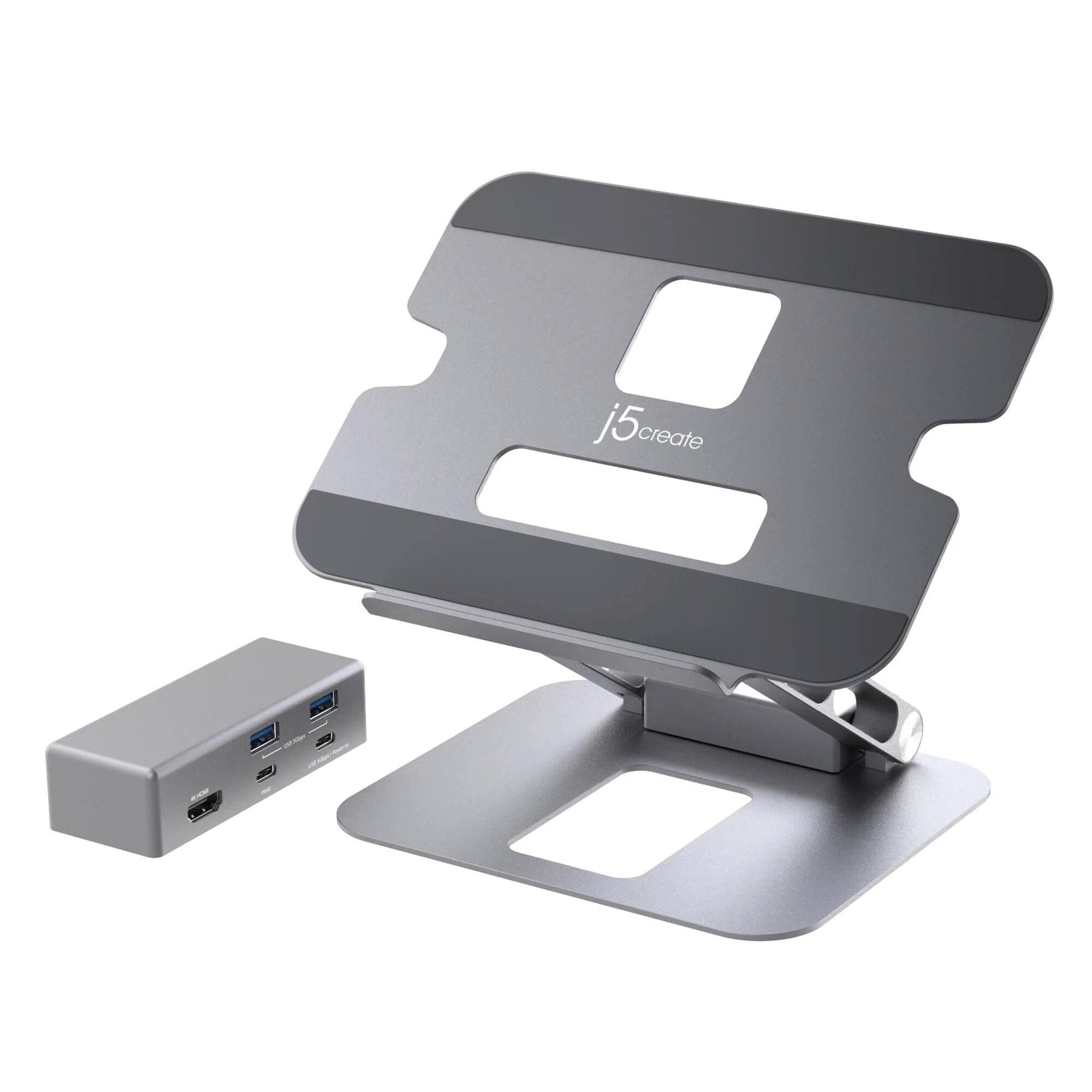
Customers value the Multi-Angle 4K Docking Stand's sturdy and flexible design, praising its ability to support their devices securely. The availability of an HDMI port enabling 4K resolution is also frequently highlighted, along with the stand's compact size and adjustable height options for comfortable use. Many appreciate the sleek and aesthetically pleasing design.
This summary was generated by AI based on customer reviews.
Decent product
||Posted . Owned for 1 week when reviewed.This reviewer received promo considerations or sweepstakes entry for writing a review.Good stand and dock. Just wish the dock had a few more ports
I would recommend this to a friendDocking stand
||Posted . Owned for 1 week when reviewed.This reviewer received promo considerations or sweepstakes entry for writing a review.Looks good and hold laptop at higher and angle needed
I would recommend this to a friendStylish and well built
||Posted . Owned for 2 weeks when reviewed.This reviewer received promo considerations or sweepstakes entry for writing a review.This is a solid stand, very stylish and well built. The hub is a nice bonus as well.
I would recommend this to a friendj5create - Multi-Angle 4K Docking Stand - Silver
||Posted . Owned for 1 week when reviewed.This reviewer received promo considerations or sweepstakes entry for writing a review.Great stand and the additional usb options is an added bonus.
I would recommend this to a friendStand
||Posted . Owned for 1 week when reviewed.This reviewer received promo considerations or sweepstakes entry for writing a review.Good product for the price I like it a lot computer does not over hear
I would recommend this to a friendAwesome!
||Posted . Owned for 3 weeks when reviewed.This reviewer received promo considerations or sweepstakes entry for writing a review.This is a fantastic platform for a laptop! I really like that it gives the user extended ports. It is very stiff so it won't fold closed on you.
I would recommend this to a friend- Pros mentioned:Design, Size, Sturdiness

Adjustable, rugged docking stand has many features
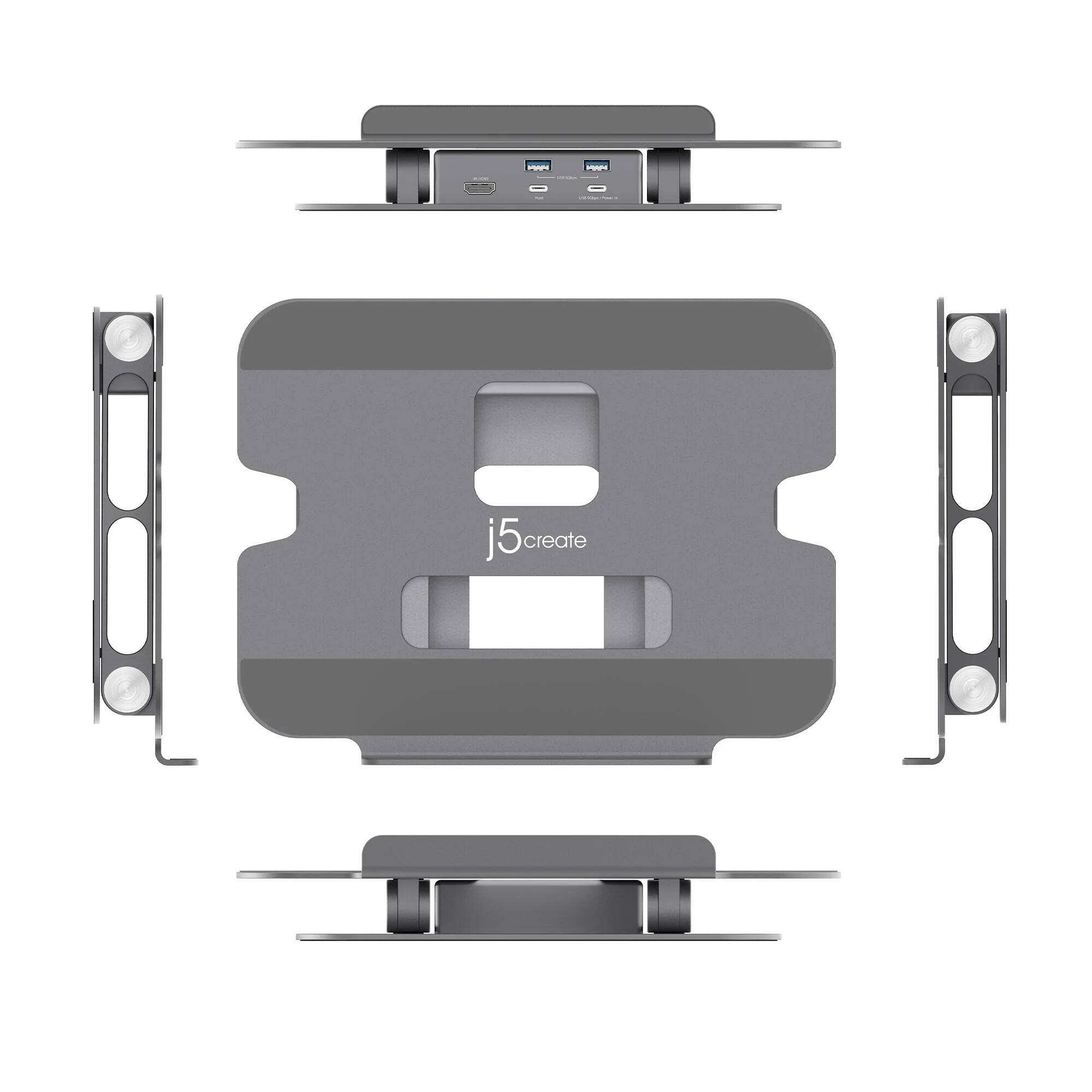
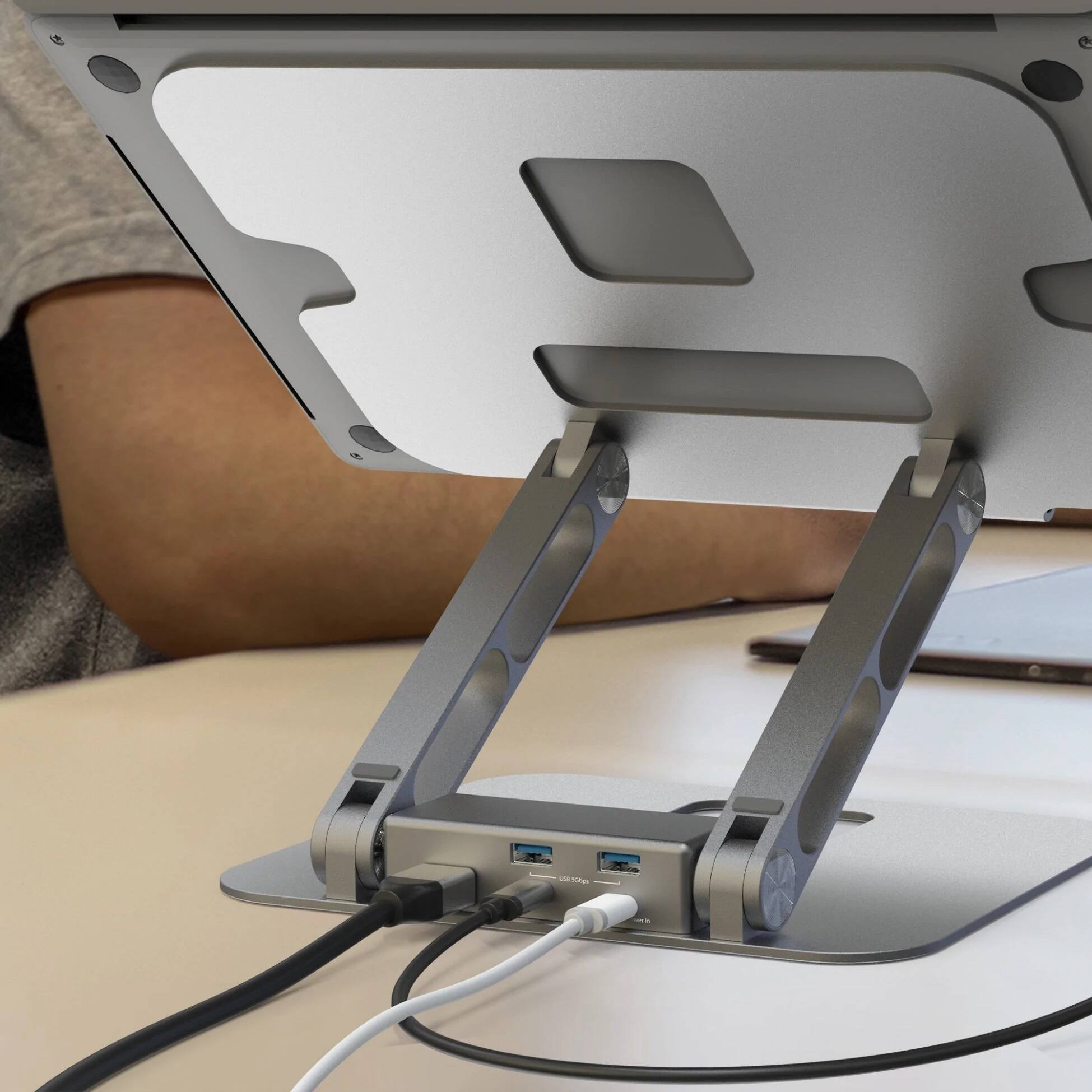
|Posted .This reviewer received promo considerations or sweepstakes entry for writing a review.The J5 Create Multi-Angle 4K Docking Stand is just what I needed. My everyday setup includes a 16-in MacBook Pro, a large external display, a graphics tablet, and sometimes a die cutting machine and a small light pad. I wanted to unclutter my desk, manage the cables for all of my devices, and use my MacBook's Web cam for Zoom meetings. Problems solved! This Multi-Angle 4K Docking stand is rugged, adjustable, and attractive. Its rubber pads hold a tablet, medium- or large-sized laptop without slipping. You can adjust the height and viewing angle for video calls, to keep your device ventilated, and to save space on your desk. Unboxing is simple. Remove the Docking Stand, plug the USB-C host cable into your computer, and plug the other end into the "host" port on the docking module. Plug in your peripherals and then set the "ports" module onto the slightly raised supports on the stand's base to keep the module in place. The available ports include: - Two USB 5Gbps ports - One USB-C pass-through power port - One additional USB-C port - One 4k HDMI display port Pros: - Aesthetic design in rugged aluminum - Adjustable height and angle - Foldable, with low profile for portability - Ability to plug a device's USB-C power supply directly into the dock's ports - Ability to use two external monitors, one plugged into the dock and one plugged into the computer - Ability to orient the ports module with the openings facing to the front or to the back - Ability to use slots in stand for cable management - Thin rubber pads on stand's bottom and top surfaces hold the stand and device in place - The docking ports run on your computer's power. Cons: I can't think of any disadvantages for most users; if you have a Mac computer with a Mag Safe power supply cord, the dock does not support pass-through power.
I would recommend this to a friend Dell Latitude laptop does not recognize
||Posted . Owned for 1 month when reviewed.This reviewer received promo considerations or sweepstakes entry for writing a review.Laptop won't recognize it therefore it's useless. Expensive laptop riser.
No, I would not recommend this to a friendBrand response from J5create Team
Posted .The Dell Latitude laptop must support DisplayPort v1.2 alt mode and USB Power Delivery 2.0 or 3.0 features through it's USB-C connectivity, for the Multi-Angle 4K Docking Stand to function. Please refer to the manufacturer of your hardware for more information on your device. Thank you.

- Pros mentioned:Hdmi, Sturdiness
Great stand! So-so docking solution...
|Posted .This reviewer received promo considerations or sweepstakes entry for writing a review.The j5Create line of Apple accessories seems to be on the lower-quality end of accessories, but offer form factors that some of the other name brands do not. One such missing element in Apple, or Mophie, or 12South's lineup is a good adjustable docking stand. For those still wondering "why do I need a stand with my dock?", I'll give you a primer: Stands like this allow users who aren't using external monitors and webcams to elevate the 13",14", or 16" screen of the MacBook Air or Pro to a comfortable viewing height without the need to use household items or books to stand the device up to a comfortable viewing level. Those stands with integrated docking allow the permanent connection of peripherals for this desk setup (such as backup/storage drives, keyboards/mice/wireless dongles, external monitors, wired Ethernet connections, etc) as part of an integrated laptop connection solution. This is where the j5 docking stand "stands out"... It's a well built, VERY sturdy elevated stand and offers the basics when it comes to docking. It's very firm, has a nice aluminum finish that matches the Apple aesthetic very well. It also has really nice rubberized surfaces that make contact with the laptop's feet for secure grippy fit even when maxed out at the highest vertical angle possible. Its the docking itself that's just so-so... First of all the dock is pretty limited and more of a port replicator: A few USB-A ports, passthrough USB-Type C port capabilities, and a single HDMI out port for connection to an auxiliary (or primary) monitor. I believe this connection is HDMI 2.0 so you can at least drive a 4K60 single monitor connection, and with the right cable, a 5K2K or certain ultra wide WQHD 21:9 monitors will work here at 60Hz. The issue is that there is only one HDMI port when these beastly Apple machines in the target market are capable of MUCH MORE from external displays. I'll be honest, for the extra $20, I highly recommend the OTHER j5create model that offers dual HDMI 2.0 and Ethernet, for a more rounded out docking experience. The dock itself is also made of aluminum colored plastic, with what I imagine will be a heavily scratched up patina within just a few months of use at my desk. I really wish j5 had found a way to encase this as part of the stand in aluminum or just picked a better feeling plastic, but at this sub-$100 price range, this isn't much of a complaint and why this dock still earns the stars it does. All in all I think this is a good entry model and comes at a great price, but the higher-end model comes at a MUCH better value within a $20 difference at the time of this writing, and I really wish Apple or some of their premium partners would produce a docking stand like this with less gaud but I applaud j5 for at least leaving their logo where a docked MacBook would hide it this time.
I would recommend this to a friend Great!!
||Posted . Owned for less than 1 week when reviewed.This reviewer received promo considerations or sweepstakes entry for writing a review.I bought it for my husband and he loves it! He wants another one for his office!!
I would recommend this to a friend- Pros mentioned:Hdmi, Size, Sturdiness
an office necessity
|Posted .This reviewer received promo considerations or sweepstakes entry for writing a review.This stand is absolutely fantastic. Everything feels so sturdy and well made. I recently started working from home 6 months ago and my neck and back are not happy with the way that I sit or stand at my mobile desk. This multi angle docking stand allows me to place my MacBook at the perfect height to keep my posture in alignment. I added this stand to my stand up mobile desk and it's just perfect. I have had so much less neck strain. I do move my desk around the house and I clamped it so it didn't fall off when I hit the rug or a dog toy, but shockingly, I really don't need to. It is so well balanced and the hinge points are tight so it just holds remarkably well but easy enough to adjust on the go. It is not very big, it is not very heavy, takes up very little space on the desk and actually creates space because my MacBook which was on the desk is now floating. Bonus! It also comes with a multiport station with all of those ports that your MacBook might not have like a USB A and HDMI. My model only has the 4 USB C ports, so having that multiport station to connect right up to the Macbook is very useful and it also takes up very little space because it fits right at the base hinge in the back out of the way. Its really a desk game changer and I couldn't more highly recommend it.
I would recommend this to a friend - Pros mentioned:Hdmi, Sturdiness
Better than your average laptop stand!
|Posted .This reviewer received promo considerations or sweepstakes entry for writing a review.Laptop stands are not hard to come by. They range in prices and quality. The j5create laptop stand easily rates on the high-end in quality, and for what you get, not as high on the price scale. This is one sturdy laptop stand. It says it can support laptops up to 9 lbs (4 kg), and I believe it, as it takes significant force to even unfold it and position the hinges at the desired angles. Needless to say, this stand isn't moving after you set up it. Get it set up at the height and angle you want and you won't have to worry about it. Speaking of which, it definitely has a range of height adjustments with the two hinges. I especially appreciate this because sometimes I set up a small folding table at my workspace due to its small size, and this is the perfect laptop stand to make up the missing height from the folding table. The non-slip padding on the surface of the stand is of good quality, which is good because the lip on this stand is a little short, the one fault I found with it. I wish it were just a couple of millimeters taller. However, the non-slip grip is strong in itself, so much so that the sleeve of my sweatshirt immediately left fuzz on the surface! Wipes off relatively easily with a damp cloth. Of course, what sets this stand apart is the dock that is included. I used this both with my Macbook Pro 16 inch (Intel). It has a great little dock made to fit in between the hinges of the lower arms. Grooves in the base line up with with two raised parts of the bottom to "lock" it into place. I couldn't tell for certain, but I believe there is a weak magnet as well that further secures the dock into place, a nice feature if you have stubborn cords that tend to pull other docks around your desk. The dock is removable, an excellent feature for two reasons - you can, of course use the dock on its own if you need to, but also because you can face the ports on the dock in either direction, toward you or away from you, as your situation applies. I occasionally still have to use the ancient technology known as an optical drive, so it's nice to be able to position the ports toward me to make it easier to plug/unplug the drive (or any other USB devices). I had no trouble with the power-pass-through feature with the USB-C ports. Just plugged the power cable into the in-port and the included (yes, included) USB-C cable from the dock to my Macbook. I don't have a 4K monitor in which to test this feature (the dock supports 4K), but I was actually able to plug in the old docking station I was using (older model that works with DisplayLink drivers), via one of the USB 3 ports, and I had all 3 displays available with not so much as a hiccup. While my workspace does not accommodate more than the two monitors I currently have, I brought another monitor from another room in and plugged it into the HDMI port, and I had 4 displays with my Macbook Pro! The j5create laptop stand is a really fantastic option for anyone needing such a stand, as it not only gives you the basics of what a laptop stand should (elevate your laptop screen to a comfortable height), it allows for an easy and clutter free setup when you want to pair your laptop with additional monitors. It's 2-hinge adjustments give an infinitely customizable setup, and the accompanying dock compliments the stand by giving you extra ports while staying comfortably out of the way (no extra desk clutter). Highly recommended, even at the higher cost!
I would recommend this to a friend - Pros mentioned:Design, Sturdiness
Just The Stand I've Been Looking For
|Posted .This reviewer received promo considerations or sweepstakes entry for writing a review.The j5create - Multi-Angle 4K Docking Stand is just what I have been looking for! My primary set up for computing on a desk is to have a large monitor with my laptop on a left-side stand so that its screen matches the height of the monitor. This allows me to use both screens (the smaller laptop screen usually handles my todo lists, calendars, and Evernote). This basic arrangement has served me well for many years. The main challenge has been finding the right stand for my laptop. I've used a variety of stands with mixed results. Usually, they lose their friction after a few months and my computer begins to slide. Sometimes I just stack books to the desired height, but that's not a real solution. With the The j5create - Multi-Angle 4K Docking Stand, I think I've finally found the right stand. It is flexible, yet appropriately stiff. Solid, but not bulky. Looks great but not distracting. And the lip eliminates the slipping laptop (or tablet) concerns. As for the mini-dock, that's a bonus for me as I got this for the stand. But now that I have it, I definitely appreciate the matching look and features it adds. The only caveat I would include is that I've not had it long enough to see if the hinges get week over time. However, as it stands now (pun intended), I could not be happier.
I would recommend this to a friend Does not work
||Posted . Owned for 1 month when reviewed.This reviewer received promo considerations or sweepstakes entry for writing a review.Does not work. The dies is not strong enough to the monitor to work
No, I would not recommend this to a friendBrand response from J5create Team
Posted .The Multi-Angle 4K Docking Stand requires an available USB-C port that supports DisplayPort alt mode v1.2 and USB Power Delivery 2.0 or 3.0. Please refer to the manufacturer of your hardware for more information on your device. ** Feel free to contact j5create Technical Support if you require further assistance. Their information can be found on our website under the "Support" tab. Thank you.
- Pros mentioned:Hdmi
Just what I needed...
|Posted .This reviewer received promo considerations or sweepstakes entry for writing a review.I've used a variety of stands over the years for my laptops and tablets, and I think this is the one stand to rule them all. The high points here are in the constuction (extremely solid, feels very durable), form factor (widely adjustable, and folds down to the size of a small textbook), and versatility. While adjustable, the articulations are very firm and you can type without worrying about the laptop moving at all. It has a non-skid surface on the foot that keeps it from sliding on my desktops, as well. The fact that the tray can be adjusted to any angle makes this exceptional for using with a tablet (e.g. using an ipad as a second monitor or for a virtual meeting platform) or even for old school data formats (read: paper). I have used this as a music stand while recording into my DAW, for example- which it excels at due to its sturdiness and small footprint. It does come with a breakout dock, which is very handy if using an ipad, macbook, or surface tablet where you are forced to manage with a paucity of data ports. Here you get a pass-through power input, USB-A, and HDMI outputs in a dock that fits nicely into the stand's form factor. That's a bonus, if not a necessity. Overall, this is exactly the laptop/tablet/music/book stand I've been waiting for. If you have similar needs for a sturdy but versatile stand, you won't regret picking this up.
I would recommend this to a friend - Pros mentioned:Hdmi
A nice little dock for my mac
|Posted .This reviewer received promo considerations or sweepstakes entry for writing a review.I'm using this dock for my older MacBook Pro and so far it's working pretty well. The stand is built well and articulates into a lot of positions so I can move it where I need it pretty easily. I'm hoping that, since I've moved to using a desktop PC for most of my work and needs, using this dock with the same keyboard and mouse and monitor that I use for the rest of my work will help improve my productivity with my Mac work. Setup is really simple. The actual "dock" part is a small box that fits into a couple grooves in the back of the stand. This makes is pretty to move around and adjust what's plugged in when setting things up without needing to move the entire stand around. There's labels on the unit that describe what plugs into where so it's hard to mess it up. Just plug the HDMI into your monitor and then connect the USB-C to your laptop via the included cable and you're all set up. There's an extra USB-C and two USB-A plugs for plugging in peripherals like a keyboard and mouse. I'm using a small USB switch so I can easily use the same mouse and keyboard I'm already using at my desktop with the MacBook Pro by just pressing a button but I also just plugged in an extra mouse and keyboard to start with and it worked great. Usage.. Not much to write here. Just use your computer with a nice monitor now. Overall, I've never seen a lot of value in docks in the past. If I wanted to use my computer at my desktop I'd just use my desktop. But with my MacBook being vital for some work I need to do, having the option to do that in a familiar workplace and setup is really useful. I'm a fan and I'm already seeing an increase in productivity.
I would recommend this to a friend - Pros mentioned:Hdmi
Sturdy dock
|Posted .This reviewer received promo considerations or sweepstakes entry for writing a review.First impression: this thing is heavy and built like a tank! The arms are hard to manipulate, but that's a good thing since it has not lost position after keeping my Zephyr G14 on it overnight. The holes in the base serve to cut down on weight and to allow unrestricted airflow which is critical if you game. The included hub is a great feature. it adds an extra usb C port and two USB A ports along with HDMI. You can sacrifice the USB C port and use it for Power Delivery as an option. It supports 3.0 so you can supply your laptop with up to 60W of power. Not quite enough for a gaming session on a laptop with a discrete GPU, but surely good enough for the lighter tasks. Probably the only thing I would have liked to see added would be an optional fan to mount under the base to keep some hot gaming laptops in check. My "normal" laptops really don't need the assistance of a fan, but haven't more cooling is always a good option. The j5create dock is now an essential item in my travel bag.
I would recommend this to a friend Solid, sturdy, incredible holding power!
|Posted .This reviewer received promo considerations or sweepstakes entry for writing a review.Working from home these past couple of years has created some unexpected challenges, including a necessity to prop up my laptop to the level of my additional 24" monitor for ease of viewing and productivity. I started with a flat mesh stand that helped a bit but didn't provide the right angle. I then used a foam wedge to get the screen to the right angle which worked but caused the laptop to get rather hot. I realized I needed something purpose-built to effectively handle the situation. I decided on the j5create docking stand because it came with a docking port with highspeed USB ports and an HDMI out. Upon receiving, I was pleasantly surprised at how solid and sturdy the stand was. It weighs about as much as my laptop at nearly 3lbs. as expected given its heavy-duty construction. Folded flat, the unit is just over an inch thick plus the lip. Should easily fit in a laptop backpack for transport. Unfolding it to the desired height and pitch was difficult to do, which I actually think is a plus since it has more holding power. The tactile strips on top and bottom areas ensure the laptop won't slide if it's bumped. The metallic construction with strategically placed cutouts act as a heatsink for your laptop. The docking station is the only flimsy part of the product in part due it its cheap plastic construction, but also because it doesn't really lock into the base anywhere with the exception of the 2 rubber strips under it slotting into the center of the hinge. The rubber strips are good if it's going to be on your desk, otherwise it needs to be held in place when connecting and disconnecting cables. Would've been nice if they had either a magnetic lock or better if it clipped into the slots so it feels like part of the stand. I like the high-speed ports and the pass-thru power type-c port as well as the HDMI out for my second screen. I would have liked if the pc connection type-c were on the back so it felt more purposeful, but it works either way. Included is a 2ft usb-c cable for the host connection which is a nice touch. This multi-angle laptop stand from j5create has exceeded my expectations by being strong and very capable of handling even a massive 9lb desktop replacement sized laptop. The docking station and cable are a nice touch and work though don't have the same level of quality.
I would recommend this to a friend- Pros mentioned:Sturdiness
Great docking stand
Posted .This reviewer received promo considerations or sweepstakes entry for writing a review.Makes it very easy to turn your laptop into a desktop computer. The stand is sturdy, and the laptop is very stable when placed on the tray, even with the screen opened all the way. The hub itself works very well. My only complaint is that it did not come with its own USB-C power supply, which is required for the hub to work.
I would recommend this to a friend Simple 4K monitor solution with top notch stand
|Posted .This reviewer received promo considerations or sweepstakes entry for writing a review.Limited but Simple solution The stand itself is fantastic. It is heavy duty aluminum and the tension on the joints is good and stiff, needing firm pressure to adjust. Once you have it adjusted to your preference you can pretty much leave it alone. There is enough tension that you can easily type on your laptop without the stand losing your prefered positioning. The provided hub nessles nicely into a spot on the base and held in place magnetically. I would have preferred a more "permanent" attachment however this is a solution for your basic setup and it's easy to pop the hub off to make a quick connection or unplug something and then pop it back in place. The no-slip pads on the base keeps it from sliding around on your desk even while typing and the same type pads keep the laptop in place. I can grab a corner of the laptop and use it to move the setup. If you are running only one external monitor off your laptop then this might be a great solution for you. It does have limitions however since it only supports a single HDMI connection but it does support a 4K display with the appropriate cable. If you have need for more than 2 USB Type A devices you will need to have a multi-port dongle or utilize ports on the laptop (which defeats the purpose of the dock). Also, the power out is only 100W so don't plan on using this with most gaming laptops since most have at least a 140W power supply. In that case you'll need to connect the power supply provided with your laptop and connect directly to the laptop. I was pleasantly surprised when I connected my Android tablet to the Host connection on the dock and my tablet immediately recognized it and allowed me to put the tablet into PC mode, which I did. The dock worked flawlessly. This might be my primary use for the combo. Setup was simple enough however the included quick installation guide could have had better instructions for the novice. I found a great visual diagram on the j5create website which a QR code link in the instructions would have been helpful. I found the JTS327 hub not quite what I need for my work setup because I still needed my Dell docking station to support my 2 monitors. I would have been better off with the j5create JTS427 which supports dual HDMI. While HDMI is more prevalent and widely supported, a DisplayPort would be a welcome addition. For single 4K monitor applications this combo would be hard to beat.
I would recommend this to a friend