Customer Ratings & Reviews
- Model:
- 80V50000US
- SKU:
- 5579128
Rating by feature
- Value
Rating 3.6 out of 5 stars
- Quality
Rating 3.8 out of 5 stars
- Ease of Use
Rating 4.1 out of 5 stars
Customers are saying
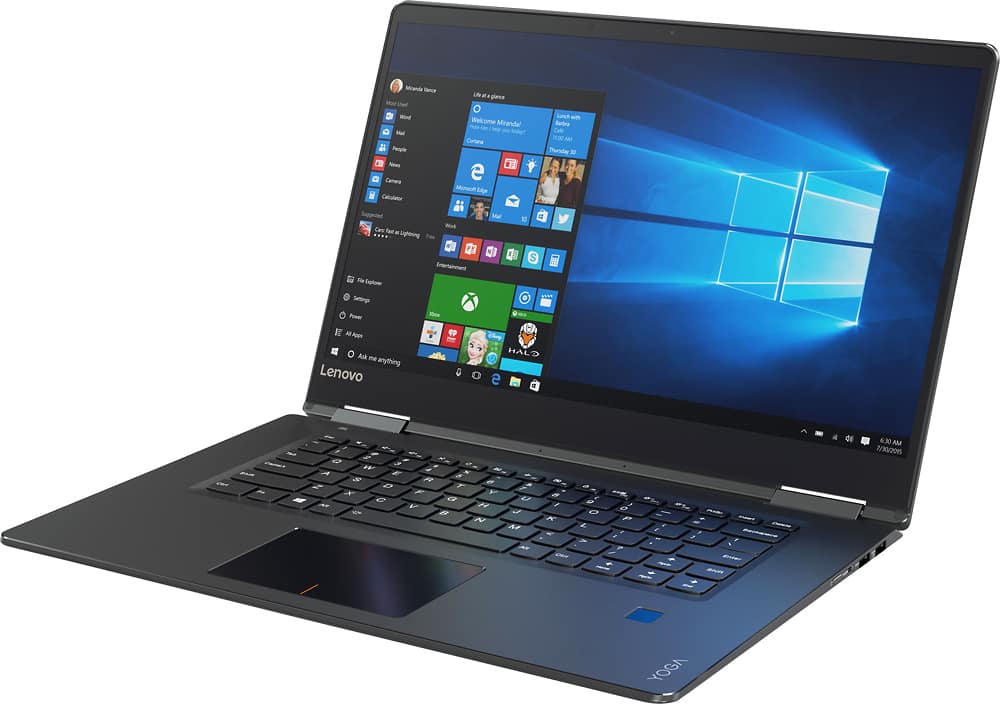
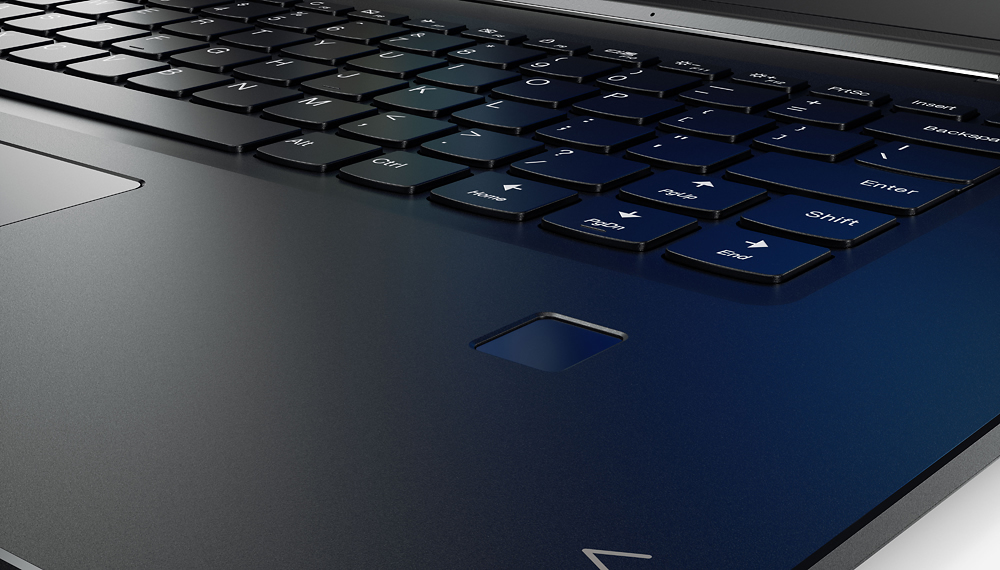
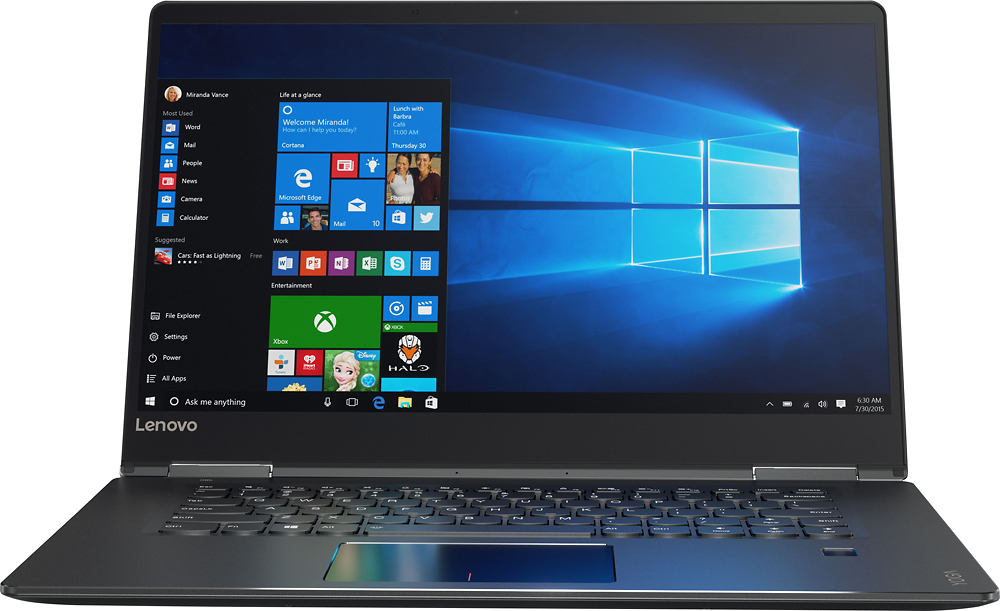
Customers are positive about the Yoga 710's touchscreen, light weight, ease of use, and SSD, with many praising its performance and design. However, customers are negative about the keyboard quality, particularly the placement and size of the right shift key, and some experienced excessive fan noise. The battery life and price also received positive feedback. While some appreciated the dedicated graphics card, others found the keyboard layout unconventional.
This summary was generated by AI based on customer reviews.
- Pros mentioned:Ssd, Touch screenCons mentioned:Keyboard quality
Excellent Premium Laptop for School or Business
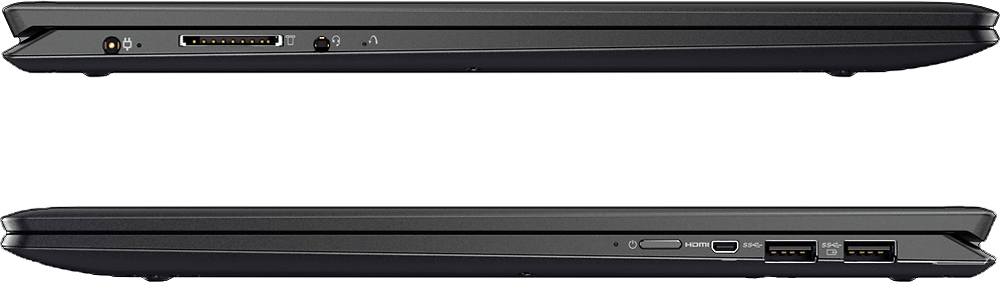
||Posted .This reviewer received promo considerations or sweepstakes entry for writing a review.I purchased this laptop around 2 months ago and I am very impressed with the level of performance I've gotten out of it. The 256GB SSD is very snappy opens all of my programs and applications without any hiccups. Wake up time from sleep is ~2-3 seconds and Start up time from shutdown is ~4-5 seconds. The screen is absolutely gorgeous; it was one of the best on display in this price range and I love watching media on it, although text not optimized for the high resolution will look pixelated. Speakers sound adequate and are loud enough for what is available on a laptop but the Dolby Audio enhancement is a welcome addition that can help to really compensate for lesser quality audio playback. I like the aesthetic of the keyboard but the functionality was not particularly to my liking. The placement of the right Shift key had me more often than not hitting the Up key when I wanted to capitalize a letter. I also think the keyboard is a bit shallow and it took me a few weeks to get used to typing on it. One more slight downside is that the laptop only has 2 USB 3.0 ports and uses MICRO-HDMI instead of Mini-HDMI. Battery life is favorable to me. Using battery saver, I was able to get at least 9.5 hours using my laptop to do office work using Battery Saver and using it to watch videos and play music with max brightness and volume, I get around 4-5 hours. Webcam is slightly better than most others in the same price range, but is still of middling quality. I think the thing that I appreciate most around this laptop is the fingerprint scanner that GREATLY improves user accessibility and a tool I could see being an extra layer of security for those looking to use this laptop for business. One small thing that I do appreciate is that the laptop has a dedicated graphics card and while it may not be very powerful, it will allow me to play some games from my Steam library while I am on the go. TL;DR This laptop does have caveats in its keyboard layout and design and limited number of expansion ports, but the wonderful screen, snappy response time, dedicated graphics and premium features like the backlit keyboard and fingerprint scanner were my motivators for picking this computer and I'm very happy with my purchase. P.S. As a side note, there is a small amount of backlight bleed on completely black screens on this laptop. The photos I took somewhat exaggerate it, but it is present for those who wish to be made aware.
I would recommend this to a friendBrand response from Lenovo Product Expert
Posted .Thank you for choosing the Lenovo Yoga 710-15. With regard to the right shift key issue you mention, there is a free software APP called KeyTweak that may help you. You can switch the key functions of specific keys on your keyboard with this software, so you could change the right shift key with the key you hit in its place. Just Google search "KeyTweak" and you will find articles about what the software does and you will find the download location for this free APP.

- Pros mentioned:SsdCons mentioned:Keyboard quality
I Am Witholding Review Till I Give BB A Chance To
||Posted .This reviewer received promo considerations or sweepstakes entry for writing a review.In all honesty I love the overall "Buying" experience and outcomes of 9 out of 10 items. These disparate electronics exceeded my expectations. But attempting to purchase a Laptop that remained functioning as it was intended to function for longer than 2 weeks, was a failure 4/4 times. In all honesty having to take back the first 3, with 5 days being the one that lasted the longest kinda burned me out on the "return" process. This last Lenova Yoga i5 with SS drive worked relatively well for 10 days. Then the Keyboard ceased working (had to hook up a USB keyboard and then a mouse a few days later to get it to work. But heck, I don't want to drag around a mouse and a keyboard to use my NEW Laptop. So I will muster my nicest persona tomorrow and take this latest non- functional back to BB and see what they are gonna do for me. I promise to keep you posted as to what they are gonna do for me.
No, I would not recommend this to a friend - Pros mentioned:Processor speed
Great laptop for doing 3D graphics and printing
||Posted .This reviewer received promo considerations or sweepstakes entry for writing a review.I love this Lenovo Yoga 710. it it so much snappier than my old laptop. The graphics are great and it holds up pretty well to complex 3D drawings and simulation. My college son abused a Yoga for years and it just kept on holding up to the abuse. I thought I'd give one a try and have not regretted it for a minute.
I would recommend this to a friendBrand response from Lenovo Product Expert
Posted .Thank you for choosing the Lenovo Yoga 710-15. We are pleased to hear that the performance of the Yoga 710-15 meets your computing needs so well.
A Well-rounded 2-in-1
||Posted .This reviewer received promo considerations or sweepstakes entry for writing a review.At first, I had purchased a heavy gaming laptop with 1GB more of GPU processing space and 8GB more of RAM, but it had a lot of issues unresolved by the manufacturer, so I picked up this Lenovo for half the price and it performed about the same for literally half the price. The screen is crisp and clear, the solid state drive is quick and snappy, there's enough RAM to do anything you would need, the mini GPU can handle most mid level games, and the i5 7th generation processor has the power of an older i7, which is great. I use this for everything from internet shopping to computer games. Honestly, and easily the best laptop I've purchased.
I would recommend this to a friend- Cons mentioned:Keyboard quality
Lenovo Yoga 710
||Posted .This reviewer received promo considerations or sweepstakes entry for writing a review.Love laptop,NOT keyboard Shift key, wrong location.
I would recommend this to a friend - Pros mentioned:Ssd, Touch screenCons mentioned:Keyboard quality
Great Screen and Battery Performance
||Posted .This reviewer received promo considerations or sweepstakes entry for writing a review.After comparing several laptop models I opted for the Lenovo YOGA 710 with dedicated NVIDIA graphics card. So far, this laptop has exceed all expectations in terms of performance and style. Here is my Pros/Cons review: Pros -It has a 15 inch screen in a 14 inch laptop body (due to an almost frame-less screen) -Dedicated graphics card NVIDIA 940MX (entry level but overall better than integrated Intel HD cards) -Beautiful and executive design (I prefer a dark color than all silver design of most laptops) -Battery live is excellent (you can get from 5 to 7 hours depending on power settings) -Slim, light and versatile (tablet mode for reading, tent mode for movies) -The Intel i5 with 8Gb RAM is more than enough for any average user -250GB SSD makes the laptop as fast as it gets (on/off in less than 10 secs) Cons -Only thing I can say is the shift key on the right (when you get use to it is less noticeable but at the begging is quite annoying) Summary: Overall a great laptop, buy with confidence!
I would recommend this to a friend - Pros mentioned:Processor speed, Ssd, Touch screenCons mentioned:Keyboard quality
Compact, Light Weight, Solid Performance
||Posted .This reviewer received promo considerations or sweepstakes entry for writing a review.To begin with, the only reason why this laptop didn't get 5 stars is because of the keyboard. But more on that later. I had been trying to get my 5 year old laptop to survive another year as I really didn't have the money to buy another one. However, after one too many "blue screens of death", I realized it was time. I first started looking at what was on sale (I'm poor!!) and decided to go with an ASUS Q504 model. I really like ASUS and was happy with my decision. I ordered it on Saturday and then found this Lenovo Yoga 710 on sale on Sunday. I really like having a solid state drive as it makes the boot up process MUCH faster. I decided to return the other one and buy the Lenovo. I wasn't sure about Lenovo as some time ago, my office had to return about 75% of our Lenovo laptops due to defects. However, so far, this one does not disappoint. The start up time is FAST. I like being able to turn it on, and then start working within 20 seconds. The power button is a bit hard to find at first (right hand side) but it's not an issue. You don't ever touch it by mistake when opening the screen. Speaking of the screen, it s GREAT! Super clear and great colors. I think that is one of the reasons why I chose this over the ASUS Q504. The screen on the ASUS is just not as crisp as the Lenovo screen. There are a couple of USB ports and a mini HDMI. I wish it had a regular HDMI as I hate having to buy another adaptor, but it is what it is. There is no USB C on this one, so if that is a must, look elsewhere. The body is aluminum and has a very solid feel to it. It just feels like a high end laptop (which for $750 on sale, it is!). So far, it has been VERY responsive. The i5 processor combined with a SSD and 8 GB of RAM has kept it running great. I haven't seen any lag time for normal use, and I usually have up to 3 to 4 programs going at once. You can expand the RAM, I just personally haven't seen the need to. The only issue is that doggone keyboard! Others have commented on it and it is all true. I can see what Lenovo has done which is make the same keyboard for the Yoga line. However, cutting the shift key on the right hand side makes for a LOT of errors. You really have to think about that shift key to hit it. If this is going to be your only computer, you'll get used to it. I jump back and forth between this and a Surface Book, and I always wind up hitting the up arrow instead of the shift key for the first few times. But, I personally didn't find the keyboard to be a deal breaker. Would I prefer that they change it? If course! But, for a light weight computer with solid performance (fast), a great screen and a solid feel, this Lenovo does great.
I would recommend this to a friendBrand response from Lenovo Product Expert
Posted .Thank you for choosing the Lenovo Yoga 710-15. With regard to the right shift key issue you mention, there is a free software APP called KeyTweak that may help you. You can switch the key functions of specific keys on your keyboard with this software, so you could change the right shift key with the key you hit in its place. Just Google search "KeyTweak" and you will find articles about what the software does and you will find the download location for this free APP.
- Pros mentioned:Touch screenCons mentioned:Keyboard quality
So far so good.
||Posted .This reviewer received promo considerations or sweepstakes entry for writing a review.I have only owned it for a few days and it is quick, has a great screen, and the size is perfect. This is the smallest 15.6" laptop I have seen and is almost the size of my wife's 13.3" HP. This is a good value compared to other laptops in the 2-in-1 space especially considering this machine has a discrete graphics card. I specifically was looking for this feature and it is not easy to find it in a 2-in-1 config. I haven't tried it yet on anything but Civilization VI and the benchmark mode ran fairly well. I was surprised and love the lack of bloatware. This comes as almost pure windows. The only software is two Lenovo apps that are useful for settings, and contacting Lenovo support. This 2-in-1 is not perfect though, it's funny when I read other reviews I mostly saw complaints about the keyboard. I thought meh, that doesn't seem like a big deal, well let me tell you I had no idea just how much I use the right shift key until suddenly I have a computer where the right shift key is terrible. I understand the design choice to keep the profile small, but this should definitely be fixed in future product. It is not a deal breaker for me, but is why this is not a 5 star laptop. Hey Lenovo maybe you should think about shrinking the left shift key some while increasing the size of right shift, this might help.( the lead engineer must have been a lefty ) and while you are at it replace the mini HDMI with USB-C. My final thought is this is a great machine with a few minor flaws, primarily with the keyboard. The size, performance, discrete graphics and price are all reasons to recommend this if you are looking for a 2-in-1.
I would recommend this to a friendBrand response from Lenovo Product Expert
Posted .Thank you for choosing the Lenovo Yoga 710-15. With regard to the right shift key issue you mention, there is a free software APP called KeyTweak that may help you. You can switch the key functions of specific keys on your keyboard with this software, so you could change the right shift key with the key you hit in its place. Just Google search "KeyTweak" and you will find articles about what the software does and you will find the download location for this free APP.
- Pros mentioned:Processor speed, Ssd, Touch screenCons mentioned:Keyboard quality
Great Machine
||Posted .This reviewer received promo considerations or sweepstakes entry for writing a review.I have been using this Lenovo Yoga 710 Laptop for about a year, and it has proven to be a robust and versatile machine for all of my consulting needs. It travels well and is build for cloud-based software integration. The solid state drive and i5 processor are very capable when running a dozen applications with high operational overhead. The display is crisp and bright and the touchscreen and flip are a huge bonus for presentations and media use. My only nits are the Enter/Shift/PgUp/PgDown cluster of the keyboard, which took some getting used to in the first month, and the micro HDMI port. I have never had a problem with this port, but they are notoriously fragile and require that you carry and adapter at all times be sure you can actually project using whatever other hardware with which you come into contact in your day. I would also recommend that graphic designers and gamers go up to the 900 series for a better card and design integration with drawing tablets. Overall, it's a great machine, and an excellent windows alternative to the Mac Book Pro. I am very happy with this product.
I would recommend this to a friend - Pros mentioned:Processor speed, Ssd, Weight
Impressed at the price point
||Posted .This reviewer received promo considerations or sweepstakes entry for writing a review.My wife and I came into the store looking for a new laptop for her. We were looking for another brand, and was additionally shown the Lenovo Yoga 710. It has all the latest features 7th Gen Intel i5 chipset, 2X2 AC WiFi, JBL Speakers, NVIDIA Graphics, 8GB RAM, 256GB SSD drive, and other must have features. My wife loves the flip design, lightweight, and how clear the HD screen was. I gave the 4.0 rating for not for having a traditional power supply brick. The cord is attached to the transformer, and I am not used that form factor. This need's to be closer to an outlet than usual. I was not expecting on how little bloatware was pre-loaded from Lenovo. No DVD drive, but I already had an external Bluray drive to attach via the USB ports.
I would recommend this to a friendBrand response from Lenovo Product Expert
Posted .Thank you for choosing the Lenovo Yoga 710-15 for your wife. We are pleased to hear that the features and performance of the Yoga 710-15 meets your wife's computing needs so well.
- Pros mentioned:Processor speed, Touch screenCons mentioned:Keyboard quality
Well worth the price
||Posted .This reviewer received promo considerations or sweepstakes entry for writing a review.Lightweight, large screen, good battery life. The keyboard is not exactly standard; the right shift key is smaller but it's easy to get used to. So far I have found no negatives with the laptop. It has sufficed my needs; office work, basic architectural drawing, movies, coding. It wirelessly links to my home and office TV with no problem. I find it to be the perfect size for mobile use, with ample screen size and an all day battery even during heavy use. I recently used Skype on a train while connected to my cell phones hotspot. The connection was strong and video/audio quality was excellent. Processor speed, storage size are more than adequate for a reasonable user. Those of you who need to have 2 TB's of music, movies, and other files have issues and should just carry a spare drive.
I would recommend this to a friend - Pros mentioned:Ssd, Weight
Good Laptop and Value For Money
||Posted .This reviewer received promo considerations or sweepstakes entry for writing a review.The laptop is a good combination of power, weight, battery life , and functionality. SSD makes it very fast . Screen gives high definition (though a little glare) and with video card good response. Will run most games but is not for very heavy duty gaming. Only downside is it has a puny 250 GB SSD.
I would recommend this to a friendBrand response from Lenovo Product Expert
Posted .Thank you for choosing the Lenovo Yoga 710-15. We are pleased to hear that the Yoga 710-15 is working out so well for you.
- Pros mentioned:Touch screen, WeightCons mentioned:Keyboard quality
Excellent mid level laptop
||Posted .This reviewer received promo considerations or sweepstakes entry for writing a review.Love the computer for my usage, excel spreadsheet automation and beginner coding. Pro's screen size, graphics card, weight, processor and memory. Con's condensed keys on the left, not many external ports and the mouse pad finicky. Overall great for my use and price point.
I would recommend this to a friendBrand response from Lenovo Product Expert
Posted .Thank you for choosing the Lenovo Yoga 710-15. With regard to the touchpad, you can make adjustments to the touchpad in your system settings. You can get there by clicking on the magnifying glass at the bottom left your Windows 10 screen. Type "touchpad" in the search window. Select "Mouse & touchpad settings" from the list of choices. You can make general adjustments to the touchpad there. You can also select "Additional mouse options" for more detailed adjustments to the touchpad sensitivity by increasing the delay of the touchpad.
- Pros mentioned:Ease of use, Touch screen, Weight
Use for work. Light weight
||Posted .This reviewer received promo considerations or sweepstakes entry for writing a review.Great computer. Easy to use and very lightweight. Adjusts easily between touch screen and laptop. Sleek.
I would recommend this to a friend - Pros mentioned:Ssd, Touch screenCons mentioned:Keyboard quality
Good laptop for general use
||Posted .This reviewer received promo considerations or sweepstakes entry for writing a review.This is a good laptop and the sale price of $699 was a deciding factor in my purchase. The screen can also act as a touchscreen and you can bend the keyboard and screen into various configurations, thus the name Yoga. As other reviewers have pointed out, the right tab key is misplaced causing a typing nightmare. The page up, page down and end keys don't work. They simply scroll the page up or down one line at a time, or move the cursor one character at a time. The solid state drive is a great feature, enabling lightning fast startup and operation. Nevertheless if Windows is performing an update, your computer could freeze up. I was told by the Geek Squad that this is a "feature" of Windows 10 and there is no setting to change the timing of updates.
I would recommend this to a friendBrand response from Lenovo Product Expert
Posted .Thank you for choosing the Lenovo Yoga 710-15. With regard to the right shift key issue you mention, there is a free software APP called KeyTweak that may help you. You can switch the key functions of specific keys on your keyboard with this software, so you could change the right shift key with the key you hit in its place. Just Google search "KeyTweak" and you will find articles about what the software does and you will find the download location for this free APP. Finally, you can turn off automatic updates within Windows 10. You will still get alerts when there is an update available, but you will be able to decide when to allow the update. This will give you the opportunity create a restore point before you allow the update and you can select when the update occurs. To change the automatic update settings in Windows 10, click on the magnifying glass icon at the bottom left of your Windows desktop screen. Type "automatic updates" in the search window. Select "Windows Update Settings" from the list of choices. Select "Advanced options". Under "Choose how updates are installed", click on the dropdown menus and select how you want Windows updates to occur.
- Cons mentioned:Keyboard quality
Techie friend approved
||Posted .This reviewer received promo considerations or sweepstakes entry for writing a review.I suppose most of my frustration is with my slow internet service, my lack of technical knowledge, and Windows 10. However, when I first started up my Yoga, it ran for a day and a half loading who knows what, some of which I was finally able to stop. Now that I have most of it cleaned up, it seems to operate smoothly and my techie friend approved. I didn't think the side power button would be a big deal, but it is hard to push and I don't like it. Everyone is right about the right shift key, it is small, and the page up key gets hit instead, so I'm typing along then realize I'm way back up in the middle of some other paragraph. Otherwise, it's nice, thin, sturdy and not cheap looking. It holds the charge amazingly well!
I would recommend this to a friendBrand response from Lenovo Product Expert
Posted .Thank you for choosing the Lenovo Yoga 710-15. With regard to the right shift key issue you mention, there is a free software APP called KeyTweak that may help you. You can switch the key functions of specific keys on your keyboard with this software, so you could change the right shift key with the key you hit in its place. Just Google search "KeyTweak" and you will find articles about what the software does and you will find the download location for this free APP.
- Pros mentioned:Touch screenCons mentioned:Keyboard quality
Well build with minor drawbacks
||Posted .This reviewer received promo considerations or sweepstakes entry for writing a review.Solid housing and nice screen.Low noise no cooling almost necessary. Keyboard works OK but is not the best.Some jumping around occurs and is to be expected on a thin laptop like this.Love the paperwhite setting that works great for prolonged tasking.Touchpad zooms in and out until you find out how not to click and hold other finger on the surface.Good graphics and colors could have some more brightness but is alright. The sound is good but the headphone sound is top notch and amazing best I ever had on any laptop. I recommend still highly. be careful not to throw it around and forcing the glass too much.the hinges are like cut out in glass surface. I would buy again....
I would recommend this to a friendBrand response from Lenovo Product Expert
Posted .Thank you for choosing the Lenovo Yoga 710-15. We are pleased to hear that the features and performance of the Yoga 710-15 meets your computing needs so well.
- Pros mentioned:Processor speed, Weight
Just what the doc ordered
||Posted .This reviewer received promo considerations or sweepstakes entry for writing a review.Was a gift to a 50 something friend. Who is low tech but loves to read, watch and play. Can easily work with GO PRO files and editing. Speed, weight, size and flexibility are right on target. Have to buy an external drive, but most laptops don't have them anyway. Too much weight.
I would recommend this to a friend - Pros mentioned:Processor speed, Ssd, Touch screen
This has everything I was looking for.
||Posted .This reviewer received promo considerations or sweepstakes entry for writing a review.This has everything I've been looking for. I love the sleek design, lit keyboard, touch screen, size, speed, ssd 256 gb, yoga, I've always been very pleased and impressed of Lenova.
I would recommend this to a friendBrand response from Lenovo Product Expert
Posted .Thank you for choosing the Lenovo Yoga 710-15. We are pleased to hear that the features and performance of the Yoga 710-15 meets your computing needs so well. We appreciate your loyalty to the Lenovo Brand.
- Cons mentioned:Fan noise, Keyboard quality
Solid build and performance, typists beware
||Posted .This reviewer received promo considerations or sweepstakes entry for writing a review.FEEL Trackpad is simply accurate, though a registry tweak was required to make two-finger tap (vs click) work. I must say that this is the first windows laptop I've used, possibly ever, on which the trackpad functioning is never affected by resting the heel of your left hand on the far left-front side of the deck. On others, doing so while using trackpad with right hand often causes mouse pointer to jump and touch scrolling and gestures to be inconsistent. Keyboard: As many other reviews have pointed out, be aware of the awkward right shift key placement. To ease that issue somewhat, the manufacturer comments on other reviews suggest a program named KeyTweak. I looked at KeyTweak but seeing that the program was last updated for windows 2000, I googled other options and am rather using SharpKeys which is working well. I swapped the functions of the right shift and arrow up keys. Other than that, the keys feel good to me and the keyboard has no flex whatsoever. I tend to type about 60wpm and am right at that on this keyboard. The physical build of this machine feels very solid to me. The materials are comfortable during use. The silver trim around the outside of the display is sometimes a bit distracting, especially when it catches a light reflection, and sort of detracts from the beauty of the display and thin bezel. The power button takes a concerning amount of pressure to affect, enough that I'm so far regularly concerned I'm going to break it. USE Display is excellent and plenty bright. On a recently returned HP I had the windows scaling set to 150% instead of the default 125%. On this lenovo I didn't need to do this for everything to look the best for me. On the first start up, this computer took a little longer than others I've set up recently but it went ahead and loaded all current windows updates, which does ultimately save time and effort. With the HP I had to initiate windows updates myself and had to perform some hacks/tweaks when the updating process froze. Regarding general performance, I have experienced no lag whatsoever, fast reboot, about 10 seconds to full usability. No games or graphics-intensive use yet but I haven't noticed loud fan as commented by others. OTHER Lenovo update tools aren't real straight forward. You first have to download the utility from Lenovo's support site, then on first run there was no program window. I had to kill the processes in task manager and restart to be able to tell what (or that anything) was happening. All in all, this is a very solid machine and I'm confident this one won't be returned. If not for the right shift key placement I would have given 5 stars. I am an IT professional and tech enthusiast. This is my third Lenovo and when I give other brands a try, it seems I always return to Lenovo after not much time.
I would recommend this to a friendBrand response from Lenovo Product Expert
Posted .Thank you for choosing the Lenovo Yoga 710-15. We are pleased to hear that the Yoga 710-15 is working out so well for you.