Customer Ratings & Reviews
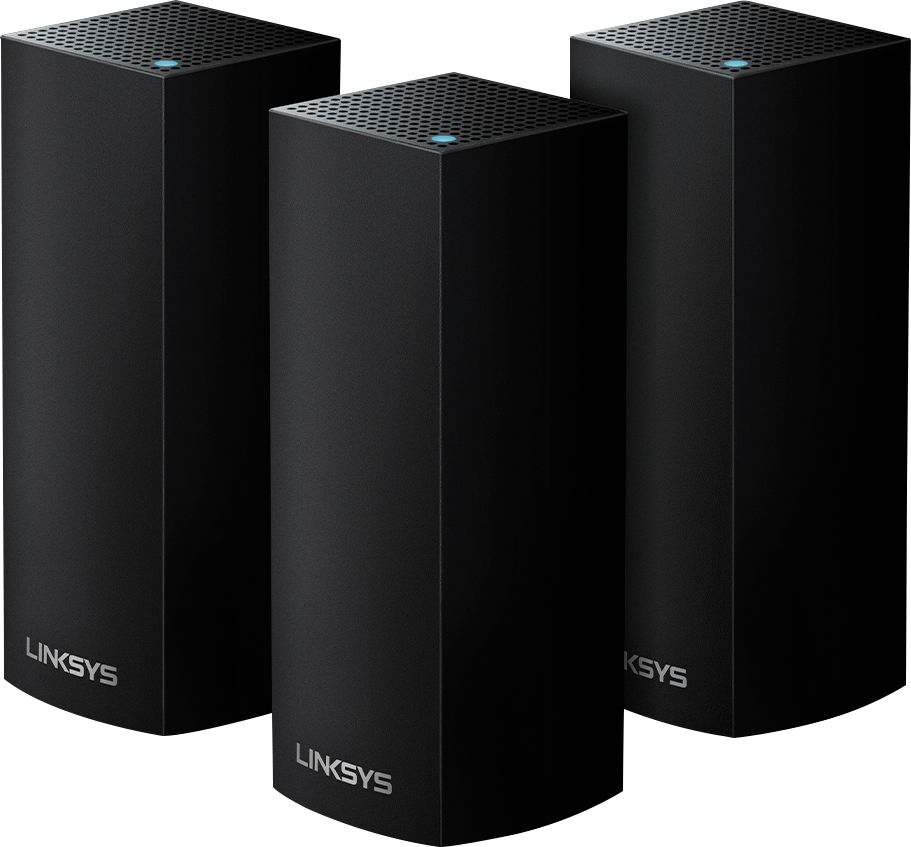








- Model:
- WHW0303B
- SKU:
- 6209705
Rating by feature
- Setup
Rating 4.3 out of 5 stars
- Range
Rating 4.3 out of 5 stars
- Signal Strength
Rating 4.3 out of 5 stars
Customers are saying
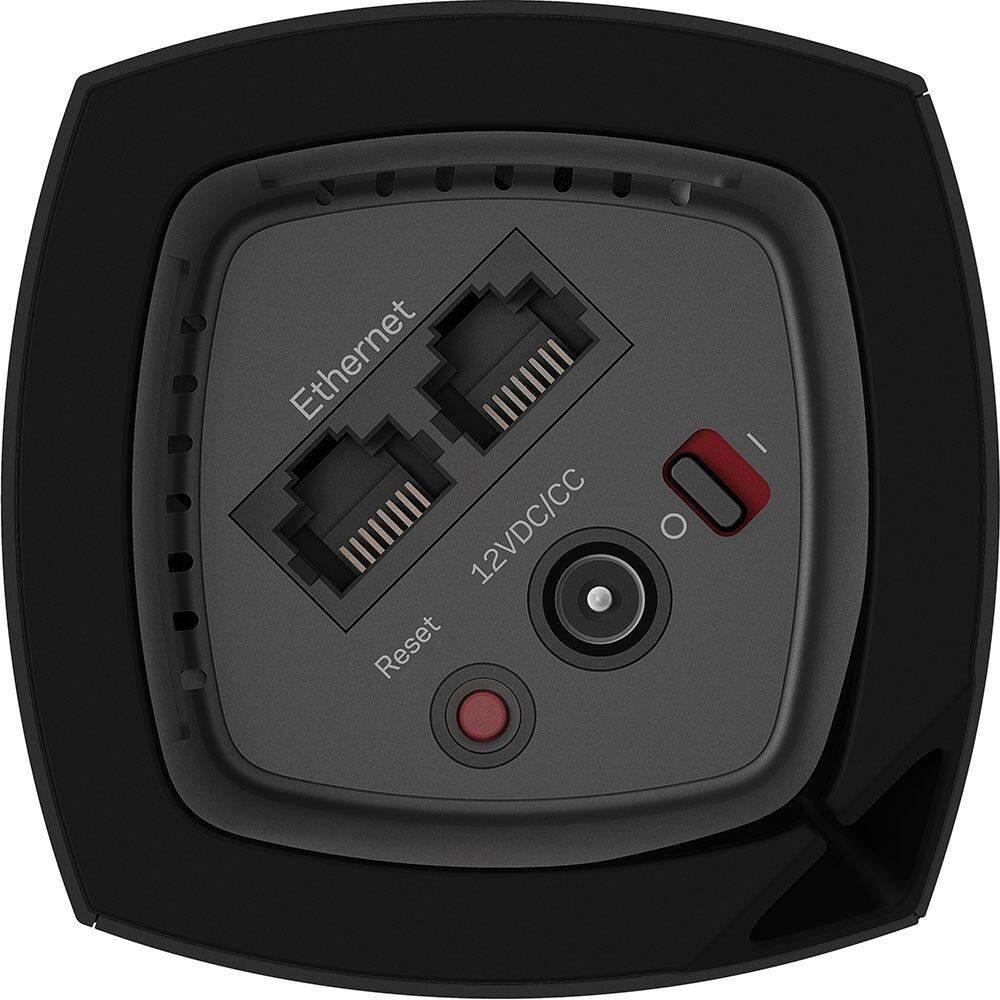
Customers are impressed with the Velop AC2200 Tri-Band Mesh Wi-Fi 5 System's ease of use, coverage, and setup, frequently citing its simple installation and strong signal. Many also praise the system's range and performance, reporting consistently reliable connectivity. However, some users experienced connection issues and noted the relatively high price. A limited number of Ethernet ports was also a recurring point of feedback.
This summary was generated by AI based on customer reviews.
WIFI EXTENDER
||Posted . Owned for 4 months when reviewed.This reviewer received promo considerations or sweepstakes entry for writing a review.DESIGN LOOKS GREAT, BUT DIDN'T REALLY WORK FOR WHAT WE NEEDED. RETURNED PRODUCT.
No, I would not recommend this to a friendBrand response from Linksys Staff
Posted .Hi, HPINK,
We regret to know that the Velop system didn’t meet your needs. However, if you still have it, we’d appreciate if you can get in touch with us at [email protected] so our Escalation Engineers can double-check if there’s anything else that we can do to improve your experience with the device. Just include a link to this review as our reference when you reach out.
Regards,
Rosalyn
Linksys Support
Ok except when you have a power outage
||Posted .This reviewer received promo considerations or sweepstakes entry for writing a review.Works ok except when there is a power outage. Then you have to get on a help line to fix everything. I have that
I would recommend this to a friendBrand response from Linksys Staff
Posted .Hi DonM,
Supposedly, your Velop Nodes should be able to establish back the internet connection after power outages. If it's taking longer than normal, a simple power cycle or reboot will resolve the issue without resetting the nodes back to factory defaults. If you keep on experiencing issues, reach out to us at [email protected] so we can have one of our Escalation Engineers assist you further. Just indicate your contact details and the link to this review for easy reference.
Best regards,
Jay
Linksys Support
Why does the WiFi go down about once a week?
||Posted .This reviewer received promo considerations or sweepstakes entry for writing a review.I've spoken to Velop Support about three times and did a complete reset each time. If this continues back they go to BB!
No, I would not recommend this to a friendBrand response from Linksys Staff
Posted .Hi,
The Velop system should not require multiple resets once it is configured. We'd like to have our Second Level Technicians assist you with further isolation and troubleshooting to resolve your case.
Just send us your contact details at [email protected] along with the link to this post so that we can escalate your case.
We hope to hear from you soon.
Regards,
Thaddeus
Linksys Support
Not thrilled with product
||Posted . Owned for 1 month when reviewed.This reviewer received promo considerations or sweepstakes entry for writing a review.Not great for 2 level house, still have problems around corners. downstairs is great
No, I would not recommend this to a friendGreat when it worked... not reliable
||Posted .This reviewer received promo considerations or sweepstakes entry for writing a review.I spent a few weeks trying to get this going. A problem with Spectrum (cable provider) complicated startup, though after that was addressed (getting download spores from 80mbs to 220mbs) I still awoke two different days to find the Velop router light red. Great support rep from Linksys... but in the end, I bailed and returned it.
No, I would not recommend this to a friend- Cons mentioned:Connection
Disappointing
||Posted . Owned for 5 months when reviewed.This reviewer received promo considerations or sweepstakes entry for writing a review.I could not get this to work, and I tried! I am a long time Linksys user and this product was terrible. I worked with customer support multiple times and the nodes just would not stay connected. I rarely return products, but this went back to the store, :(
No, I would not recommend this to a friendBrand response from Linksys Staff
Posted .Hi, Hollisterjf,
Several factors might have caused the challenge and this could just be a one-off case. Know that our Escalation Engineers are just here at [email protected] should you want to try a Linksys product again. The team would gladly lend you a hand.
Rosalyn
Linksys Support
- Pros mentioned:Setup
Linksys
||Posted . Owned for 3 weeks when reviewed.This reviewer received promo considerations or sweepstakes entry for writing a review.Initially installed very easily, and was working with slower than expected speed, it came up with an update is available and from there everything went wrong. Could not reach support at all. Thanks BestBuy for your quick and easy returns, and I got an Orbi that works great.
No, I would not recommend this to a friendBrand response from Linksys Staff
Posted .Hello, wolfiii,
We could have our Escalation Engineers look into this further on what’s causing the issue with your Linksys WHW0303B. However, in case you have future concern with any of our products, please do not hesitate to send it over email at [email protected] and send along with your contact info and the link of this review, for our reference.
Regards,
Elyza
Linksys Support
Wifi was not a strong as expected
||Posted .This reviewer received promo considerations or sweepstakes entry for writing a review.The Wifi signal was not as strong as expected. Disappointed in the overall product. Signal strength is slow still.
No, I would not recommend this to a friendBrand response from Linksys Staff
Posted .Hi,
The Velop System's Channel Finder feature and raising the nodes above floor level should help optimize your network's signal strength. Nevertheless, we appreciate your sharing and allow us to turn things around. Please shoot us an email at [email protected] with the link to this post and we'll have our Escalation Engineers take care of you.
Regards,
Klaudette
Linksys Support
- Pros mentioned:Coverage, Setup

Good system for beginners
|Posted .This reviewer received promo considerations or sweepstakes entry for writing a review.Pluses: - Packaging and box are great - Looks nice - Setup is pretty easy - Great coverage - Full wireless speed with an all wireless setup - 2.4 and 5GHz bands can share the same SSID - Linksys Tech support was really good. - Automatically identified Wemo products - Can have firmware updates Minuses: - Have to have the Linksys app on phone or tablet to setup and update - All access is through a phone or tablet, cannot make changes through the Linksys website for setup. - Linksys app can be pretty slow sometimes - Tries to do everything for you. Manual setups can be harder to do. - Can't hid the SSID, I couldn't find the option anywhere. - If you already have a wireless router there are cheaper ways to expand your wireless coverage - Cost - Providing information to Linksys to setup. Linksys grabs your SSID, it becomes visible when you log into the Linksys website when you log in. Also, needed location turned on phone to setup. But, that's part of Cloud applications. Review Overall, it's a nice package, and does what it says. For beginners/low tech people, it should be easy to setup. I plugged in all 3 and then did the setup. It found each one, setup separately, even though they were all on different floors. The speed was good anywhere I tried to connect, roaming between units was not a problem. Most people are going to have a wireless modem/router from their ISP, so this becomes an expense way to spread coverage. But, if you need to have max wifi speed, it’s better than a wireless extender/repeater. I have an extender, but it’s connect by Ethernet, so I don’t lose any throughput to my wireless devices connected to it. I never had a problem roaming with my router and extender, but I manually set the channels to ensure this. The Velop takes care of that automatically for you. Even two units is expensive compared to buying an extender or using an old router as an Access Point. But, if you don’t have additional Ethernet connections this solves the problem. My network has a Server on it, and the unit kept trying to connect to my router. Finally figured it out and forced it to use my server DNS so my wireless devices could also see the server and access it. It handled 15 devices with no problems. Each unit has 2 Ethernet ports on them, so you can connect them directly and extend an Ethernet connection. I turned off my existing wireless system to test the Velop. If you have any problems with your wireless units connecting after setup, try cycling the Velop and disconnecting/reconnecting or power on/off your various devices. If you have issues or limitations with hardwiring devices in your location, this can really shine and provide the wireless coverage you need at top speeds. If you can physically connect wireless devices there are cheaper options, or smaller packages of the Velop.
No, I would not recommend this to a friendBrand response from Linksys Staff
Posted .Hi, Grimmace,
We’re glad to hear that the setup process worked as expected. Currently, the settings of the Velop system can only be changed using the Android or iOS app. However, we’ll definitely share your feedback with our Engineering Team as we are gathering more ideas to improve the app in the upcoming updates. To hide the SSID of the network, simply go to the Wi-Fi Settings > Advanced Wi-Fi Settings. Please do not hesitate to shoot us an email anytime at [email protected] or call us at 800-986-0518 should you need our assistance or if you have inquiries with the product.
Regards,
Irish
Linksys Support
Not what I was looking for.
||Posted . Owned for 7 months when reviewed.This reviewer received promo considerations or sweepstakes entry for writing a review.Not what I was looking for. The ones about needing a firmware update was a hassle so I returned them
No, I would not recommend this to a friendBrand response from Linksys Staff
Posted .Hi, BeRad,
We regret to hear that you already returned the Velop system. Feel free to tap us anytime at [email protected] should you decide to use a Linksys product again. Our Escalation Engineers are always ready to give you a hand.
Regards,
Rosalyn
Linksys Support
Weak
||Posted . Owned for 1 month when reviewed.This reviewer received promo considerations or sweepstakes entry for writing a review.They take away the strength of your wifi and only give you a 3rd of the strength. Very disappointed.
No, I would not recommend this to a friendBrand response from Linksys Staff
Posted .Hi, Mike,
Physical obstruction and wireless interference may one of the reasons why we only got less strength of Wi-Fi. Running the Channel Finder may isolate the concern. Send us an email then at [email protected] so we can have this checked with our Escalation Engineers with your contact details and the link of this review for our reference.
We will wait for your email.
Regards,
Elyza
Linksys Support
- Cons mentioned:Price
Blah
||Posted .This reviewer received promo considerations or sweepstakes entry for writing a review.No parental controls. No where near the 6000 ft. Expensive. And not easily updated
No, I would not recommend this to a friendBrand response from Linksys Staff
Posted .Hi, Dschmitz,
One of the features of the Velop System is the Parental Controls. To assist you in setting it up and maximizing the wireless coverage, allow us to get you over to our Escalation Engineers. Please email us at [email protected] with your phone number and the link to this post.
Regards,
Irish
Linksys Support
So-so
||Posted . Owned for 2 weeks when reviewed.This reviewer received promo considerations or sweepstakes entry for writing a review.Easy set up, good App and decent coverage for large square footage but doesn't work well with 2.4ghz devices. Not impressed based on the functionality at premium price. If I had to do again, I'd pay a few extra bucks to get a higher end product or save a few bucks and get a mid-range product for a mid-range price
No, I would not recommend this to a friendDidn't meet our needs. 2 story home
||Posted . Owned for 9 months when reviewed.This reviewer received promo considerations or sweepstakes entry for writing a review.Not good coverage or strong enough router. Only pulls 24mbps and we have 1 gig.
No, I would not recommend this to a friendBrand response from Linksys Staff
Posted .Hi, MommaMoore,
Proper node placement as well as optimized settings will greatly help to improve the overall performance of the Velop system. Let’s have our Escalation Engineers assist you instead. Just send us an email at [email protected] along with your contact information and a link to this review as our reference.
Regards,
Rosalyn
Linksys Support
Little hard to set up
||Posted .This reviewer received promo considerations or sweepstakes entry for writing a review.Having difficulty setting these up. Not sure if is my router is the challenge or if it is the product setup.
No, I would not recommend this to a friendBrand response from Linksys Staff
Posted .Hello Lynhen1992,
The Velop system's setup process should be easy and straightforward. Moreover, the Velop itself should be directly connected to your modem. For further assistance, hit us up at [email protected]. Email us your full contact info and the link of your review as reference.
Hoping to hear from you soon.
Harvey
Linksys Support
- Cons mentioned:Connection
Absolute Trash. Worst Router I’ve ever bought
||Posted .This reviewer received promo considerations or sweepstakes entry for writing a review.Worst router I’ve ever had. Not worth it, always disconnects from the internet. Range sucks. Thought I’d try it and it’s terrible. I’m sticking to net gear from now on, I never have problems with them. Get a net gear router not this piece of crap
No, I would not recommend this to a friend - Cons mentioned:Connection
Connection and speed issues
||Posted .This reviewer received promo considerations or sweepstakes entry for writing a review.Didn’t work out at our house. We had speed and connection issues. Tried resetting, but no look. Wasn’t reliable for the price. Went with an Eero system and love it.
No, I would not recommend this to a friendBrand response from Linksys Staff
Posted .Hi, Plastikm,
If your Velop System is properly configured and the firmware is up-to-date, it should provide you a stable connection and fast Wi-Fi speed. If you haven't returned the product yet, please send us the link to this review and your contact details at [email protected] so we can get you over to one of our Escalation Engineers for a fix.
Regards,
Jay
Linksys Support
Don't buy if you plan on doing any network admin
||Posted . Owned for 8 months when reviewed.This reviewer received promo considerations or sweepstakes entry for writing a review.Atrocious support from Linksys. Known issues have gone unresolved for over 3 years and Linksys offers no update on if the issue will even be fixed. Mac address filtering blocks the child devices unless all 3 Mac addresses from each child device are whitelisted, reducing the maximum number of devices you can whitelist from 32 down to 26. Linksys support offers no fixes and no indication they even plan to look at a fix. Save yourself some trouble and stay away from this piece of garbage
No, I would not recommend this to a friendBrand response from Linksys Staff
Posted .Hi Ryan,
By design, 32 MAC addresses can be filtered with the MAC Filter feature. Nonetheless, we would like to look into your case, and investigate it further. Please email us your case number and link to this review at [email protected], so that we can pull up your records, and assist you.
Regards,
Kyla
Linksys Support
Mesh mush network
||Posted .This reviewer received promo considerations or sweepstakes entry for writing a review.Does not seem to extend my wifi or speed it up. I live in an older ranch style home. Plaster walls. Nothing's works
No, I would not recommend this to a friendBrand response from Linksys Staff
Posted .Hi, Memorycardmogel,
The performance of the Velop system or any networking device depends on your network environment. If you happen to have plaster walls with metallic mesh, then that could cause wireless interference. Allow us to have you assisted by or Escalation Engineers to look closely into this and help you optimize the mesh network's performance. Please email us at [email protected] with your phone number and the link to this post for our reference.
Regards,
Irish
Linksys Support
- Pros mentioned:CoverageCons mentioned:Ethernet ports
Smart WiFi but Slow App
|Posted .This reviewer received promo considerations or sweepstakes entry for writing a review.The Linksys Velop home WiFi system is fairly simple and is designed to setup with the Linksys app. There are a few pros and cons to this wifi system but overall it is a good product. One of the pros is that it is a very cool looking device (compared to traditional routers). Another pro is that it has smart WiFi so you can control the settings from anywhere, including blocking specific websites or the internet from any connected device. Also, compared to the Google WiFi system (which I installed last month), the settings have more options (like a traditional router). For example, you can't remove the security setting on the Google WiFi but you can on this device. You can also use MAC cloning and prioritize the connected devices. There are many other advanced routing options that I was glad to see but that I don't usually use. The other big pro was the coverage area. I installed the first node in one corner of my basement and got coverage throughout all three floors and all the way to the opposite side of the house on the top floor. There were also some cons that I would point out. The first was the difficulty in setting up the node. The app was extremely slow and constantly hung up. I had to go through the setup process at least 6 times to get the setup to complete. It took over 3 hours to get the first node working. Each time it got hung up I had to start over and reset my device. Also, it was confusing whether I was logging onto the Linksys cloud or directly to the router. I got errors that the cloud was unavailable and then it would connect to the device directly. Also, logging into the app takes a long time. I wanted to turn off my son's WiFi and it took me a few minutes before the app connected and was available. I think the app needs further development but since this is a new product I assume it will work better over time. By the way, I used the app with my iPhone 6. Another con was the internet speed. I did a speed test with my traditional router and was getting the full 60 Mbps with my previous router. On this WiFi network I consistently got 35 Mbps. I couldn't figure out what was limiting the speed since it has the same technology as my other router. The final negative about this device is that you can only plug one additional Ethernet connection into the main node. Since I have my phone (Vonage), network storage, desktop computer and printer all in my office, I am not able to connect them to this WiFi network without purchasing additional equipment. Overall, it is a solid WiFi system. I'm not sure if they sell a version with just 2 nodes, but unless you have a huge coverage area, you won't need all three nodes.
I would recommend this to a friendBrand response from Linksys Staff
Posted .Hi, ChrisS,
We're glad to hear that you've noticed an improvement with the wireless coverage. The setup process should be seamless and easy but It looks like you had to do it multiple times to complete. We would appreciate if you could give us more details on which part of the setup process failed, gave you error messages or ran slow in your attempts so we could see what we can do to improve it. Once everything is configured, you are actually logging into the Linksys cloud to manage your Velop nodes. The app giving you an error that the cloud is unavailable was probably due to an incomplete setup or connectivity issue on your mobile device. One of our Escalation Engineers can help you in optimizing the settings and internet speed through this device by simply emailing us your phone number and the link to this review at [email protected]. You may also call us at 800-986-0518 any time.
Regards,
Irish
Linksys Support