Customer Ratings & Reviews
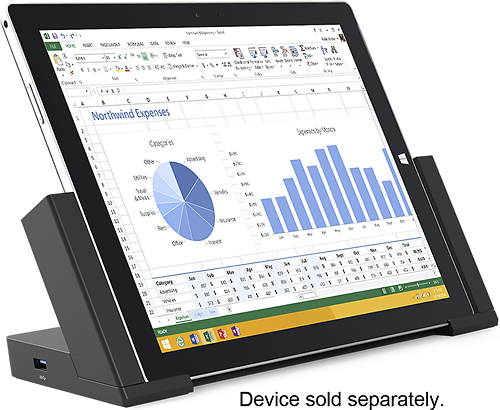
- Model:
- 3Q9-00001
- |
- SKU:
- 7524004
Customer reviews
Rating 4.6 out of 5 stars with 480 reviews
(480 customer reviews)to a friend
Customers are saying
Customers consistently note the Surface Pro 3 Docking Station's ease of use and abundance of USB ports as significant advantages. Many appreciate its size and the ability to charge the Surface Pro 3 while docked, although some find the price to be a drawback. Concerns regarding compatibility with certain devices and accessories were also raised by some users.
This summary was generated by AI based on customer reviews.
- Pros mentioned:Charging, Ease of use, Usb ports
Rated 5 out of 5 stars
recommended if you need extra USB's....
||Posted .This reviewer received promo considerations or sweepstakes entry for writing a review.if you are like me and using your Surface as a desktop as well as a tablet/laptop - get the dock! Easy charging capability thru the side slots; the One Note pen magnetizes to the side, and plenty of port space for USB's (5 total - a win-win), ethernet, and external monitor hook-up! My Dell desktop tower and laptop didn't have as much versatility or ports. You will never need a desktop/laptop again if you purchase the dock with your Surface!
I would recommend this to a friend - Pros mentioned:Ease of use, Usb portsCons mentioned:Price
Rated 4 out of 5 stars
Love the tool - Not the Price
||Posted .This reviewer received promo considerations or sweepstakes entry for writing a review.The docking station has been great along with my Surface Pro. The added USB ports and landline connection has been necessary for the structure of my personal setup. I have a hard time justifying the price, it doesn't add speed, processing or any other feature to the Surface Pro - but again, was easy to integrate and use along with my other Microsoft products. Would recommend to anyone who has a home office or who has an employer that doesn't provide a similar tool already.
I would recommend this to a friend - Pros mentioned:Charging, Ease of use, Usb ports
Rated 5 out of 5 stars
Great
||Posted .This reviewer received promo considerations or sweepstakes entry for writing a review.Great docking station for the Pro 3. I bought 4 of them for my field technicians to use when they are in the office. They love them. Easy to hook up to a large monitor and keyboard. Several USB ports. Charges the Pro while in the dock. I have 7 Surface Pro 3's. Will probably buy docks or the rest.
I would recommend this to a friend - Pros mentioned:Charging, Ease of use
Rated 5 out of 5 stars
top dock
||Posted .This reviewer received promo considerations or sweepstakes entry for writing a review.This is a great computer dock. So far i have only used the external mini displayport port and the 3.5mm jack but it has been great. It is easy to click in and it feels smooth and sturdy. It has a minimalist design and charges the SP3 device well. I have 2 monitors hooked up using it
I would recommend this to a friend - Pros mentioned:Charging
Rated 5 out of 5 stars
Docking Station
||Posted .This reviewer received promo considerations or sweepstakes entry for writing a review.I wasn't sure about it at first, but decided to give it a try. It is awesome. I am able to connect two additional monitors. To do this you need to buy the mini displayport-to-hdmi adapter, one for each monito you want to hook up. I bought the one made by insignia, and it works perfect. I think it was $20. One monitor plugs into the monitor port on the docking station and the other plugs into the monitor port on the surface itself. Actually, with this setup you have a total of three monitors. I have two 27" HP monitors with this setup and they work great. In addition, the docking station also charges the surface while it is docked. Definitely worth it if you are looking at doing work from home, and don't want to buy a desktop computer
I would recommend this to a friend - Pros mentioned:Ease of use, Usb ports
Rated 5 out of 5 stars
A MUST for Surface Pro Desktop Connectivity
||Posted .This reviewer received promo considerations or sweepstakes entry for writing a review.I originally was quite excited about my new Surface Pro, but of course the same things that made it portable and easy to use also made network and printer connectivity difficult. The docking station solved all of these issues beautifully! Dropping the Surface Pro into the dock is quick and easy... no hassling with a lot of extra wires, hubs, and power cords once you plug everything into the back of this thing. I have the dock connected to a USB 2.0 printer cable, Ethernet cable, a USB 2.0 portable drive, and a USB 3.0 portable drive. Everything is seamless and works like a champ!!
I would recommend this to a friend - Pros mentioned:Ease of use, Usb ports
Rated 5 out of 5 stars
Great Accessory for my tablet
||Posted .This reviewer received promo considerations or sweepstakes entry for writing a review.This docking station has added the key features I was looking for when I bought the Microsoft Surface Pro 3. I have external dual monitors, wireless key board, and other USB hook ups that without this device I could not achieve. The easy to use slide out sides make this product a must for on the go use. I am constantly out of the office and to bring it in and just snap it into the docking station has made being on the go simple. Highly recommend this product if your looking for dual screen hook up and added USB ports.
I would recommend this to a friend - Pros mentioned:Ease of useCons mentioned:Battery life
Rated 5 out of 5 stars
Great fit for the surface pro
||Posted .This reviewer received promo considerations or sweepstakes entry for writing a review.Microsoft has done a good job of designing this. It fits around the surface and type keyboard perfectly allowing me to put in the surface or remove it easily. I like that I can just use it as a stand without connecting the charger so I don't continually charge the surface battery. Of course the other connections do not work until you connect to the charger. Price is really too high. $100 would be a better price point. I got it on sale and used rewards to make it reasonable.
I would recommend this to a friend - Pros mentioned:Usb portsCons mentioned:Price
Rated 4 out of 5 stars
Adds much needed USB ports!
||Posted .This reviewer received promo considerations or sweepstakes entry for writing a review.I LOVE the 3 USB 3.0 and 2 USB 2.0 ports this dock adds, it's also nice to have a RJ45 wired ethernet connection too. I don't like that it's $200.00 for a glorified piece of plastic, but oh well. For the money I wish Microsoft would've added speakers to it. A neat thing I just found out is that the left side has a magnet that will hold the stylus pen to it -that's pretty cool!. In summary, I love the added expansion this dock offers, but for the price I wish it had some speakers too. Still, it's a great product and if you use your Surface Pro 3 more stationary than mobile you'll get a lot of use out of this dock.
I would recommend this to a friend - Pros mentioned:Ease of use, Size
Rated 5 out of 5 stars
Replaced my tablet, desktop and laptop
||Posted .This reviewer received promo considerations or sweepstakes entry for writing a review.Was looking for a single computer for personal use and business. Surface was the complete solution. I work at home and at the office and was tired of working on different computers. Surface solved that with the ability to easily transport it. It also replaced a tablet when working with clients and a laptop when traveling. Docking stations at both the office and home a great addition. Use full size keyboard, mouse and larger screen.
I would recommend this to a friend - Pros mentioned:Ease of use, Keyboard
Rated 5 out of 5 stars
Must Have Surface Pro 3 Accessory!
||Posted .This reviewer received promo considerations or sweepstakes entry for writing a review.The Surface Pro 3 is great for portability, but when I'm in my office working at my desk, I enjoy using a full keyboard and mouse, as well as having the speed of a hard wire network connection. The Surface Pro 3 docking station gives me the ability to easily dock the device and not have to deal with multiple connections. This also gives an easy way to connect an external monitor as a second screen or larger primary screen.
I would recommend this to a friend - Pros mentioned:Ease of use, Usb ports
Rated 5 out of 5 stars
Excellent Add-On to your SurfacePro
||Posted .This reviewer received promo considerations or sweepstakes entry for writing a review.I do a lot of travel and work with my Surface Pro, in fact I'm on the road right now using the docking station. Great way to add more USB ports and a stationary fix for typing, viewing, etc. The added functionality of the docking station is a must for the heavy user. Plus, I can have it at my home desk with peripherals already plugging in for rapid docking and getting off to work. Must buy!
I would recommend this to a friend - Pros mentioned:Usb portsCons mentioned:Price
Rated 4 out of 5 stars
Needed if want surface to be your PC
||Posted .This reviewer received promo considerations or sweepstakes entry for writing a review.The surface can truly be your new PC. It's a lot more than just a simple tablet. It's powerful and useful. But if you're going to try and use it as an every day PC as well you will need this docking station see you connect multiple USBs in a regular size keyboard. Just seems though for as much as surface costs that this could either be included or at least less expensive. 4 stars only due to disappointment of paying for surface (worth it) then realizing had to go spend $$ for more peripherals to make it useful.
I would recommend this to a friend - Pros mentioned:Ease of useCons mentioned:Compatibility
Rated 5 out of 5 stars
A must have for a work situation
||Posted .This reviewer received promo considerations or sweepstakes entry for writing a review.I use this with the tablet and 2x 24inch monitors, a keyboard and mouse at work. I have to tie into the tablet display for the second screen. So at work, I have the tablet screen, and 2 external screens. Works great. You do need an adapter to make get the cables to work for the monitors. Only downside is buying the adapters. Wish the docking station had native DVI and HDMI outputs.
I would recommend this to a friend - Pros mentioned:Usb portsCons mentioned:Price
Rated 4 out of 5 stars
make surface pro 3 become more of a desktop
||Posted .This reviewer received promo considerations or sweepstakes entry for writing a review.As of writing, there is one later version of the surface dock for surface pro 3, but this version suffices to meet my minimum needs i.e. wired lan, an additional mini-display and USB-3 port. The newer dock has more expansion slots, with 2 additional mini-display and 4 USB 3.0 ports. If your expansion requirements are not that extensive, and say, you could get this surface at least two-thirds the price of the lowest price you can find of the newer version out there, this should be an alright choice .
I would recommend this to a friend - Pros mentioned:Ease of use, Usb ports
Rated 5 out of 5 stars
Great accessory for a great computer(Surface Pro3)
||Posted .This reviewer received promo considerations or sweepstakes entry for writing a review.I purchased the dock because I wanted to have another power adapter and it wasn't too much more to step up to the dock. I have to say I'm really impressed with how they build this thing. It's easy to use and really impressive how well built it is. There are tons of ports on the back to work with and the left side is even magnetic so it will hold the Surface pen in place for easy access.
I would recommend this to a friend - Pros mentioned:Ease of use, SizeCons mentioned:Compatibility
Rated 5 out of 5 stars
If you have a Surface 3, you'll want one of these!
||Posted .This reviewer received promo considerations or sweepstakes entry for writing a review.I got one of these for my Surface Pro and it worked great and made desktop use and charging easily manageable. Then I got my Surface 3 and I had to order the new dock that works with the Surface Pro 3. The difference is that it has more USB 3.0 ports, and it is a bit larger to hold the Surface Pro 3. Too bad that the Surface Pro 2 dock was not compatible with the Pro 3, but still, for productivity sake, you'll want the docking station. The best part is that you can keep the Surface charge without having to worry about the magnetic charge from accidentally falling off - not a problem with the dock. It's easy to dock and easy to undock and go. It's worth the cost in the long run. Enjoy.
I would recommend this to a friend - Pros mentioned:Ease of use, Size
Rated 5 out of 5 stars
Very helpful accessory for the Surface Pro
||Posted .This reviewer received promo considerations or sweepstakes entry for writing a review.When I first saw the docking station, I was intrigued! I really enjoy and use my Surface Pro 3 -- the docking station is an excellent addition. It adds to the versatility of the Surface Pro, especially when at home. Keeps the unit charged and in a very usable position. And to hit the road: just take the Surface Pro out and take advantage of its compact size. Great buy!
I would recommend this to a friend - Pros mentioned:Usb portsCons mentioned:Price
Rated 4 out of 5 stars
Power up your Surface Pro
||Posted .This reviewer received promo considerations or sweepstakes entry for writing a review.One USB is not enough if you want a desktop replacement, so here you go the Docking station. It really level up your surface pro to a desktop replacement because it charges it and add more ports for use. I found it really good, and i basically bringing it around in my house. Again, like the Type Cover, it is overpriced, but if you can get it for about $120, then it is worth it.
I would recommend this to a friend - Pros mentioned:Usb ports
Rated 4 out of 5 stars
Useful and absolutely necessary, for me at least
||Posted .This reviewer received promo considerations or sweepstakes entry for writing a review.I use my Surface at work and absolutely have to have multiple monitors. The dock allows me to connect to external monitors and has plenty of USB ports, which is nice because the surface itself doesn't have enough. The dock also acts as a charger. The left side of the dock is a magnet and holds the pen. I'm right handed, so I wish it was on the right. Overall, it does it's job. Nothing more, nothing less.
I would recommend this to a friend