Customer Ratings & Reviews





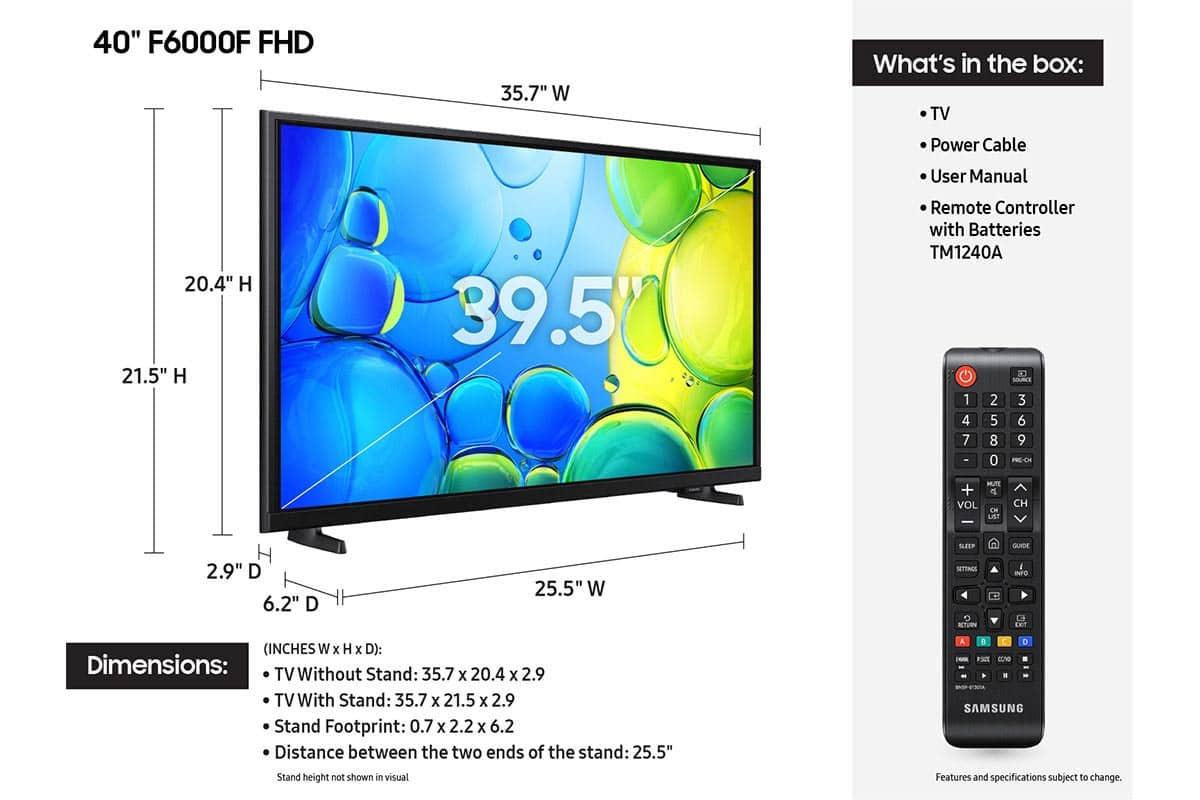






- Model:
- UN40F6000FFXZA
- SKU:
- 10187592
Rating by feature
- Picture Quality
Rating 4.8 out of 5 stars
- Sound Quality
Rating 4.6 out of 5 stars
- Brightness
Rating 4.7 out of 5 stars
Customers are saying
Customers enjoy the 40" Class F6000F Series LED Full HD Smart Tizen TV (2025), especially the great picture quality and ease of setup. Many also appreciate the size and lightweight design of the TV. However, some customers have noted concerns about the TV's responsiveness, the remote control, and the viewing angle.
This summary was generated by AI based on customer reviews.
- Pros mentioned:Setup ease
Smart Tv
||Posted . Owned for 3 weeks when reviewed.This reviewer received promo considerations or sweepstakes entry for writing a review.Tv was very easy to set up , only problem their is no audio out button for my hearing aid device to hook up too !
I would recommend this to a friend - Pros mentioned:Picture quality
Samsung 40”
||Posted . Owned for 1 month when reviewed.This reviewer received promo considerations or sweepstakes entry for writing a review.Good little tv for the kids, picture quality is good and they can use their smart phones with the tv. For $200 not a bad buy.
I would recommend this to a friend - Pros mentioned:Picture quality
Samsung 40 inch
||Posted . Owned for 1 month when reviewed.This reviewer received promo considerations or sweepstakes entry for writing a review.Great tv, picture quality is very good and remote easy to use
I would recommend this to a friend amazon tv app and YouTube TV System
||Posted . Owned for 1 month when reviewed.This reviewer received promo considerations or sweepstakes entry for writing a review.My wife asked me to setup our New AmazonPlugin and I did, but to access it to get to our YouTube TV Streaming Service, I had to use the Amazon input. It would be nice to have those inputs be on display on the tv, instead of having to select input to find them. We even tried downloading a YouTube TV app and only found the Website available. The YouTube Website is available on the remote which would be nice if I could change out that auto select button. Maybe in the near future, don't hard wire internet sites into the remote but allow it to let you select which app to place in the options. The Sound is so low, I thought maybe it was set for a soundbar but nothing I tried makes the audio louder at a lower setting. We have to place it into the 43 digit range to hear it.
No, I would not recommend this to a friendBrand response from Samsung
Posted .Hi TTexasTommy,
Thank you for sharing your experience. Please know that you can customize your Home screen by installing, removing or adding your favorite apps to the Home screen. Here's how:
Searching for & Installing Apps
1. From the Home screen, press left on the remote’s directional pad.
2. Navigate to and select Search.
3. Using the search bar, enter the content or app you’d like to find.
4. Navigate to and select the app you’d like to install, then select Install.
Note: Previously installed apps can be accessed on the Settings screen.
Adding & Managing Apps on Home Screen
1. Go to App Settings (these can be found at the bottom of the Apps screen) and select the app you want to move. The following options will be available:
a. Add to Home: Move the app to your desired location on the Home screen.
b. Delete: Delete app.
c. Lock/Unlock: Lock the app with a PIN so only you can use it. When the app is selected again, you will be prompted to enter the PIN to unlock it.
d. Reinstall: Reinstall the app.
e. View Details: View the app’s information and details.
If you need more help with app management, please don’t hesitate to reach Samsung Support at 1-800-SAMSUNG, available daily from 8AM - 12AM EST. You can also visit the Samsung website and click on ‘Support’ for:
• Live Chat
• Manuals, Software, & Warranty Info
~ Samsung Advisor
- Pros mentioned:Picture quality
Amazing
||Posted . Owned for 2 weeks when reviewed.This reviewer received promo considerations or sweepstakes entry for writing a review.Very nice looking tv, plays movies and video games great!
I would recommend this to a friend - Pros mentioned:Picture quality
Love samsung
||Posted . Owned for 1 week when reviewed.This reviewer received promo considerations or sweepstakes entry for writing a review.Easy set up. Great picture and sound. Purchased for a kids room in progress renovation.
I would recommend this to a friend - Pros mentioned:Picture quality
Tv
||Posted . Owned for 3 weeks when reviewed.This reviewer received promo considerations or sweepstakes entry for writing a review.It’s very nice tv I’m happy to but this tv it very nice sound and I bought different TV this is the one of my dream and highest quality
I would recommend this to a friend - Pros mentioned:Setup ease
Nice tv
||Posted .This reviewer received promo considerations or sweepstakes entry for writing a review.Great as a 2nd smart television. Budget friendly, easy setup, preloaded with current apps.
I would recommend this to a friend - Pros mentioned:Picture quality
Tv Samsung
||Posted . Owned for 1 month when reviewed.This reviewer received promo considerations or sweepstakes entry for writing a review.Excellent I love it since I got it no complaints at all
I would recommend this to a friend - Pros mentioned:Picture quality
Ms
||Posted . Owned for 3 weeks when reviewed.This reviewer received promo considerations or sweepstakes entry for writing a review.I love this tv. Always had good luck with Samsung. Pictures so clear
I would recommend this to a friend - Pros mentioned:Picture quality
Samsung 40” Smart TV
||Posted . Owned for 3 weeks when reviewed.This reviewer received promo considerations or sweepstakes entry for writing a review.Picture and sound quality are outstanding. It was easy to setup. Lots of apps preloaded.
I would recommend this to a friend - Pros mentioned:Picture quality
Happy Customer
||Posted . Owned for 1 month when reviewed.This reviewer received promo considerations or sweepstakes entry for writing a review.Great choice for 40 inch smart tv. Crisp picture of good depth.
I would recommend this to a friend Samsung - 40" Class F6000F Series LED Full HD Smar
||Posted .This reviewer received promo considerations or sweepstakes entry for writing a review.Samsung - 40" Class F6000F Series LED Full HD Smart Tizen TV (2025)
I would recommend this to a friendEXCELLENT TV
||Posted . Owned for 1 month when reviewed.This reviewer received promo considerations or sweepstakes entry for writing a review.I am very pleased with this 40" TV from Samsung. Great size for our smaller bedroom. Clear, beautiful display. Easy to set up. I love Samsung TVs and only buy them.
I would recommend this to a friendTiming is everything
||Posted .This reviewer received promo considerations or sweepstakes entry for writing a review.We happen to be Samsung TV fans. When this one came available at a great price we jumped on it. Maily because our oldest Samsung of 15 years went black screen! No problem they have improved immensely over those 15 years!
I would recommend this to a friendSamsung tv
||Posted .This reviewer received promo considerations or sweepstakes entry for writing a review.Good tv for the money. Would definitely purchase again
I would recommend this to a friendPerfect sunroom tv
||Posted . Owned for 1 month when reviewed.This reviewer received promo considerations or sweepstakes entry for writing a review.This tv is the perfect size for my room. The price was just right!
I would recommend this to a friend- Pros mentioned:Size, Weight
Super Tv
||Posted . Owned for 3 weeks when reviewed.This reviewer received promo considerations or sweepstakes entry for writing a review.This Tv size was the only one that fit in mine medium small room , the other to big or too small , the remote control has numbers nothing crazy like others new brands , the legs of the tv can fit any furniture that you have at home , I recommend if you will have others devices connected to the Tv try to buy the same brand , the pixels are perfect , you can see the wrinkles on people lol very good , the volume is perfect it is not too low or too loud , it is not heavy , and it look will last forever and if you do not have cable you can buy the cheapest antenna and this TV will pick it without interference like others tv that you need to move the antenna everywhere so you get the signal or even you need to hold it to watch your shows .
I would recommend this to a friend - Pros mentioned:Picture quality, Setup ease
Great product for the money
||Posted . Owned for 1 month when reviewed.This reviewer received promo considerations or sweepstakes entry for writing a review.I got this as an uprgade for my kids' bedroom tv. Perfect size for most rooms. The picture quality is fantastic, really crisp colors that pop. Even though its FHD (1080p), the colors are similar to OLED thanks to Samsung's fantastic display quality. The OS is easy to use and if you have a newer samsung device, like a phone or tablet, its seamlessly connects and casts to the tv without any issues. Sound is clear and no muffling or distortion. I have a similar samsung display in my bedroom and this purchase solidifies my desire to continue to purchase additional samsung TVs (and anything they produce displays for) in the future.
I would recommend this to a friend - Pros mentioned:Picture quality, Size
Amazing clarity watching the NFL playoff games!
||Posted . Owned for 3 weeks when reviewed.This reviewer received promo considerations or sweepstakes entry for writing a review.We are very satisfied with this 40" Samsung TV — gorgeous picture and pleasant sound. It replaces our old 32" TV, and we welcome the greater size, that does not overpower the small room. We choose to ignore the Smart TV features, instead simply connecting our existing Roku device to it for additional channel subscriptions in addition to the cable TV. I might mention that I cashed in my Best Buy Visa rewards, which knocked down the purchase price — what a useful credit card!
I would recommend this to a friend