Customer Ratings & Reviews





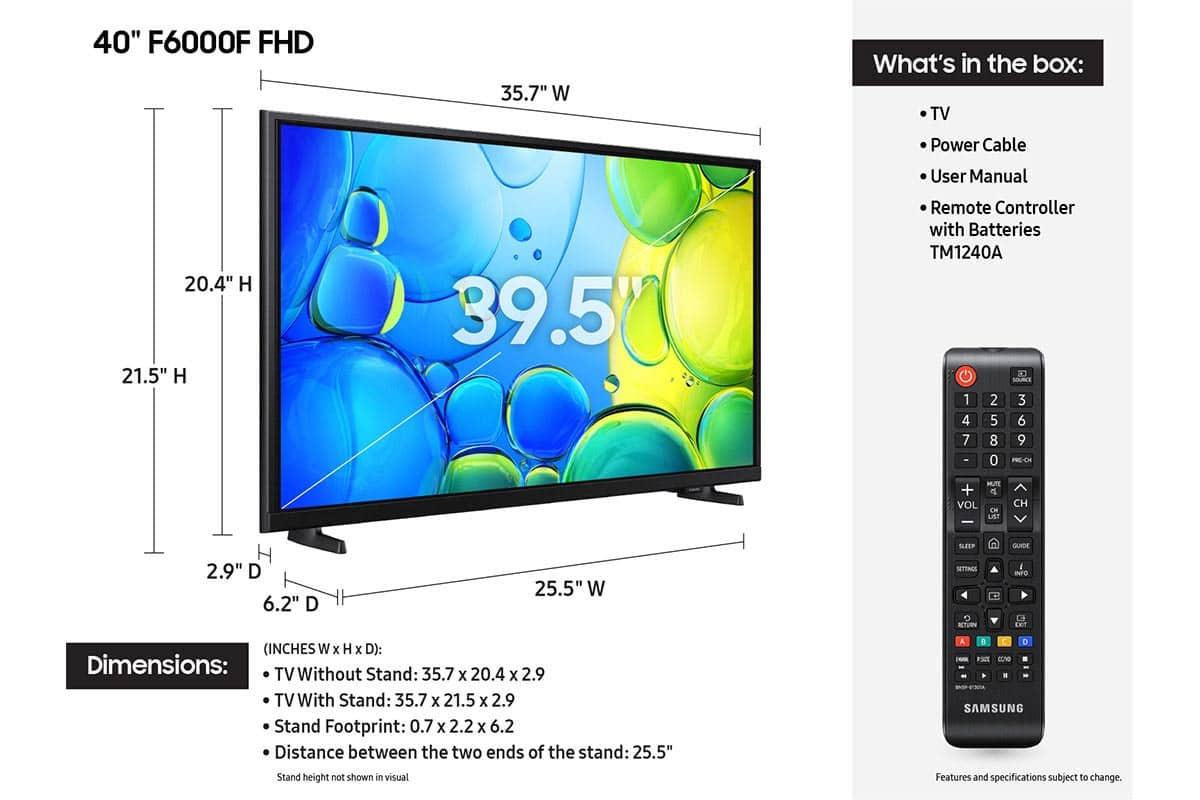






- Model:
- UN40F6000FFXZA
- SKU:
- 10517922
Rating by feature
- Picture Quality
Rating 4.7 out of 5 stars
- Sound Quality
Rating 4.5 out of 5 stars
- Brightness
Rating 4.7 out of 5 stars
TV construction feels very flimsy
||Posted .This reviewer received promo considerations or sweepstakes entry for writing a review.So far the screen works fine but it seems very cheaply made cabinet is like 4 inches thick and plastic is very flimsy. I actually chose Samsung so I thought it would be a nicer unit but not so much.
No, I would not recommend this to a friendBrand response from Samsung
Posted .Hi knowseeker,
We appreciate your purchase and feedback on the F6000F TV. Please know your opinion is important to us and will be shared with our internal teams. If you have any questions or need help, we’re always here. Call 1-800-SAMSUNG from 8AM - 12AM EST, seven days a week, or connect with a LiveChat agent anytime by selecting ‘Support’ on our website.
~Samsung Advisor
Great Price!!
||Posted .This reviewer received promo considerations or sweepstakes entry for writing a review.Great price for this Smart TV! It's perfect for our exercise room!!
I would recommend this to a friendSamsung - 40" Class F6000F Series
||Posted . Owned for 1 week when reviewed.This reviewer received promo considerations or sweepstakes entry for writing a review.I bought this for my wife, due to the older one that I bought in 2016 got knock off the tv station accidently.
I would recommend this to a friend- Cons mentioned:Remote control
remote
||Posted . Owned for 2 months when reviewed.This reviewer received promo considerations or sweepstakes entry for writing a review.poor slow and no speak button remote not user friendly
No, I would not recommend this to a friendBrand response from Samsung
Posted .Hi connie,
We appreciate your feedback regarding response time. For optimal performance, please ensure your F6000F TV is running the latest firmware. You can check this by going to: Home > left directional key > Settings > Support > Software Update
To further optimize performance, try running Device Care, which checks memory, clears unused cached data, and closes background apps: Home > left directional key > Settings > Support > Device Care > Start Device Care
If issues continue, please reach Samsung Support at 1-800-SAMSUNG, available 8AM – 12AM EST, 7 days a week. LiveChat is also available via the ‘Support’ link on our website.
~ Samsung Advisor
- Cons mentioned:Responsiveness
Slow response time
||Posted . Owned for 6 months when reviewed.This reviewer received promo considerations or sweepstakes entry for writing a review.This TV app change and remote control is frustratingly very slow.
No, I would not recommend this to a friendBrand response from Samsung
Posted .CliffT,
We appreciate your feedback regarding response time. For optimal performance, please ensure your TV is running the latest firmware. You can check this by going to: Home > left directional key > Settings > Support > Software Update
To further optimize performance, try running Device Care, which checks memory, clears unused cached data, and closes background apps: Home > left directional key > Settings > Support > Device Care > Start Device Care
If issues continue, please reach Samsung Support at 1-800-SAMSUNG, available 8AM – 12AM EST, 7 days a week.
LiveChat is also available via the ‘Support’ link on our website.
~ Samsung Specialist
Great deal
||Posted .This reviewer received promo considerations or sweepstakes entry for writing a review.Perfect deal. The purchase was seemless and the pickup was ideal.
I would recommend this to a friendPurchase
||Posted .This reviewer received promo considerations or sweepstakes entry for writing a review.Good equipment in a good price, clear screen. Good purchase experience
I would recommend this to a friendSlow and Frustrating to Set Up.
||Posted . Owned for 3 weeks when reviewed.This reviewer received promo considerations or sweepstakes entry for writing a review.First, I usually I only buy Samsung TVs. Have 6 currently between 2 houses. First nitpick is it’s very thick. Wanted to mount it on the wall but it stuck out so far it blocked the door from closing. Second, I spent over an hour just trying to set it up. Waited and waited for it to download my apps from my Samsung account. Got a spinning wheel for 30 minutes with no progress bar so I couldn’t tell if hung up or was just sloooow - have 600 mb internet. Finally had to turn it off to get out of the download. Restarted it and opted to download individual apps myself. First one was YouTube TV. Got the Google sign in and was given a code to confirm that was to appear on the TV. Never came - tried numerous times. After that, I gave up and packed it back up. Going back to BB tomorrow. Worst tv setup I’ve ever experienced.
No, I would not recommend this to a friendBrand response from Samsung
Posted .CHDinCT,
We're sorry to hear the F6000F TV didn’t meet your expectations. Your experience is important and will be shared with our product team.
Should you give Samsung another look in the future, we’d be glad to assist with setup, settings, or features. You can contact us at 1-800-SAMSUNG, 8AM – 12AM EST daily, or LiveChat with a representative at the ‘Support’ link on our website.
~ Samsung Specialist
NEW TV
||Posted . Owned for 1 month when reviewed.This reviewer received promo considerations or sweepstakes entry for writing a review.Happy with this TV. Samsung products have good. Hope it will stay like this.
I would recommend this to a friendA gem
||Posted . Owned for 1 month when reviewed.This reviewer received promo considerations or sweepstakes entry for writing a review.Love the tv. Resolution is crisp and clear. Great small tv.
I would recommend this to a friendGreat TV with great price
||Posted .This reviewer received promo considerations or sweepstakes entry for writing a review.Great purchase. Good option for kid or visit room.
I would recommend this to a friend- Pros mentioned:Picture quality
King
||Posted . Owned for 1 month when reviewed.This reviewer received promo considerations or sweepstakes entry for writing a review.The best TV ever I would still recommend for my family to buy it in Future.
I would recommend this to a friendBrand response from Samsung
Posted .Hi Jimbo,
Thank you for sharing your thoughts on the Samsung’s F6000F TV. If particular issues impacted your rating, Samsung Customer Support is available to assist with any concerns. If you have any questions, please don’t hesitate to reach us at 1-800-SAMSUNG (8AM – 12AM EST, 7 days a week). You’ll also find LiveChat, manuals, software, and warranty details under the ‘Support’ section of our website.
~ Samsung Advisor
new tv
||Posted .This reviewer received promo considerations or sweepstakes entry for writing a review.Great sale on this tv and your tech people are amazing
I would recommend this to a friendHem and Roid
||Posted . Owned for 1 month when reviewed.This reviewer received promo considerations or sweepstakes entry for writing a review.Great Product! Installation, Documents, Ease of Use, all worked Great!
I would recommend this to a friendnew tv
||Posted . Owned for 1 month when reviewed.This reviewer received promo considerations or sweepstakes entry for writing a review.Very pleased with the Samsung 40" that we got would buy again.
I would recommend this to a friendSamsung OS the way to go
||Posted .This reviewer received promo considerations or sweepstakes entry for writing a review.Great operating system easy to install and operate
I would recommend this to a friendGreat TV
||Posted . Owned for 1 month when reviewed.This reviewer received promo considerations or sweepstakes entry for writing a review.Best brand I've purchased in years. I couldn't have made 3 better buy
I would recommend this to a friendUndisclosed Incompatibility Issues
||Posted . Owned for 1 month when reviewed.This reviewer received promo considerations or sweepstakes entry for writing a review.Discovered only after the 2025 Samsung 40in LED Full HD Smart TV was installed by Best Buy that it was not going to be complatible with my CD-DVD player. I now have to find a device to link them. Never had this issue with my original 2017 Samsung 40in LED Full HD Smart TV. Wondering if I should have tried to have my 2017 model fixed, instead of feeling I was misled into buying the newer model.
No, I would not recommend this to a friendBrand response from Samsung
Posted .Hi BeverleyB,
I'm sorry to hear of the confusion regarding the F6000F TV specifications. You can connect your DVD player using an HDMI cable. If your DVD player does not support HDMI, you’ll need an RCA to HDMI converter like this one: https://www.bestbuy.com/site/insignia-rca-to-hdmi-converter-black/6134312.p?skuId=6134312
~ Samsung Advisor
Same picture as a 15 year old model
||Posted .This reviewer received promo considerations or sweepstakes entry for writing a review.I have been a Samsung customer for years. This Samsung is hugely disappointing as the picture is not crisp. I was replacing a bedroom Samsung that was over 15 years old and would take up to 15 minutes to turn on. The pictures quality is the same as the new one. It's not that there is an issue, its just not a great picture like you would expect from a new TV. Also on this TV i have to have the volume on 50 to hear it.
No, I would not recommend this to a friendBrand response from Samsung
Posted .Hi SheriC,
We appreciate your feedback on the picture quality of Samsung’s F6000F TV. If the image doesn’t quite match your preferences, there are several adjustments you can make to better suit your viewing environment and content type.
First, please ensure your TV is running the latest firmware, as updates may include important picture quality enhancements. Go to: Home > Left directional button > Settings > Support > Software Update > Update Now
To explore picture mode options, navigate to: Home > Left directional button > Settings > All Settings > Picture > Picture Mode. Options include:
• Standard – Ideal for general viewing
• Dynamic – Brighter and more vibrant for well-lit spaces
• Eco – Optimized for energy efficiency
• Movie – Best for viewing in low light
You can further customize your image by going to: Settings > All Settings > Picture > Expert Settings, where you can adjust Brightness, Contrast, Color Tone, Sharpness, Contrast Enhancer and more.
If you’d like help finding the best picture settings for your preferences, please don’t hesitate to contact Samsung Support at 1-800-SAMSUNG, available 8AM – 12AM EST, 7 days a week. You can also LiveChat with an agent or explore additional resources on our website by clicking the ‘Support’ link.
~Samsung Advisor
FZ's TV's
||Posted . Owned for 3 weeks when reviewed.This reviewer received promo considerations or sweepstakes entry for writing a review.I'm quite pleased with the Samsung line of TV's. This 40 inch Samsung replaced a 32 inch model we had since 2013.
I would recommend this to a friend