Customer Ratings & Reviews





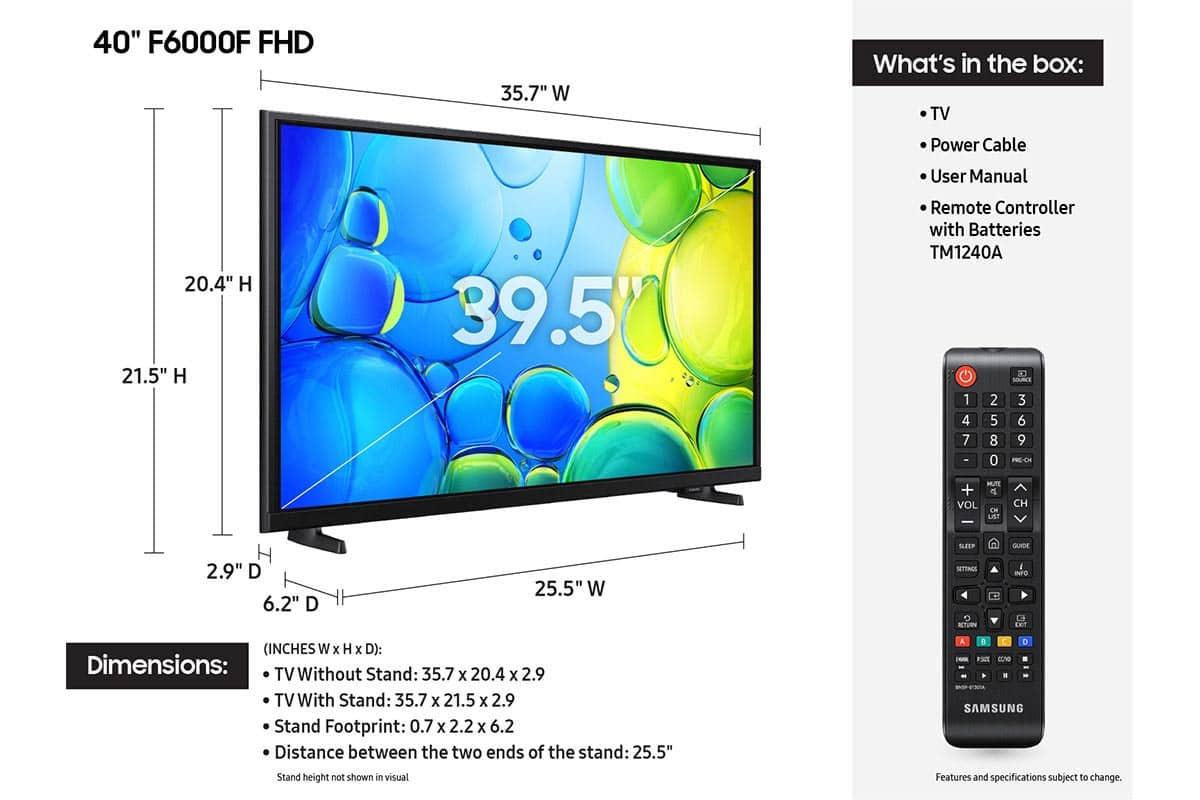






- Model:
- UN40F6000FFXZA
- SKU:
- 10517922
Rating by feature
- Picture Quality
Rating 4.7 out of 5 stars
- Sound Quality
Rating 4.5 out of 5 stars
- Brightness
Rating 4.7 out of 5 stars
dissatisfied
||Posted . Owned for 1 month when reviewed.This reviewer received promo considerations or sweepstakes entry for writing a review.substandard, I have requested several times that I would like to return to upgrade. Very displeased. I went in the hospital unable to return with the the 14 days. I seldom watch.
No, I would not recommend this to a friendBrand response from Samsung
Posted .Hi LaverneC,
Thank you for sharing your purchase experience with Best Buy. If there’s anything we can assist with, please don’t hesitate to call us at 1-800-SAMSUNG, available daily from 8AM - 12AM EST. You can also visit the Samsung website and click on ‘Support’ for:
• Live Chat
• Manuals, Software, & Warranty Info
~ Samsung Advisor
Didn’t really like it much
||Posted . Owned for 2 weeks when reviewed.This reviewer received promo considerations or sweepstakes entry for writing a review.The graphics didn’t look so good. Returned it because it wasn’t connecting to the Xbox S. And I didn’t like the size.
No, I would not recommend this to a friendBrand response from Samsung
Posted .Hi SalvadorL,
We appreciate your feedback. Please know we are always available and may have been able to assist you with connecting to your XBOX.
Should you ever decide to give Samsung TVs another try and have questions or need help with settings, setup, or features, please know we’re here to help. Call us at 1-800-SAMSUNG, 8AM - 12AM EST, 7 days a week.
LiveChat with an agent as well as manuals, software, and warranty info can be found at the ‘Support’ link on our Samsung website.
We hope to regain you as a customer in the future.
~ Samsung Advisor
Slow as a 90’s computer
||Posted . Owned for 3 weeks when reviewed.This reviewer received promo considerations or sweepstakes entry for writing a review.The tv is the slowest tv I’ve ever owned. I know it’s a cheap tv and only using it as a second monitor or to watch hockey. Takes a couple of minutes to power on and get into sling.
No, I would not recommend this to a friendBrand response from Samsung
Posted .Hi thereview,
We appreciate your feedback on the response time, and for optimal performance, we ask that you please ensure you've got the latest firmware version installed on your F6000F TV. You can check this by going to Home > Menu > Settings > Support > Software Update.
You may also want to further optimize performance with the self-diagnostic tool, which checks memory, frees up unused cached memory, and closes background apps. Go to: Home > Menu > Settings > Support > Device Care > Start Device Care.
If you have any questions or need help, we’re always here. Call 1-800-SAMSUNG from 8AM - 12AM EST, seven days a week, or connect with a LiveChat agent anytime by selecting ‘Support’ on our website.
~ Samsung Advisor
Tv stopped working
||Posted . Owned for 3 weeks when reviewed.This reviewer received promo considerations or sweepstakes entry for writing a review.Stopped working within a month now taking back. Will let you know after return and exchange .
No, I would not recommend this to a friendBrand response from Samsung
Posted .Hi BethD,
It’s unfortunate to hear about your experience with Samsung’s F6000F TV. We’re committed to delivering quality, value, and the best possible product experience. This TV is backed by a 1-year limited manufacturer’s warranty, which includes authorized repair for eligible defects when purchased brand-new from an authorized retailer. To review full warranty terms, you can enter your model number here: https://www.samsung.com/us/support/warranty/
We’d appreciate the opportunity to assist further. Please contact Samsung Customer Support at 1-800-SAMSUNG (8AM – 12AM EST, 7 days a week), or connect with a LiveChat agent by clicking the ‘Support’ link on our website.
~ Samsung Advisor
Samsung Done
||Posted . Owned for 1 week when reviewed.This reviewer received promo considerations or sweepstakes entry for writing a review.This is the second Samsung television we have purchased and definitely the last. Both models have ongoing issues with the HDMI loosing connection. Never buy Samsung.
No, I would not recommend this to a friendBrand response from Samsung
Posted .Hi Martin,
We regret to hear about your experience with the Samsung F6000F TV. Samsung stands behind the quality and performance of our products and offers a 1-year limited warranty covering manufacturer defects when purchased new from an authorized seller. You can enter your model number to review the full terms here: https://www.samsung.com/us/support/warranty/
If you haven’t already, please contact Samsung Customer Support at 1-800-SAMSUNG (available 8AM – 12AM EST daily) or via LiveChat on our website under the ‘Support’ section. We’d welcome the chance to assist.
~ Samsung Advisor
Samsung Smart TV
||Posted . Owned for less than 1 week when reviewed.This reviewer received promo considerations or sweepstakes entry for writing a review.I returned this TV. Samsung does not allow you to add any apps to the TV.
No, I would not recommend this to a friendBrand response from Samsung
Posted .Hi BZY63,
Please know you can absolutely add apps to the F6000F TV from our built-in app store. To do so, please follow the below instructions:
1. From the Home screen, navigate to Apps and then select the desired app.
2. You can also select Search on the left side of the screen to search for a specific app if you can’t find the app you want. Enter the name of the app you’d like to search for, then select it when it appears.
3. Select Install. When the installation is complete, the Open menu appears.
4. Select Open to run the app immediately.
I hope this tip helps. If you have any questions, please don’t hesitate to reach us at 1-800-SAMSUNG (8AM – 12AM EST, 7 days a week). You’ll also find LiveChat, manuals, software, and warranty details under the ‘Support’ section of our website.
~ Samsung Advisor
Open box purchase
Posted .This reviewer received promo considerations or sweepstakes entry for writing a review.We love a TV the quality is clear the remote works really wonderful although it's not the right remote but you know it works with the TV and for open box product it was pretty good so you could try to open box products at Best Buy
I would recommend this to a friend- Pros mentioned:Picture quality
New TV
Posted .This reviewer received promo considerations or sweepstakes entry for writing a review.TV fine - Service somewhat slow to receive when needed
I would recommend this to a friend Great for the most part
Posted .This reviewer received promo considerations or sweepstakes entry for writing a review.It’s a good tv but when moving through the menu to go to a streaming app it’s just a little slow. The movements are delayed but when I’m playing on the Xbox everything is perfectly fine, it’s just with the remote when you click an arrow it’s so delayed. I would expect more since it’s a 2025 tbh.
I would recommend this to a friend- Pros mentioned:Picture quality
Chuck
Posted .This reviewer received promo considerations or sweepstakes entry for writing a review.Overall the product was much better than expected, although y our Sales clerk was not very helpful.
I would recommend this to a friend TV installation !
Posted .This reviewer received promo considerations or sweepstakes entry for writing a review.Excellent work ! I am thoroughly satisfied with installation work !
I would recommend this to a friendMs. Annis
Posted .This reviewer received promo considerations or sweepstakes entry for writing a review.Excellent. On time; stated I'd get a refund for items not needed. Great work.
I would recommend this to a friendsamsung tv GREAT
Posted .This reviewer received promo considerations or sweepstakes entry for writing a review.very pleased with my choice of this tv great color and easy to use
I would recommend this to a friend- Cons mentioned:Responsiveness
Very slow TV
Posted .This reviewer received promo considerations or sweepstakes entry for writing a review.I don't know if this TV was designed to be exceptionally slow when switching between apps or If it is defective. We have bought several new TV 's in the past 24 months and have never experienced this type of delay. ????
No, I would not recommend this to a friendBrand response from Samsung
Posted .Hi LarryR,
We appreciate your feedback regarding response time. For optimal performance, please ensure your F6000F TV is running the latest firmware. You can check this by going to: Home > left directional key > Settings > Support > Software Update.
To further optimize performance, try running Device Care, which checks memory, clears unused cached data, and closes background apps: Home > left directional key > Settings > Support > Device Care > Start Device Care.
If issues continue, please reach Samsung Support at 1-800-SAMSUNG, available 8AM – 12AM EST, 7 days a week. LiveChat is also available via the ‘Support’ link on our website.
~ Samsung Advisor
Shaky legs
Posted .This reviewer received promo considerations or sweepstakes entry for writing a review.Maybe the screws provided were not long enough so I am not able to tighten the legs properly. I’m going to return it because I don’t know how long it will hold up or maybe fall over. I can’t rate the picture, sound or brightness quality as I am not going to proceed with the setup.
No, I would not recommend this to a friendBrand response from Samsung
Posted .Hi AltheaR,
So we can better support you, please contact us at 1-800-SAMSUNG, 8 AM – 12 AM EST, 7 days a week. Or visit us on the Samsung website and click on the ‘Support’ link for:
• LiveChat
• Manuals, Software, & Warranty Info
~ Samsung Advisor
Salesman did not know details of extra coverage
Posted .This reviewer received promo considerations or sweepstakes entry for writing a review.Bought a 40 inch Samsung TV. Was told that the extra warranty I bought would cover the TV if anything wrong repairman would come to the house to fix it. This was not true as later discovered the TV would have to be 42 inches. Had to call and cancel the extra coverage.
I would recommend this to a friendBrand response from Samsung
Posted .Hi Barbara,
Thank you for sharing your in-store experience with us.
If you ever have questions or need support, we’re here to help. Call us at 1-800-SAMSUNG, available from 8AM - 12AM EST, seven days a week. You can also connect with a LiveChat agent by clicking the ‘Support’ link on our website.
~ Samsung Advisor