Customer Ratings & Reviews











- Model:
- K43S30
- SKU:
- 10562707
Rating by feature
- Picture Quality
Rating 4.8 out of 5 stars
- Sound Quality
Rating 4.6 out of 5 stars
- Brightness
Rating 4.8 out of 5 stars
Sony tv
||Posted . Owned for 1 month when reviewed.This reviewer received promo considerations or sweepstakes entry for writing a review.I received excellent service and the delivery went well and my TV is working great
I would recommend this to a friendBrand response from SonyListens
Posted .Hi PaulaSims, we're glad you like your new TV! Thanks for choosing Sony! ~Earl

TV On Sale
||Posted . Owned for 3 weeks when reviewed.This reviewer received promo considerations or sweepstakes entry for writing a review.Excellent service and product. I caught a good sale, ordered it online, and received it quickly.
I would recommend this to a friendBrand response from SonyListens
Posted .That's fantastic, WG11418! Thank you for sharing such a wonderful shopping experience. We are delighted to hear that you are very satisfied with your purchase and you are enjoying the excellent picture quality of the TV. Thank you for the 5-star rating and for choosing Sony! -Jess
tv delievery
||Posted . Owned for 1 month when reviewed.This reviewer received promo considerations or sweepstakes entry for writing a review.Arrived on time. Friendly, efficient doing their job.
I would recommend this to a friendBrand response from SonyListens
Posted .Awesome, RayL! We're glad your TV arrived on time. Enjoy and thanks for choosing Sony. -Craig
John and Marorie
||Posted . Owned for 3 weeks when reviewed.This reviewer received promo considerations or sweepstakes entry for writing a review.The Sales Person was very friemdly and heplful and was able to answer all of our questions.
I would recommend this to a friendBrand response from SonyListens
Posted .Hi JohnH,
Thank you for the 5-star rating! We're glad to hear that you had a great experience with our customer service representative. Thank you for choosing Sony!
-David
Sony TV
||Posted . Owned for 3 weeks when reviewed.This reviewer received promo considerations or sweepstakes entry for writing a review.I love my TV!!!!!!!!!!!!!!!!!!!!!!!!!!!!!!!!!!!!!!
I would recommend this to a friendBrand response from SonyListens
Posted .Hi Becky, Awesome! We're extremely pleased to know that you love your BRAVIA 3. Thank you so much for your purchase and for choosing Sony! - Romeo
Sony 43
||Posted . Owned for 3 weeks when reviewed.This reviewer received promo considerations or sweepstakes entry for writing a review.The geek squad came in set up the tv. They did a great job setting it up I was very pleased. Thank you
I would recommend this to a friendBrand response from SonyListens
Posted .Hi MollieT Great service! We're also glad that you are enjoying your new TV. We appreciate your feedback and thank you for choosing Sony. Erin
Should have got another LG
||Posted .This reviewer received promo considerations or sweepstakes entry for writing a review.Glitchy to say the least. Cable box picture goes in and out. Frustrating.
No, I would not recommend this to a friendBrand response from SonyListens
Posted .Hi I81U812,
Thank you for taking the time to share your feedback. We are truly sorry to hear that you are experiencing this frustrating issue with the picture from your cable box going in and out, making the experience glitchy.
We want to help you resolve this quickly to ensure you can enjoy the full performance of your BRAVIA 3. This type of signal interruption can often be fixed with a few simple steps. Please try the following troubleshooting solutions:
1. Perform a power cycle of your TV by unplugging it from the wall outlet for 2 minutes, then plug it back in.
2. Ensure your TV has the latest software version by navigating to Settings > System > About > System software update > Update your TV software.
3. Try connecting your cable box to a different HDMI port on the TV.
4. Change the HDMI signal format on the TV to 'Enhanced' by going to Settings > Channels and inputs > External inputs > HDMI signal format > Select the HDMI Input in which the cable box is connected > Select Enhanced format.
5. Try using a new High-speed HDMI cable to rule out a cable issue.
If the issue still persists after trying these steps, please do not hesitate to contact our technical support team for further assistance here: https://us.esupport.sony.com/support/s/support-contact?language=en_US&category=tv
Thanks for considering Sony products!
Regards,
Dominick
TV GUIDE
||Posted . Owned for less than 1 week when reviewed.This reviewer received promo considerations or sweepstakes entry for writing a review.I purchased a Sony 43in three years ago and had an excellent tv guide. (X85J) The best tv ever for that size. I purchased the Bravia 3 S30 43in today. What a great disappointment with Tv Guide. I watch TV with an outdoor antenna. This has turned me off after 40 plus years with Sony. They took care of streamers only with this tv.
No, I would not recommend this to a friendBrand response from SonyListens
Posted .Hi DeweyO,
Thank you for your feedback on the BRAVIA 3 (K43S30). We apologize for the disappointment with the TV Guide feature. The BRAVIA 3 is designed with a focus on streaming services, which may differ from the TV Guide experience you had with the X85J model. We understand the importance of having a reliable TV Guide, especially for users who rely on an outdoor antenna. Your feedback is valuable, and we will share it with our product development team to consider for future updates. If you need assistance with any other features or have further concerns, please email us at [email protected] with the following details and we'll be more than happy to assist you.
Name:
BestBuy Username:
Model Number:
Issue/Concern:
Telephone Number:
We appreciate your input and thank you for your purchase.
Sincerely,
Romeo
Sony Social Support
Worst open box experience from Best Buy
||Posted .This reviewer received promo considerations or sweepstakes entry for writing a review.Horrible experience buying open box from Best Buy. They shipped a broken TV without any serial number and refused to take it back. This is fraudulent activity from Best Buy. Will never buy from them, will stick with other major e-commerce sites for excellent services. Open box TV arrived broken. Immediately took it to best buy strore whitout taking the package out of the box. Best buy store associate took the TV out pack it again after checking the TV gave me return lable to ship the TV. I had used the return label. I got the refund on August 12, 2025. Then I was charged again on August 15, 2025 and received same broken TV on August 18, 2025 and they charged me again.
No, I would not recommend this to a friendGreat TV
||Posted . Owned for 1 week when reviewed.This reviewer received promo considerations or sweepstakes entry for writing a review.TV is fine. Set up was simple Unpackage requires some help.
I would recommend this to a friendBrand response from SonyListens
Posted .Hi DavidC, perfect! We're truly happy to hear about your satisfaction with the ease of setup and superb performance of your BRAVIA 3. Thank you very much for your purchase and for choosing the best brand, Sony! - Romeo
Color and Adjustment is Off
||Posted . Owned for less than 1 week when reviewed.This reviewer received promo considerations or sweepstakes entry for writing a review.The Bravia TV has been our go to TV for the last decade. We have two in our house in the guest room and family room. They have been amazing tvs. When adding a TV to our bedroom, the small Bravia 3 seemed like a natural choice. However, I very much dislike this TV. The color and adjustment options are completely off, especially with skintones. I fussed with the color and advanced color options for 90 minutes and could not adjust enough. Or if adjusting in one show/app, another show and app had terrible color. I’ve never returned a Sony TV before, and it is disappointing and unfortunate to be returning this one. But I very much dislike this.
No, I would not recommend this to a friendBrand response from SonyListens
Posted .Hi CK01,
Thank you for your comment. While we're thrilled that you've chosen our BRAVIA TVs for the past decade, we sincerely apologize if our BRAVIA 3 did not meet your expectations. This is certainly not the feedback we hoped to receive. Picture quality can depend on the signal and content being played. We appreciate your feedback about the picture settings for this TV and would like to gather more information or offer suggestions. If you still have your unit and are interested, you can schedule a one-on-one consultation with our experts here:
• https://electronics.sony.com/one-on-one-consultation?utm_campaign=ooclink_rsiyt_20201026&utm_source=youtube&utm_medium=social_organic&utm_content=rsi&cid=sco-na-3351
We want to make sure you’re taken care of and help check on your TV. May we contact you directly to assist you? If so, please email the below information to [email protected]. Apologies if you disclosed some of this information in your review and to customer service, we just want to ensure that we have your accurate details at the time of communication.
Full Name:
BestBuy Username:
Telephone Number:
Sony TV Model Number:
Additional Information regarding your experience with the TV:
We value you as a Sony customer and apologize for the inconvenience. We hope to speak with you directly to resolve this matter.
Thank you for allowing us to assist you.
Sincerely,
Romeo
Sony Social Support
Thumbs up
||Posted . Owned for 1 week when reviewed.This reviewer received promo considerations or sweepstakes entry for writing a review.Very good tv. Perfect fit for the room that I bought it for.
I would recommend this to a friendBrand response from SonyListens
Posted .Hi RamonB,
Thank you for the 5-star rating! We're happy to hear that you like the television for your room. Thank you for choosing Sony!
-David
Great tv at this price point.
||Posted . Owned for 1 week when reviewed.This reviewer received promo considerations or sweepstakes entry for writing a review.Speedy interface. Great screen. Delivered quickly with no damage.
I would recommend this to a friendBrand response from SonyListens
Posted .Hi DSquare, We're glad that you are enjoying your new TV. Thank you for choosing Sony. Erin

Great TV for Kids Room
||Posted . Owned for 1 week when reviewed.This reviewer received promo considerations or sweepstakes entry for writing a review.Really good television for the price range. Works great in bedroom
I would recommend this to a friendBrand response from SonyListens
Posted .Hi Umcanes, we're glad happy to know that you like our product. Thanks for choosing Sony. ~Earl
Came but no remote!
||Posted . Owned for less than 1 week when reviewed.This reviewer received promo considerations or sweepstakes entry for writing a review.TV arrived 1 day early. box was partially opened. Came wit no remote or TV cord straps. TV was in great condition as described. Either someone broke into my package and stole the remote or someone did not check for a remote to be included. Seriously! no remote!!
No, I would not recommend this to a friendBrand response from SonyListens
Posted .Hi Zackery,
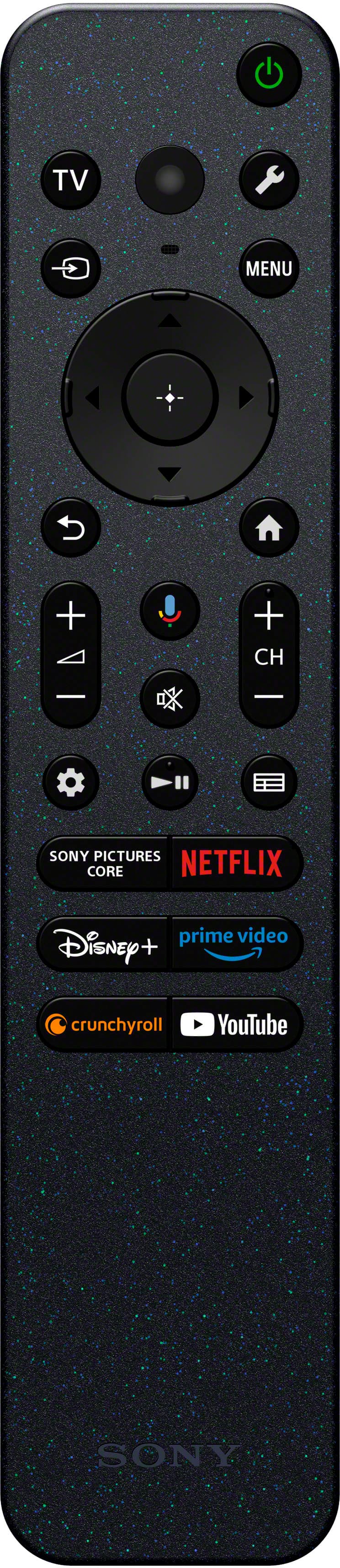
Thank you for bringing this to our attention, and we sincerely apologize for the inconvenience. It is unfortunate to know that your BRAVIA 3 came without the Voice Remote Control. This is certainly not the news we'd like to hear from you. The brand new BRAVIA 3 should have the following accessories when purchased:
• Table Top Stand
• Batteries
• Operating Instructions
• Voice Remote Control
• AC Power Cord
• Quick Setup Guide
For best assistance and to confirm the details, we highly recommend contacting your dealer/Best Buy. Should you need more assistance, please email us at [email protected] with the following information:
Name:
BestBuy Username:
Model Number:
Issue:
Telephone Number:
We value you & your input, and thanks for choosing Sony.
Best regards,
Romeo
Sony Social Support
Good price.
||Posted . Owned for 1 week when reviewed.This reviewer received promo considerations or sweepstakes entry for writing a review.Great tv for the price. Using it as an extra tv in our new redone basement.
I would recommend this to a friendBrand response from SonyListens
Posted .Hi KathyA, fabulous! You've certainly made a great choice! We're extremely pleased it suits your needs. Thank you so much for your purchase and for choosing the best brand, Sony! - Romeo
Smiley TV
||Posted . Owned for 1 week when reviewed.This reviewer received promo considerations or sweepstakes entry for writing a review.Excellent install & customer service from William.
I would recommend this to a friendBrand response from SonyListens
Posted .Hi Smileys, thanks for commenting! We're thrilled to hear about your satisfaction with your BRAVIA 3 and superb installation service from William. Thank so much for your purchase and for the perfect star review! - Romeo
Cant get rid of Google
||Posted . Owned for 1 week when reviewed.This reviewer received promo considerations or sweepstakes entry for writing a review.When turned on cant get rid of google to imediately select what I want to view. I have no intrest in google on my TV
No, I would not recommend this to a friendBrand response from SonyListens
Posted .Hi BruceK,
We sincerely apologize if the Google TV feature of your BRAVIA 3 didn't live up to your expectations. Depending on the TV settings, the Home screen will be displayed when the TV is turned on. If you change the following setting, you can change the screen that is displayed when the TV is turned on to the TV broadcast channel or external input such as HDMI that you were watching before turning off the TV.
1. Press the wrench (Quick Settings) button on the remote control.
2. Select [Power on behavior], and then select [Last used input].
The next time the TV is turned on, the TV broadcast channel or external input such as HDMI that you were watching before turning off the TV will be displayed.
ref: https://helpguide.sony.net/tv/lusltn2/v1/en-003/01-03_10.html?hl=home
We want to make sure you’re taken care of and help check on your TV. May we contact you directly to get more information and assist you? If so, please email the following details to [email protected].
Apologies if you disclosed some of this information in your review and to customer service, we just want to ensure that we have your accurate details at the time of communication.
Full Name:
BestBuy Username:
Telephone Number:
Sony TV Model Number:
Additional Information regarding your experience with the TV:
We value you being a Sony customer. Sorry for the inconvenience and hope to speak directly to try to resolve this matter.
Thank you for letting us help assist you.
Sincerely,
Romeo
Sony Social Support
Disappointed
Posted .This reviewer received promo considerations or sweepstakes entry for writing a review.Unit was purchased as an exceptionally condition open box unit . Arrived completely damaged. Returned item
No, I would not recommend this to a friendBurning smell at 3weeks
||Posted . Owned for 3 weeks when reviewed.This reviewer received promo considerations or sweepstakes entry for writing a review.I’ve had this tv about 3 weeks and it started producing a burning rubber type smell coming from the back of the unit. Now I have to wait 3 business days for the repair center to even reach out to me, let alone fix it so I’ll probably be out for weeks. Best but won’t return either because it’s past the 14 days. I’m so disgusted because now I have no television and a toddler that *needs* to watch his favorite show before bed and no way to do this unless I buy a new tv. I also have birds that can literally die from any fumes it’s causing because their lungs are so sensitive. spent too much money for this problem and Sony wants to wait around and be slow. This issue shouldn’t have happened in the first place. The tv before this happened was amazing but it smells like it’s gonna blow up.
No, I would not recommend this to a friendBrand response from SonyListens
Posted .Hi Jacki,
Thank you for bringing this to our attention, and we sincerely apologize for the inconvenience. It is unfortunate to hear that you're having an issue with your BRAVIA 3 within 3 weeks of use. This is usually not the case and certainly not the experience we were hoping you would have. We want to make sure you’re taken care of and help check on your TV. May we contact you directly to get more information and assist you? If so, please email the below information to [email protected]. Apologies if you disclosed some of this information in your review and to customer service, we just want to ensure that we have your accurate details at the time of communication.
Sony Case Number:
Full Name:
Best Buy Username:
Telephone Number:
Sony TV Model Number:
Additional Information regarding your experience with the TV:
We value you being a Sony customer. Sorry for the inconvenience and hope to speak directly to try to resolve this matter.
Thank you for letting us help assist you.
Sincerely,
Romeo
Sony Social Support