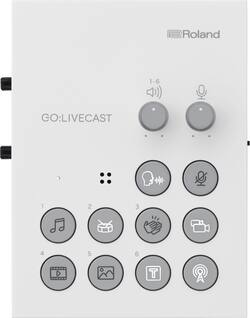
Roland - Livestreaming Studio for Content Creation on iOS Devices to Switch Dual Cameras, Display Titles, and More - WHITE
- Key Specs
- Continuous Watts x Channel @ Ohms: NA
- Network Connector(s): No network connectors
- General
- Brand: Roland
- Model Number: GO:LIVECAST
- Product Name: Livestreaming Studio for Content Creation on iOS Devices to Switch Dual Cameras, Display Titles, and More
- Color: WHITE
- Audio
- Continuous Watts x Channel @ Ohms: NA
- Supported File Formats: NA
- Input
- Network Connector(s): No network connectors
- Audio Only Inputs: No audio only inputs
- Features
- App Compatible: true (The product can be connected to a program or software application on a mobile device, which then receives collected data from the product.)
- Adjustable Controls: Volume
- Dimensions
- Product Height: 2 inches (The out of box height of the item. Height is measured as the vertical distance from the bottom of the item to the top as it would be primarily used or placed.)
- Product Width: 0.5 inches (The out of box width of the item. Width is measured as the horizontal distance from one side of the item to the other as it would be primarily used or placed.)
- Product Depth: 5.4 inches (The out of box depth of the item. Depth is measured as the distance from the front of the item to the back as it would be primarily used or placed.)
- Product Weight: 0.5 pounds (The out of box weight of the item.)
- Certifications Listings & Approvals
- ENERGY STAR Certified: false (Devices carrying the ENERGY STAR service mark, such as computer products and peripherals, kitchen appliances, and other products, generally use 20% to 30% less energy than required by federal standards.)
- Warranty
- Warranty - Parts: 1 Year
- Warranty - Labor: 90 Days
- Other
- UPC: 761294514689
Get up and streaming in minutes with professional-level content using just Roland’s GO:LIVECAST Streaming Studio and your mobile device. You’ll easily create high-quality content using the two-camera functionality, interview-ready camera switching, screen-in-screen capability, graphic presets, sound effects triggers, audio mixing, and more – all without needing a computer or other A/V gear. With multiple connector inputs, you can use this with your whole studio including external microphones - or use the built-in mic for quality sound. This powerful recording and streaming tool will help you create engaging live web shows rivaling the most advanced creators on social media. The GO:LIVECAST is a content creator’s dream with the absolute simplicity of selecting your favorite streaming platform, like Facebook or YouTube, and pressing the “ON AIR” button to go live!
- Easy-to-Use: 1: Download the app and connect your compatible phone or tablet to the GO:LIVECAST with included cable. 2: Connect a second device via Wi-Fi. 3: Select your streaming service and press the “ON AIR” button to go live! Built-in mic w/ reverb or use a headset mic or XLR with phantom power.
- Multi-Camera Studio: Switch cameras or PiP, trigger video and audio clips, custom titles, view live comments, and adjust audio levels as you stream with intuitive, hands-on controls. Stereo line input for external audio devices. Use front and back camera simultaneously on iPhone XS or later.
- Stream with Enhanced Content : Stream live to Twitch, Facebook Live, YouTube, and other major platforms or record for later posting. App includes music, videos, photos, and sound effects to boost production value or import from your media library. Create Live Sets to cue your content on-demand.
- Desktop or Mobile Streaming: Power GO:LIVECAST with the included cable and your phone charger, or connect a portable USB battery and take your show on the road. Livestream anywhere and create professional results for “on-location” interviews, live event coverage, maker content, gaming, and more.
- Roland Quality: For nearly 50 years, Roland’s innovative multimedia products and electronic musical instruments have fueled inspiration in artists and creators around the world. Roland is known by pros and hobbyists for audio/video streaming products, BOSS guitar gear, V-MODA headphones, and more.
- iOS Compatibility: iOS 13/14: iPhone 7 & later, iPhone SE (2nd gen.), iPad Mini (5th gen.), iPad Air (3rd), iPad (7th), iPad Pro 11", iPad Pro (3rd/4th)
- Android 9: Samsung Galaxy Feel2, S8—S10+, Note 8—10+, A20, A30; Huawei Mate 10 Pro, 20 Pro, P30 lite/Premium; Sony Xperia 1 and 8; Sharp Aquos R3, sense3
- Android 10: Samsung Galaxy Feel2/S9—S10+/S20/S20+ 5G/Note 9—10+/A20/A30/A41/Z Flip/A21/Note20 Ultra 5G/A51 5G/Z Fold2 5G; Huawei Mate 20 Pro, P30 lite/Premium; Sony Xperia 1/5/8/1II/10 II/XZ2/Compact/Prem./XZ3/Ace/5 II; Google Pixel 3a/XL, 3/XL, 4/XL
- Android 10 Cont. : Sharp Aquos R compact, R2/compact, R3, R5G, zero2, sense3, Android One S3/S5/S7/X4; LG style3, VELVET, G8X ThinQ, V60 ThinQ 5G; OPPO Find X2 Pro, Reno3 5G/A; Xiaomi Mi 10 Lite 5G
- Android 11: Samsung Galaxy S20/S20+ 5G; Sony Xperia 1II/5 II; Google Pixel 3a/XL, 3/XL, 4/XL, 4a, 5; Sharp Aquos sense4, zero2
- Easy-to-Use: 1: Download the app and connect your compatible phone or tablet to the GO:LIVECAST with included cable. 2: Connect a second device via Wi-Fi. 3: Select your streaming service and press the “ON AIR” button to go live! Built-in mic w/ reverb or use a headset mic or XLR with phantom power.
- Multi-Camera Studio: Switch cameras or PiP, trigger video and audio clips, custom titles, view live comments, and adjust audio levels as you stream with intuitive, hands-on controls. Stereo line input for external audio devices. Use front and back camera simultaneously on iPhone XS or later.
- Stream with Enhanced Content : Stream live to Twitch, Facebook Live, YouTube, and other major platforms or record for later posting. App includes music, videos, photos, and sound effects to boost production value or import from your media library. Create Live Sets to cue your content on-demand.
- Desktop or Mobile Streaming: Power GO:LIVECAST with the included cable and your phone charger, or connect a portable USB battery and take your show on the road. Livestream anywhere and create professional results for “on-location” interviews, live event coverage, maker content, gaming, and more.
- Roland Quality: For nearly 50 years, Roland’s innovative multimedia products and electronic musical instruments have fueled inspiration in artists and creators around the world. Roland is known by pros and hobbyists for audio/video streaming products, BOSS guitar gear, V-MODA headphones, and more.
- iOS Compatibility: iOS 13/14: iPhone 7 & later, iPhone SE (2nd gen.), iPad Mini (5th gen.), iPad Air (3rd), iPad (7th), iPad Pro 11", iPad Pro (3rd/4th)
- Android 9: Samsung Galaxy Feel2, S8—S10+, Note 8—10+, A20, A30; Huawei Mate 10 Pro, 20 Pro, P30 lite/Premium; Sony Xperia 1 and 8; Sharp Aquos R3, sense3
- Android 10: Samsung Galaxy Feel2/S9—S10+/S20/S20+ 5G/Note 9—10+/A20/A30/A41/Z Flip/A21/Note20 Ultra 5G/A51 5G/Z Fold2 5G; Huawei Mate 20 Pro, P30 lite/Premium; Sony Xperia 1/5/8/1II/10 II/XZ2/Compact/Prem./XZ3/Ace/5 II; Google Pixel 3a/XL, 3/XL, 4/XL
- Android 10 Cont. : Sharp Aquos R compact, R2/compact, R3, R5G, zero2, sense3, Android One S3/S5/S7/X4; LG style3, VELVET, G8X ThinQ, V60 ThinQ 5G; OPPO Find X2 Pro, Reno3 5G/A; Xiaomi Mi 10 Lite 5G
- Android 11: Samsung Galaxy S20/S20+ 5G; Sony Xperia 1II/5 II; Google Pixel 3a/XL, 3/XL, 4/XL, 4a, 5; Sharp Aquos sense4, zero2
Whats Included
- GO:LIVECAST STREAMING STUDIO FOR SMARTPHONES
- QUICKSTART GUIDE
- Lightning to USB Micro-B type cable
- USB Type-A to USB Micro-B type cable
- USB Type-C to USB Micro-B type cable
- GO:LIVECAST STREAMING STUDIO FOR SMARTPHONES
- QUICKSTART GUIDE
- Lightning to USB Micro-B type cable
- USB Type-A to USB Micro-B type cable
- USB Type-C to USB Micro-B type cable
Q: Will this work on Android 11 pixel 3?
A: Yes. They have a website that shows compatibility with different ios and android devices. https://www.roland.com/global/support/by_product/golivecast/support_documents/0a587645-9cb6-47f3-b1c4-66b77126cfad/
Q: can go pro be used with this?
A: Unfortunately not, has to be a phone or tablet that can download the Roland Go:Livecast app. They need more customization.