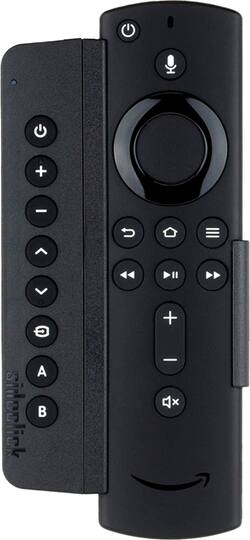
Sideclick - Universal Remote Attachment for Amazon Fire TV (all models) - Black
- Key Specs
- Remote Control Type: Universal
- Remote Control Features: Auto code search, Multi-Function
- Number Of Devices Controlled: 8
- Works With: Amazon Alexa (Compatible with or able to be connected to other smart devices or applications.)
- General
- Product Name: Universal Remote Attachment for Amazon Fire TV (all models)
- Brand: Sideclick
- Model Number: SC2-FT15K
- Features
- Remote Control Type: Universal
- Remote Control Features: Auto code search, Multi-Function
- Display Type: None
- Number of Buttons: 8
- Connectivity
- Number Of Devices Controlled: 8
- Wireless: true
- Connectivity Technology: Infrared (The manner in which a device sends data to another device over a short distance.)
- Connector Type: Proprietary
- Compatibility
- Works With: Amazon Alexa (Compatible with or able to be connected to other smart devices or applications.)
- Brand Compatibility: Amazon Fire TV
- Model Compatibility: 1st and 2nd Generation Amazon Fire TV and Amazon Fire TV Stick; Voice and Non-Voice Remote; Echo Voice Remote; Alexa Voice Remote
- Compatible Product(s): Receiver, Television
- Power
- Rechargeable: true
- Dimension
- Product Weight: 4.13 ounces (The out of box weight of the item.)
- Warranty
- Manufacturer's Warranty - Parts: 1 year
- Manufacturer's Warranty - Labor: 1 year
- Other
- UPC: 859585006026
Control your Amazon Fire TV Stick, Fire TV Stick with 4K, Amazon Fire TV 1st and 2nd Generation Amazon Fire TV remotes, Amazon Fire Cube, Amazon Fire TV with 4K, Alexa Voice Remote, and multiple other devices such as your TV, Blu-ray, sound bar, DVD Player, amp and more with this all-in-one Sideclick starter kit. This remote attachment starter kit includes the Sideclick slim universal remote and two adapter clips to fit all models of Amazon Fire remotes. Amazon Fire remote not included.
- Compatible with Amazon Fire TV remotes: Amazon Fire TV Stick, Fire TV Stick with 4K, 1st and 2nd Generation Amazon Fire TV remotes, Amazon Fire Cube, Amazon Fire TV with 4K, Alexa Voice Remote.
- Easy to Program: Uses IR learning technology to program 8 buttons over multiple devices in under a minute.
- Don't Lose Your Voice: Sideclick's clip-on design attaches in a snap and allows you to utilize your streaming remote's voice search feature, which is lost in other universal remote options.
- Ultimate Accessory for Cordcutters: Sideclick is the perfect solution for channel changing with an HD Antenna.
- Consolidate your remotes: 8 buttons can be programmed over multiple devices. No need to keep your remotes for the TV, Sound Bar, Receiver, or Blu Ray player lying around.
Whats Included
- 2 AAA Batteries
- 2 Amazon Fire TV Adapter Clips (compatible with voice and non-voice Amazon Fire TV remotes)
- Owner's manual
- Sideclick Universal Remote Attachment for Amazon Fire TV
Q: Does it work with the Granger Bessel gb55 Bluetooth system?.
A: Can anyone tell me if i can order a power cord, remote, n coaxles? For a Granger Bessel GB-55 5.1. And can u tell me if it comes with cables, speaker wire, or???? Please, n thank you.
Q: Does this come with the remote or is this just an attachment to the remote.
A: This does not come with the remote. It's an optional attachment that allows you to control your other devices (change TV or Receiver volume, change source input, etc). It's an attachable universal learning remote that is supposed to replace the basic functions of extra remotes you may have lying around. I love mine.
Q: Does it work on all firesticks.I lost my remote
A: It doesn't control the firestick, just other devices that you have the remote for. It needs those devices remotes for programming.
Q: Will this work with older non voice Fire TV stick remote?
A: Yes it will. The device comes with two adapters, one for the non voice controlled remote and one for the newer voice controlled remote.
A: The Sideclick Remote Attachment device requires that you have the remote control device for the TV you wish to control. The buttons on the Sideclick are programmed by: 1. putting the Sideclick into the programming mode; 2. pointing the IR transmitter of the TV remote at the IR receiver/transmitter window of the Sideclick device; 3. pressing and releasing the desired button on the Sideclick that is to be programmed; 4. pressing and releasing the appropriate button on the TV remote that corresponds to the desired function to be memorized by the Sideclick; 5. repeating steps 3 & 4 for each additional Sideclick button to be programmed; 6. when all buttons have been programmed, the Sideclick will automatically exit the programming mode after a short delay. So a TV remote is required to program the Sideclick, but once programmed, this Sideclick Remote Attachment device will control the basic TV functions of Power On/Off, Volume Up/Down, Channel Up/Down, Input Select and an additional two user-desired functions available on the TV remote (e.g. Menu, Enter, etc.), or any other IR-controlled device (e.g. soundbar, audio receiver, etc.). Could you borrow a Samsung TV remote that is compatible with your TV from a friend or relative?
A: Ths SideClick only works with the TV. It will not control the FIRETV STICK of any apps installed on the FIRE TV STICK, including KODI!!!
A: If it looks like any of these it will fit, you do not need to read the code on the back




















