Best Buy essentials™ - Full-size Wireless Membrane Keyboard and Mouse Bundle with USB Receiver - Black
Best Buy essentials™ - Full-size Wireless Membrane Keyboard and Mouse Bundle with USB Receiver - Black
- Best Buy essentials™ - Wireless Optical Standard Ambidextrous Mouse with USB Receiver - Wireless - Black$9.99
More Buying Options
Related Item

Specifications
- Form FactorFull-sizeKeyboard TechnologyMembraneConnection TypeWireless
- Key Specs
- Form Factor: Full-size (The size, arrangement, and physical configuration of the product.)
- Keyboard Technology: Membrane (Type of technology that detects a key press.)
- Connection Type: Wireless
- General
- Brand: Best Buy essentials™
- Model Number: BE-WLKBMB2B
- Product Name: Full-size Wireless Membrane Keyboard and Mouse Bundle with USB Receiver
- Color: Black
- Features
- Numeric Keypad: true
- Touchpad: false
- Spill Resistant: true (Designed to resist some degree of accidental liquid spill. The level of spill-resistance is indicated by the product manufacturer, but the degree of protection may not be guaranteed after normal wear of the product.)
- Foldable: false
- Functions
- Form Factor: Full-size (The size, arrangement, and physical configuration of the product.)
- Number Of Keys: 112
- Keyboard Technology: Membrane (Type of technology that detects a key press.)
- Multimedia Keys: true
- Connectivity
- Connection Type: Wireless
- Wireless Connectivity: Radio Frequency (RF - 2.4 Ghz/Low Latency) (The manner in which a device sends data to another device over a short distance without the use of wires or cables.)
- Maximum Wireless Range: 32.8 feet
- Compatibility
- Operating System Compatibility: Windows, Mac, Chrome
- Plug and Play Operation: true
- Power
- Rechargeable Battery: false
- Battery Size: AAA (The battery size required for operation.)
- Number of Batteries Required: 2
- Battery Chemistry: Alkaline
- Batteries Included: true (Indicates whether the product comes with the required batteries for its operation.)
- Dimensions
- Product Height: 1 inches (The out of box height of the item. Height is measured as the vertical distance from the bottom of the item to the top as it would be primarily used or placed.)
- Product Width: 6 inches (The out of box width of the item. Width is measured as the horizontal distance from one side of the item to the other as it would be primarily used or placed.)
- Product Depth: 17 inches (The out of box depth of the item. Depth is measured as the distance from the front of the item to the back as it would be primarily used or placed.)
- Product Weight: 1.6 ounces (The out of box weight of the item.)
- Mouse
- Mouse Included: true
- Mouse Operation: Button(s), Scroll wheel
- Mouse Type: Standard
- Connection Type (Mouse): Wireless
- Wireless Connectivity (Mouse): Radio Frequency (RF - 2.4 Ghz/Low Latency) (The manner in which a mouse sends data to another device over a short distance without the use of wires or cables.)
- Maximum Sensitivity: 1600 dots per inch (Mouse sensitivity is measured in dots per inch (DPI). The higher the DPI, the more sensitive the mouse is and may be more useful for high-density pixel screens. Lower DPI typically means more precision and accuracy in mouse movement.)
- Minimum Sensitivity: 800 dots per inch (Mouse sensitivity is measured in dots per inch (DPI). The higher the DPI, the more sensitive the mouse is. Lower DPI typically means more precision and accuracy in mouse movement, but higher DPI may be useful for high-density pixel screens.)
- Number of Buttons: 6
- Handedness: Right-handed
- Maximum Wireless Range (Mouse): 32.8 feet
- Rechargeable Battery (Mouse): false
- Battery Chemistry (Mouse): Alkaline
- Battery Size (Mouse): AA (The battery size required for operation.)
- Warranty
- Warranty - Parts: 1 year limited
- Warranty - Labor: 1 year limited
- Other
- UPC: 600603321801
Ditch the cords and upgrade your computer setup with the Best Buy essentials Full-size Wireless Membrane Keyboard and Mouse Bundle with USB Receiver. The adjustable kickstand allows you to position the keyboard between three different heights to find the perfect angle to type across all 112 keys. Smoothly track across your desk with the 6-button, right-handed red light optical mouse. One AA battery for the mouse and two AAA batteries for the keyboard are included in the bundle, allowing you to use the product straight out of the box. Now let’s get typing!
- Compatible with Windows, macOS, and ChromeOS: Works with Windows 11, Windows 10, macOS 10.12 to 11.4, and ChromeOS 78.
- Plug-and-play wireless design: Eliminate cords and easily connect to your device with a 2.4GHz USB receiver, which features a wireless range up to 32.8 ft.
- Full-size keyboard with adjustable kickstand: Provides three height positions for comfortable typing with 112 keys.
- Cordless optical mouse: Enjoy smooth tracking with a 6-button, right-handed mouse featuring textured side grips and a vertical scroll wheel.
- Number pad: The keyboard features a full-size numeric keypad to help input data more accurately.
- Adjustable mouse speed: Set the mouse to your preferred DPI resolution (800/1,200/1,600) to navigate your computer.
- Quick access keys: Easily switch between songs, adjust the volume, or mute with the multimedia buttons at the top of the keyboard.
- Spill resistant: Keyboard features five spill holes on the bottom to help prevent damage in case of accidental spills.
- Brought to you by Best Buy: Best Buy essentials products are just what you need to support your tech at a great price.
Whats Included
- Best Buy essentials™ Full-size Wireless Membrane Keyboard and Mouse Bundle with USB Receiver
- AAA battery (2)
- AA battery
- Quick Setup Guide
Q: How many buttons does the mouse have?
A: The mouse has six buttons.
Q: What operating systems are compatible with this keyboard and mouse?
A: This keyboard and mouse are compatible with Windows 11, Windows 10, macOS 10.12 to 11.4, and ChromeOS 78.
Q: Can I adjust the height of the keyboard?
A: Yes, the keyboard has an adjustable kickstand that allows for three different height positions.
Q: What is the purpose of the multimedia keys on the keyboard?
A: The multimedia keys allow you to easily switch between songs, adjust the volume, or mute the sound.
Q: What is the maximum wireless range of the keyboard and mouse?
A: The keyboard and mouse have a wireless range of up to 32.8 feet.
Q: How do I connect the keyboard and mouse to my computer?
A: The keyboard and mouse connect wirelessly to your computer using a 2.4GHz USB receiver.
Q: Does this keyboard and mouse bundle come with batteries?
A: Yes, one AA battery for the mouse and two AAA batteries for the keyboard are included.
A: We understand you're having trouble connecting your Best Buy essentials™ Full-size Wireless Membrane Keyboard. Since this is a wireless keyboard that comes with a USB receiver, it doesn't connect via Bluetooth directly. To get it connected, please ensure the small USB receiver that came with the keyboard is plugged securely into an available USB port on your computer. Also, check that both the keyboard and mouse have fresh batteries installed and are powered on. On the USB receiver, and sometimes on the keyboard/mouse themselves, there might be a "Connect" or "Pairing" button. Press this button on the receiver first, then on the keyboard/mouse to establish the connection. If it still doesn't connect, try plugging the USB receiver into a different USB port on your computer, as some ports can be finicky. If you ever have any questions or need assistance, please don't hesitate to reach out to our Best Buy essentials customer support team at (1-866-597-8427). - Mae | BestBuy Essential Support
Compare similar products
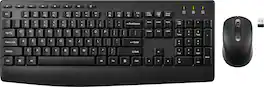
Ditch the cords and upgrade your computer setup with the Best Buy essentials Full-size Wireless Membrane Keyboard and Mouse Bundle with USB Receiver. The adjustable kickstand allows you to position the keyboard between three different heights to find the perfect angle to type across all 112 keys. Smoothly track across your desk with the 6-button, right-handed red light optical mouse. One AA battery for the mouse and two AAA batteries for the keyboard are included in the bundle, allowing you to use the product straight out of the box. Now let’s get typing!
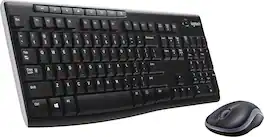
Meet all of your computer accessory needs with the Logitech MK270 Wireless Combo. A reliable wireless combo with a tiny Logitech plug-and-forget receiver. This keyboard and mouse combo features Logitech Advanced 2.4 GHz wireless, delivering the reliability of a cord with wireless convenience. Long-lasting battery life eliminates the hassle of frequently changing batteries.

Defy Boring with Pebble Keys 2 K380s minimalist keyboard made with recycled plastic. Its minimalist, streamlined shape and sleek curves make it as iconic as you and super portable. Hop across 3 devices with the Easy-Switch buttons on the Bluetooth keyboard and work faster with the Fn shortcut keys like screen capture, search, and more. Customize the 10 keyboard Fn shortcut keys to work how you want and save time with shortcuts in Logi Options+ App.
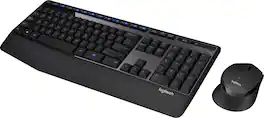
The Logitech Wireless Combo MK345 pairs a comfortable full-size keyboard with a right-handed mouse. It comes with comfortable and textured palm rest, spill-resistant design, and glossy finish. Its wireless connectivity gives the reliability of a cord plus wireless convenience and freedom. Its energy efficient engineering delivers 36-month keyboard and 18-month mouse battery life.
| Pros for Best Buy essentials™ - Full-size Wireless Membrane Keyboard and Mouse Bundle with USB Receiver - Black | |||
|---|---|---|---|
| Connectivity, Size, Overall Performance, Ease of Use, Key Feel | Keyboard Quality, Ease of use, Price, Wireless, Battery Life | Keyboard Quality, Size, Battery Life, Connectivity, Portability | Keyboard Quality, Ease of use, Wireless, Price, Battery Life |
| Cons for Best Buy essentials™ - Full-size Wireless Membrane Keyboard and Mouse Bundle with USB Receiver - Black | |||
| Mouse Performance, Button Layout | Lag, Connection | Number Pad | Lag |
Specs
Reviews
Customers are saying
Customers regard the Full-size Wireless Membrane Keyboard and Mouse Bundle with USB Receiver as a good product for its overall performance, ease of use, and connectivity. Many find the keyboard's size suitable and appreciate its battery life. However, some customers have expressed concerns about the mouse's comfort and the keyboard's button layout.
Customer Images
The vast majority of our reviews come from verified purchases. Reviews from customers may include My Best Buy members, employees, and Tech Insider Network members (as tagged). Select reviewers may receive discounted products, promotional considerations or entries into drawings for honest, helpful reviews.
- Rated 4 out of 5 stars
Nice set
Very good set. Connects easily. Once connected you just turn it on with an easy on-off button on bottom of the mouse. Battery install easy. Works great.
DarrylD Posted
- Rated 4 out of 5 stars
Best Buy Essentials wireless keyboard/mouse bundle
This Best Buy Essentials wireless keyboard and mouse bundle is a good choice if on a budget for sure. I have had zero issues with the keyboard. The mouse however is vert easy to click the right button by my finger only laying on top of it. Instead of doing a return, I added a band aid and a little waterproof medical tape to the top cover as shown in the picture included and it works fine for me.
Papaw Posted
- Rated 5 out of 5 stars
Reliable, Comfortable, and Perfect for a High-Prod
I am very pleased with the Best Buy essentials™ Full-size Wireless Membrane Keyboard and Mouse Bundle. For anyone who spends their day juggling complex projects and high-volume communication, this set is a fantastic addition to the desk. Smooth Performance & Ease of Use The "speed" and responsiveness of both the keyboard and mouse are impressive for a wireless setup. The 2.4GHz USB receiver provides a rock-solid connection with zero noticeable lag, which is essential when you're multitasking between different applications. It was truly a "plug-and-play" experience—I was up and running in seconds without any tedious software installation. Built for Comfort and Efficiency The keyboard features a full-size layout, which is a must-have for professional data entry and quick navigation. The membrane keys have a soft, quiet feel that makes long hours of typing much more comfortable. The mouse is equally reliable, with a contoured shape that fits the hand naturally, allowing for precise control and smooth scrolling through long documents or web pages. The Power of Simplicity What I appreciate most is how this bundle simplifies my setup. By using a single USB receiver for both devices, it keeps my workspace clean and frees up ports for other peripherals. It’s a powerful, straightforward solution that delivers exactly what it promises. Final Verdict If you’re looking for a dependable, no-nonsense keyboard and mouse bundle that can keep up with a heavy workload, this Best Buy essentials™ set is an incredible value. It’s efficient, comfortable, and built to handle a busy professional environment.
ChetH Posted