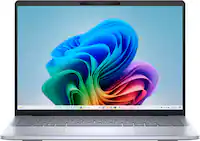
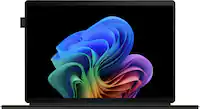
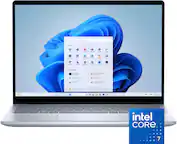
Acer - Refurbished Excellent - Swift Go 14 AI Ready Laptop – 14" WUXGA Touch – AMD Ryzen 7 8845HS – 16GB Memory – 1TB SSD - Steel Gray
Acer - Refurbished Excellent - Swift Go 14 AI Ready Laptop – 14" WUXGA Touch – AMD Ryzen 7 8845HS – 16GB Memory – 1TB SSD - Steel Gray
FREE shipping to
- Microsoft - Office 365 Personal (1 Person) (12-Month Subscription) - Activation Required - Windows, Mac OS, Apple iOS, Android [Digital]$99.99
![Microsoft - Office 365 Personal (1 Person) (12-Month Subscription) - Activation Required - Windows, Mac OS, Apple iOS, Android [Digital]](https://pisces.bbystatic.com/image2/BestBuy_US/images/products/fa90dd84-caf2-4bbe-86e9-18b037ea6563.jpg;maxHeight=160;maxWidth=166)
Related Item

Highlights
- Key Specs
- Screen Type: IPS
- Screen Size: 14 inches (Size of the screen, measured diagonally from corner to corner.)
- Screen Resolution: 1920 x 1200 (WUXGA) (Screens come in a range of resolutions (measured in pixels, horizontal x vertical). The higher the resolution, the greater the picture quality.)
- Touch Screen: true (Touch-screen devices make navigating more intuitive. Using a touch-screen display, you can do things such as tap to select, hold and drag to move items, swipe to scroll, and pinch to zoom.)
- Brightness: 400 nits (A measure of the total light output.)
- Processor Model: AMD Ryzen 7 8000 Series (Your computer's processor is like its brain. Working in combination with system memory, the power of the processor determines the complexity of software you can run, how many programs you can have open at the same time, and how fast those programs will run. Most computers feature an AMD, Intel or Snapdragon processor.)
- CPU Base Clock Frequency: 3.8 gigahertz (Actual central processing unit (CPU) speed may vary by device configuration and design. The average rate at which the processor is able to execute tasks under normal operating conditions as asserted by the manufacturer.)
- Storage Type: SSD
- Total Storage Capacity: 1000 gigabytes
- System Memory (RAM): 16 gigabytes (Random-access memory (RAM) is a computing device's short-term data storage, which allows active information to be accessed quickly. The size and type of RAM determines how efficiently the device can handle large amounts of information at one time. For example, gaming or video editing requires more RAM for optimal performance.)
- Graphics: AMD Radeon 780M (Often referred to as a "graphics processing unit" (GPU), this device is responsible for displaying image content and decoding/encoding video content in programs and games.)
- Display Connector(s): 1 x HDMI 2.1 (The number and type of connectors used to connect to an external display.)
- Battery Life (up to): 9.5 hours (Battery life will vary depending on the product configuration, product model, applications loaded on the product, power management setting of the product and the product features used by the customer. As with all batteries, the maximum capacity of this battery will decrease with time and usage.)
- Battery Chemistry: Lithium-ion
- 2-in-1 Design: false (A laptop and a tablet combined in one lightweight, portable device. Sometimes referred to as "convertible" or "hybrid" laptops, these devices deliver the processing power and keyboard of a laptop. When you're ready to play, either detach the screen or fold your 2-in-1 into tablet mode to comfortably watch movies, play games, read an e-book and more.)
- Backlit Keyboard: true (Integrated lights allow for visibility of the keys in low-light conditions.)
- General
- Brand: Acer
- Model Number: SFG14-63T-R1F4
- Product Name: Swift Go 14 AI Ready Laptop – 14" WUXGA Touch – AMD Ryzen 7 8845HS – 16GB Memory – 1TB SSD
- Color: Steel Gray
- Year of Release: 2024
- Display
- Display Type: LCD
- Screen Type: IPS
- Screen Size: 14 inches (Size of the screen, measured diagonally from corner to corner.)
- Screen Resolution: 1920 x 1200 (WUXGA) (Screens come in a range of resolutions (measured in pixels, horizontal x vertical). The higher the resolution, the greater the picture quality.)
- Touch Screen: true (Touch-screen devices make navigating more intuitive. Using a touch-screen display, you can do things such as tap to select, hold and drag to move items, swipe to scroll, and pinch to zoom.)
- Brightness: 400 nits (A measure of the total light output.)
- Color Gamut (Standard RGB): 100 percent
- Processor
- Processor Brand: AMD
- Processor Model: AMD Ryzen 7 8000 Series (Your computer's processor is like its brain. Working in combination with system memory, the power of the processor determines the complexity of software you can run, how many programs you can have open at the same time, and how fast those programs will run. Most computers feature an AMD, Intel or Snapdragon processor.)
- Processor Model Number: 8845HS
- CPU Base Clock Frequency: 3.8 gigahertz (Actual central processing unit (CPU) speed may vary by device configuration and design. The average rate at which the processor is able to execute tasks under normal operating conditions as asserted by the manufacturer.)
- CPU Boost Clock Frequency: 5.1 gigahertz (Actual central processing unit (CPU) speed may vary by device configuration and design. The maximum rate at which the processor is able to execute tasks, typically only used for a short period of time as needed. This rate may temporarily boost the processor's performance, but may result in overheating, shutdown, or damage to equipment if sustained.)
- Number of CPU Cores: 8-core (A core, or "brain" of a CPU, allows it to receive and execute instructions. Each core can work independently or together to perform parallel operations.)
- Neural Processing Unit (NPU): true (Whether the product comes with an integrated neural processing unit (NPU) that performs computations for AI (artificial intelligence) functions to increase proficiency of the CPU and reduce power consumption.)
- Maximum NPU Performance: 16 trillions operations per second (The maximum neural processing unit (NPU) computations performed. NPUs increase proficiency of the CPU and reduce power consumption for AI (artificial intelligence) functions.)
- Storage
- Storage Type: SSD
- Total Storage Capacity: 1000 gigabytes
- Solid State Drive Capacity: 1000 gigabytes (The amount of data that can be stored on the device's solid state drive (SSD). SSD is a flash-based storage with faster speeds than a hard disk drive (HDD).)
- Memory
- System Memory (RAM): 16 gigabytes (Random-access memory (RAM) is a computing device's short-term data storage, which allows active information to be accessed quickly. The size and type of RAM determines how efficiently the device can handle large amounts of information at one time. For example, gaming or video editing requires more RAM for optimal performance.)
- Type of Memory (RAM): LPDDR5X (Each type of RAM delivers a different level of speed, bandwidth, energy efficiency and performance.)
- Graphics
- Graphics Type: Integrated (Dedicated graphics uses a separate graphics card for processing video images. Because it does not use memory from the system's RAM, there is no extra burden on the CPU and graphics are processed more efficiently. Integrated graphics shares system RAM to process video images.)
- GPU Brand: AMD Radeon
- Graphics: AMD Radeon 780M (Often referred to as a "graphics processing unit" (GPU), this device is responsible for displaying image content and decoding/encoding video content in programs and games.)
- Compatibility
- Operating System: Windows 11 Home (The operating system manages all software and hardware, including files, memory and connected devices. Most importantly, it lets you interact with your device and your programs in a visual way; otherwise, you'd be typing computer code to get anything done.)
- Connectivity
- Display Connector(s): 1 x HDMI 2.1 (The number and type of connectors used to connect to an external display.)
- Number of HDMI Outputs (Total): 1
- USB Ports: 2 x USB-C 4, 2 x USB-A 3.2 (The number and type of USB ports the product has.)
- Number of USB Ports (Total): 4
- Number of USB-A Charging Ports: 1
- Number of USB-C Charging Ports: 2
- Headphone Jack: true (The device features an interface that allows for the connection of headphones.)
- Wireless Connectivity: Wi-Fi, Bluetooth (The manner in which a device sends data to another device over a short distance without the use of wires or cables.)
- Wireless Networking Standard: Wi-Fi 6E (The wireless networking standard used by the device. Each iteration of the standard developed by the Wi-Fi Alliance corresponds to an existing IEEE 802.11 protocol; for example, standard 802.11ac (or AC) is termed Wi-Fi 5. Refers specifically to the standard the device is designed to use, but ultimately determines product interoperability and backward compatibility including previous versions.)
- Cooling
- CPU Cooling System: Air
- Power
- Battery Life (up to): 9.5 hours (Battery life will vary depending on the product configuration, product model, applications loaded on the product, power management setting of the product and the product features used by the customer. As with all batteries, the maximum capacity of this battery will decrease with time and usage.)
- Battery Chemistry: Lithium-ion
- Camera
- Front-Facing Camera: true
- Built-In Microphone: true
- Features
- 2-in-1 Design: false (A laptop and a tablet combined in one lightweight, portable device. Sometimes referred to as "convertible" or "hybrid" laptops, these devices deliver the processing power and keyboard of a laptop. When you're ready to play, either detach the screen or fold your 2-in-1 into tablet mode to comfortably watch movies, play games, read an e-book and more.)
- Backlit Keyboard: true (Integrated lights allow for visibility of the keys in low-light conditions.)
- Touchpad Type: Multi-touch
- Audio Technology: DTS:X Ultra Audio
- Cable Lock Slot: Kensington Security Slot (K-Slot)
- Dimensions
- Product Height: 0.59 inches (The out of box height of the item. Height is measured as the vertical distance from the bottom of the item to the top as it would be primarily used or placed.)
- Product Width: 12.32 inches (The out of box width of the item. Width is measured as the horizontal distance from one side of the item to the other as it would be primarily used or placed.)
- Product Depth: 8.58 inches (The out of box depth of the item. Depth is measured as the distance from the front of the item to the back as it would be primarily used or placed.)
- Product Weight: 2.76 pounds (The out of box weight of the item.)
- Certifications Listings & Approvals
- ENERGY STAR Certified: false (Devices carrying the ENERGY STAR service mark, such as computer products and peripherals, kitchen appliances, and other products, generally use 20% to 30% less energy than required by federal standards.)
- EPEAT Qualified: false (The Electronic Product Environmental Assessment Tool (EPEAT) was designed to provide an environmental assessment tool for purchasers. In order to qualify for EPEAT, a product must meet all 23 required criteria.)
- Included
- Optical Drive Type: None (An optical disk drive (ODD) uses a laser light to read data from or write data to an optical disc. These discs include CDs, DVDs, and Blu-ray Discs. This allows you to play music or watch movies using prerecorded discs.)
- Numeric Keypad: false
- Warranty
- Warranty - Parts: 1 year
- Warranty - Labor: 1 year
- Other
- UPC: 195133246682
Say hi to the all new Swift Go 14 AMD—your AI PC featuring AMD Ryzen 7 8845HS processor equipped with Ryzen AI. A visually brilliant 14" WUXGA (1920 x 1200) 100% sRGB touch display and designed in an eye-catching, thin-and-light body with Windows 11 and Copilot for Windows that’s great on the go!
- Premium Performance on the Go: With the unparalleled performance of the AMD Ryzen 7 8845HS processor and built-in AMD Radeon 780M Graphics, the Swift Go 14 AI PC delivers premium experiences and optimized power performance—so you can effortlessly breeze through the most demanding of tasks.
- AI PC Ready for Tomorrow: Unlock the power of AMD Ryzen AI in the Swift Go 14 AI PC, which delivers up to 60% improved AI performance. Teamed up with Acer's own AI solutions, this provides an immersive and enjoyable AI experience that’s ready for the ever-evolving possibilities of AI technology.
- Indulge Your Eyes: The Swift Go 14 with a 14-inch 16:10 WUXGA (1920 x 1200) touchscreen display offers vivid color accuracy, remarkably deep blacks, and ultra-crisp image quality. The intuitive touchscreen provides effortless tapping and swiping
- The Connectivity: Boasting 2 USB Type-C (USB 4), 2 USB 3.2 Gen 1 ports (one supporting off-line charge), HDMI 2.1, Wi-Fi 6E and a MicroSD slot, the Swift Go has all the essential connections to keep your productivity powered on!
- Style Meets Substance: The expertly crafted Swift Go 14 smoothly opens with one hand while its thin and light aluminum body easily slips into your bag—and with a fully extendable 180° hinge, privacy shutter and a 44% larger OceanGlass touchpad, it's perfectly tailored for your on-the-go lifestyle.
- Enhance Your AI PC Experience: The 1440p QHD webcam with privacy shutter features Acer PurifiedVoice with AI Noise Reduction. Acer PurifiedView combines 3 key features (Background Blur, Automatic Framing and Gaze Correction) together with advanced AI algorithms that make you look more centric and confidently through e-meeting, live streaming and video calling.
- Copilot in Windows - your AI Assistant: Do more, quicker than ever across multiple applications with the centralized generative AI assistance of Copilot in Windows (in preview). Accessible with a single touch of the Copilot Key.
- Brand New Ways to Create: With new AI features in Windows 11 editing your stories, photos and videos gets easier.With AMD Ryzen AI to help you discover and harness the power of AI technology for work, play, and AI-enabled experiences.
- AcerSense: With a single click of the dedicated AcerSense button, laptop performance, maintenance, and customizing experiences can be seamlessly managed using the AcerSense utility app that features an Acer Experience Zone tab to easily locate the device’s AI features and receive updates.
Whats Included
- Laptop
- USB Type-C Power Adapter
- Power Cord
Q: What us the weight of this laptop?
A: 1.4kg or 2lbs, 15oz
Compare similar products
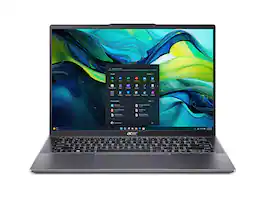
Say hi to the all new Swift Go 14 AMD—your AI PC featuring AMD Ryzen 7 8845HS processor equipped with Ryzen AI. A visually brilliant 14" WUXGA (1920 x 1200) 100% sRGB touch display and designed in an eye-catching, thin-and-light body with Windows 11 and Copilot for Windows that’s great on the go!

AI-Powered Performance for Days - Embrace the next level of AI performance where productivity is boosted, and ideas transform into reality. Swift 16 AI is your gateway to a smarter, more efficient digital life, powered by the Intel Core Ultra processor, with an NPU delivering up to 47 TOPS. Tap into a vast ecosystem of AI experiences across various apps, elevating your workflow to new heights..

No matter what adventure you chase, the 360° hinge gives you the flexibility to get things done, whether in tablet, tent, stand or laptop modes. An optional active pen allows for natural writing while taking notes or journaling.

Embrace the next level of AI performance where productivity is boosted, and ideas transform into reality. Swift 14 AI is your gateway to a smarter, more efficient digital life, powered by the AMD Ryzen AI 300 Series processor. From sparking creative brilliance to effortlessly handling multiple tasks, AI-powered computing transforms the way you work and play, redefining the possibilities of technology
| Pros for Acer - Refurbished Excellent - Swift Go 14 AI Ready Laptop – 14" WUXGA Touch – AMD Ryzen 7 8845HS – 16GB Memory – 1TB SSD - Steel Gray | |||
|---|---|---|---|
| There were no pros for this product— | There were no pros for this product— | Portability, Build Quality, Processor Speed, Touchscreen, Battery Life | There were no pros for this product— |
| Cons for Acer - Refurbished Excellent - Swift Go 14 AI Ready Laptop – 14" WUXGA Touch – AMD Ryzen 7 8845HS – 16GB Memory – 1TB SSD - Steel Gray | |||
| There were no cons for this product— | There were no cons for this product— | Weight, Fan Noise | There were no cons for this product— |
Specs




Reviews
Customer Images
The vast majority of our reviews come from verified purchases. Reviews from customers may include My Best Buy members, employees, and Tech Insider Network members (as tagged). Select reviewers may receive discounted products, promotional considerations or entries into drawings for honest, helpful reviews.
- Rated 4 out of 5 stars
Very Capable Laptop with Some Issues
It has been 9 days of regularly using my Acer Swift Go 14; the laptop certainly has had its few troubles but overall it has exceeded my expectations. At first startup, the laptop seemed to be running egregiously slow–even when running basic softwares like Google Chrome. After uninstalling bloatware, updating the graphics driver, and switching the battery settings to ‘best performance’ mode, its runtime dramatically improved. Poor internet connection may have contributed to its initial slow runtime. Despite not being marketed as a gaming laptop–I’m surprised by how well I am able to run some games. Web-based games like Roblox, while on its highest graphics settings, run at an average 60 FPS, casual games like Minecraft (highest settings) run 79 FPS, and Dead by Daylight runs at 64 FPS at its lowest settings. I have not tested intense graphics heavy games like Cyberpunk 2077 or GTA V. I have noticed that prolonged gaming of more intense games can cause the laptop to overheat and crash. So far, this has only happened once. Placing the laptop on a warmer surface (like my lap, with a blanket) could contribute to its heat spike. Device accessories like cooling pads would work well if intending to use the Acer Swift Go for decent gaming. The device’s cooling fans can become somewhat loud. It becomes most noticeably consistent when playing games–but otherwise is quiet/silent when using the device for photo editing, streaming, and web browsing. I am not bothered by the volume of the fans when gaming and do not find it to be disruptive. Compared to other touch-screen laptops, the Acer Swift Go’s matte screen finish prevents noticeable finger prints when using it. Occasionally, the touch screen will inexplicably stop working (not receiving/responding to touch). Going into ‘Device Manager’ and disabling then enabling the affected device under “Human Interface Devices” easily fixed this issue for me. I do not heavily rely on the use of an integrated web cam, but while testing it a few times I have had friends comment on video latency or low quality graphics. Poor internet connection could have contributed to such issues. Overall, the Acer Swift Go 14 has surpassed my expectations. Streaming, browsing, and graphic design have all been exceedingly fast and easy to do. Despite not being marketed as a gaming-compatible laptop, I have found very little issues while gaming (such as; crashing from overheating). You may encounter some issues; bloatware causing slow runtimes, somewhat-loud cooling fans, and the touch screen occasionally disabling. I have found all of the software issues to be easy to fix and the loud fans have not been overly disruptive or hindering while using the laptop.
StevenL Posted