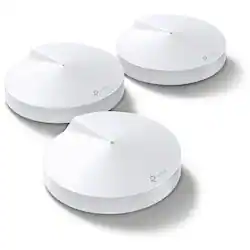
TP-Link - Deco M9 Plus – AC2200 Smart Home Mesh WiFi System -(3-pack)
- General
- Brand: TP-Link
- Model Number: AC2200
- Product Name: Deco M9 Plus – AC2200 Smart Home Mesh WiFi System -(3-pack)
- Security
- Firewall Type: SPI (The method the firewall uses to filter and process data to increase network security, primarily by blocking malicious traffic requests while allowing legitimate traffic through.)
- Network
- Ethernet Standard: 10/100/1000 (Each standard is a variation of the IEEE 802.3 set of computer networking technologies known as Ethernet. New versions evolved to include higher bandwidth, different physical media, and other new and improved features. Standards are often denoted by speeds (in Megabits per second). For example, a 10/100/1000 Ethernet port transmits at 10 Mbps, 100 Mbps, and 1000 Mbps (1 Gbps).)
- Frequency Band: 2.4 GHz, 5.0 GHz (Bands may be grouped into categories such as low- and high-band VHF (Very High Frequency), low- and high-band UHF (Ultra High Frequency), or certain frequency channels (measured in MHz or GHz). Generally, higher frequencies transmit information faster but have shorter range than lower frequencies.)
- Wireless Standard: AC (The wireless networking protocol used by the device. Each iteration of the protocol is based on the 802.11 standard developed by the Institute of Electrical and Electronics Engineers (IEEE) Standards Association. Denoted by letters following 802.11 (802.11a, 802.11ac, etc.), each version, published in alphabetical order, encompasses all previous versions.)
- Certifications Listings & Approvals
- ENERGY STAR Certified: false (Devices carrying the ENERGY STAR service mark, such as computer products and peripherals, kitchen appliances, and other products, generally use 20% to 30% less energy than required by federal standards.)
- Features
- Integrated Modem: false
- Wireless: true
- Ports
- Port Type(s): RJ-45, USB (USB 2.0 connects external drives, gaming controllers, smartphones, MP3 players and other accessories.USB 3.0 transfers data faster than USB 2.0, but only when used with USB 3.0 devices.USB Type-C provides fast speeds and versatile power, featuring connectors with identical ends that plug in upside down or right side up. Adapters allow for video as well as backward compatibility.Thunderbolt provides ultra-high bandwidth for fast data transfer between devices featuring a Thunderbolt or MiniDisplayPort connection.HDMI allows you to connect a projector or display HD media on your HDTV or monitor.Media card slots allow you to transfer photos from your digital camera or camcorder.)
- Other
- UPC: 845973081553
Deco is the simplest way to guarantee a strong Wi-Fi signal in every corner of your home. Enjoy fast and secure tri-band Wi-Fi no matter how many devices you have. Deco M9 Plus is much more than just a Wi-Fi system, able to act as a hub for all your smart home devices. Simply works with a variety of Zigbee, Bluetooth, Wi-Fi devices. Three separate Wi-Fi bands deliver super-fast, stable connections to devices in every room of your home. More bandwidth is freed up with dedicated wireless links between Deco units. Say goodbye to lag with AC2200 WiFi system. Deco M9 Plus uses not only 5G_1(867Mbps) as wireless backhaul but also 5G_2(867Mbps) and 2.4G(400Mbps) as backhaul while traffic gets heavy, delivering speeds over 1000Mbps which is ideal for your gigabit fiber.
- Whole Home Coverage: Deco M9 Plus (3-pack) uses a system of units to achieve seamless whole-home WiFi coverage up to 6,500 sq. ft. — eliminate weak signal areas once and for all!
- Tri-Band Speeds: Reach speeds up to 2200 Mbps with the tri-band Deco M9 Plus.
- TP-Link Mesh Technology: With advanced Deco Mesh Technology, units work together to form one unified whole-home network with the same network name. Deco automatically chooses the best connection for your device as you move throughout your home
- Dynamic Backhaul: A dynamic backhaul up to 1.5 Gbps ensures you have fast, stable connections throughout your home.
- Built-in Smart Hub: Deco M9 Plus acts as a hub for your wireless and smart home devices. Adjust settings and create interactions from one app.
- Connect More Devices: Deco can handle traffic from even the busiest of networks, providing lag-free WiFi connection for over 100 devices.
- TP-Link HomeCare: A free lifetime subscription to TP-Link HomeCare protects your family with personalized security features, including Parental Controls, built-in Antivirus and Quality of Service (QoS).
- Easy Setup: Setup is easier than ever — The Deco app will walk you through setup step by step.
A: The USB port appears to be restricted to "future use". It is able to charge / power devices, but NOT exchange data with them.
Q: Will this work with xfinity xFi router/gateway?
A: Yes, however it's preferable to disable any other wireless that your existing router may already be using.
A: No, the Deco M9 Plus has a separate, dedicated 5GHz band, to ensure optimal performance for the WiFi backhaul. That being said, you can use the Dynamic Backhaul feature by combining both WiFi and/or Ethernet backhaul options per your preference within your network. Yes, once you have installed the Deco M9 Plus successfully, you can connect LAN/Ethernet devices to the available Ethernet port(s) on each Deco M9 unit and they will have network access.
Q: Is this compatible with CenturyLink internet service? Other mesh systems I tried are not.
A: Call up your provider tech help and tell them what you are trying to do and they should be capable of telling you how to add a Mesh system to their router. Further to this, you are best to go to https://community.tp-link.com/en/ for more on this question.
A: The Deco M9 Plus (3-pack) is designed to provide up to 6,500 square feet of coverage and connectivity for over 100 devices.
Q: Will these work with AT&T's Pace 5268AC Gateway
A: Yes, you can connect the primary Deco unit to your existing network via Ethernet. Depending on your preference, you can set the Deco up in Router Mode or in Access Point Mode.














