
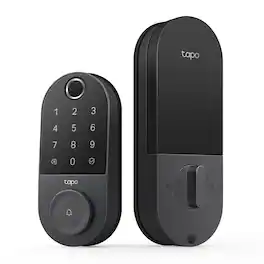
TP-Link - Tapo DL100 Smart Wi-Fi Deadbolt Door Lock – Keyless Tactile Buttons, App-Controlled Custom Access, Fits Standard Doors - Black
TP-Link - Tapo DL100 Smart Wi-Fi Deadbolt Door Lock – Keyless Tactile Buttons, App-Controlled Custom Access, Fits Standard Doors - Black
Highlights
- Key Specs
- Color Finish: Black
- Lock Type: Deadbolt
- Lock/Unlock Mechanism: App, Electronic guest keys, Keypad, Key (There are several technologies used by smart locks to manage access, such as biometrics, Bluetooth, or NFC. Some locks allow codes to be entered via a keypad or touchscreen; digital keys can often be sent to multiple authorized devices or temporarily shared with guests.)
- Power Source: Battery-powered
- Installation Type: Replacement
- Wireless Connectivity: Bluetooth, Wi-Fi (The manner in which a device sends data to another device over a short distance without the use of wires or cables.)
- General
- Brand: TP-Link
- Model Number: Tapo DL100
- Product Name: Tapo DL100 Smart Wi-Fi Deadbolt Door Lock – Keyless Tactile Buttons, App-Controlled Custom Access, Fits Standard Doors
- Color: Black
- Color Finish: Black
- Features
- Finish: Black
- Lock Type: Deadbolt
- Lock/Unlock Mechanism: App, Electronic guest keys, Keypad, Key (There are several technologies used by smart locks to manage access, such as biometrics, Bluetooth, or NFC. Some locks allow codes to be entered via a keypad or touchscreen; digital keys can often be sent to multiple authorized devices or temporarily shared with guests.)
- Auto Unlock: true (Locks with this feature automatically unlock when certain conditions are met, such as coming within range of a home wireless network or when activated via a mobile app.)
- Unlock Notifications: true
- Shareable Keys: true (This feature allows a single key to be shared with multiple users or authorized devices.)
- Number of Keypad Codes Supported: 200 (Multiple keypad codes can be programmed to allow temporary access for guests, deliveries, and more while keeping primary codes secure.)
- Remote Monitoring Capabilities: true (Monitor)
- Power
- Power Source: Battery-powered
- Rechargeable Battery: false
- Battery Size: AA (The battery size required for operation.)
- Number of Batteries Required: 4
- Batteries Included: true (Indicates whether the product comes with the required batteries for its operation.)
- Compatibility
- Installation Type: Replacement
- App Compatible: true (The product can be connected to a program or software application on a mobile device, which then receives collected data from the product.)
- Wireless Connectivity: Bluetooth, Wi-Fi (The manner in which a device sends data to another device over a short distance without the use of wires or cables.)
- Works With: Amazon Alexa, Google Home, SmartThings (Compatible with or able to be connected to other smart devices or applications.)
- Warranty
- Warranty - Parts: 1 year limited
- Warranty - Labor: 1 year limited
- Other
- UPC: 840460601023
Upgrade your home security with the TP-Link Smart Door Lock — the perfect blend of convenience, control, and peace of mind. Keypad entry or the Tapo app, and manage access from anywhere with remote locking and real-time alerts. With advanced encryption, tamper detection, and auto-lock features, you get enhanced security without sacrificing ease of use. Whether you're home or away, TP-Link puts smarter, safer access at your fingertips.
- Quick & Easy Installation: Tapo DL100 offers hassle-free setup with all mounting tools included
- AA Battery Powered: Lasts up to 200 days in Wi-Fi mode or 300 days in Bluetooth mode. Includes easy battery replacement and a USB-C port for emergency power. 4xAA batteries included.
- Smart Wi-Fi Deadbolt Door Lock: Convenient and secure, the DL100 provides certified, durable deadbolt security with thoughtful smart features for enhanced convenience.
- Multiple Ways to Unlock: Keyless keypad, energy-efficient Bluetooth for nearby access, remote Wi-Fi via the Tapo App, voice commands with PIN verification, and 2 backup keys for peace of mind.
- Convenient and Secure Access: Manage access effortlessly by creating groups for family, guests, or visitors in the App - no physical keys required.
- Keyless Tactile Buttons: Skip the hassle of keys with up to 200 customizable codes. Our smart lock features a backlit keypad for nighttime use and the option to enter your passcode in between random digits for added security.
- Stay Informed, Control from Anywhere: Receive real-time alerts, check door status, and lock or unlock it remotely with the App. Set custom profiles for family and guests, and track all activity with timestamps to see who accessed your home and when.
- Protect with Auto-Lock and PIN Attempt Limiter: Automatically lock after use with customizable intervals, and guard against unauthorized access by locking the system after a set number of failed unlock attempts
- Certified for Durability: BHMA Grade 3 certification ensures long-lasting reliability and can withstand daily use for years. With an IP54 weatherproof rating, this product also protects against rain, dust, and dirt.
- Smart Home Integration: Compatible with Alexa, Google Home, and Samsung SmartThings for one-app management. Say a voice control and PIN to Alexa and Google Assistant to lock or unlock the door.
- Door Compatibility: Installs on the standard lock hole sizes of 2-1/8'' (54mm) and 1-1/2'' (38mm). No drilling, no extra holes, no hassle.
Whats Included
- 1 x Tapo DL100 Smart Wi-Fi Door Lock
- 1 x Installation Mounting Plate
- 1 x Latch Bolt
- 1 x Strike Plate
- 1 x Dust Box
- 1 x Battery
- 1 x USB Adapter Cable
- 1 x Physical Key
- 1 x Set of Screws
- 1 x Quick Start Guide
Disclaimers
- 1. Battery life is based on Tapo laboratory tests. Actual battery life may vary due to device settings, usage, router specifications, and environmental factors.
- 2. External only.
- 3. Speed is based on Tapo laboratory tests. Actual speed may vary due to device settings, usage, router specifications, and environmental factors.
Q: What happens when the batteries die?
A: If the batteries die, you can use one of the two included physical keys, or you can connect a charge bank to a USB-C connector built into the bottom of the exterior keypad faceplate to temporarily power the lock.
A: Hi Musicmama, The Tapo DL100 supports 2.4 GHz Wi-Fi connectivity. Many Wi-Fi routers that support 5 GHz also support 2.4 GHz, providing "Dual-Band" Wi-Fi connectivity. If your router supports Dual-Band Wi-Fi and the 2.4 GHz band is enabled, the DL100 can join your network with ease during setup in the Tapo app.
Q: Does the app notify when the battery is low? If the battery is not working and need to be changed?
A: Yes, the app displays the battery percentage and pushes notifications to you directly if it is low.
Q: Is the keypad required to be installed or can I keep the key hole original to the door.
A: You have to use the keypad. it comes with its own set of physical keys too so you have a backup option
A: This is an installation issue. I installed myself on 3 doors and I had to trim out some wood on one door to make the deadbolt fit correctly.
Q: Does this lock work with Alexa? If yes is set up easy?
A: Yes, this lock works with both of my smart home assistants: Alexa and Google Home.
Q: What is the temperature range for this device ? Can I withstand freezing Midwest winter
A: It worked well for me in Wisconsin on detached garage with temperatures down to -20F
Compare similar products

Upgrade your home security with the TP-Link Smart Door Lock — the perfect blend of convenience, control, and peace of mind. Keypad entry or the Tapo app, and manage access from anywhere with remote locking and real-time alerts. With advanced encryption, tamper detection, and auto-lock features, you get enhanced security without sacrificing ease of use. Whether you're home or away, TP-Link puts smarter, safer access at your fingertips.

Meet Yale Code, the non-connected door lock that brings key-free entry to your door an an approachable price point. Ideal for those who are new to electronic locks, or just want an affordable way to upgrade their home, Yale Code has a simple DIY installation process that doesn’t require any professional help, and there’s no app or phone set-up is needed. Create and store up to 20 key-free entry codes directly in the lock itself, and share secure and convenient access with friends, family, housemates, caretakers, and more. The backlit keypad ensures that you can easily read its numbers for entry at any time of day, and the backup key allows all members of your household to choose their preferred way to unlock the door. With its sleek design and low profile, Yale Code looks great on any door while bringing trusted security to your home.
Unlock convenience and security with Tapo DL110. Its lightning-fast fingerprint sensor unlocks your door in under 1 second, and the ultra-long battery life keeps it powered for up to 1 year. Access in six different ways: by fingerprint recognition, using custom passcodes on the keypad, manage from anywhere with Wi-Fi, via close-range Bluetooth, your smart home assistant, or by using the included backup keys. Manage residents and guests with ease by creating custom permanent, one-time or scheduled passcodes. Pair with your Amazon Alexa, Google Home or Samsung SmartThings for hands-free voice operation and mangement. Security features such as auto-lock, real-time alerts for suspicious activity, and a detailed activity log give you ultimate peace of mind. Finally, the Tapo DL110 boasts a hassle-free installation with all necessary tools included so that you can take control of your front door security in no time.

Experience ultra-fast, convenient keyless door unlocking and seamless smart home integration to your new and existing automation devices with eufy Smart Lock E31. Stop fumbling for keys when your hands are full and unlock your front or back door in less than 0.3 seconds using just your fingerprint. The lock’s intelligence improves fingerprint recognition with each use, ensuring quick access for your family. Enjoy multiple door unlocking options: eufy App, built-in keypad, included physical key, or voice commands via Siri, Alexa or Google Assistant. Seamlessly link eufy’s Matter-supported smart lock to your current smart home ecosystem using your existing home automation hub. It features compatibility with all major smart home ecosystems, including Apple Home, Google Home, Alexa, and SmartThings for easy, hands-free management of your Smart Lock and more. It pairs with Apple HomePod or other smart devices to experience simple setup, guest access management, real-time notifications, event logs, and remote unlocking.
| Pros for TP-Link - Tapo DL100 Smart Wi-Fi Deadbolt Door Lock – Keyless Tactile Buttons, App-Controlled Custom Access, Fits Standard Doors - Black | |||
|---|---|---|---|
| Installation Ease, Overall Performance, Battery Life, Connectivity, Button Layout | Installation Ease, Build Quality, Security, Keypad Illumination, Locking Mechanism | Battery Life, Overall Performance, Installation, Ease of use, Fingerprint Recognition | Overall Performance, Battery Life, Installation, Ease of Use, Fingerprint Sensor |
| Cons for TP-Link - Tapo DL100 Smart Wi-Fi Deadbolt Door Lock – Keyless Tactile Buttons, App-Controlled Custom Access, Fits Standard Doors - Black | |||
| There were no cons for this product— | Connectivity | There were no cons for this product— | There were no cons for this product— |
Specs
Reviews
Customers are saying
Customers appreciate the Tapo DL100 Smart Lock for its easy installation and overall performance, noting its attractive design. They also value the connectivity features, which allow access through a cellphone, and the reliable battery life. Additionally, users find the button layout and app integration to be well-designed and user-friendly.
Customer Images
The vast majority of our reviews come from verified purchases. Reviews from customers may include My Best Buy members, employees, and Tech Insider Network members (as tagged). Select reviewers may receive discounted products, promotional considerations or entries into drawings for honest, helpful reviews.
- Rated 5 out of 5 stars
Easy Access
As the reviews stated, installing the deadbolt yourself is simple but expect some bumps along the road if your door slots are uneven lol. Besides that, enjoy easy access into your home without the worries of having your keys. It also has an auto-lock timer and an app to operate the deadbolt. And lastly for safety, if the batteries die and you can’t get in, keep a spare in a lockbox outside the door.
Iammsfree Posted
- Rated 5 out of 5 stars
Great value
I was very easy to install, and it is working great
GonzaloC Posted
- Rated 5 out of 5 stars
I normally don’t do this, but a win is a win!!!
This is the best purchase I ever made. No more looking for keys or wetting myself LOL. I never been so happy. The setup was easy I did it by myself within 20 minutes. If you’re thinking, think no more just do it!! You won’t regret it.
My2tys Posted