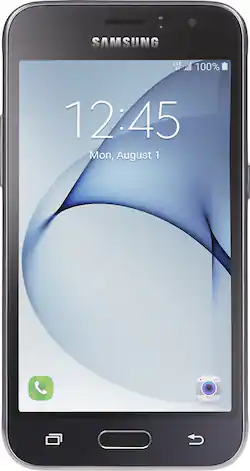
Tracfone - Samsung Galaxy Luna 4G LTE with 8GB Memory Prepaid Cell Phone
- Key Specs
- Screen Size: 4.5 inches (Size of the screen, measured diagonally from corner to corner.)
- Rear-Facing Camera: 5 megapixels
- Built-in Storage: 8 gigabytes
- Phone Memory (RAM): 1.5 gigabytes (Random-access memory (RAM) temporarily stores data so that it can be accessed quickly. The size of the RAM determines how efficiently the phone can handle large amounts of information at once, such as switching between several open apps.)
- General
- Product Name: Samsung Galaxy Luna 4G LTE with 8GB Memory Prepaid Cell Phone
- Brand: Tracfone
- Model Number: TFSAS120VC3PWP
- Display
- Screen Size: 4.5 inches (Size of the screen, measured diagonally from corner to corner.)
- Screen Resolution: 800 x 480 (Screens come in a range of resolutions (measured in pixels, horizontal x vertical). The higher the resolution, the greater the picture quality.)
- Screen Type: Other
- Camera
- Integrated Camera: Yes - Front and Back
- Front-Facing Camera: 2 megapixels
- Rear-Facing Camera: 5 megapixels
- Network
- Carrier: Tracfone
- Mobile Hotspot Capability: true (A hotspot-enabled device is able to connect wirelessly to a cellular network and share the connection via Wi-Fi with nearby compatible devices.)
- Power
- Battery Capacity: 2050 milliampere hours (The amount of energy stored in the battery.)
- Compatibility
- Charging Interface(s): Micro-USB (The connection for transmitting power to charge the device.)
- SIM Card Size: Nano SIM
- SIM Card Slots: Single SIM
- Features
- Sensors: Proximity sensor (Detects stimuli such as heat, light, sound, motion, or pressure and responds accordingly by operating a control or initiating a function of the device.)
- Built-in Storage: 8 gigabytes
- Performance
- Operating System: Android 6.0.1 Marshmallow (The operating system manages all software and hardware, including files, memory and connected devices. Most importantly, it lets you interact with your device and your programs in a visual way; otherwise, you'd be typing computer code to get anything done.)
- Processor Brand: Qualcomm
- Processor Speed: 1.2 gigahertz (Actual central processing unit (CPU) speed may vary by device configuration and design. Also referred to as clock speed, this is how quickly the central processing unit (CPU) can receive and interpret instructions. The higher the number, the more operations per second that can be completed. Working in combination with system memory, the power of the processor determines the complexity of software you can run.)
- Phone Memory (RAM): 1.5 gigabytes (Random-access memory (RAM) temporarily stores data so that it can be accessed quickly. The size of the RAM determines how efficiently the phone can handle large amounts of information at once, such as switching between several open apps.)
- Other
- UPC: 616960171409
Talk with family or access the internet with this TracFone Samsung Galaxy Luna smartphone. Android 6.0.1 Marshmallow OS provides dependable support for apps, while 8GB internal storage lets you transfer your contact list. This TracFone Galaxy Luna smartphone features a large 4.5-inch screen, making it ideal for everything from video-conferencing to gaming.
- Qualcomm MSM8916 processor: Quad-core 1.2GHz processor and 1.5GB of RAM deliver outstanding overall performance for opening and running applications, flipping through menus, running home screens and more.
- Android 6.0 Marshmallow OS: Smart battery usage and simple fingerprint recognition — all in a familiar layout. Google Now on Tap takes what's already on your screen and provides intuitive shortcuts to relevant info.
- 4G LTE speed: Provides fast Web connection for downloading apps, streaming content and staying connected with social media.
- 4.5" touch screen: Large, clear screen lets you browse apps, view photos and watch videos in crisp detail.
- 5.0MP rear-facing camera: Capture images and videos on the go. Built-in LED light. Also includes a 2MP front-facing camera.
- 8GB internal memory plus microSD slot: Provides ample room to house your contacts, music, apps and photos. Expand storage up to 128GB by adding a microSD card (sold separately).
- Use your smartphone as a mobile hotspot: Share your 4G data connection with other compatible wireless devices.*
- Ultra Power Saving mode lets you keep your phone powered on for longer in between charges: This mode changes your screen to black and white and shuts down all unnecessary features to dramatically minimize battery consumption.
- Access to Google Play: Browse and download apps, magazines, books, movies, and television programs directly to your phone.
- Listen to your favorite tunes: Store and play your MP3 files on your phone.
Whats Included
- Samsung GALAXY Luna
- 2050 mAh Battery
- Power adapter
A: Hi. Yes. If you have your current phone number and service active, we can transfer it over to the new device, also this device has the Triple Minutes promotion.
Q: Does this phone come with a sim card?
A: Hi. Yes, this device has a nano SIM card assigned for you to activate it.
Q: How do I transfer things from my lg tracfone to this new phone? pictures, notes, contacts, etc
A: Good day, linloc. If your old phone is a basic phone, you could send the content via email or Bluetooth. If both phones are Android, you may use our Transfer Wizar application: https://play.google.com/store/apps/details?id=com.tracfone.generic.mobiletransfer&hl=es
Q: Is this a GSM phone or a CDMA phone?
A: Hi. This is a CDMA technology device.
Q: Hi there. Can I use this phone with safe link ? If yes, what do I need to do? Thank You.
A: Yes, this phone works with safelink, I just transferred my service and same number. Go to Tracfone.com, click on activate. Enter the MEID number on the red card that comes with your new phone. It will then take you to different choices of how you want to activate the service. Choose transfer current phone to new phone. It will show you where to put your old phone info (MEID) and phone number. Then the new phone info (MEID), that's the number on the red card. If you can't find your old phone's MEID, it should be on the back under the battery cover, you might even have to take the battery out to find it. Hit submit and the transfer will be done automatically, it only took my service about 15 minutes to transfer. Make sure both phone's are on. When the old phone stops working, turn off your new phone and back on again, then make a call. Your Done!!
A: No, this smartphone is compatible with microSD card.
A: Hello, Woody. In order to get access to its interactive manual, please click on the link below: http://tracfone.devicebits.com/tracfone/home.seam?custId=TFSAS120VL&locale=en_US
A: GPS apps that display location supposedly work without the SIM however I don't know how well without the assistance of the cell towers. Maps will not work without the SIM, unless you're on Wi-Fi, since the map data must be downloaded from the internet.




















