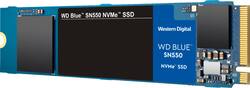
WD - Blue SN550 500GB PCIe Gen 3 x4 NVMe Internal Solid State Drive with 3D NAND Technology
- Key Specs
- Storage Capacity: 500 gigabytes (Measured in megabytes (MB), gigabytes (GB) and terabytes (TB), this is the amount available for storing files, music, movies, photos and more. The total includes the capacity of the hard disk drive and solid state drive if both are included on the computer.)
- Storage Drive Type: SSD (Traditional, mechanical hard disk drives are the most common type of storage because they're relatively inexpensive and offer huge capacities. However, they also generate both noise and heat. Solid state drives, also known as SSDs, are many times faster than hard disk drives and have no moving parts to wear out, but typically offer less capacity for the same price.)
- Maximum Read Speed: 2400 megabytes per second (The greatest speed at which the device can read information; for example, opening files.)
- Maximum Write Speed: 1750 megabytes per second (The greatest speed at which the device can write information; for example, saving files.)
- Interface(s): PCIe Gen 3 x4 (Refers to the types of connections that devices use to interact and communicate with each other.)
- General
- Product Name: Blue SN550 500GB PCIe Gen 3 x4 NVMe Internal Solid State Drive with 3D NAND Technology
- Brand: WD
- Model Number: WDBA3V5000ANC-WRSN
- Capacity
- Storage Capacity: 500 gigabytes (Measured in megabytes (MB), gigabytes (GB) and terabytes (TB), this is the amount available for storing files, music, movies, photos and more. The total includes the capacity of the hard disk drive and solid state drive if both are included on the computer.)
- Performance
- Storage Drive Type: SSD (Traditional, mechanical hard disk drives are the most common type of storage because they're relatively inexpensive and offer huge capacities. However, they also generate both noise and heat. Solid state drives, also known as SSDs, are many times faster than hard disk drives and have no moving parts to wear out, but typically offer less capacity for the same price.)
- Maximum Read Speed: 2400 megabytes per second (The greatest speed at which the device can read information; for example, opening files.)
- Maximum Write Speed: 1750 megabytes per second (The greatest speed at which the device can write information; for example, saving files.)
- Heatsink: false (Dissipates heat during intense operation for sustained peak performance.)
- Compatibility
- Internal Or External: Internal
- Product Compatibility: Desktop computers, Laptop computers
- Interface(s): PCIe Gen 3 x4 (Refers to the types of connections that devices use to interact and communicate with each other.)
- Operating System Compatibility: Windows
- Features
- Security Features: None
- Data Encryption: false
- Usage: Performance computing, Gaming, Everyday computing
- Memory
- NAND Flash Memory Type: 3D NAND (Single Level Cell (SLC) stores 1 bit of data per memory cell; Multi Level Cell (MLC) stores 2 bits per cell, Triple Level Cell (TLC) 3 bits, and Quad Level Cell (QLC) 4 bits. Vertical NAND (V-NAND) or 3D NAND stores more data by layering cells vertically. Similarly, there are 3D MLC, 3D TLC and 3D QLC stacked cells.)
- Dimensions
- Product Height: 0.1 inches (The out of box height of the item. Height is measured as the vertical distance from the bottom of the item to the top as it would be primarily used or placed.)
- Product Width: 0.9 inches (The out of box width of the item. Width is measured as the horizontal distance from one side of the item to the other as it would be primarily used or placed.)
- Product Weight: 0.2 ounces (The out of box weight of the item.)
- Included
- Included Software: WD SSD Dashboard
- Other
- UPC: 718037871264
Put NVMe™ power at the heart of your PC for lightning-fast, ultra-responsive performance. The WD Blue™ SN550 NVMe™ SSD can deliver over 4 times the speed of our best SATA SSDs. Whether you’re working, creating or processing large amounts of data, take advantage of this powerful internal drive’s high speeds to do more, faster. Available in capacities up to 2TB* in an affordable M.2 2280 form factor, there’s no time like now to make the change to NVMe.
- Think small: Build powerful small-form-factor PCs with a slim single-sided M.2 2280 PCIe Gen3 x4 NVMe SSD.
- Boost your performance: Get sequential read speeds up to 2400MB/sec to improve your productivity no matter what you're doing or creating.
- Limited warranty: Five-year limited warranty.
- M.2 2280 Interface is backwards compatible: With PCIe Gen3 x2, PCIe Gen2 x4, PCIe Gen2 x2, and PCIe Gen2 x1.
- Right storage for your next PC: NVMe goes mainstream with a powerful, cost-effective storage solution that adds to the reliability of an SSD.
- Do more with less: Scalable NVMe hardware and accelerated architecture enable both high performance and low power consumption that maxes out at only 3.5W.
- Do more, faster: WD-designed controller and firmware are paired with 3D NAND for optimized, consistent performance.
- Continuing legacy: Thousands of hours of hardware, firmware, and validation testing combine to advance the WD Blue™ heritage of quality and reliability.
Whats Included
- Blue SN550 NVMe 500GB Internal PCI Express 3.0 x4 Solid State Drive with 3D NAND Technology
- WD SSD Dashboard
- Quick Install Guide
Q: Can someone use this in a Desktop? On a Desktop motherboard?
A: It says you can. Form M.2
Q: Does this come with the screws also?
A: It takes one screw. And no it does not. I used the original screw from the computer. It worked fine. Hope that helps.
Q: Will this work in a HP Notebook-15-dw1083wm laptop?
A: Hi BigJohn, The WD Blue SN550 NVMe SSD can deliver up to 4 times the speed of SATA SSDs. Whether you’re working, creating or processing large amounts of data, take advantage of this powerful internal drive’s high speeds to do more, faster. Moreover, we recommend you to please contact to your host device support to check whether the drive will fit and support. In order to know more about the drive refer to the link: https://products.wdc.com/library/SpecSheet/ENG/02-01-WW-04-00050.pdf -Need Help? Please see our "'Contact Us" page for information.
Q: Can I use this with a hdd that is already installed and working on my desktop?
A: Yes, if your PC has an extra cable. Your HHD will have 1 cable from the power supply and 1 (smooth, flat) cable from the motherboard. You'll need another cable from the motherboard. If you want to use your existing OS, your Windows PC can use WD's included Acronis software (a download from WD's website) to clone your HHD to the new drive. You'd then swap the motherboard attachments of the cables, hoping that you won't have to change the computer's bootup routine. Now your PC will boot 50 times faster (or so it will seem) and you can use your old HHD for storage.
A: Hi bigjack75707, Thank you for showing your interest in the WD SSD. In Order to know the compatibility. I would request you to please contact the Motherboard or computer manufacturer. Need Help? Please see our "'Contact Us" page for information.