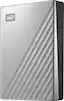
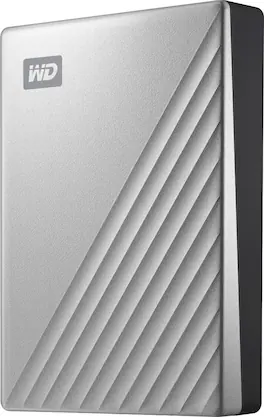
WD - My Passport Ultra 4TB External USB 3.0 Portable Hard Drive - Silver
Storage Capacity
4000GBColor
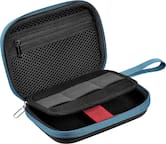
Silver- Insignia™ - Portable Hard Drive Case - Black$12.99

More Buying Options
Related Item

Specifications
- Storage Capacity4000 gigabytesStorage Drive TypeHDDMaximum Read Speed0 megabytes per secondMaximum Write Speed0 megabytes per secondInterface(s)USB-C (USB 3.1 Gen1)
- Key Specs
- Storage Capacity: 4000 gigabytes (Measured in megabytes (MB), gigabytes (GB) and terabytes (TB), this is the amount available for storing files, music, movies, photos and more. The total includes the capacity of the hard disk drive and solid state drive if both are included on the computer.)
- Storage Drive Type: HDD (Traditional, mechanical hard disk drives are the most common type of storage because they're relatively inexpensive and offer huge capacities. However, they also generate both noise and heat. Solid state drives, also known as SSDs, are many times faster than hard disk drives and have no moving parts to wear out, but typically offer less capacity for the same price.)
- Maximum Read Speed: 0 megabytes per second (The greatest speed at which the device can read information; for example, opening files.)
- Maximum Write Speed: 0 megabytes per second (The greatest speed at which the device can write information; for example, saving files.)
- Interface(s): USB-C (USB 3.1 Gen1) (Refers to the types of connections that devices use to interact and communicate with each other.)
- General
- Brand: WD
- Model Number: WDBFTM0040BSL-WESN
- Product Name: My Passport Ultra 4TB External USB 3.0 Portable Hard Drive
- Color: Silver
- Capacity
- Storage Capacity: 4000 gigabytes (Measured in megabytes (MB), gigabytes (GB) and terabytes (TB), this is the amount available for storing files, music, movies, photos and more. The total includes the capacity of the hard disk drive and solid state drive if both are included on the computer.)
- Performance
- Storage Drive Type: HDD (Traditional, mechanical hard disk drives are the most common type of storage because they're relatively inexpensive and offer huge capacities. However, they also generate both noise and heat. Solid state drives, also known as SSDs, are many times faster than hard disk drives and have no moving parts to wear out, but typically offer less capacity for the same price.)
- Maximum Read Speed: 0 megabytes per second (The greatest speed at which the device can read information; for example, opening files.)
- Maximum Write Speed: 0 megabytes per second (The greatest speed at which the device can write information; for example, saving files.)
- Compatibility
- Internal Or External: External
- External Hard Drive Type: Portable (Physical characteristics of the hard drive, including size, weight and how you connect to your device.)
- Interface(s): USB-C (USB 3.1 Gen1) (Refers to the types of connections that devices use to interact and communicate with each other.)
- Minimum System Requirements: Windows / 8.1 / 10, Reformatting required for macOS and other operating systems
- Features
- Security Features: Password Protection
- Data Encryption: true
- Encryption Algorithm: 256-bit AES (The algorithm standard used to encrypt data on a device.)
- Usage: Everyday computing, Backup
- Lighting Type: None
- Power
- Power Source: USB port
- Dimensions
- Product Height: 0.8 inches (The out of box height of the item. Height is measured as the vertical distance from the bottom of the item to the top as it would be primarily used or placed.)
- Product Width: 3.21 inches (The out of box width of the item. Width is measured as the horizontal distance from one side of the item to the other as it would be primarily used or placed.)
- Product Weight: 8.1 ounces (The out of box weight of the item.)
- Included
- Included Software: WD Security, WD Drive Utilities, WD Backup, WD Discovery
- Warranty
- Warranty - Parts: 3 years
- Warranty - Labor: 3 years
- Other
- UPC: 718037864112
Move essential data across devices efficiently with this Western Digital My Passport Ultra External Portable Hard Drive. The drive uses USB 3.0 technology for quick read and write speeds, and the USB-C connector offers effortless plug-in options while boosting transfer rates. Abundant storage space for all types of media and applications. The backup software lets you automatically save works in progress at your preferred intervals. Password protection and 256-bit AES hardware-based encryption for added security. 
- 4TB storage capacity: Provides ample space for storing documents, photos, music and more.
- USB 3.0 interface: Offers an easy-to-use connection to devices. Backward compatible with USB 2.0 for simple connection to your computer. USB-powered.
- Social friendly.: Included WD Discovery software lets you connect to popular social media and cloud storage services like, Dropbox and Google Drive
- Automatic backup options: The My Passport Ultra drive comes equipped with WD Backup software to help make sure everything you create while on your own life journey - photos, videos, music and documents - doesn’t get lost.
- Locked down.: The My Passport Ultra’s built-in 256-bit AES hardware encryption with password protection helps keep your digital life's contents secure.
- Portable design: Lets you take your data on the go.
- 4TB storage capacity: Provides ample space for storing documents, photos, music and more.
- USB 3.0 interface: Offers an easy-to-use connection to devices. Backward compatible with USB 2.0 for simple connection to your computer. USB-powered.
- Social friendly.: Included WD Discovery software lets you connect to popular social media and cloud storage services like, Dropbox and Google Drive
- Automatic backup options: The My Passport Ultra drive comes equipped with WD Backup software to help make sure everything you create while on your own life journey - photos, videos, music and documents - doesn’t get lost.
- Locked down.: The My Passport Ultra’s built-in 256-bit AES hardware encryption with password protection helps keep your digital life's contents secure.
- Portable design: Lets you take your data on the go.
- 4TB storage capacity: Provides ample space for storing documents, photos, music and more.
- USB 3.0 interface: Offers an easy-to-use connection to devices. Backward compatible with USB 2.0 for simple connection to your computer. USB-powered.
- Social friendly.: Included WD Discovery software lets you connect to popular social media and cloud storage services like, Dropbox and Google Drive
- Automatic backup options: The My Passport Ultra drive comes equipped with WD Backup software to help make sure everything you create while on your own life journey - photos, videos, music and documents - doesn’t get lost.
- Locked down.: The My Passport Ultra’s built-in 256-bit AES hardware encryption with password protection helps keep your digital life's contents secure.
- Portable design: Lets you take your data on the go.
Whats Included
- My Passport Ultra Portable Storage
- Quick install guide
- USB-C cable with USB 3.0 adapter
- WD Discovery software* for WD Backup, WD Security and WD Drive Utilities (*Internet activation required)
- My Passport Ultra Portable Storage
- Quick install guide
- USB-C cable with USB 3.0 adapter
- WD Discovery software* for WD Backup, WD Security and WD Drive Utilities (*Internet activation required)
- My Passport Ultra Portable Storage
- Quick install guide
- USB-C cable with USB 3.0 adapter
- WD Discovery software* for WD Backup, WD Security and WD Drive Utilities (*Internet activation required)
Q: Can I get cloud storage with this product?
A: Yes, you can get free 500GB WD 2Go cloud storage and FILERECOVERY software.
Q: Does this hard drive have password protection?
A: Yes, this hard drive has password protection for added security.
Q: What kind of software is included with this hard drive?
A: This hard drive includes WD Security, WD Drive Utilities, WD Backup, and WD Discovery software.
Q: Is the encryption hardware based on this portable hard drive?
A: Yes, the encryption is hardware-based with 256-bit AES.
Q: Does this drive require reformatting for Mac OS?
A: Yes, reformatting is required for Mac OS.
Q: Can I automatically back up my files with this drive?
A: Yes, you can automatically save works in progress with the backup software.
Q: What kind of encryption algorithm does this drive use?
A: This drive uses a 256-bit AES encryption algorithm.
A: Mine came with a cord that has a USB-C type plug on both ends. It came with a USB-A adapter. You can take the adapter and plug it into either end of the cord and that end will plug into any of the USB ports on your laptop or desktop. The other end plugs into the USB-C port on the external hard drive itself.
Compare similar products
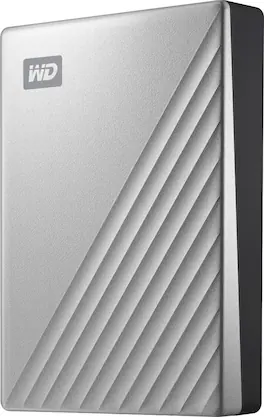
Move essential data across devices efficiently with this Western Digital My Passport Ultra External Portable Hard Drive. The drive uses USB 3.0 technology for quick read and write speeds, and the USB-C connector offers effortless plug-in options while boosting transfer rates. Abundant storage space for all types of media and applications. The backup software lets you automatically save works in progress at your preferred intervals. Password protection and 256-bit AES hardware-based encryption for added security.
Access and save data quickly on this Western Digital My Passport Ultra drive for Mac. The hard drive uses USB 3.0 technology and USB-D connectivity to maximize plug-in options. Keep your files safe with the included security software, offering encryption and password protection. Its modern metal design complements your Mac, and out of the box, it’s formatted for macOS and Time Machine compatibility.

Store, share and transport files with the lightweight Western Digital My Passport Portable Hard Drive. The SuperSpeed USB port lets you transfer large files in seconds and 256-bit AES hardware encryption helps keep your files secure. The My Passport provides enough space to store thousands of files and documents. Auto backup capability allows you to select the time and frequency of file transfers.

Help safeguard your cherished memories effortlessly with the easystore portable hard drive. Designed for your on-the-go lifestyle, this compact device offers seamless plug-and-play connectivity. Preserve your photos, videos, and important files with ease, thanks to the included backup software. Your memories deserve exceptional protection, and easystore helps ensure that every precious moment is seamlessly stored, so you can relive them whenever, wherever.
| Pros for WD - My Passport Ultra 4TB External USB 3.0 Portable Hard Drive - Silver | |||
|---|---|---|---|
| Storage Capacity, Ease of use, Reliability, Size, USB-C | Ease of use, Storage, Size, Overall Performance, Speed | Storage, Ease of use, Reliability, Size, Price | Storage Capacity, Ease of use, Reliability, Price, Size |
| Cons for WD - My Passport Ultra 4TB External USB 3.0 Portable Hard Drive - Silver | |||
| Software, Cable Length | Noise Level | Software, Noise, Heat | Software, Noise, Heat |
Specs


Reviews
Customers are saying
Customers commend the My Passport Ultra 4TB for its substantial storage capacity and user-friendly design. Many appreciate its reliability and compact size, making it ideal for travel. While the inclusion of USB-C compatibility is a plus for modern devices, some users have expressed a desire for a longer cable and clearer instructions for the transfer software.
- Storage Capacity (190)
- Ease of use (130)
- Reliability (109)
- Cable Length (4)
- Software (4)
Customer Images
The vast majority of our reviews come from verified purchases. Reviews from customers may include My Best Buy members, employees, and Tech Insider Network members (as tagged). Select reviewers may receive discounted products, promotional considerations or entries into drawings for honest, helpful reviews.
- Rated 5 out of 5 stars
Running good with 4K editing.
Its easy and it does not having me problems yet. Im editing in 4K and i have my doubts about this HD because is old, but everything goes well with Davinci Resolve and 4K without proxys. So, well done.
Manuel Posted
- Rated 5 out of 5 stars
Great for Time Machine. Good value.
I bought this for Time Machine on my wife's iMac. Since it's her business machine, backup is vital. It must be reformatted for the time machine back up, but that's quick and easy enough. Almost automatic, but not quite. I gave her 3TB for Time Machine and 1TB for project storage. The "Mac experts" recommend three times the HD space for time Machine backups. So again, being her business machine that's what I did, just to be sure. So far, it's great. It's silent and small, its powered by USB C, so it just sits out of the way doing its vital job. WD has always been a good brand, and the passport a good product to my experience with them. Recommended.
MandKArms Posted
- Rated 4 out of 5 stars
SSD uses a lot of the storage capacity
The SSD uses some of your storage capacity and it's quite a bit. Thus, even though it says 4 Terabytes it is really more like 3TB of space after the 1TB used for the system. They should advertise that so it is not false advertising.
Augie Posted
Explore tech essentials Sponsored
- $229.99The price was $623.99