Yale - Smart Lock with Matter, Designed for Google Home; Electronic Deadbolt with Pushbutton Keypad - Ash
Color
AshRelated Item

Highlights
- Key Specs
- Color Finish: Gray
- Lock Type: Deadbolt
- Lock/Unlock Mechanism: Keypad, Key, Electronic guest keys, Voice assistant (There are several technologies used by smart locks to manage access, such as biometrics, Bluetooth, or NFC. Some locks allow codes to be entered via a keypad or touchscreen; digital keys can often be sent to multiple authorized devices or temporarily shared with guests.)
- Power Source: Battery-powered
- Installation Type: Replacement
- Wireless Connectivity: Matter, Wi-Fi (The manner in which a device sends data to another device over a short distance without the use of wires or cables.)
- General
- Brand: Yale
- Model Number: YRD510-MT1-ASH
- Product Name: Smart Lock with Matter, Designed for Google Home; Electronic Deadbolt with Pushbutton Keypad
- Color: Ash
- Color Finish: Gray
- Features
- Finish: Grey
- Lock Type: Deadbolt
- Lock/Unlock Mechanism: Keypad, Key, Electronic guest keys, Voice assistant (There are several technologies used by smart locks to manage access, such as biometrics, Bluetooth, or NFC. Some locks allow codes to be entered via a keypad or touchscreen; digital keys can often be sent to multiple authorized devices or temporarily shared with guests.)
- Auto Unlock: true (Locks with this feature automatically unlock when certain conditions are met, such as coming within range of a home wireless network or when activated via a mobile app.)
- Unlock Notifications: true
- Number of Keypad Codes Supported: 250 (Multiple keypad codes can be programmed to allow temporary access for guests, deliveries, and more while keeping primary codes secure.)
- Power
- Power Source: Battery-powered
- Rechargeable Battery: false
- Battery Size: AA (The battery size required for operation.)
- Number of Batteries Required: 4
- Batteries Included: true (Indicates whether the product comes with the required batteries for its operation.)
- Compatibility
- Installation Type: Replacement
- App Compatible: true (The product can be connected to a program or software application on a mobile device, which then receives collected data from the product.)
- Wireless Connectivity: Matter, Wi-Fi (The manner in which a device sends data to another device over a short distance without the use of wires or cables.)
- Operating System Compatibility: Android, Apple iOS
- Works With: Google Home, Amazon Alexa, SmartThings, Apple Home (Compatible with or able to be connected to other smart devices or applications.)
- Voice Assistant Built-in: Google Assistant, Amazon Alexa (A digital assistant built into the device that uses voice commands to answer questions and control smart devices.)
- Performance
- Minimum Operating Temperature: -22.0 degrees fahrenheit (The lowest recommended ambient (surrounding) temperature in which the product can ideally operate stated by the manufacturer. Generally long-term exposure of the product to temperatures less than the minimum can result in ineffective operation.)
- Maximum Operating Temperature: 140 degrees fahrenheit (The highest recommended ambient (surrounding) temperature in which the product can ideally operate stated by the manufacturer. Generally long-term exposure of the product to temperatures more than the maximum can result in ineffective operation.)
- Warranty
- Warranty - Parts: Lifetime limited warranty on Finish and Mechanical. Two years on Electronics
- Warranty - Labor: Not applicable
- Other
- UPC: 081023117357
The Yale Smart Lock, designed to work seamlessly with Google Home, allows users to manage access from anywhere*, create passcodes for guests, and get real-time alerts when someone comes and goes. With Matter technology, it connects effortlessly to Google Home as well as other Matter-enabled products in your home for a smooth and connected smart home experience. This keyed, push button lock offers multiple unlocking options, IPX5 rating for enhanced weather resistance as well as is rated ANSI/BHMA Grade 2. With easy installation and optimized battery life, securing your home has never been more convenient. *Remote access requires Matter-enabled hub.
- Built with Matter onboard: A unified technology that makes smart devices work seamlessly together across brands, giving you the freedom to use your favorite Matter-enabled app and product (Matter-enabled hub required for remote access)
- Control from anywhere: Use the Google Home app to create and share entry codes and see who comes and goes (Matter-enabled hub required for remote access)
- Voice control: Use Google Assistant to lock your door hands-free with voice commands, so you never have to reach for your keys
- Multiple ways to unlok: Always have access to your home with custom entry codes, the app, or a physical key
- Works with most entry doors: Don't worry about fit, it replaces deadbolts on standard US and Canada entryway doors and includes an adaptor for small bore holes (for doors 1 ½”)
Whats Included
- Yale Smart Lock with Matter
- Yale Door Sense
- Deadbolt
- Strike Plate
- Mounting Hardware, Installation Instrutions, 4 AA Batteries
Q: Will this work for Anderson sliding glass door?
A: No, this does not. Yale does offer Patio locks specifically for Anderson. Please check out the link: https://shopyalehome.com/search?q=patio. If you have any additional questions, please get in touch with [email protected] or call 855-213-5841.
Compare similar products

The Yale Smart Lock, designed to work seamlessly with Google Home, allows users to manage access from anywhere*, create passcodes for guests, and get real-time alerts when someone comes and goes. With Matter technology, it connects effortlessly to Google Home as well as other Matter-enabled products in your home for a smooth and connected smart home experience. This keyed, push button lock offers multiple unlocking options, IPX5 rating for enhanced weather resistance as well as is rated ANSI/BHMA Grade 2. With easy installation and optimized battery life, securing your home has never been more convenient. *Remote access requires Matter-enabled hub.
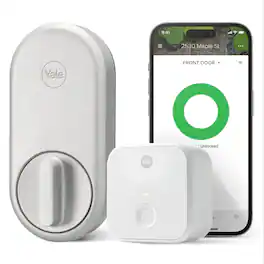
Embrace a key-free and worry-free lifestyle with Yale's very first retrofit smart lock: the Yale Approach Lock with Wi-Fi. This sleek and modern lock seamlessly integrates with your front door and makes accessing your home simpler and more convenient than ever before. The Yale Approach lock installs on the inside of your door without replacing your existing deadbolt, so no DIY experience is needed, and you can keep your keys. Paired with a Yale Connect, stay in control of your door by sharing virtual keys and locking or unlocking your door-from anywhere. Thanks to the Yale Access app’s Activity Feed, keep tabs on your door at all times and know when friends, family and vacation rental guests come and go. For ultimate peace of mind, Auto-Lock with Doorsense ensures that your door is always locked behind you, giving you one less thing to worry about. Hands full? Let Yale get the door by enabling Auto-Unlock. Pair with the Yale Keypad to unlock even more ways to access your home.

YALE ASSURE 2 TOUCH. A lock as unique as you. Make coming home more seamless with the Yale Assure Lock 2 Touch built-in Wi-Fi. Thanks to the new biometric keypad, a simple touch of your finger is all it takes. Explore multiple ways to access your home including hands-free Auto-Unlock, back-up key, or your phone or Apple Watch from anywhere

You've got enough on your plate, let Yale get the door. Fitting into any lifestyle, this lock offers increased convenience and security giving you one less thing to worry about during your day. With multiple ways to unlock, the ability to share and track entry codes, and advanced Auto-Lock with DoorSense, the Yale Assure Lock 2 protects your home and family. Add a Yale Smart Module to control your lock from your smartphone or voice assistant when you’re away from home.
| Pros for Yale - Smart Lock with Matter, Designed for Google Home; Electronic Deadbolt with Pushbutton Keypad - Ash | |||
|---|---|---|---|
| Overall Performance, Installation Ease, Connectivity, Battery Life, Keypad Responsiveness | There were no pros for this product— | Ease of use, Installation, Overall Performance, Design, Security | Ease of use, Installation, Security, Design, Bluetooth |
| Cons for Yale - Smart Lock with Matter, Designed for Google Home; Electronic Deadbolt with Pushbutton Keypad - Ash | |||
| There were no cons for this product— | There were no cons for this product— | Battery Life | Battery Life, Auto Unlock, Instructions |
Specs
Reviews
Customer Images
The vast majority of our reviews come from verified purchases. Reviews from customers may include My Best Buy members, employees, and Tech Insider Network members (as tagged). Select reviewers may receive discounted products, promotional considerations or entries into drawings for honest, helpful reviews.
- Rated 5 out of 5 stars
Yale Smart Lock w/ Matter and Thread
I was super excited to install the new Yale Smart Lock w/ Matter. As someone who has integrated both Google Home and Apple HomeKit into their home, I only use products that support both ecosystems. With the addition of Matter, this has simplified my setup even more. Physical install was simple. Start to finish it took me maybe 10 minutes. The included instructions were clear and I've installed many locks, including smart locks, so I consider myself to be quite experienced. Setting up the lock in your smart home app of choice comes with a bit more complication. There are 2 methods to do this. 1: via the Yale app. 2: Via matter in any of the smart home apps. Matter also requires a hub, so do your research before opting for Matter is this is an option you want. Setting up via the Yale app is simple. Download the app, sign in to an account, add the device following the instructions. The whole things takes roughly 10 minutes tops. Setting up via Matter is also extremely simple if you've met all the requirements and know what to do. The included instruction are terrible here and do NOT help in any way. Fortunately, experience and luck was on my side. I also want to note, you cannot use the Yale app if you choose Matter. You must do one or the other. I started with Google Home since this device was built for that platform in mind. Google Home actually walked me through some additional steps which included pressing and holding the gear icon (bottom left of the num pad) until it started blinking white. Once it is in this state, it is in Matter pairing mode. You can scan the Matter QR code located to the right of the device back plate. From there, it added to my Google Home in a matter of minutes. I then had to generate a new Matter code from the Google Home app, then open Apple HomeKit and use that new code to setup the divide there. You can only use the default code for Matter once, then you need to use the originating app to generate codes for other apps. Google Home and Apple HomeKit work perfect with the lock. Locking, Unlocking, setting automations, setting PIN codes are all easy. A default PIN code is created by each app to start, but you can generate "guest codes" or simply invite family or friends to the app to share the lock with. Manual locking is as you expect, easy. Works just as a typical lock. From inside you twist the knob, outside you can use a key just like a normal lock. This is also great for times when the battery dies when not at home. The keypad is straight forward to use as well. Pressing the Yale logo at the top initiated locking the door when leaving. The aesthetic of the lock is super nice and fits well with other Google Home products. It's modern and generic enough though to match really any ecosystem or house. I have not had the lock enough to fully test battery life, but after a few weeks of use, the battery is still showing 100% and appears to use minimal power. Once you know how to set this up, it's super simple and I'd highly recommend it to anyone familiar with Matter, or, looking to just use the built in Yale app.
This review is from Yale - Smart Lock with Matter, Designed for Google Home; Electronic Deadbolt with Pushbutton Keypad - Snow
Posted by elitegangsta
- Rated 5 out of 5 stars
Most wide-integrated & responsive smart lock
I’m so happy with this Matter Yale smart lock. I already own three smart locks from another brand, but I specifically chose this model to replace my old Yale Nest lock, which I’ve been using since 2016. The installation was straightforward and flawless. I removed my old lock, installed the new Yale, and it fit perfectly without needing any extra tools or adjustments. Once the lock, deadbolt, and strike plate were in place, I inserted the batteries and powered it up. After a short chime, I opened the Google Home app and since the lock is designed to work with it and added the device using the Matter code located on the side of the lock where the batteries are housed. I like that the code is permanently attached to the lock, eliminating the need to store it elsewhere for future use. After adding the lock to Google Home, I went to the device settings, opened the “Matter apps and services” section, and retrieved the pairing code to also connect it to my Apple HomeKit. That setup was flawless. The lock’s design is elegant, blends beautifully with my backyard door, and the color and build quality are excellent, it feels premium, not cheap. Beyond the aesthetics, what I truly appreciate is the seamless Matter over Thread integration with Apple HomeKit, SmartThings, and Amazon Alexa. This cross-platform compatibility means I can control the lock from any smartphone, anywhere, using my Google device as a hub, even when away from my home Wi-Fi. What sets this lock apart from other brands is its reliability and speed. The moment I hit “unlock/lock,” whether through voice control or my iPhone’s HomeKit app, it responds instantly in the blink of an eye. In contrast, my other locks can take up to 30 seconds to execute the same command, while Yale executes immediately. Since I use Google, Apple, and Amazon ecosystems, this smart lock is a perfect fit. It offers multiple unlocking options: a physical key, entry code, app control, and even Google Assistant voice commands to lock it. I’m extremely satisfied with this purchase.
This review is from Yale - Smart Lock with Matter, Designed for Google Home; Electronic Deadbolt with Pushbutton Keypad - Snow
Posted by Zaid
- Rated 4 out of 5 stars
Almost great except for some quirks
This Yale lock has great design, ease of use and perfect Google connectivity. It has good functionality but it has some quirks that are hard to ignore, most especially for my home. Let me line them up: PROS 1) Hardware is very easy to install. It fits perfectly in my previous lock and I did not even need to look at the instructions manual. Compnents slide easily in, without any modifications to my door. 2) Software setup and integration is easy as well. My home is a Google home enabled. I do not have a Matter-enabled router, but I have 2nd gen hubs. I just followed the steps to install it, and it was easily included in my Google home system. Passcodes are easy to add per user. 3) Google home integration is great. I can easily lock/ unlock it with a press of a button even remotely, all from my dashboard. It also has voice integration but I’ll discuss that in my con. Google app activity is easily monitored so I know who goes in and out. The app has a vacation mode option where it disables any code from being used when the mode is enabled. 4) The design is great. It is light and seemingly hollow but is sturdy. I got the white one (though my doorbell is color ash- lol). It looks sleek. 5) Though I have not tried it, I believe I can re-key this, based on what I see with the hardware. I have a Kwikset system for all my doors so I only use one key (which I do not use, really, because I have been using digital keypads for years now), but I know if compatible with re-keying for Yale locks. I just need to find time to actually leave my main door without a lock for a couple of hours to bring the Yale lock to the locksmith to have it re-keyed; so I use the same key for all. Out-of-the-box, this Yale lock comes with a physical key, as it should, so I duplicated it, for now, for the adults in the household. The included key is of high quality steel. 6) The keypad has a nice feel. It is easy to press and the feedback of the buttons are very responsive. It has indicator sounds as well that helps to know activity. 7) I am on my third week of use. We have three adults and a million kids who go through the door a lot. I would say, the lock is used AT LEAST 40 times in one day. That is conservative. Battery still says 100%. CONS 1) This Yale lock requires a separate door sensor to know if the door is open or closed. Some locks nowadays just need straight calibration from the device without a need for a sensor. 2) Auto-lock intervals are far apart. The fastest time it will auto lock is 30 seconds from the time I close the door. Everytime I leave, we have to press the YALE button so that it manually locks. Same as when we come in, we need to make sure we turn the dial to lock so it locks. My front door is by a busy curb. Someone can just follow me, wait a while until I go in, and open the door behind me. My previous lock will automatically lock once the door closes and it will send out an alarm if the door is left ajar—this Yale lock does not have that immediate auto lock option which gives my home some vulnerability in terms of security. 3) The keypad is a little bit of a dust magnet. Especially with dry dusty California, I can feel the dust rest on top of the keypad. It does not get dirty, but I can feel that dust texture on the keypad especially after gardener days. 4) This is a tricky assessment because the keypad also integrates the key. It is good because it comes as one device on the bolt, so it makes the design better. However, unless I get it re-keyed (which I placed as a possible PRO), it will use a different key from the doorknob it is installed with. Would have been great to have it just on the bolt dial so I don’t have to change keys. It is not great if you live in an apartment. 5) The voice integration could have been great, but in order to unlock it, I have to say my passcode out loud. If it only recognized my voice signature, which google does for other apps, where I just use my voice any the responses are custom to me, that would have been good, so it will not have to ask for the passcode. But it does. The personal pin is a password. No one says their password out loud. I have 4 kids at home. I am not handing out home keys to them, same as any other snooping neighbor especially if the windows are open for any conversation to be heard. This is more of a security risk. 6) This is my biggest con, there is no child lock. My toddler can easily reach out for the lock and unlock the door himself. I have a doorknob right below it that I can lock as a safety feature, but locking the doorknob disables the ability to unlock the door digitally. So we have to be extra vigilant or else I might have a toddler running on the street. Some other locks have a lock stopper that requires extra adult strength to unlock the bolt at a second phase or the dial. This one does not. This Yale Smart Lock with Matter is almost a great lock if you can live with it’s quirks. Like any other lock, there is something to improve on. However, for me, the quirks are quite important for me to give this a perfect score. It is still a good lock. Perhaps they can perfect these quirks for the next iteration. If you’re looking for a lock that matches seamlessly with Google Home, and like its design, this could be good for you. If you have toddlers or small kids, you might have to find a supplemental child safety feature to your door, or this might not be for you.
This review is from Yale - Smart Lock with Matter, Designed for Google Home; Electronic Deadbolt with Pushbutton Keypad - Snow
Posted by DarR