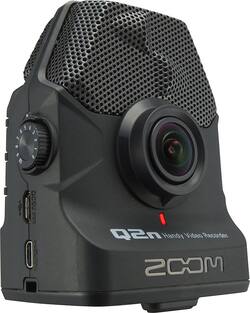
Zoom - Q2n Handy HD Action Camera - Black
- Key Specs
- Effective Pixels: 3 megapixels (The actual number of pixels which make up the viewable image.)
- General
- Product Name: Q2n Handy HD Action Camera
- Brand: Zoom
- Model Number: Q2N
- Color: Black
- Imaging
- Image Sensor Type: CMOS (CCD and CMOS are the two main technologies used in image sensors. CCD, the older of the two types, turns analog light signals into digital pixels. This conversion happens without distortion, resulting in high-quality images. Newer CMOS sensors use transistors at each pixel to move electrical charges. CMOS sensors are typically less expensive, but also require more light to create distortion-free images.)
- Digital Zoom: 1.5x (A digital zoom is accomplished electronically, with no adjustment of the camera's optics, and no optical resolution gained in the process. The existing data is not enhanced or added to, merely displayed at a lower resolution, thereby giving an illusion of an enlarged image.)
- Optical Zoom: None (The optical zoom uses a combination of lenses that magnify the image prior to it being registered at high resolution by the imaging sensor.)
- Image Stabilization: None (This feature helps reduce image/video blur or distortion that may occur from unsteady motion.)
- 360 Degree Capture: false (The capability of the product to record an image incorporating a 360 degree point of view.)
- Low Light/High Sensitivity: true (High sensitivity digital imaging devices are designed to work in low light conditions to produce a high dynamic range image.)
- Exposure Control
- Effective Pixels: 3 megapixels (The actual number of pixels which make up the viewable image.)
- Display
- Display Type: LCD
- Screen Size: 1.77 inches (Size of the screen, measured diagonally from corner to corner.)
- Aspect Ratio: 16:9 (The measurement of the width of a screen compared to the height of a screen, expressed as a ratio.)
- Touch Screen: true (Touch-screen devices make navigating more intuitive. Using a touch-screen display, you can do things such as tap to select, hold and drag to move items, swipe to scroll, and pinch to zoom.)
- Video
- Slow Motion Recording: false
- Video Encoding Formats: MOV (The process of preparing the video for output, where the digital video is encoded to meet proper formats and specifications for recording and playback with the use of a compatible device.)
- Compatibility
- Tripod/Monopod Mountable: true (A support function that allows the device to be mounted to monopods and tripods for leveling and stability.)
- Socket Size: 1/4 in.
- Memory Card Compatibility: microSD, microSDHC (The type of memory card(s) recommended for use with the product.)
- Features
- Face Detection: true (A function that automatically detects human faces and then sets focus and appropriate exposure to capture them.)
- Action Camera: true
- Integrated Speaker(s): true
- Night Recording: false (The ability to capture and record video in low-light conditions, typically via infrared light or intensifier tubes that amplify existing light to illuminate the scene.)
- Wind Noise Reduction: true (If you take a lot of outside videos, in windy conditions, you'll need to make sure you have wind noise reduction on your camcorder. It does just what it says it does, cuts down the noise of the wind as it hits the microphone.)
- Connectivity
- Output(s): HDMI, USB 2.0, 3.5mm audio
- Microphone Input: true (The device features an input for connecting an external microphone.)
- Headphone Jack: true (The device features an interface that allows for the connection of headphones.)
- Charging Interface(s): Other (The connection for transmitting power to charge the device.)
- Power
- Rechargeable Battery: true
- Removable Battery: true
- Battery Size: AA (The battery size required for operation.)
- Included
- Batteries Included: true (Indicates whether the product comes with the required batteries for its operation.)
- Remote Control Included: false
- Dimensions
- Product Height: 3.4 inches (The out of box height of the item. Height is measured as the vertical distance from the bottom of the item to the top as it would be primarily used or placed.)
- Product Width: 2.6 inches (The out of box width of the item. Width is measured as the horizontal distance from one side of the item to the other as it would be primarily used or placed.)
- Product Depth: 1.8 inches (The out of box depth of the item. Depth is measured as the distance from the front of the item to the back as it would be primarily used or placed.)
- Product Weight: 0.2 pounds (The out of box weight of the item.)
- Filter Diameter: 55 millimeters
- Other
- UPC: 884354017422
The Zoom Q2n gives you a fast and easy way to create HD videos with high-impact audio. The built-in X/Y microphones capture sound with beautiful stereo imaging. And the 160º lens excel in an array of lighting conditions - whether you're filming at home, in a rehearsal space, or at a club.
- 1.77" color LCD display: Gives you a clear view of the action you're recording or reviewing.
- CMOS sensor: Offers stunning detail and clarity with both video and still images.
- Wide-angle lens: Designed for precise image capture.
- Voice recording: Save commentary using the built-in stereo microphone.
- MicroSD card slot: Supports microSD Card, microSDHC Card and microSDXC Card.
- HDMI and USB 2.0 interfaces: For high-speed video transfer. USB streaming capability allows the camcorder to function as a webcam.
Whats Included
- Zoom Q2n Handy HD Action Camera
- 2xAA batteries
- Owner's Manual
A: Certainly can! I just tested this with the newest firmware update. I ran hmdi micro adapter to hdmi cable to TV. Shows live feed with minimal latency (even during recording) and plays back as well. Wonderful feature!
Q: Could this be used with a remote control? If so, what would be compatible?
A: Sorry no remote control capability. This is really a set it and let it shoot. In my case, this is not really a deal breaker. I use the file and edit with post production software so editing is not an issue.
Q: The camera stops recording sometimes after,3, 5, 7 minutes. How come?
A: Are you using a Zoom recommended micro card? If the writing speed of the card you are using is too slow the device will stop recording.
A: Im thinking of options to skin your cat a few ways: 1) send into q2n via the 1/8" external input of your pre-recorded audio during a video recording if you're not concerned of time alignment. 2) record a video separately with q2n then utilize a video editor and or audio editor. Most popular free & easy & satisfy your mentioned needs are: Microsoft Movie Maker and Audacity.
Q: Can the zoom q2n be set up so that's its used as a webcam through my Tv.. via hmdi/ micro. Cable ?
A: Technically yes, but when I put it in Webcam mode it quickly exited with an error as soon as I tried to access it as a webcam in MS Windows. Research showed that there was a firmware upgrade to fix this. I really didn't need the webcam so I never updated. It functions as a standard USB webcam. Whether it can do HDMI-out in webcam mode, I can't say . The USB port is fragile and mine quit working. Its a great camcorder but I think the USB and webcam aspects need improvement.
Q: Can you live stream with it?
A: Yes, you can use Q2n as a high-quality webcam for streaming over the web using YouTube Live or other popular streaming platforms.
Q: USB port not working for power in or card reader out.is this repairable?
A: I had the same issue. Some USB cables only handle data, not power too. Check your cable.












