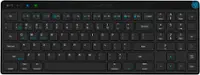
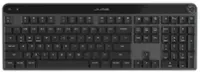
Alogic - Echelon USB-C Compact Rechargeable Wireless Keyboard for macOS - Wireless Connectivity - Bluetooth/RF - Compact - White
Alogic - Echelon USB-C Compact Rechargeable Wireless Keyboard for macOS - Wireless Connectivity - Bluetooth/RF - Compact - White
Related Item

Specifications
- Form FactorCompact (60%)Connection TypeWireless
- Key Specs
- Form Factor: Compact (60%) (The size, arrangement, and physical configuration of the product.)
- Connection Type: Wireless
- General
- Brand: Alogic
- Product Name: Alogic Echelon USB-C Compact Rechargeable Wireless Keyboard for macOS - Wireless Connectivity - Bluetooth/RF - Compact
- Color: White
- Functions
- Form Factor: Compact (60%) (The size, arrangement, and physical configuration of the product.)
- Connectivity
- Connection Type: Wireless
- Compatibility
- Operating System Compatibility: Windows
- Dimensions
- Product Height: 5.42 inches (The out of box height of the item. Height is measured as the vertical distance from the bottom of the item to the top as it would be primarily used or placed.)
- Product Width: 14.83 inches (The out of box width of the item. Width is measured as the horizontal distance from one side of the item to the other as it would be primarily used or placed.)
- Product Depth: 1.87 inches (The out of box depth of the item. Depth is measured as the distance from the front of the item to the back as it would be primarily used or placed.)
- Product Weight: 0.7 ounces (The out of box weight of the item.)
- Warranty
- Warranty - Parts: 2 year limited
- Warranty - Labor: 2 years
- Other
- UPC: 9350784101532
Echelon Compact | The Tidy Way to Work on MacCompact Layout with NumpadQuick Switch Between Three DevicesShortcuts for Office ProductivityRechargeable Battery Lasts WeeksCompact without CompromisesEchelon Compact streamlines all the office functionality of our best-selling Echelon Keyboards into a slim 96% layout that saves you precious desk space. Most importantly of all, we haven't compromised on the size or spacing of Echelon's keys, allowing for quick, accurate and cramp-free typing. Designed for Compact ProductivityEchelon Compact Keyboards include a variety of single-click shortcuts to make repetitive tasks easier, such as single click Select All, Cut, Copy and Paste buttons on top of the numpad, ideal for data entry. macOS Shortcuts | Home FolderOpens your Mac's home folder. Desktop FolderOpens your Mac's Desktop folder. Sleep, Lock & PowerTap to lock your Mac, hold for 1 sec to sleep, hold for 3 secs to power off. Bluetooth 1 & Select AllSwitch to saved Bluetooth device #1 or select all items in the current application. Bluetooth 2 & CopySwitch to saved Bluetooth device #2 or copy selected items. Bluetooth 3 & PasteSwitch to saved Bluetooth device #3 or paste selected items. CutCut (copy then delete) selected items. Switch Between Three Devices with a Single ClickThe Echelon Wireless Keyboard for macOS can store up to three paired Bluetooth devices, making it easy to multitask with your iPad and MacBook, or share a keyboard at a hotdesk. No Batteries NeededEchelon features an integrated, USB-C charging battery which lasts weeks between charges, saving you the expense and hassle of swapping batteries in and out.
- Alogic Echelon USB-C Compact Rechargeable Wireless Keyboard: Echelon Compact | The Tidy Way to Work on MacCompact Layout with NumpadQuick Switch Between Three DevicesShortcuts for Office ProductivityRechargeable Battery Lasts WeeksCompact without CompromisesEchelon Compact streamlines all the office functionality of our best-selling Echelon Keyboards into a slim 96% layout that saves you precious desk space. Most importantly of all, we haven't compromised on the size or spacing of Echelon's keys
- Alogic Echelon USB-C Compact Rechargeable Wireless Keyboard: Echelon Compact | The Tidy Way to Work on MacCompact Layout with NumpadQuick Switch Between Three DevicesShortcuts for Office ProductivityRechargeable Battery Lasts WeeksCompact without CompromisesEchelon Compact streamlines all the office functionality of our best-selling Echelon Keyboards into a slim 96% layout that saves you precious desk space. Most importantly of all, we haven't compromised on the size or spacing of Echelon's keys
- Alogic Echelon USB-C Compact Rechargeable Wireless Keyboard: Echelon Compact | The Tidy Way to Work on MacCompact Layout with NumpadQuick Switch Between Three DevicesShortcuts for Office ProductivityRechargeable Battery Lasts WeeksCompact without CompromisesEchelon Compact streamlines all the office functionality of our best-selling Echelon Keyboards into a slim 96% layout that saves you precious desk space. Most importantly of all, we haven't compromised on the size or spacing of Echelon's keys
Whats Included
- Wired Aluminum Keyboard with Numeric Keypad for Mac, Silver; User Manual
- Wired Aluminum Keyboard with Numeric Keypad for Mac, Silver; User Manual
- Wired Aluminum Keyboard with Numeric Keypad for Mac, Silver; User Manual
Compare similar products

Echelon Compact | The Tidy Way to Work on MacCompact Layout with NumpadQuick Switch Between Three DevicesShortcuts for Office ProductivityRechargeable Battery Lasts WeeksCompact without CompromisesEchelon Compact streamlines all the office functionality of our best-selling Echelon Keyboards into a slim 96% layout that saves you precious desk space. Most importantly of all, we haven't compromised on the size or spacing of Echelon's keys, allowing for quick, accurate and cramp-free typing. Designed for Compact ProductivityEchelon Compact Keyboards include a variety of single-click shortcuts to make repetitive tasks easier, such as single click Select All, Cut, Copy and Paste buttons on top of the numpad, ideal for data entry. macOS Shortcuts | Home FolderOpens your Mac's home folder. Desktop FolderOpens your Mac's Desktop folder. Sleep, Lock & PowerTap to lock your Mac, hold for 1 sec to sleep, hold for 3 secs to power off. Bluetooth 1 & Select AllSwitch to saved Bluetooth device #1 or select all items in the current application. Bluetooth 2 & CopySwitch to saved Bluetooth device #2 or copy selected items. Bluetooth 3 & PasteSwitch to saved Bluetooth device #3 or paste selected items. CutCut (copy then delete) selected items. Switch Between Three Devices with a Single ClickThe Echelon Wireless Keyboard for macOS can store up to three paired Bluetooth devices, making it easy to multitask with your iPad and MacBook, or share a keyboard at a hotdesk. No Batteries NeededEchelon features an integrated, USB-C charging battery which lasts weeks between charges, saving you the expense and hassle of swapping batteries in and out.

Defy Boring with Pebble Keys 2 K380s minimalist keyboard made with recycled plastic. Its minimalist, streamlined shape and sleek curves make it as iconic as you and super portable. Hop across 3 devices with the Easy-Switch buttons on the Bluetooth keyboard and work faster with the Fn shortcut keys like screen capture, search, and more. Customize the 10 keyboard Fn shortcut keys to work how you want and save time with shortcuts in Logi Options+ App.

Type and click across computers effortlessly with the Logitech MK955 Signature Slim Wireless Keyboard and Mouse Combo made out of recycled plastic. Make work-life magic with customization and shortcuts that keep you in control of your wireless mouse and keyboard. Enjoy fast, precise scrolling and a familiar laptop-style keyboard feel that allows you to work even smarter with the Logi Options+ App’s custom shortcuts. Quiet keyboard typing and mouse clicking give you more focus and less disturbance to others. Connect wirelessly with Bluetooth or the included Logi Bolt USB receiver, and stay concentrated for longer with up to 36 months of battery life for the wireless keyboard and 24 months for the wireless mouse for larger hands.

Let personality POP on your deskspace and beyond with POP Keys. The new, head-turning mechanical keyboard from Logitech comes with 8 swappable emoji keys and an emoji menu button, all customizable through Logitech software. Choose an aesthetic to match your own and enjoy a satisfying, retro typewriter-like experience, with multi-device wireless connectivity (via Bluetooth® or Logi Bolt USB receiver) and a series of cool new shortcuts. POP Keys’ compact form saves desktop space, and encourages better body posture. Plus, scooped keys match the shape of your fingertips for comfortable typing. With a classic Logitech promise of durability, POP Keys has up to 3 years’ battery life.
| Pros for Alogic - Echelon USB-C Compact Rechargeable Wireless Keyboard for macOS - Wireless Connectivity - Bluetooth/RF - Compact - White | |||
|---|---|---|---|
| There were no pros for this product— | Keyboard Quality, Connectivity, Battery Life, Portability, Size | Keyboard Quality, Connectivity, Battery Life, Ease of Use, Noise Level | There were no pros for this product— |
| Cons for Alogic - Echelon USB-C Compact Rechargeable Wireless Keyboard for macOS - Wireless Connectivity - Bluetooth/RF - Compact - White | |||
| There were no cons for this product— | Number Pad | There were no cons for this product— | There were no cons for this product— |
Specs
Reviews
This product doesn't have any reviews yet.