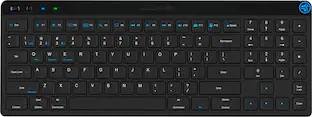
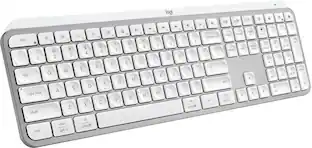
Alogic - Echelon USB-C Compact Rechargeable Wireless Keyboard for macOS - Wireless Connectivity - Bluetooth/RF - Compact - White
More Buying Options from Marketplace sellers
Related Item

Specifications
- Form FactorCompact (60%)Connection TypeWireless
- Key Specs
- Form Factor: Compact (60%) (The size, arrangement, and physical configuration of the product.)
- Connection Type: Wireless
- General
- Brand: Alogic
- Product Name: Alogic Echelon USB-C Compact Rechargeable Wireless Keyboard for macOS - Wireless Connectivity - Bluetooth/RF - Compact
- Color: White
- Functions
- Form Factor: Compact (60%) (The size, arrangement, and physical configuration of the product.)
- Connectivity
- Connection Type: Wireless
- Compatibility
- Operating System Compatibility: Windows
- Dimensions
- Product Height: 5.42 inches (The out of box height of the item. Height is measured as the vertical distance from the bottom of the item to the top as it would be primarily used or placed.)
- Product Width: 14.83 inches (The out of box width of the item. Width is measured as the horizontal distance from one side of the item to the other as it would be primarily used or placed.)
- Product Depth: 1.87 inches (The out of box depth of the item. Depth is measured as the distance from the front of the item to the back as it would be primarily used or placed.)
- Product Weight: 0.7 ounces (The out of box weight of the item.)
- Warranty
- Warranty - Parts: 2 year limited
- Warranty - Labor: 2 years
- Other
- UPC: 9350784101532
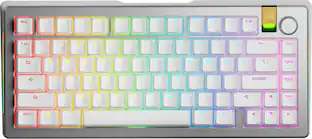
Echelon Compact | The Tidy Way to Work on MacCompact Layout with NumpadQuick Switch Between Three DevicesShortcuts for Office ProductivityRechargeable Battery Lasts WeeksCompact without CompromisesEchelon Compact streamlines all the office functionality of our best-selling Echelon Keyboards into a slim 96% layout that saves you precious desk space. Most importantly of all, we haven't compromised on the size or spacing of Echelon's keys, allowing for quick, accurate and cramp-free typing. Designed for Compact ProductivityEchelon Compact Keyboards include a variety of single-click shortcuts to make repetitive tasks easier, such as single click Select All, Cut, Copy and Paste buttons on top of the numpad, ideal for data entry. macOS Shortcuts | Home FolderOpens your Mac's home folder. Desktop FolderOpens your Mac's Desktop folder. Sleep, Lock & PowerTap to lock your Mac, hold for 1 sec to sleep, hold for 3 secs to power off. Bluetooth 1 & Select AllSwitch to saved Bluetooth device #1 or select all items in the current application. Bluetooth 2 & CopySwitch to saved Bluetooth device #2 or copy selected items. Bluetooth 3 & PasteSwitch to saved Bluetooth device #3 or paste selected items. CutCut (copy then delete) selected items. Switch Between Three Devices with a Single ClickThe Echelon Wireless Keyboard for macOS can store up to three paired Bluetooth devices, making it easy to multitask with your iPad and MacBook, or share a keyboard at a hotdesk. No Batteries NeededEchelon features an integrated, USB-C charging battery which lasts weeks between charges, saving you the expense and hassle of swapping batteries in and out.
- Alogic Echelon USB-C Compact Rechargeable Wireless Keyboard: Echelon Compact | The Tidy Way to Work on MacCompact Layout with NumpadQuick Switch Between Three DevicesShortcuts for Office ProductivityRechargeable Battery Lasts WeeksCompact without CompromisesEchelon Compact streamlines all the office functionality of our best-selling Echelon Keyboards into a slim 96% layout that saves you precious desk space. Most importantly of all, we haven't compromised on the size or spacing of Echelon's keys
Whats Included
- Wired Aluminum Keyboard with Numeric Keypad for Mac, Silver; User Manual
Compare similar products

Echelon Compact | The Tidy Way to Work on MacCompact Layout with NumpadQuick Switch Between Three DevicesShortcuts for Office ProductivityRechargeable Battery Lasts WeeksCompact without CompromisesEchelon Compact streamlines all the office functionality of our best-selling Echelon Keyboards into a slim 96% layout that saves you precious desk space. Most importantly of all, we haven't compromised on the size or spacing of Echelon's keys, allowing for quick, accurate and cramp-free typing. Designed for Compact ProductivityEchelon Compact Keyboards include a variety of single-click shortcuts to make repetitive tasks easier, such as single click Select All, Cut, Copy and Paste buttons on top of the numpad, ideal for data entry. macOS Shortcuts | Home FolderOpens your Mac's home folder. Desktop FolderOpens your Mac's Desktop folder. Sleep, Lock & PowerTap to lock your Mac, hold for 1 sec to sleep, hold for 3 secs to power off. Bluetooth 1 & Select AllSwitch to saved Bluetooth device #1 or select all items in the current application. Bluetooth 2 & CopySwitch to saved Bluetooth device #2 or copy selected items. Bluetooth 3 & PasteSwitch to saved Bluetooth device #3 or paste selected items. CutCut (copy then delete) selected items. Switch Between Three Devices with a Single ClickThe Echelon Wireless Keyboard for macOS can store up to three paired Bluetooth devices, making it easy to multitask with your iPad and MacBook, or share a keyboard at a hotdesk. No Batteries NeededEchelon features an integrated, USB-C charging battery which lasts weeks between charges, saving you the expense and hassle of swapping batteries in and out.

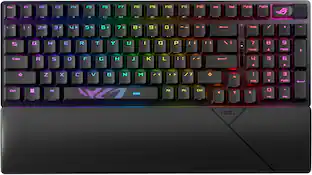
Meet the CORSAIR K100 AIR Wireless RGB Mechanical Gaming Keyboard, an ultra-thin keyboard that places outstanding performance and productivity in a sleek brushed aluminum frame. Its unbelievably thin profile – just 11mm at its slimmest point – makes the K100 AIR the stylish centerpiece of your entire desktop and workspace. Hyper-fast, tactile CHERRY MX Ultra Low Profile mechanical keyswitches deliver a responsive, satisfying mechanical keyboard experience – you will want to use the keyboard for everything.The K100 AIR offers three ways to connect to your PC, Mac, and devices for optimal, hyper-fast wireless versatility: sub-1ms SLIPSTREAM WIRELESS, Bluetooth, or USB wired. Connect to multiple devices wirelessly and switch between them with the press of a button, with secure AES 128-bit encryption. Wired mode enables CORSAIR AXON Hyper-Processing Technology to transmit keystrokes up to 8x faster than standard gaming keyboards, helping you stay one step ahead of opponents during competition. The K100 AIR offers endlessly customizable lighting and workflows for total control over your setup. Four dedicated G keys are fully programmable to perform custom actions, shortcuts, and macros to elevate your productivity. The K100 AIR shines with brilliant per-key RGB backlighting, for nearly limitless customization for up to 20 lighting layers simultaneously, powered by AXON. Unlock full control over lighting, key remapping, and more with powerful CORSAIR iCUE software. With up to 200 hours of wireless battery life and all the premium features in CORSAIR’s thinnest gaming keyboard ever, the K100 AIR enables you to play elevated.
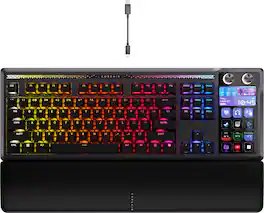
GALLEON 100 SD fuses iconic Stream Deck technology into a high-performance mechanical keyboard, giving you precise, real-time command of your entire gaming setup all from one device. Customizable shortcut keys and dials help you react faster without breaking focus, whether you're executing complex in-game combos or controlling apps like Discord and Spotify. Keep tabs on everything from hardware stats to your favorite Twitch channels on a fullcolor 5" LCD screen. The keyboard also delivers serious gaming performance with lightning-fast 8,000Hz hyperpolling, FlashTap SOCD, and smooth MLX Pulse switches. It’s more than just a keyboard—it’s a new era of input.

MK540 Advanced is an instantly familiar wireless keyboard and mouse combo built for precision, comfort and reliability. The full-size keyboard features a familiar key shape, size, and feeling – optimized for precision and noise reduction. The palmrest and adjustable tilt legs keep you comfortable for long stretches and the contoured mouse is designed to fit perfectly into either palm. Plug and play your keyboard and mouse with one tiny USB receiver with Logitech Unifying technology. You’ll get a reliable – and encrypted – wireless connection up to 32.8 ft away with virtually no delays or dropouts.
| Pros for Alogic - Echelon USB-C Compact Rechargeable Wireless Keyboard for macOS - Wireless Connectivity - Bluetooth/RF - Compact - White | |||
|---|---|---|---|
| There were no pros for this product— | Key Feel, Keyboard Quality, Battery Life, RGB Lighting, Connectivity | Key Feel, Build Quality, Stream Deck Integration, Noise Level, Customization | There were no pros for this product— |
| Cons for Alogic - Echelon USB-C Compact Rechargeable Wireless Keyboard for macOS - Wireless Connectivity - Bluetooth/RF - Compact - White | |||
| There were no cons for this product— | Software, Price | Software | There were no cons for this product— |
Specs



Reviews
This product doesn't have any reviews yet.
Explore tech essentials Sponsored
 $195.99The price was $216.49