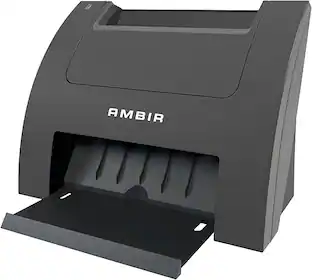
Ambir Technology Inc - AMBIR Photo Scanner with PictureStudio Software - Black
Specifications
- NetworkingWiredScan MethodCameraDuplex Scan FunctionNo
- Key Specs
- Networking: Wired
- Scan Method: Camera
- Duplex Scan Function: false
- General
- Brand: Ambir Technology Inc
- Model Number: PS400-NA
- Product Name: AMBIR Photo Scanner with PictureStudio Software
- Color: Black
- Connectivity
- Scanner Connectivity: USB
- Minimum System Requirements: Windows 10 or higher; Mac OS 11 or higher; 8MB Ram; 2GB Free Hard Drive Space; Internet Access
- Dimensions
- Product Height: 12.68 inches (The out of box height of the item. Height is measured as the vertical distance from the bottom of the item to the top as it would be primarily used or placed.)
- Product Width: 8.59 inches (The out of box width of the item. Width is measured as the horizontal distance from one side of the item to the other as it would be primarily used or placed.)
- Maximum Document Length: 14 inches
- Maximum Document Width: 8.5 inches
- Product Weight: 3.5 pounds (The out of box weight of the item.)
- Features
- Automatic Document Feeder Included: false
- Scanner Type: Photo
- Scanner Resolution: Up to 600 x 600 (Refers to the number of pixels/dots, both horizontally and vertically, of the image produced by the scanner. Generally, the higher the resolution, the sharper and cleaner the produced image.)
- Memory Card Slot: false
- File Format(s): PNG, JPEG, BMP
- Image Scanner Type: CIS
- Included
- Included Software: PictureStudio
- Certifications Listings & Approvals
- ENERGY STAR Certified: false (Devices carrying the ENERGY STAR service mark, such as computer products and peripherals, kitchen appliances, and other products, generally use 20% to 30% less energy than required by federal standards.)
- TWAIN Compliant: false (Products with this label are compliant with standards set by the TWAIN Working Group for regulating communication between software and digital imaging devices. Devices that are TWAIN compliant are compatible for use with each other without requiring additional software, even if they have different capabilities.)
- Warranty
- Warranty - Parts: 1 year limited
- Warranty - Labor: 1 year limited
- Other
- UPC: 835345006857
Introducing the ultimate solution for effortlessly preserving and revitalizing your cherished memories. Say hello to our cutting-edge photo scanner and PictureStudio photo editing software, designed to breathe new life into your old, faded photos with just a single touch. Gone are the days of sifting through endless photo albums in search of that one special moment. With our seamless search feature, navigating through your digitized photo collection has never been easier. Simply enter a keyword or filter by tag, and watch as your memories come to life before your eyes. Whether it's restoring colors to faded photographs, organizing your entire photo collection in one convenient location, or effortlessly sharing and backing up your memories, AMBIR has you covered.
- Software capabilities: Complete Photo Editing and Organization Software
- Interface: USB – Easily connects with a single cable
- Scan speed/control: 4" x 6" in 3 seconds at 300dpi
- Image scaling/enlargement: From 25% to 400%
- Buttons and/or modes: The device does not have buttons, however based on settings can either scan manually or automatically.
- Up to 600dpi: Choose between high-resolution (300dpi) or ultra-high resolution (600dpi) scanning options
- Bit color: 24-bit
- Scan size: Accommodates photo sizes ranging from 1”x1” to 8”x10”; and Panoramic photos up to 12” with ease
Whats Included
- Photo Scanner
- USB Cable
- USB-C to USB-A Adapter
- Maintenace Kit
- Quick Start Guide
Disclaimers
- *Based on average speed from start of scan to end of feeding, scanning thirty-six 4" x 6" photos at 300 dpi in landscape orientation. Results may vary based on processor speed, memory, and operating system of the connected computer.
Q: How fast can this scanner scan a 4x6 photo?
A: This scanner can scan a 4x6 photo in 3 seconds at 300 dpi.
Q: What is the maximum resolution this scanner can produce?
A: This scanner has a maximum scanning resolution of 600 x 600 dpi.
Q: Does this scanner come with any software?
A: Yes, this scanner comes with PictureStudio photo editing and organization software.
Q: How does this scanner connect to my computer?
A: This scanner connects to your computer easily with a single USB cable.
Q: What is the maximum size photo this scanner can handle?
A: This scanner can scan photos from 1 inch x 1 inch up to 8 inches x 10 inches. It can also scan panoramic photos up to 12 inches.
Q: How many photos can be loaded into the feeder?
A: The scanner was specifically designed to scan and protect the integrity of old photos. Only one photo can be placed in the feed tray at a time. However, it features an auto-scan mode in its software, allowing users to continuously insert photos into the tray without needing to manually initiate each scan.
Q: Is there a special tool to use when scanning a very small photo (say 1"X1") ?
A: No specific tools are required to scan photos as small as 1x1. However, you may find it easier using the included carrier sheet. Would also recommend disabling "auto scan" to make sure the picture is in the proper position (when not using the carrier sheet).
Compare similar products

Introducing the ultimate solution for effortlessly preserving and revitalizing your cherished memories. Say hello to our cutting-edge photo scanner and PictureStudio photo editing software, designed to breathe new life into your old, faded photos with just a single touch. Gone are the days of sifting through endless photo albums in search of that one special moment. With our seamless search feature, navigating through your digitized photo collection has never been easier. Simply enter a keyword or filter by tag, and watch as your memories come to life before your eyes. Whether it's restoring colors to faded photographs, organizing your entire photo collection in one convenient location, or effortlessly sharing and backing up your memories, AMBIR has you covered.

Say goodbye to the days of scanning photos with a slow flatbed! Scanning photos and memorabilia has never been easier with the Plustek ePhoto Z300. With the ePhoto Z300 you can scan a 4x6 photo in about 2 sec. This means you can scan 3,000 photos in just one afternoon. ePhoto Z300 is a scanner specifically designed for scanning photos. It uses a special soft compound roller to protect old photos. The CCD sensor provides accurate reproduction color and black and white photos. The included ePhoto software is easy to use and doesn’t require complex operational procedures. Just insert a photo into the scanner and scanning automatically starts.

Safeguard your most treasured memories with this Kodak SCANZA digital film scanner. Easy-loading adapters and inserts let you scan negatives and slides of varying sizes, and a tilt-up full-color LCD screen provides access to color, size and resolution adjustments as you scan. Compatible with both PC and Mac systems, this Kodak SCANZA digital film scanner delivers a convenient way to convert your images to digital files.
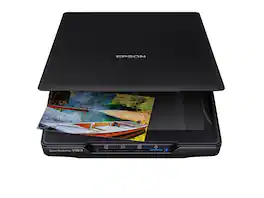
Make scanning simple with the affordable, compact and lightweight Epson Perfection V39 II. Featuring an optical resolution of 4800 dpi, this easy-to-use photo scanner delivers amazing clarity and detail at a great value. With the included Epson ScanSmart software, you can scan photos, artwork, illustrations, books, documents and more to cloud storage services as well as stitch together oversized images. Moreover, if your photos have faded, you can bring back the color in one click with Easy Photo Fix technology. The V39 II delivers high-quality letter-sized scans in as fast as 10 seconds. It also includes convenient one-touch scanning with easy-to-use buttons, so you can scan directly to PDF or email with just the touch of a button. In addition, you can create editable Microsoft Word, Excel and PowerPoint files using optical character recognition (OCR) software. The V39 II is USB powered for portability, includes a built-in kickstand for space-saving vertical placement and storage, and features a high-rise, removable lid to accommodate bulky items such as books and photo albums. Meet the nexus of stunning image quality and great value with the Epson Perfection V39 II.
| Pros for Ambir Technology Inc - AMBIR Photo Scanner with PictureStudio Software - Black | |||
|---|---|---|---|
| Ease of use, Resolution, Scan Speed, Software, Photo Quality | Scanning Speed, Overall Performance, Ease of Use | Ease of use, Scanning Speed, Image Quality | Ease of use, Overall Performance, Resolution, Scan Quality, Size |
| Cons for Ambir Technology Inc - AMBIR Photo Scanner with PictureStudio Software - Black | |||
| Auto Crop | There were no cons for this product— | There were no cons for this product— | Connectivity, Compatibility, Noise Level, Kickstand, USB |
Specs
Reviews
Rating 4.1 out of 5 stars with 25 reviews
- Scan Speed (13)
- Software (11)
- Ease of use (6)
- Photo Quality (4)
- Resolution (4)
- Auto Crop (3)
Customer Images
The vast majority of our reviews come from verified purchases. Reviews from customers may include My Best Buy members, employees, and Tech Insider Network members (as tagged). Select reviewers may receive discounted products, promotional considerations or entries into drawings for honest, helpful reviews.
Discover related products
 Tech Fest Deal$94.99The price was $169.99
 $850.00The price was $1,050.00
 $125.99The price was $179.99
 Tech Fest Deal$67.12The price was $84.90
 $259.99The price was $299.99




Keep exploring
 $399.98The price was $433.25
 $799.00The price was $949.99
 $235.99The price was $279.99
Fujitsu - Ricoh ImageScanner fi-70F Flatbed Scanner - 600 dpi Optical - 24-bit 8-bit Grayscale - USB
$259.00The price was $279.00