- Key Specs
- Remote Control Type: Voice control
- Remote Control Features: IR device control, Smart Touch, Voice Activated
- Number Of Devices Controlled: 1
- Works With: Siri (Compatible with or able to be connected to other smart devices or applications.)
- General
- Brand: Apple
- Model Number: MJFM3LL/A
- Product Name: Siri Remote
- Features
- Remote Control Type: Voice control
- Remote Control Features: IR device control, Smart Touch, Voice Activated
- Display Type: None
- Body Material: 100% recycled aluminum
- Connectivity
- Number Of Devices Controlled: 1
- Wireless: true
- Connectivity Technology: Bluetooth (The manner in which a device sends data to another device over a short distance.)
- Compatibility
- Works With: Siri (Compatible with or able to be connected to other smart devices or applications.)
- Compatibility: Apple TV HD, Apple TV 4K (1st generation), Apple TV 4K (2nd generation)
- Brand Compatibility: Apple
- Compatible Product(s): Streaming media player, Television
- Power
- Rechargeable: true
- Dimensions
- Product Weight: 2.2 ounces (The out of box weight of the item.)
- Other
- UPC: 194252406953
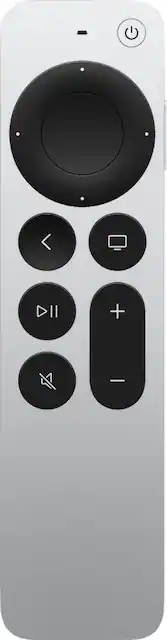
The Siri Remote (2nd generation) brings precise control to your Apple TV 4K and Apple TV HD.¹ Its all-new touch-enabled clickpad lets you click titles, swipe through playlists, and use a circular gesture on the outer ring to find just the scene you're looking for. And with Siri, you can find what you want to watch using just your voice.
- Compatible with Apple TV 4K (1st & 2nd generation) and Apple TV HD: Enables easy control of your Apple TV.
- Control your Apple TV with Siri: You can find what you want to watch using just your voice.
- IR transmitter and all-new touch-enabled clickpad: Lets you click titles, swipe through playlists, and use a circular gesture on the outer ring to find just the scene you're looking for.
- Bluetooth wireless technology: To operate your Apple TV from a distance.
- Built-in rechargeable lithium-ion battery: Use Lightning port to charge via USB to computer system or power adapter (sold separately).
- Compatible with Apple TV 4K (1st & 2nd generation) and Apple TV HD: Enables easy control of your Apple TV.
- Control your Apple TV with Siri: You can find what you want to watch using just your voice.
- IR transmitter and all-new touch-enabled clickpad: Lets you click titles, swipe through playlists, and use a circular gesture on the outer ring to find just the scene you're looking for.
- Bluetooth wireless technology: To operate your Apple TV from a distance.
- Built-in rechargeable lithium-ion battery: Use Lightning port to charge via USB to computer system or power adapter (sold separately).
Whats Included
- Apple Siri Remote
- Lightning to USB Cable
- User guide
- Apple Siri Remote
- Lightning to USB Cable
- User guide
A: Yes, the new Siri Remote features the same 10-second skip. In order to activate the 10-second skip simply tap and click the left or right sides of the D pad. As suggested by another user, there is a new circular scrubbing feature, but activating it isn't as intuitive as one might think. Hope that helps.
A: Yes you can use this remote on the original Apple TV 4K. You probably can also use the original remote on the 2nd gen, if that’s what you’re asking.
Q: Can the turn on/off button be used to turn on/off a sound bar?
A: I was happily surprised to learn that the remote can turn off all the components in my system at once, so it'll turn off a TV, receiver and Apple TV at the same time.
Q: Can you flip through channels with direct tv stream?
A: No still have to go through guide
Q: Does it have a zoom feature?
A: No it does not.
A: Yes should work
Q: Does this work with a 4th generation apple tv?
A: I not sure what gen mine was but mine was the one that came with the glass remote. It drop and destroyed the glass, I replace it with this remote and it works great.
Q: Will this remote work to replace the Apple Remote A1513?
A: If that is an Apple TV remote then yes