
Brother - INKvestment Tank 580 Wireless All-in-One SuperTank Inkjet Printer, up to 3 Years of Ink + 3 year warranty (MFC-T580DW) - Black
Brother - INKvestment Tank 580 Wireless All-in-One SuperTank Inkjet Printer, up to 3 Years of Ink + 3 year warranty (MFC-T580DW) - Black
More Buying Options
Related Item

Specifications
- NetworkingWirelessENERGY STAR CertifiedYesPrinter TypeAll In One, Printer, Copier, ScannerISO Color Print Speed9 pages per minuteISO Mono Print Speed16 pages per minuteOutput Tray Capacity50
- Key Specs
- Networking: Wireless
- ENERGY STAR Certified: true (Devices carrying the ENERGY STAR service mark, such as computer products and peripherals, kitchen appliances, and other products, generally use 20% to 30% less energy than required by federal standards.)
- Printer Type: All In One, Printer, Copier, Scanner
- ISO Color Print Speed: 9 pages per minute (The number of color pages able to be printed per minute in the device's default single-side mode, as tested by the International Standards Organization (ISO).)
- ISO Mono Print Speed: 16 pages per minute (The number of black ink (grayscale) pages able to be printed per minute in the device's default single-side mode, as tested by the International Standards Organization (ISO).)
- Output Tray Capacity: 50
- Touch Screen: false (Touch-screen devices make navigating more intuitive. Using a touch-screen display, you can do things such as tap to select, hold and drag to move items, swipe to scroll, and pinch to zoom.)
- General
- Brand: Brother
- Model Number: MFC-T580DW
- Product Name: INKvestment Tank 580 Wireless All-in-One SuperTank Inkjet Printer, up to 3 Years of Ink + 3 year warranty (MFC-T580DW)
- Color: Black
- Display Screen: true
- Display Screen Size: 1 inches
- Dimensions
- Product Height: 5.8 inches (The out of box height of the item. Height is measured as the vertical distance from the bottom of the item to the top as it would be primarily used or placed.)
- Product Width: 15.4 inches (The out of box width of the item. Width is measured as the horizontal distance from one side of the item to the other as it would be primarily used or placed.)
- Product Depth: 13.5 inches (The out of box depth of the item. Depth is measured as the distance from the front of the item to the back as it would be primarily used or placed.)
- Product Weight: 14.8 pounds (The out of box weight of the item.)
- Features
- Automatic Document Feeder: false
- Photo Printing: true
- Monochromatic/Color: Color
- Automatic Reduction/Enlargement: true
- Automatic Two-Sided Printing: true
- Tray Capacity: 150
- Duty Cycle: Up to 2,500 (The maximum number of pages per month that the device can produce without failing, as specified by the manufacturer.)
- Connectivity
- Wired Connectivity: USB-B
- Wireless Connectivity: Wi-Fi (The manner in which a device sends data to another device over a short distance without the use of wires or cables.)
- Minimum System Requirements: Windows: 10 Home / 10 Pro / 10 Education / 10 Enterprise, Windows 11 Home / 11 Pro / 11 Education / 11 Enterprise, Windows Server 2016 / 2019 / 2022; Mac(7): macOS v13 / v14 / v15, ChromeOS, Linux (KYLIN Linux Desktop / UOS Desktop).
- Certifications Listings & Approvals
- EPEAT Qualified: true (The Electronic Product Environmental Assessment Tool (EPEAT) was designed to provide an environmental assessment tool for purchasers. In order to qualify for EPEAT, a product must meet all 23 required criteria.)
- EPEAT Level: Silver (The Electronic Product Environmental Assessment Tool (EPEAT) was designed to provide an environmental assessment tool for purchasers. In order to qualify for EPEAT, a product must meet all 23 required criteria. Products are rated Bronze, Silver or Gold based on how many of 28 optional criteria they meet (below 50%, 50%, 75%).)
- TWAIN Compliant: true (Products with this label are compliant with standards set by the TWAIN Working Group for regulating communication between software and digital imaging devices. Devices that are TWAIN compliant are compatible for use with each other without requiring additional software, even if they have different capabilities.)
- Scanner Info
- Scanner Type: Flatbed
- Duplex Scan Function: false
- Scanner Resolution: Up to 1200 x 2400 (Refers to the number of pixels/dots, both horizontally and vertically, of the image produced by the scanner. Generally, the higher the resolution, the sharper and cleaner the produced image.)
- Fax Info
- Integrated Fax: false
- Ink
- Compatible Cartridges: Brother LC506
- Ink Subscription Service Available: false (The printer monitors ink usage and alerts the subscription provider when levels are low. A purchased subscription provides refills of ink based on usage.)
- Ink Cartridges Required: None (The quantity and color of ink cartridges required for the printer to operate.)
- Ink Cartridges Included: None (The quantity and color of ink cartridges included.)
- Ink Bags/Bottles Required: 1 x Black, 1 x Cyan, 1 x Magenta, 1 x Yellow (The quantity and color of ink bags/bottles required for the printer to operate.)
- Ink Bags/Bottles Included: 1 x Black, 1 x Cyan, 1 x Magenta, 1 x Yellow (The quantity and color of ink bags/bottles included.)
- Memory
- Memory Card Slot: false
- Paper Info
- Maximum Document Length: 8.5 inches
- Maximum Document Width: 14 inches
- Supported Paper Sizes: Standard Tray: Up to 8.5" x 14" (Legal); Manual Feed Slot: Up to 8.5" x 14" (Legal); Duplex: Up to 8.5" x 11" (Letter)
- Paper Feeder: Cassette tray
- Paper Handling: 150 Sheets
- Compatible Media Types: Standard Tray/Manual Feed Slot: Plain Paper, Inkjet Paper, Glossy Paper, Recycled Paper, Envelopes, Index Cards
- Copier Info
- Maximum Number Of Copies: 99
- Copier Resolution (Black): Up to 1200 x 1200 (Refers to the number of pixels/dots, both horizontally and vertically, of the image produced by the copier in black ink. Generally, the higher the resolution, the sharper and cleaner the produced image.)
- Copier Resolution (Color): Up to 1200 x 1200 (Refers to the number of pixels/dots, both horizontally and vertically, of the image produced by the copier in colored ink. Generally, the higher the resolution, the sharper and cleaner the produced image.)
- Performance
- Printer Resolution (Black): Up to 6000 x 1200 (Refers to the number of pixels/dots, both horizontally and vertically, of the image produced by the printer in black ink. Generally, the higher the resolution, the sharper and cleaner the produced image.)
- Printer Resolution (Color): Up to 6000 x 1200 (Refers to the number of pixels/dots, both horizontally and vertically, of the image produced by the printer in colored ink. Generally, the higher the resolution, the sharper and cleaner the produced image.)
- Approximate Page Yield (Black): 7500
- Approximate Page Yield (Color): 5000
- Warranty
- Warranty - Parts: 3-year limited warranty
- Warranty - Labor: Not applicable
- Other
- UPC: 012502679752
The Brother INKvestment Tank 580 Wireless Color Inkjet All-in-One Printer includes a 3-year limited warranty(1), making it a smart choice for your home or home office. With up to three years of ink bottles included in the box(2) you can print all your personal and specialized documents freely, without worrying about running out of ink. Innovative ink tank technology provides a simple and convenient solution with fast refill speeds and a spill-free design, plus keys that help you avoid inserting them into the incorrect color slot. With robust features, this printer includes an easy-to-load 150-sheet paper tray(3), 1-sheet manual feed slot(3), wireless connectivity(4), and the ability to print from virtually anywhere with the Brother Mobile Connect app(5). Produce beautiful prints in vibrant color and bold blacks at fast print speeds with BTD180 Brother Genuine Ink bottles – the only brand we recommend for your Brother printer.
- Maximize your savings with up to 3 years of ink in the box(2): Print, copy, scan and fax for up to 3-years with the included ink(2) - all backed by a 3-year warranty.
- Fast print speeds up to 16 PPM black and 9 PPM color (7): Efficiency is the name of the game. The MFC-T580DW ink tank printer delivers professional-grade print speeds.
- Innovative refillable ink tank technology: Unlike messy bottle-based systems, Brother's keyed bottle design makes refills foolproof – with each color bottle only fitting its designated tank slot. Refill in 30 seconds for color, 65 seconds for black with zero spills, zero guesswork.
- Productivity-Focused Printing Features: The MFC-T580DW ink tank printer includes a 150-sheet paper tray(3) with an easy-load design that makes loading your paper simple, while automatic duplex (2-sided) printing saves paper and money.
- The Brother Mobile Connect app puts the power of printing at your fingertips: Go mobile with the simple-to-use Brother Mobile Connect app(6) that delivers easy onscreen menu navigation for printing, copying, scanning, and device management from your mobile device.
- Connect your way: Interface with your printer on your wireless(4) network or via USB.
- Crisp, Vibrant Prints with 1,200 x 6,000 DPI Resolution: From bold presentations to colorful reports, the MFC-T980DW ink tank printer delivers professional-quality color and rich black & white prints.
- Customer Support: Includes a 3-year limited warranty(9). For customer service, visit us at www.brother-usa.com/support.
- Brother Genuine Ink: Reliable performance you can count on. Brother Genuine Ink is quality-tested to work seamlessly with your Brother printer. Choose Brother Genuine BTD180 Ink bottles, the only brand we recommend for use with your printer.
- Maximize your savings with up to 3 years of ink in the box(2): Print, copy, scan and fax for up to 3-years with the included ink(2) - all backed by a 3-year warranty.
- Fast print speeds up to 16 PPM black and 9 PPM color (7): Efficiency is the name of the game. The MFC-T580DW ink tank printer delivers professional-grade print speeds.
- Innovative refillable ink tank technology: Unlike messy bottle-based systems, Brother's keyed bottle design makes refills foolproof – with each color bottle only fitting its designated tank slot. Refill in 30 seconds for color, 65 seconds for black with zero spills, zero guesswork.
- Productivity-Focused Printing Features: The MFC-T580DW ink tank printer includes a 150-sheet paper tray(3) with an easy-load design that makes loading your paper simple, while automatic duplex (2-sided) printing saves paper and money.
- The Brother Mobile Connect app puts the power of printing at your fingertips: Go mobile with the simple-to-use Brother Mobile Connect app(6) that delivers easy onscreen menu navigation for printing, copying, scanning, and device management from your mobile device.
- Connect your way: Interface with your printer on your wireless(4) network or via USB.
- Crisp, Vibrant Prints with 1,200 x 6,000 DPI Resolution: From bold presentations to colorful reports, the MFC-T980DW ink tank printer delivers professional-quality color and rich black & white prints.
- Customer Support: Includes a 3-year limited warranty(9). For customer service, visit us at www.brother-usa.com/support.
- Brother Genuine Ink: Reliable performance you can count on. Brother Genuine Ink is quality-tested to work seamlessly with your Brother printer. Choose Brother Genuine BTD180 Ink bottles, the only brand we recommend for use with your printer.
Whats Included
- Brother MFC-T580DW
- Starter Black Ink Bottle (approx. 7,125 pages) (10)
- Starter Cyan, Magenta, and Yellow Ink Bottles (approx. 4,400 pages) (10)
- AC Power Cord
- Product Safety Guide
- Reference Guide
- Warranty Card
- Quick Setup Guide
- Brother MFC-T580DW
- Starter Black Ink Bottle (approx. 7,125 pages) (10)
- Starter Cyan, Magenta, and Yellow Ink Bottles (approx. 4,400 pages) (10)
- AC Power Cord
- Product Safety Guide
- Reference Guide
- Warranty Card
- Quick Setup Guide
Product Manuals
Disclaimers
- (1) Maximum total warranty coverage is 3 years.
- (2) Based on average monthly print volumes of 125 pages at 60% black pages and 40% color pages.
- (3) Maximum Capacity based on using 20lb. paper.
- (4) Wireless connection required.
- (5) Free Brother Mobile Connect App download, wireless connection and connection of an eligible printer with Brother are required. Compatibility may vary by device, operating system and country.
- (6) Free app download & wireless connection required. Compatibility may vary by device and operating system.
- (7) Based on ISO/IEC 24734 (after first set of ISO test pages). For inkjet print speed methodology, please visit www.brother-usa.com/printspeed. Print speeds vary with use. See manufacturer for info on print speed.
- (10) Approx. yields may vary by printer model and are extrapolated based on Brother's original methodology that uses Test Patterns based on ISO/ IEC 24712
- (1) Maximum total warranty coverage is 3 years.
- (2) Based on average monthly print volumes of 125 pages at 60% black pages and 40% color pages.
- (3) Maximum Capacity based on using 20lb. paper.
- (4) Wireless connection required.
- (5) Free Brother Mobile Connect App download, wireless connection and connection of an eligible printer with Brother are required. Compatibility may vary by device, operating system and country.
- (6) Free app download & wireless connection required. Compatibility may vary by device and operating system.
- (7) Based on ISO/IEC 24734 (after first set of ISO test pages). For inkjet print speed methodology, please visit www.brother-usa.com/printspeed. Print speeds vary with use. See manufacturer for info on print speed.
- (10) Approx. yields may vary by printer model and are extrapolated based on Brother's original methodology that uses Test Patterns based on ISO/ IEC 24712
A: I’m sorry to hear that you are having issues with the Brother Mobile Connect app on your Brother MFCT580DW. I sincerely apologize for any inconvenience this issue may have caused you. We can help with that. I have included a link to the FAQ answer that should assist you. Please follow all the steps listed in the following link: Answer Link: https://help.brother-usa.com/AgentWeb/api/contextmanager/v.32510240001/workspaceContext/workspace/processedPrint/Answer/178477 Answer Link: https://help.brother-usa.com/AgentWeb/api/contextmanager/v.32510240001/workspaceContext/workspace/processedPrint/Answer/178479 If you still have difficulties, please contact Brother Customer Service at: https://www.brother-usa.com/support/MFCT580DW
Compare similar products

The Brother INKvestment Tank 580 Wireless Color Inkjet All-in-One Printer includes a 3-year limited warranty(1), making it a smart choice for your home or home office. With up to three years of ink bottles included in the box(2) you can print all your personal and specialized documents freely, without worrying about running out of ink. Innovative ink tank technology provides a simple and convenient solution with fast refill speeds and a spill-free design, plus keys that help you avoid inserting them into the incorrect color slot. With robust features, this printer includes an easy-to-load 150-sheet paper tray(3), 1-sheet manual feed slot(3), wireless connectivity(4), and the ability to print from virtually anywhere with the Brother Mobile Connect app(5). Produce beautiful prints in vibrant color and bold blacks at fast print speeds with BTD180 Brother Genuine Ink bottles – the only brand we recommend for your Brother printer.
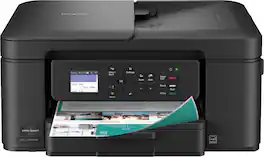
The Brother Work Smart 1360 Wireless All-in-One Refresh Subscription Eligible Inkjet Printer is the perfect choice for a reliable printer with robust efficiency-boosting features. With tools like automatic duplex (2-sided) printing, a 20-page single-sided automatic document feeder(1), and wireless(2) and Cloud connectivity(3) options available on the 1.8” color display, this multifunction printer helps you get your work done with simplicity and ease. Perfect for printing anything from to-do lists to business reports, this color inkjet printer outputs quality prints at fast speeds. Brother Page Gauge(4) monitors your ink usage so you know when you’re running low. When paired with the Brother Mobile Connect app(5), setup is quick and easy – plus, you’ll be able to print from virtually anywhere on your mobile device(6). Print Confidently with Brother Genuine LC501 Ink in your Brother Work Smart 1360 for reliable, consistent prints –it’s the only brand we recommend for your Brother printer.

With long-lasting durability, productivity-boosting features, and a value-driven refillable ink tank, the Brother INKvestment Tank 780 Wireless Color Inkjet All-in-One Printer with Duplex Printing is a no-brainer for your home office or small office. An incredible three years of ink is included in the box,(1) for worry-free printing without the need for frequent ink refills, plus a 3-year limited warranty(2) for peace of mind. An innovative refillable ink tank provides an easy and practical solution for ink replenishment, with fast refill speeds and spill-free ink bottles that are keyed to help avoid inserting them into the incorrect color slot. Plus, enjoy feature-rich functionality with an easy-to-load 150-sheet paper tray(3), 1-sheet manual feed slot(3), single-sided automatic document feeder (ADF), automatic duplex (2-sided) printing, wireless connectivity(4), and the ability to print from virtually anywhere(5) with the Brother Mobile Connect app(6). Produce beautiful prints in vibrant color and bold blacks at fast print speeds with Brother Genuine BTD180 Ink bottles – the only brand we recommend for your Brother printer.

The INKvestment 4355 Wireless Color Inkjet All-in-One Printer takes productivity to the next level. An easy-to-use 1.8” color display provides streamlined functionality, with the ability to connect directly to popular Cloud apps(1). Enhance your workflow with the included 150-sheet paper tray(2), 20-sheet single-sided automatic document feeder (ADF) (2), one-sheet manual feed slot(2), and automatic duplex (2-sided) printing. Get things done efficiently with advanced print speeds, Wi-Fi Direct, and multiple connectivity options. Plus, the convenience to complete your work wherever you go – you can print directly from your mobile device from virtually anywhere with the Brother Mobile Connect app(3). Produce beautiful prints in vibrant color and bold blacks at fast print speeds with LC506 Brother Genuine Ink cartridges – the only brand we recommend for your Brother printer.
| Pros for Brother - INKvestment Tank 580 Wireless All-in-One SuperTank Inkjet Printer, up to 3 Years of Ink + 3 year warranty (MFC-T580DW) - Black | |||
|---|---|---|---|
| There were no pros for this product— | Print Quality, Size, Connectivity, Overall Performance, Noise Level | Print Quality, Setup Process, Reliability | Print Quality, Connectivity, Size, Setup Ease, Paper Tray Capacity |
| Cons for Brother - INKvestment Tank 580 Wireless All-in-One SuperTank Inkjet Printer, up to 3 Years of Ink + 3 year warranty (MFC-T580DW) - Black | |||
| There were no cons for this product— | Setup Difficulty | There were no cons for this product— | Noise Level |
Specs



Reviews
Customer Images
The vast majority of our reviews come from verified purchases. Reviews from customers may include My Best Buy members, employees, and Tech Insider Network members (as tagged). Select reviewers may receive discounted products, promotional considerations or entries into drawings for honest, helpful reviews.
- Rated 5 out of 5 stars
Solid Wireless Printer/Scanner w/Lots of INK
I have already used this printer/scanner to help my daughter with a school project, printed a few travel photos, printed a few manuals/instruction books (double-sided), made copies of school worksheets, and scanned a few guides/articles. It is basic, but it has everything I need, works well, and should be worry free for the next few years. Pros 1. Checking the level and refilling ink is easy. There are sight glasses for each color and a small access door for refills right on the front of the printer. The printer comes with around 10x more ink than normal and the refills are affordable compared to other options. 2. Compact size and reasonable weight make it easy to reposition 3. Low noise and no noticeable print/scan delay coming out of sleep mode 4. 2-sided printing works great and only adds 2-3 seconds per page compared to single sided printing. 5. The printer buttons are good size and well marked, making it is pretty easy to do something quick like make a copy. 6. Good results on regular paper. Black and white print is sharp and colors are accurate. 7. Decent print speeds, that were just a bit under the quoted spec in real life. Black & White: 14-15 pages per minute on normal and 3-4 pages per minute on fine quality (normal actually looks good to me). Color: 3 pages per minute on normal and 8x10 photo/fine quality is 2-3min each page. 8. There are Brother mobile/PC apps for my iPhone 13, Pixel 8 (Android), and Windows 11 laptop that allow easy wireless printing and scanning. I really love that Brother allows you to skip registration and just use your printer (no account required). The Brother app also makes setup easy, by walking you thru Wi-Fi connections and filling the ink/paper. 9. Brother also offers a mobile print plug-in that allows printing from your mobile device's built-in print menu with additional settings for quality and output. On mobile devices, I recommend downloading both the Brother mobile app and plug-in. I use the app for scanning and prefer to use the plug-in for printing from my phone's built-in print menu when using editing apps or the internet browser. 10. 3-year warranty from a solid company. I have owned 4 Brother printers of different kinds over the past 20 years and they were all reliable. Other Notes - The supplied power cord length is a few inches short of 6ft and has 2 prongs (no ground required). The printer end of the cord has a right angle and comes out of the side of the printer (not the back). - The single line LCD display (think calculator) looks dated and makes changing settings locally harder than other printers I have used. Some copy functions have dedicated buttons, but other settings require scrolling line by line and clicking to get thru menus and select options. The control panel angle is adjustable to make the LCD easier to read at different heights, but there is no backlight for the LCD which makes it hard to use in dim light. This is not a deal breaker since most of the time I use the mobile or PC app, but disappointing for this price point. - There is no auto-document feeder (only a flat bed scanner), this reduces the size of the printer, but should consider the larger model if you scan or copy a lot of multi-page documents. - The Brother mobile and PC app are pretty good, but not perfect. I did have to delete and reinstall the printer once on the mobile app to correct a connection issue. You also cannot see ink level in the app, only on the front of the printer.
This review is from Brother - INKvestment Tank 580 Wireless All-in-One SuperTank Inkjet Printer, up to 3 Years of Ink + 3 year warranty (MFC-T580DW) - Black
MGoose Posted
- Rated 5 out of 5 stars
What an INKvestment: Small Footprint, Big Impact
The Brother MFC-T580DW Printer color inkjet all-in-one Printer has been a great addition to my study. Gone are the days where we spent all of our money buying ink cartridges with its INKvestment tanks that are both affordable to replace and can last years depending on use. These cartridges can technically last 3 years if you're monthly volume averages about 125 pages of light ink coverage. If you're printing high quality photos this period will decrease significantly. Personally, I use my printer for printing high-resolution glossy photos from my Smartphone or PC, and for basis work/productivity/school prints for me and my kids. - Design/Build - The printer has a matte black textured finish which is easy to keep clean. It's a relatively small footprint with a top cover that opens for scanning or copying. Dimensions are about 15.5" x 13.5" x 6". The print head is Piezoelectric which is very precise and durable compared to thermal heads. The LCD screen is small and hard to read, but the entire panel actually has 3 tilt settings to make it very easy, love this feature. I was able to enter my Wi-fi credentials with the buttons and LCD screen in about 30 seconds, but you can do that on the smartphone app too. Placing a window in the front for the inkjet cartridges makes it really easy to see your ink levels so that you know when to replace. - Specs & Features - - 4 INKvestment tanks - Cyan, Magenta, Yellow, and Black - 150 Sheet Standard Tray (Plain, Inkjet, Glossy, Recycled paper) Max weight about 60# - Manual Feed only fits 1 sheet (Envelopes, Labels, Cardstock, Photo paper) Max weight about 80# - 2-sided (Duplex) printing - Dual Band Wireless (2.4GHz and 5GHz) I like to put mine on the 2.4GHz band but it's nice to be able to use both - There's enterprise level security supporting WPA3-SAE, SSL/TLS and IP filtering. - Print Speed: Black 16ppm, Color 9ppm (This will vary with ink coverage) - Print Resolution: 1200 x 6000 dpi - Black: 120 Nozzles, Cyan/Magenta/Yellow: 70 Nozzles each. I've seen higher but print quality is really good so I wouldn't worry here. - Software - I downloaded the app for both my phone and my computer. The app on the phone is a breeze to operate. You can select paper type, size, and quality right from your phone. However, I did not see the scan function in my phone app, I used my PC app to scan. I will note setup on my PC did require more technical acumen than a typical casual user. It took me about an hour to setup my mobile app, pc app, update firmware, etc. I would recommend updating drivers and firmware via your PC. Environmental/Sustainability The ease of refilling ink cartridges eliminates plastic cartridge waste which also reduces shipping and disposal. It has energy star certification. It also has an EPEAT Silver rating for environmental impact. - Performance - The color print quality of my photos was exceptional and just as good as any photo I've picked up from local/national photo printers. I chose normal quality and I could produce a full coverage 8.5 x 11" glossy, coverstock photo print in about 3.5 minutes. If I chose higher quality it took up to 12 minutes but this seemed like a waste of time considering the high quality of the "Normal" quality print. The Black/White printing is quick and does the job. I personally prefer Laser black, but these quick b/w prints were good enough. I don't like to get caught up in pages per minute counts too much at home printing in my study because ink coverage can dictate print times as well as the complexity of the job. I felt like the full-color photo printing was good, and the B&W business/school document printing was extremely fast. The ink is dye-based so it is theoretically possible to get some smudges but I had no problems with this. The printer seemed like it went to sleep fairly quickly, I'm not sure where to adjust this or if you can, but I found my self waking up the printer several times while I was setting things up for a photo print. Scanning was very good. The 1200x2400 optical resolution captures high detail. I liked the B/W scanning better than color for reprints. - Pros/Cons - *Pros* - Wireless - Small, compact footprint - Generous amount of ink in the box - Extremely low operating cost is great for high-volume users or those that print photos - 3 year warranty - Glossy Photo print quality is excellent - Dual Band 2.4/5.0 GHz - Performs nozzle cleanings automatically after periods of inactivity *Cons* - No Automatic Document Feeder (ADF) - Small LCD Screen - Some parts of setup can be frustrating The Brother MFC-T580DW is a great value that delivers affordable everyday home printing. There are a few budget conscious features such as the LCD or lack of an ADF but it absolutely deserves a place in any home office with it's more than capable Print/Scan features. The app makes it easy to transfer your photos to print from your smartphone. Even though it's not perfect, I would highly recommend it for students, home office/remote workers, or those families or individuals want an affordable way to print their photos. It's an incredible value.
This review is from Brother - INKvestment Tank 580 Wireless All-in-One SuperTank Inkjet Printer, up to 3 Years of Ink + 3 year warranty (MFC-T580DW) - Black
NanoEthan Posted
- Rated 4 out of 5 stars
Mixed value and inconvenience deliver for home use
The most compelling feature of the Brother MFC-T580 is its shift away from expensive cartridges to an integrated tank printer system that uses ink bottles for refilling. This design dramatically lowers the running costs, bringing the cost-per-page for color prints to under $0.01 per page. This exceptional affordability makes it an outstanding choice for high-volume home or small office use where frequent printing is required. The refilling process is relatively clean and very straightforward, with spouts on each bottle fitting directly to the printer for each color. It significantly reduces waste plastic which would otherwise be thrown away. The initial setup process proved to be significantly frustrating. The recommended mobile application for setup failed to complete the process, preventing immediate wireless use. Ultimately, the printer required a direct physical connection to a PC via USB to finalize the installation and driver configuration. Even then, it did not automatically configure the printer driver, requiring me to add the printer on my PC after it was connected to the network. The printer's connection options are limited to USB or WiFi. Critically, the printer does not have a wired Ethernet network port, which can be a limitation for users who prefer the stability and security of a physical network connection in a permanent office setup. The scanning functional is limited, making it inefficient for processing multi-page documents. Scanning can only be done one page at a time (it lacks an Automatic Document Feeder or ADF). Furthermore, the scan destination is limited to a local target (PC or mobile application), meaning documents cannot be scanned directly to network folders or cloud services without an intermediary computer. The on-device LCD display is a significant drawback in terms of user experience. It is a single-line display with a highly constrained character limit. Worse, the display lacks backlighting, which makes it extremely difficult to read in low-light conditions or from an angle, often requiring the user to shine a light on it or crouch down to confirm settings and status messages. Even understanding this is a value priced printer, I would have made a different design choice. The overall print quality is average for a modern inkjet printer in this class. For general document printing, the performance is commendable: Small type and fine details are very readable and crisp. When printing images or colored graphics, there is no noticeable bleed or smudging between colors, maintaining clear separation. However, the quality is not flawless: Upon close inspection, some minor artifacts—such as light banding or slight graininess in solid blocks of color—are visible. The print quality is good enough for a home office, personal use, and schoolwork. However, the output is not sufficient to make a professional impression for materials intended for high-stakes business presentations or client handouts where premium, flawless color fidelity is expected. Overall, this printer delivers exactly what is promised: a great upfront price with extremely low operating costs. This printer is perfect for a family with regular printing needs who isn't looking to impress anyone.
This review is from Brother - INKvestment Tank 580 Wireless All-in-One SuperTank Inkjet Printer, up to 3 Years of Ink + 3 year warranty (MFC-T580DW) - Black
Dan0Sterling Posted







