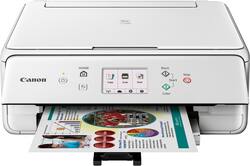
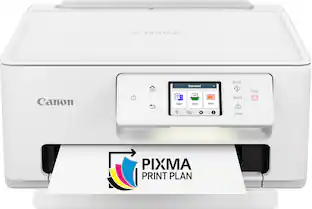
Canon - PIXMA TS6020 Wireless All-In-One Printer - White
- Key Specs
- Networking: Wired, Wireless
- ENERGY STAR Certified: true (Devices carrying the ENERGY STAR service mark, such as computer products and peripherals, kitchen appliances, and other products, generally use 20% to 30% less energy than required by federal standards.)
- Printer Type: All In One, Copier, Printer, Scanner
- ISO Color Print Speed: 10 pages per minute (The number of color pages able to be printed per minute in the device's default single-side mode, as tested by the International Standards Organization (ISO).)
- ISO Mono Print Speed: 15 pages per minute (The number of black ink (grayscale) pages able to be printed per minute in the device's default single-side mode, as tested by the International Standards Organization (ISO).)
- Output Tray Capacity: 100
- Touch Screen: false (Touch-screen devices make navigating more intuitive. Using a touch-screen display, you can do things such as tap to select, hold and drag to move items, swipe to scroll, and pinch to zoom.)
- General
- Brand: Canon
- Model Number: 1368C022
- Product Name: PIXMA TS6020 Wireless All-In-One Printer
- Color: White
- Display Screen: true
- Display Screen Size: 3 inches
- Dimensions
- Product Height: 5.5 inches (The out of box height of the item. Height is measured as the vertical distance from the bottom of the item to the top as it would be primarily used or placed.)
- Product Width: 14.7 inches (The out of box width of the item. Width is measured as the horizontal distance from one side of the item to the other as it would be primarily used or placed.)
- Product Depth: 14.7 inches (The out of box depth of the item. Depth is measured as the distance from the front of the item to the back as it would be primarily used or placed.)
- Product Weight: 13.6 pounds (The out of box weight of the item.)
- Features
- Automatic Document Feeder: false
- Photo Printing: true
- Automatic Reduction/Enlargement: true
- Automatic Two-Sided Printing: true
- Tray Capacity: 200
- Certifications Listings & Approvals
- EPEAT Qualified: false (The Electronic Product Environmental Assessment Tool (EPEAT) was designed to provide an environmental assessment tool for purchasers. In order to qualify for EPEAT, a product must meet all 23 required criteria.)
- TWAIN Compliant: true (Products with this label are compliant with standards set by the TWAIN Working Group for regulating communication between software and digital imaging devices. Devices that are TWAIN compliant are compatible for use with each other without requiring additional software, even if they have different capabilities.)
- Scanner Info
- Scanner Type: Flatbed
- Duplex Scan Function: true
- Scanner Resolution: Up to 19200 x 19200 (Refers to the number of pixels/dots, both horizontally and vertically, of the image produced by the scanner. Generally, the higher the resolution, the sharper and cleaner the produced image.)
- Fax Info
- Integrated Fax: false
- Ink
- Compatible Cartridges: PGI-270 PGBK, PGI-270 PGBK XL, CLI-271 (BK/C/M/Y), CLI-271 (BK/C/M/Y) XL
- Memory
- Memory Card Slot: false
- Paper Info
- Maximum Document Length: 11.7 inches
- Maximum Document Width: 8.5 inches
- Supported Paper Sizes: 4" x 6", 5" x 5" Square, 5" x 7", 8" x 10", Letter, Legal, U.S. No 10
- Paper Feeder: Cassette tray
- Paper Handling: 100-sheets rear paper tray; 100-sheets front paper cassette
- Compatible Media Types: Plain paper, Canon High Resolution paper, Glossy photo paper, Matte paper, Semi-glossy paper
- Copier Info
- Maximum Number Of Copies: 99
- Performance
- Printer Resolution (Black): Up to 4800 x 1200 (Refers to the number of pixels/dots, both horizontally and vertically, of the image produced by the printer in black ink. Generally, the higher the resolution, the sharper and cleaner the produced image.)
- Printer Resolution (Color): Up to 4800 x 1200 (Refers to the number of pixels/dots, both horizontally and vertically, of the image produced by the printer in colored ink. Generally, the higher the resolution, the sharper and cleaner the produced image.)
- Connectivity
- Minimum System Requirements: Apple Mac OS X v10.8.5 - macOS v10.12 (Sierra); Windows 10, Windows 8, Windows 8.1, Windows 7, Windows 7 SP1, Windows Vista SP2
- Other
- UPC: 013803275049
Get everything done with this Canon PIXMA all-in-one printer. It scans, prints and copies in paper sizes ranging from 4' x 6' to 8.5' x 14' and offers automatic duplexing. This Canon PIXMA all-in-one printer has a five-color ink system, so you only need to refill the color that runs out.
Fast print speeds up to 15 ISO ipm* in black, up to 10 ISO ipm* in color; creates a 4" x 6" photo-quality print in as little as 39 seconds*
- Easy Replenish: With a printer set up for Easy Replenish, you'll automatically receive shipments of the ink you need. The printer monitors its own ink levels, so you'll only receive ink when you need it.
- Prints up to 15 ISO ipm* in black and up to 10 ISO ipm* in color: Generates a 4" x 6" photo-quality print in as little as 39 seconds.
- Ideal for home or small business use: Offers excellent print quality for photos and documents and accepts a variety of paper types and sizes.
- Wireless and mobile printing capability: Connect this printer to your home or office network with the built-in wireless LAN. Plus, print from your mobile device with the free Canon PRINT app.
- Apple® AirPrint enabled: For easy printing from Apple iPad® and iPhone®.
- Edit and organize your photos: The My Image Garden software provides filter effects and automatic layout suggestions for customizing your prints, calendar view for easy organizing, and more.
- Up to 4800 x 1200 dpi (dots per inch) color resolution: High resolution for producing incredible quality and detail in documents and photos.
- 5 individual ink tank system: Get amazing color in your documents and photos with five individual ink tanks and replace only the color that runs out.
- Standard paper handling: 100-sheet front paper cassette input and 100-sheet rear paper tray output capacity.
- 3" LCD touchscreen: Makes it easy to select the functions you want.
- USB port for simple connectivity: The high-speed USB 2.0 port offers a standard connection to your PC.
- Scanner with color CIS (Contact Image Sensor): Allows you to scan documents in up to 2400 x 4800 dpi optical resolution and in up to 19200 dpi interpolated resolution, so you can enjoy faithful document reproduction.
- Built-in duplex printing: Print on both sides of the page without turning it over manually to minimize your printing costs and be more environmentally responsible.
- Fast borderless photo printing: Print a beautiful, borderless 4" x 6" photo in approximately 39 seconds.
- Automatic power on/off: This convenient feature automatically powers up the printer whenever you send a photo or document to be printed.
Whats Included
- Canon PIXMA TS6020 Wireless All-In-One Printer
- 4" x 6" photo paper sample pack (3 sheets PP-301)
- Setup CD-ROM
- Full set of ink tanks
- Power cord
Product Manuals
Q: I has shelf above where printer will sit. Does paper LOAD from front?
A: You can load paper in the back or you can come from the paper tray underneath it, so your shelf should be fine if you print from the bottom tray
A: Yes it does have that option to print in black and white or in color.
Q: is this printer compatible w a MAC?
A: Yes we have a Mac computer and it will print
Q: Do I need to be connected to the cloud to print wirelessly?
A: No, you do not need to be connected to the cloud to print wirelessly.
Q: Can you scan film negatives with this printer?
A: Yes, you can scan photo negatives.
Q: Can one print directly from an iPad?
A: I was able to print wirelessly from an iPhone and a MacBook Pro. It should work with an iPad.
Q: Can I scan photos into my computer?
A: Yes
People also viewed
 $249.00The price was $323.00
 $119.89The price was $179.89
 $99.89The price was $179.89
 $79.89The price was $109.89
 $449.00The price was $450.45





Today's top picks
 $479.99The price was $729.99
 $69.99The price was $129.99
 $199.99The price was $249.99
 $49.99The price was $62.99