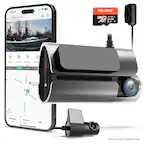
Cobra - SC 120 QHD Universal Dash Cam, works with Apple CarPlay/Android Auto - Black
Cobra - SC 120 QHD Universal Dash Cam, works with Apple CarPlay/Android Auto - Black
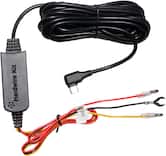
- Cobra - USB-C with 2.5A Micro USB Adapter Hardwire Kit for Compatible Dash Cams and Devices - Black$29.99
More Buying Options
Related Item

Specifications
- Field of View140 degreesAutomatic Incident DetectionYesG-SensorYesRecording Resolution2560 x 1440Forward Collision WarningNoCompatibilityiOS, Android
- Key Specs
- Field of View: 140 degrees
- Automatic Incident Detection: true
- G-Sensor: true
- Recording Resolution: 2560 x 1440 (Refers to the number of pixels, both horizontally and vertically, used to capture video. The higher the resolution the finer the video detail that can be seen.)
- Forward Collision Warning: false
- Compatibility: iOS, Android
- Wi-Fi Built-in: true (Able to connect directly to a wireless network without the use of an adapter.)
- Camera Mounting Location: Windshield
- Vehicle Camera Type: Dashboard
- Professional Installation Recommended: false
- General
- Brand: Cobra
- Model Number: SC120
- Product Name: SC 120 QHD Universal Dash Cam, works with Apple CarPlay/Android Auto
- Color: Black
- Vehicle Camera Type: Dashboard
- Professional Installation Recommended: false
- Recording & Playback
- Field of View: 140 degrees
- Automatic Incident Detection: true
- G-Sensor: true
- Recording Resolution: 2560 x 1440 (Refers to the number of pixels, both horizontally and vertically, used to capture video. The higher the resolution the finer the video detail that can be seen.)
- Loop-Cycle Recording: true
- GPS Enabled: true
- Camera Power Source: Vehicle battery
- Expandable Memory Compatibility: microSD
- Recording Feature: true
- Alert
- Forward Collision Warning: false
- Lane Departure Warning: false
- Traffic Camera Alert: false
- Compatibility
- Compatibility: iOS, Android
- App Compatible: true (The product can be connected to a program or software application on a mobile device, which then receives collected data from the product.)
- Wi-Fi Built-in: true (Able to connect directly to a wireless network without the use of an adapter.)
- Operating System Compatibility: Android, Apple iOS, Apple iPadOS
- Features
- Integrated Microphone: true
- Night Vision: true
- Display
- Screen Included: false
- Mounting
- Camera Mounting Location: Windshield
- Mount Included: true
- Mount Type: Adhesive
- Input
- Number Of Auxiliary Inputs: 0
- Number of USB Port(s): 1
- Dimensions
- Product Height: 1.18 inches (The out of box height of the item. Height is measured as the vertical distance from the bottom of the item to the top as it would be primarily used or placed.)
- Product Width: 1.18 inches (The out of box width of the item. Width is measured as the horizontal distance from one side of the item to the other as it would be primarily used or placed.)
- Product Depth: 2.76 inches (The out of box depth of the item. Depth is measured as the distance from the front of the item to the back as it would be primarily used or placed.)
- Product Weight: 0.12 pounds (The out of box weight of the item.)
- Warranty
- Warranty - Parts: 1 year
- Warranty - Labor: 1 Year
- Other
- UPC: 028377108426
Big protection comes in small packages. Whether it’s in capturing the broad vistas of a scenic drive, or recording unexpected incidents along the way, the QHD video of the Cobra SC 120 has the power to see what’s ahead, and the size to stay out of your line of sight.
- Apple CarPlay/Android Auto Compatible: Easily view your route and interact with alerts on your CarPlay or Android Auto compatible display. Increase your focus on the road ahead, and have control over your alerts without fumbling for your phone.
- Clarity You Can Count On: QHD 1600P video resolution provides the clarity and details you need, whether it's a scenic drive or it's an accident you're involved in
- Cloud Video Management: Instantly store, edit, and share footage from anywhere with built in WiFi
- Small but Mighty: The power to provide evidence when you need it, and small enough to stay out of your line of sight
- Relive your Road Trips: Use Trip Clips to create condensed time-lapsed videos of your scenic drives and adventures to easily share with friends and family
- Apple CarPlay/Android Auto Compatible: Easily view your route and interact with alerts on your CarPlay or Android Auto compatible display. Increase your focus on the road ahead, and have control over your alerts without fumbling for your phone.
- Clarity You Can Count On: QHD 1600P video resolution provides the clarity and details you need, whether it's a scenic drive or it's an accident you're involved in
- Cloud Video Management: Instantly store, edit, and share footage from anywhere with built in WiFi
- Small but Mighty: The power to provide evidence when you need it, and small enough to stay out of your line of sight
- Relive your Road Trips: Use Trip Clips to create condensed time-lapsed videos of your scenic drives and adventures to easily share with friends and family
Whats Included
- Cobra SC 120 Dash Cam
- Power Cable
- Static Removal Film
- Sticky Cable Anchors
- Data Cable
- 16GB SD Card
- Cobra SC 120 Dash Cam
- Power Cable
- Static Removal Film
- Sticky Cable Anchors
- Data Cable
- 16GB SD Card
Q: What is the field of view of the camera?
A: The field of view of this camera is 140 degrees.
Q: Does the dash cam have a built-in microphone?
A: This dash cam model has an integrated microphone.
Q: Is the dash cam compatible with GPS?
A: This dash cam is compatible with GPS.
Q: What is the warranty on the dash cam?
A: The manufacturer's warranty for both parts and labor on the Cobra SC 120 dash cam is 1 year.
Q: Can the dash cam be used with both Apple CarPlay and Android Auto?
A: The SC 120 QHD Universal Dash Cam is compatible with both Apple CarPlay and Android Auto.
Q: What are the dimensions of the dash cam?
A: The Cobra SC 120 QHD Universal Dash Cam is 1.18 inches high, 1.18 inches wide, and 2.76 inches deep.
Q: What are the Frames Per Second this camera can record? 15, 30, 60?
A: Thank you for your question. The SC 201 records 30 frames per second.
Q: What does it come with? Specifically, does it come WITH a Micro-SD card?
A: Thank you for your question. Included with the SC 120 is a 16GB SD Card, Cable Management Kit, Temporary Install Film and Power Cable.
Compare similar products

Big protection comes in small packages. Whether it’s in capturing the broad vistas of a scenic drive, or recording unexpected incidents along the way, the QHD video of the Cobra SC 120 has the power to see what’s ahead, and the size to stay out of your line of sight.

Stay in the clear with the voice-controlled Garmin Dash Cam Mini 3 dash camera. This ultracompact key-sized dash cam automatically records high-definition 1080p video with a wide 140-degree field of view — and even saves video of detected incidents. The built-in-Garmin Clarity polarizer reduces windshield glare for a clear view. Plus, Garmin Clarity HDR optics enable the camera to capture crisp details, day and night. With a paid Vault subscription and an active Wi-Fi network connection, the secure online Vault automatically stores important saved video clips so you can easily view and share with the Garmin Drive smartphone app. Voice control lets you use spoken commands in English, German, French, Spanish, Italian and Swedish to save video and start or stop audio recording. Some jurisdictions regulate or prohibit use of this device.

The REDTIGER F4 4K Dash Cam captures crystal-clear footage with its 4K front camera and optional rear camera (2.5K front, 1080P rear). With a 160-degree wide-angle lens and advanced night vision, it ensures detailed recording even in low light. The 2.2-inch touch screen provides easy navigation for settings, playback, and video management. Voice-activated controls allow hands-free operation, keeping you focused on the road. Built-in GPS tracks your route and speed, while WiFi connectivity enables easy video access and sharing through the REDTIGER app. The G-sensor detects collisions and locks important footage, while loop recording ensures continuous coverage. Includes a 32GB card, expandable up to 256GB, and comes with an 18-month warranty and 24/7 customer support.
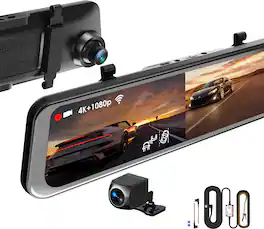
Elevate your vehicle’s safety and functionality with the REXING M2 Max Pro Mirror Dash Cam. This advanced system integrates seamlessly with your rearview mirror, featuring a 12" IPS touchscreen that displays high-quality video from the rear camera. Capture detailed footage with dual cameras, offering 4K resolution at the front and 1080p at the rear, ensuring comprehensive coverage from multiple angles. The M2 Max Pro is equipped with Advanced Driver Assistance Systems (ADAS), including Blind Spot Detection, Rear Collision Warning, and Parking Assistance, enhancing your driving safety. It also boasts a built-in GPS Logger to record precise time, location, and speed data, alongside Blind Spot Detection and Lane Change Assist to facilitate safe driving maneuvers. Additional features include enhanced night vision for clear recordings in low light conditions, Wi-Fi connectivity for easy video management, and a G-sensor that locks videos upon detecting impacts. Loop recording ensures continuous coverage by overwriting old footage, while the included smart hardwire kit activates the Parking Monitor, providing round-the-clock surveillance by recording when vibrations are detected. This mirror dash cam not only improves your driving visibility but also offers crucial safety features, making it an essential upgrade for any vehicle.
| Pros for Cobra - SC 120 QHD Universal Dash Cam, works with Apple CarPlay/Android Auto - Black | |||
|---|---|---|---|
| Size, Video Quality, Ease of use, Resolution, Design | Overall Performance, Size, Video Quality, Installation, Field of View | There were no pros for this product— | Video Quality, Ease of use, Installation, Overall Performance, GPS |
| Cons for Cobra - SC 120 QHD Universal Dash Cam, works with Apple CarPlay/Android Auto - Black | |||
| Connectivity, App | Connectivity | There were no cons for this product— | Glare Reduction, Night Vision, SD Card |
Specs
Reviews
Customers are saying
Customers frequently mention the SC 120 QHD Universal Dash Cam's smaller size, great video quality, and ease of use. The QHD resolution and low-profile design are also appreciated, along with its unobtrusive field of view and simple installation. However, some customers have expressed concerns about the need for an additional app and connectivity issues.
Customer Images
The vast majority of our reviews come from verified purchases. Reviews from customers may include My Best Buy members, employees, and Tech Insider Network members (as tagged). Select reviewers may receive discounted products, promotional considerations or entries into drawings for honest, helpful reviews.
- Rated 2 out of 5 stars
not for me
while i love how small it is, i would not recommend or re-buy because the process of downloading clips is so long. you have to have your car on, disconnect from carplay, get on the (slow) app, connect to the devices wifi which is a hit or miss, then finally look through the clips. if you don’t intend to download clips unless there’s an accident, then this might be the one for you, but i like downloading the crazy driving i capture and this does not make it easy. also the app has a built in navigation as if we all don’t already have several built in options in our phone.
jessica Posted
- Rated 4 out of 5 stars
Best Used As a Set-It-And-Forget-It DashCam
The Cobra SC 120 is the essential minimalists’ dashcam. It’s for those who just want to mount, provide power, and forget about it. It provides 1440p resolution, has a built-in G sensor to capture and lock an in-progress video recording, and even has app integrations with Apple CarPlay and Android Auto. A big part of this dashcam is the use of the DriveSmarter app, because there aren't a whole lot of physical buttons to push on this tiny dashcam. TL;DR…Right off the bat, I’d like to share my thoughts on the camera overall. As a set-it-and-forget-it dashcam, it’s perfect. It provides loop recording, will lock recordings due G-Sensor triggers, and can lock recordings on demand without any apps. Using the DriveSmarter app WITH the camera is a bit cumbersome. Browsing through the recordings feels clunky and slow. I took a star off for that. I’m sure the rest of the DriveSmarter app is fine, but I’m talking in regards to the SC120. Lastly, in order to use this camera’s premium features (Parking Mode, Motion Detection), you’ll need to purchase the hardwire kit, which is sold separately. The dashcam itself is tiny; very very tiny. If clever enough, you could mount this behind your rear view mirror and never notice it was there. The dashcam is mounted using 3M double-sided tape onto your windshield and once mounted has variable adjustability to get that perfect 140 degree angle of your field of view. Power is provided via 12V car socket; a hardwire kit is available as well, but not included in this kit. I feel like the amount of mounting tape should be more than sufficient to hold the webcam in place as it is super lightweight. Use of the dashcam is very simple. Once the car provides power, it’s up and running and provides 3 different statuses based on its LED. It will illuminate blue briefly to indicate power, then flash red to designate video recording. Finally, it will flash purple to indicate that a recording is being tagged and file locked, meaning it will not be overwritten during loop recording. You’re off and running! Video quality is 1440p @ 30Hz with a 140 degree field of view. This is plenty to catch what is in front of you. The SC120 It has two buttons: an (1) action button and a (2) mic on/off button. The action button can prompt an immediate lock on the existing recording in the event you catch something that wasn’t already caught (or felt) by the G-Sensor. Sometimes you may pass by something “interesting” and a simple press of the button will lock that recording. The action button can also prompt “Trip Clips”, which are time lapse video recordings of your current drive. This is activated by pressing the action button twice. Finally, you can flash the included 16GB SD card by holding the action button for 5 seconds. As for the mic, a simple press of the mic button will toggle the mic on and off. If you’re not a big app person or don’t intend to use the car integrations, then you can simply pull the SD card and download your videos onto your computer. If you want to get the full potential from this dashcam, you’ll want to use the DriveSmarter app. At a very minimum, it will help you frame your shot because it doesn’t have a dedicated screen. But the app also provides real-time information, such as traffic conditions, red light cam notifications and even speed traps. If using CarPlay or Android Auto, DriveSmarter will be your main app displayed on your screen, much like Google Maps or Apple Maps. This could be a tough space to fight for as many of us are accustomed to the native map apps. But you can toggle between apps if you choose to. Finally, the SC120 provides both Parking Mode and Motion Detection. The caveat is that you must have the hardwire kit to utilize this feature. Parking Mode will pull low power to the G-Sensor when parked and off, and will begin recording when the sensor detects motion. Similarly, Motion Detection will pull low power and record detected motion while your car is parked and off. There are concerns about battery drain in this mode and Cobra suggests to cap the amount of time in this mode. But back to basics here; this is a dashcam that is your eyes (and ears if you want) while you’re driving to your daily destinations. Until you run into a sticky situation of your own or see something interesting, this dashcam should go unnoticed day in, day out. Its size alone provides that out-of-sight-out-of-mind with respect to other bulky dashcam units. It’s a fantastic unit for the price and comes from a very reputable company.
softwareEngineer Posted
- Rated 4 out of 5 stars
Tiny, Simple, Clear Video
A tiny witness for your daily drives that is easy to install and records good detail. It may not have the fancy features of more expensive models, but it gets the job done while also being inconspicuous and a great value. Highlights: * Very compact. * QHD resolution for fine details. * Wide field of view. * Includes a suitably-sized 16gb microSD card and can accept replacements up to 256gb. Room for Improvement: * Power requirements may prevent some USB-C cables from working. * Reflections from inside the windshield can be annoying. * Can’t view live or recorded video through app if phone is connected to CarPlay. Setup: As with most dash cams, the first thing to do is to plug it in and power it up. Dash cams used to need to be hard-wired to the car’s fuse panel which is still the preferred method, but new ones like this Cobra SC-120 come with a 12v (cigarette lighter) adapter for easy plug-and-play installation. The lighter plug has a long cable with a USB-C right-angle connector on the end that plugs into the dash cam. Other ways of connecting to power through your car’s OBD port or hard-wired connections are available as optional accessory purchases. After the cam is powered up, the next thing to do is set it up using the free App for your phone. This dash cam uses a combination of Bluetooth and WiFi to establish that connection. If your car has a built-in WiFi hotspot, you can use that keep the dash cam connected to the internet instead of to your phone directly. Otherwise, your phone will temporarily connect to the dash cam via WiFi when needed to change settings, view recordings or check the live video. The app and a built-in voice in the dash cam guide you through the initial connection and setup but getting it connected to my phone was a tad finicky. It took a few tries but I eventually got everything connected and working. The live video is clear and fluid but with a slight bit of delay. I used this live video the check the placement of the dash cam on my windshield. Perhaps it’s the angle of my windshield or maybe the lens on the dash cam doesn’t have a polarizing filter, but there was a bit of reflection from inside the car shown in the video. After finding a good spot for this tiny dash cam, it was easy to clean the spot and stick it on. The bracket is tight enough to prevent accidental movement but flexible enough to adjust the angle of the camera for the perfect view. Now that the dash cam is mounted and working, the last big part of the installation is to neatly route the power cable around the windshield and to the car’s power port. Using the tool provided, it was relatively easy to tuck the wire in to the trim and make it look neat. Small cable clips are provided if needed to hold the wire in places where pliable trim may not be easy to find. If this dash cam is the only thing you have to plug in to that 12v cigarette lighter, then you’re all set. While that lighter plug also has an USB-A port to use for other things in the car like charging your phone, I also have a radar detector that came with a 12v cigarette lighter plug connected to its power cord, too. I tried using a standard USB-C cable to power up the dash cam by plugging it in to the radar detector’s plug but the dash cam didn’t get enough power and didn’t work. Same goes for the radar detector plugging into the dash cam’s lighter plug. Perhaps I just need to find a suitable USB-C cable that works for the dash cam, but it doesn’t appear to be a standard one. For now, I’ll just have to swap lighter plugs, but this is something that may be an issue for anyone with both a dash cam and a radar detector that both came connected to 12v cigarette lighter plugs. Usage: Under normal circumstances, the dash cam will power up with the car and immediately start loop recording. A reasonably-sized 16GB microSD card came with this dash cam so it can record quite a bit before automatically erasing the oldest recordings to make room for newer ones. You can always replace the bundled memory card with a larger one up to 256gb if needed, but you shouldn’t need to. There are only two buttons and one light on the dash cam. The main button can be used to mark recordings to be saved like in the event of an incident or just to mark something seen that should be saved. That button can also be used to manually format the memory card to keep it working smoothly. The other button turns the built-in microphone on or off for privacy. The light indicates when the dash cam is powered on, recording, etc. Everything else is available through the app. For the dash cam, the app lets you modify all settings, view recordings and check the live video. If you have the dash cam wired up to have power when your vehicle is off, it will also work when parked to monitor the car and record video in the event of a parking incident. If your car has a persistent WiFi hotspot as well, then the dash cam’s video can be remotely accessed. The app also has navigation and shared incident reports from other app users like marked radar traps, traffic cameras, etc. If your phone is connected to CarPlay in your car, that app can show its map and incidents on your car’s screen. This app does not allow access to the dash cam’s live or recorded videos through CarPlay. Your phone has to be disconnected from CarPlay for those features to work in the phone’s app. I would be nice to have access to the dash cam’s video and settings on your car’s display, but it is understandable that it doesn’t work because your phone connects to both CarPlay and the dash cam via WiFi - just not simultaneously. If you want to grab videos off the camera faster or don’t want to deal with the app and WiFi, you can easily remove the microSD card and put it in your choice of card reader. A shorter USB-C data cable is provided to connect the dash cam directly to your computer for local file access, but this 8 inch long cable is so short that you’d probably have to prop your laptop on your dash to reach to where the dash cam is mounted since the dash cam is not really meant to be removed once installed. Overall: This a basic dash cam with a tiny footprint and good video quality. Basic installation is easy but it also supports other installation methods if your needs are more advanced. It doesn’t have many of the features of higher-end models, but it definitely does the job of recording higher-quality video while driving without being a distraction to the driver. Once set up, you can essentially forget it’s even there until you need it… like any good dash cam would.
gadgeTT Posted