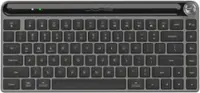
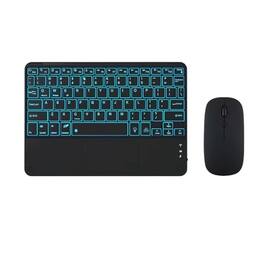
Earthley Blooms - Ultra-slim With Built-in Touchpad And Mouse Portable Mini Wireless Rechargeable Backlit For Ipad Tablet - Black
Color
BlackFREE shipping to
Related Item

Specifications
- Form FactorFull-sizeConnection TypeWired
- Key Specs
- Form Factor: Full-size (The size, arrangement, and physical configuration of the product.)
- Connection Type: Wired
- General
- Brand: Earthley Blooms
- Model Number: 245508683342
- Product Name: Ultra-slim With Built-in Touchpad And Mouse Portable Mini Wireless Rechargeable Backlit For Ipad Tablet
- Color: Black
- Functions
- Form Factor: Full-size (The size, arrangement, and physical configuration of the product.)
- Connectivity
- Connection Type: Wired
- Compatibility
- Operating System Compatibility: Universal
- Dimensions
- Product Height: 1.484 inches (The out of box height of the item. Height is measured as the vertical distance from the bottom of the item to the top as it would be primarily used or placed.)
- Product Width: 9.56 inches (The out of box width of the item. Width is measured as the horizontal distance from one side of the item to the other as it would be primarily used or placed.)
- Product Depth: 14.844 inches (The out of box depth of the item. Depth is measured as the distance from the front of the item to the back as it would be primarily used or placed.)
- Product Weight: 1.012 ounces (The out of box weight of the item.)
- Warranty
- Warranty - Parts: 7-day warranty
- Other
- UPC: 245508683342
7-Color LED Backlit - This wiressless 7-color led backlit bluetoothand mouse adoptswireless connection and scissor key structure,which bring you ainput experience,it has built in rechargeable polymeric lithium better and charging indicator,thewill enter into sleeping mode if there is no action in 10 minutes,therefor it has a small comsumption and longlife.Theand mouse compatible with iOS, including Computer, Desktop, PC, Laptop, Android Tablets Windows,iPhone, iPad, AndroidWindows Surface tablet cell phone,etc.Pairing instruction:before use this keyboard,itbe connected with your tablet or other device,when it pairs successfully,you do not need to reconnect it in future,please connnect the keybaord with your tablet according to the right graphic instruction as below:1.Turn on the keyboard;2.Press the "Connect" button to 3 seconds,theblinks;3.open thefrom settings in your IPAD and find thekeyboard,then click and connect(password free connection).Hot keys and Indicator:you can press the FN+function keys,power LED:when theturns on,it flashes 1-2 seconds and then goes out automatically;charging LED:it flashes while charging and goes out once theis full; BT LED:it flashed when theis connecting and goes out after connected;Charging instruction:1.please charge at least 6 hours when you first time use this keyboard,next time when theis low ,please at least charge 2 hours;2.the redflashes means the it is lowand please charge it in time;3.please connect the charging cable to thecorrectly.Troubleshooting:if theis not connected or paired with the tablet computer after successful pairing,the text input delay or even typing letters appear in the process,please according to the following steps:delete alldevices,tablet computeroption in the closed on a tablet computeroption,-restart the tablet computerand tbalet computer again.
- black: 7-Color LED Backlit - This wiressless 7-color led backlit bluetoothand mouse adoptswireless connection and scissor key structure,which bring you ainput experience,it has built in rechargeable polymeric lithium better and charging indicator,thewill enter into sleeping mode if there is no action in 10 minutes,therefor it has a small comsumption and longlife.Theand mouse compatible with iOS,
- black: 7-Color LED Backlit - This wiressless 7-color led backlit bluetoothand mouse adoptswireless connection and scissor key structure,which bring you ainput experience,it has built in rechargeable polymeric lithium better and charging indicator,thewill enter into sleeping mode if there is no action in 10 minutes,therefor it has a small comsumption and longlife.Theand mouse compatible with iOS,
Whats Included
- Box_Contents: 1
- Box_Contents: 1
Compare similar products
7-Color LED Backlit - This wiressless 7-color led backlit bluetoothand mouse adoptswireless connection and scissor key structure,which bring you ainput experience,it has built in rechargeable polymeric lithium better and charging indicator,thewill enter into sleeping mode if there is no action in 10 minutes,therefor it has a small comsumption and longlife.Theand mouse compatible with iOS, including Computer, Desktop, PC, Laptop, Android Tablets Windows,iPhone, iPad, AndroidWindows Surface tablet cell phone,etc.Pairing instruction:before use this keyboard,itbe connected with your tablet or other device,when it pairs successfully,you do not need to reconnect it in future,please connnect the keybaord with your tablet according to the right graphic instruction as below:1.Turn on the keyboard;2.Press the "Connect" button to 3 seconds,theblinks;3.open thefrom settings in your IPAD and find thekeyboard,then click and connect(password free connection).Hot keys and Indicator:you can press the FN+function keys,power LED:when theturns on,it flashes 1-2 seconds and then goes out automatically;charging LED:it flashes while charging and goes out once theis full; BT LED:it flashed when theis connecting and goes out after connected;Charging instruction:1.please charge at least 6 hours when you first time use this keyboard,next time when theis low ,please at least charge 2 hours;2.the redflashes means the it is lowand please charge it in time;3.please connect the charging cable to thecorrectly.Troubleshooting:if theis not connected or paired with the tablet computer after successful pairing,the text input delay or even typing letters appear in the process,please according to the following steps:delete alldevices,tablet computeroption in the closed on a tablet computeroption,-restart the tablet computerand tbalet computer again.

7-Color LED Backlit - This wiressless 7-color led backlit bluetoothand mouse adoptswireless connection and scissor key structure,which bring you ainput experience,it has built in rechargeable polymeric lithium better and charging indicator,thewill enter into sleeping mode if there is no action in 10 minutes,therefor it has a small comsumption and longlife.Theand mouse compatible with iOS, including Computer, Desktop, PC, Laptop, Android Tablets Windows,iPhone, iPad, AndroidWindows Surface tablet cell phone,etc.Pairing instruction:before use this keyboard,itbe connected with your tablet or other device,when it pairs successfully,you do not need to reconnect it in future,please connnect the keybaord with your tablet according to the right graphic instruction as below:1.Turn on the keyboard;2.Press the "Connect" button to 3 seconds,theblinks;3.open thefrom settings in your IPAD and find thekeyboard,then click and connect(password free connection).Hot keys and Indicator:you can press the FN+function keys,power LED:when theturns on,it flashes 1-2 seconds and then goes out automatically;charging LED:it flashes while charging and goes out once theis full; BT LED:it flashed when theis connecting and goes out after connected;Charging instruction:1.please charge at least 6 hours when you first time use this keyboard,next time when theis low ,please at least charge 2 hours;2.the redflashes means the it is lowand please charge it in time;3.please connect the charging cable to thecorrectly.Troubleshooting:if theis not connected or paired with the tablet computer after successful pairing,the text input delay or even typing letters appear in the process,please according to the following steps:delete alldevices,tablet computeroption in the closed on a tablet computeroption,-restart the tablet computerand tbalet computer again.

Logitech Mouse - Optical - Wireless - Radio Frequency - 2.40 GHz - Magic Night - Tilt Wheel
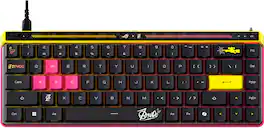
ROG Falchion Ace HFX ZywOo Edition embodies that same focus, combining pro-level tuning with a design inspired by ZywOo’s competitive mindset. Equipped with pre-lubed ROG HFX Magnetic Switches, Rapid Trigger, Speed Tap Mode, five-layer acoustic dampening, and dual USB-C® ports, it’s engineered for peak performance in high-stakes environments
Specs
Reviews
This product doesn't have any reviews yet.