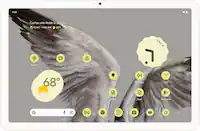
Google - Pixel Tablet with Charging Speaker Dock - 11" Android Tablet - 128GB - Wi-Fi - Hazel
- Key Specs
- Screen Size: 10.95 inches (Size of the screen, measured diagonally from corner to corner.)
- Screen Resolution: 2560 x 1600 (Screens come in a range of resolutions (measured in pixels, horizontal x vertical). The higher the resolution, the greater the picture quality.)
- Processor Model: Google Tensor G2 (Your computer's processor is like its brain. Working in combination with system memory, the power of the processor determines the complexity of software you can run, how many programs you can have open at the same time, and how fast those programs will run. Most computers feature an AMD, Intel or Snapdragon processor.)
- Total Storage Capacity: 128 gigabytes
- Operating System: Android 13 (The operating system manages all software and hardware, including files, memory and connected devices. Most importantly, it lets you interact with your device and your programs in a visual way; otherwise, you'd be typing computer code to get anything done.)
- Voice Assistant Built-in: Google Assistant (A digital assistant built into the device that uses voice commands to answer questions and control smart devices.)
- Wireless Connectivity: Bluetooth, Wi-Fi (The manner in which a device sends data to another device over a short distance without the use of wires or cables.)
- Security Features: Fingerprint reader, Password Protection
- General
- Brand: Google
- Model Number: GA04754-US
- Product Name: Pixel Tablet with Charging Speaker Dock - 11" Android Tablet - 128GB - Wi-Fi
- Color: Hazel
- Model Family: Google Pixel Tablet
- Year of Release: 2023
- Display
- Screen Size: 10.95 inches (Size of the screen, measured diagonally from corner to corner.)
- Screen Resolution: 2560 x 1600 (Screens come in a range of resolutions (measured in pixels, horizontal x vertical). The higher the resolution, the greater the picture quality.)
- Processor
- Processor Model: Google Tensor G2 (Your computer's processor is like its brain. Working in combination with system memory, the power of the processor determines the complexity of software you can run, how many programs you can have open at the same time, and how fast those programs will run. Most computers feature an AMD, Intel or Snapdragon processor.)
- Storage
- Total Storage Capacity: 128 gigabytes
- Memory
- System Memory (RAM): 8 gigabytes (Random-access memory (RAM) is a computing device's short-term data storage, which allows active information to be accessed quickly. The size and type of RAM determines how efficiently the device can handle large amounts of information at one time. For example, gaming or video editing requires more RAM for optimal performance.)
- Compatibility
- Operating System: Android 13 (The operating system manages all software and hardware, including files, memory and connected devices. Most importantly, it lets you interact with your device and your programs in a visual way; otherwise, you'd be typing computer code to get anything done.)
- Operating System Compatibility: Android
- Voice Assistant Built-in: Google Assistant (A digital assistant built into the device that uses voice commands to answer questions and control smart devices.)
- Connectivity
- Wireless Connectivity: Bluetooth, Wi-Fi (The manner in which a device sends data to another device over a short distance without the use of wires or cables.)
- Power
- Charging Interface(s): USB-C (The connection for transmitting power to charge the device.)
- Camera
- Front-Facing Camera: true
- Front Facing Camera Megapixels: 8 megapixels (The more megapixels, the more detail that the camera facing the user can capture.)
- Front Facing Camera Video Resolution: 1080p (Refers to the number of pixels, both horizontally and vertically, used by the camera facing the user to capture video. The higher the resolution the finer the video detail that can be seen.)
- Rear-Facing Camera: true
- Rear Facing Camera Megapixels: 8 megapixels (The more megapixels, the more detail that the camera facing away from the user can capture.)
- Rear Facing Camera Video Resolution: 1080p (Refers to the number of pixels, both horizontally and vertically, used by the camera facing away from the user to capture video. The higher the resolution the finer the video detail that can be seen.)
- Features
- Security Features: Fingerprint reader, Password Protection
- Dimensions
- Product Width: 6.7 inches (The out of box width of the item. Width is measured as the horizontal distance from one side of the item to the other as it would be primarily used or placed.)
- Product Depth: 10.2 inches (The out of box depth of the item. Depth is measured as the distance from the front of the item to the back as it would be primarily used or placed.)
- Product Weight: 1.1 ounces (The out of box weight of the item.)
- Certifications Listings & Approvals
- ENERGY STAR Certified: false (Devices carrying the ENERGY STAR service mark, such as computer products and peripherals, kitchen appliances, and other products, generally use 20% to 30% less energy than required by federal standards.)
- Other
- UPC: 193575035789
The Pixel Tablet is engineered by Google to be more helpful at home – and in your hand. Place it on the Charging Speaker Dock for great-sounding music and video streaming.[1] Control your smart home, and say “Hey Google” for hands-free help.[2] It’s all powered by the Google Tensor G2 chip, and it’s the perfect companion to your Pixel phone.
- Home is where the dock is: The Pixel Tablet’s unique speaker dock keeps it charged and ready, 24/7. And it doubles as a great-sounding speaker for room-filling music. ¹
- Android operating system: The Android apps you love are already optimized for your Pixel Tablet’s larger screen; it comes with Google TV so you can watch your favorite shows and movies, and it’s easy to cast content with Chromecast built in ¹
- Beautiful 11-inch screen: The Pixel Tablet has a gorgeous 11-inch screen with brilliant colors and adaptive brightness – perfect for streaming your favorite movies and shows, and editing photos and videos. ³
- Storage for what matters most: 128 GB UFS 3.1 storage provides space for your contacts, music, photos and more. ⁴
- Google Tensor G2. Now in tablet form: The Pixel Tablet is the first tablet with the Google Tensor G2 chip built in. It features Google AI and enables fast and smooth streaming, high-quality video calls, accurate voice typing, efficient multitasking, and more.
- Crisp and clear video calls: The Pixel Tablet comes with Google Meet for HD video calling. ⁵ The camera follows you so you can move around the room while staying in frame.
- Do more at home with Hub Mode: Get some of the best features of a smart display when your tablet is docked, like a digital photo frame, smart home controls, and hands-free help. Just say “Hey Google” to play music and videos, get answers, turn the lights on, set timers, and more. ⁶
- An easier way to share: With Nearby Share, you can quickly and securely share photos, videos, and more between your Pixel Tablet and other nearby phones and laptops. ⁷
- The info you need, at a glance: At a Glance shows you useful info right when you need it, like weather forecasts, event reminders, or package deliveries. ⁸
- It works seamlessly with other Pixel devices.: The Pixel Tablet effortlessly connect your Pixel phone, earbuds, watch, and tablet with each other; and easily switch audio between your Pixel phone, earbuds, and tablet. ⁹
- Reimagine your photos, right on your tablet.: Magic Editor in Google Photos makes complex edits easy. With a few taps, AI can change the background, move objects, and more.⁺
- Instant inspiration.: Gemini helps you kickstart productivity and creativity – brainstorm ideas, write notes, make plans, and more.¹¹
- Circle to Search. Whoa.: Just circle what you want more info about, whether it’s an image, text, or video. Pixel finds it fast – right from the app you’re in.¹²
- Home is where the dock is: The Pixel Tablet’s unique speaker dock keeps it charged and ready, 24/7. And it doubles as a great-sounding speaker for room-filling music. ¹
- Android operating system: The Android apps you love are already optimized for your Pixel Tablet’s larger screen; it comes with Google TV so you can watch your favorite shows and movies, and it’s easy to cast content with Chromecast built in ¹
- Beautiful 11-inch screen: The Pixel Tablet has a gorgeous 11-inch screen with brilliant colors and adaptive brightness – perfect for streaming your favorite movies and shows, and editing photos and videos. ³
- Storage for what matters most: 128 GB UFS 3.1 storage provides space for your contacts, music, photos and more. ⁴
- Google Tensor G2. Now in tablet form: The Pixel Tablet is the first tablet with the Google Tensor G2 chip built in. It features Google AI and enables fast and smooth streaming, high-quality video calls, accurate voice typing, efficient multitasking, and more.
- Crisp and clear video calls: The Pixel Tablet comes with Google Meet for HD video calling. ⁵ The camera follows you so you can move around the room while staying in frame.
- Do more at home with Hub Mode: Get some of the best features of a smart display when your tablet is docked, like a digital photo frame, smart home controls, and hands-free help. Just say “Hey Google” to play music and videos, get answers, turn the lights on, set timers, and more. ⁶
- An easier way to share: With Nearby Share, you can quickly and securely share photos, videos, and more between your Pixel Tablet and other nearby phones and laptops. ⁷
- The info you need, at a glance: At a Glance shows you useful info right when you need it, like weather forecasts, event reminders, or package deliveries. ⁸
- It works seamlessly with other Pixel devices.: The Pixel Tablet effortlessly connect your Pixel phone, earbuds, watch, and tablet with each other; and easily switch audio between your Pixel phone, earbuds, and tablet. ⁹
- Reimagine your photos, right on your tablet.: Magic Editor in Google Photos makes complex edits easy. With a few taps, AI can change the background, move objects, and more.⁺
- Instant inspiration.: Gemini helps you kickstart productivity and creativity – brainstorm ideas, write notes, make plans, and more.¹¹
- Circle to Search. Whoa.: Just circle what you want more info about, whether it’s an image, text, or video. Pixel finds it fast – right from the app you’re in.¹²
Disclaimers
- 1 Subscriptions may be required for certain content.
- 2 Requires compatible smart home devices (sold separately) and the Google Home app.
- 3 Screen has rounded corners. When measured diagonally as a rectangle, screen is 11 inches. Actual viewable area is less. Subscriptions may be required to stream certain content.
- 4 Storage specifications refer to capacity before formatting. Actual formatted capacity will be less.
- 5 Requires compatible apps.
- 6 Home control features require compatible smart devices (sold separately). Subscriptions may be required.
- 7 Requires compatible phones running on Android 6.0 or newer or Chromebooks running on Chrome OS 91 or newer.
- 8 Event reminders require compatible email app. Nest package delivery feature requires compatible Nest Doorbell (sold separately) and the Google Home app.
- 9 Watch, phone and earbuds sold separately. Fast pair requirems location enabled. Devices must have been previously paired with Pixel Buds.
- ⁺ Results may vary.
- ¹¹ Gemini mobile app available on select devices, languages, and countries. Internet connection required. Check responses for accuracy.
- ¹² Requires internet connection and compatible devices, apps, and surfaces. Results may vary depending on visual matches.
- 1 Subscriptions may be required for certain content.
- 2 Requires compatible smart home devices (sold separately) and the Google Home app.
- 3 Screen has rounded corners. When measured diagonally as a rectangle, screen is 11 inches. Actual viewable area is less. Subscriptions may be required to stream certain content.
- 4 Storage specifications refer to capacity before formatting. Actual formatted capacity will be less.
- 5 Requires compatible apps.
- 6 Home control features require compatible smart devices (sold separately). Subscriptions may be required.
- 7 Requires compatible phones running on Android 6.0 or newer or Chromebooks running on Chrome OS 91 or newer.
- 8 Event reminders require compatible email app. Nest package delivery feature requires compatible Nest Doorbell (sold separately) and the Google Home app.
- 9 Watch, phone and earbuds sold separately. Fast pair requirems location enabled. Devices must have been previously paired with Pixel Buds.
- ⁺ Results may vary.
- ¹¹ Gemini mobile app available on select devices, languages, and countries. Internet connection required. Check responses for accuracy.
- ¹² Requires internet connection and compatible devices, apps, and surfaces. Results may vary depending on visual matches.
Q: Does this tablet have expandable storage like Samsung tablets?
A: No expandable storage on this tablet.
A: According to an article on Cnet, it does have cast but NO bluetooth
Q: Does the Google Pixel tablet get OS updates like Samsung and how many updates do they guarantee?
A: Hi there, thanks for your inquiry about Google Pixel Tablet. The device will get updates for at least 5 years from when it first became available on the Google Store in the US. These include security and software updates, and may also include new features. If you have additional inquiries, please don't hesitate to reach us on our 'Contact Us' page by visiting our Google Help site here: https://support.google.com/googlepixeltablet/gethelp
Q: Can you charge the Pixel tablet with a charging cord even when it is not on the stand?
A: Yes it has an USB C port on the side of it.
Q: Will this be compatible with a bluetooth keyboard?
A: Of course!
A: Pixel Tablet Supports USI 2.0 which means it will have support for third party digital stylus that are on the USI 2.0 standard.
A: the tablet has its own speakers and sound pretty good when streaming. what you can't do is cast sound to the dock when not attached. The dock has excellent sound, but must be attached to be utilized.
A: Hi there, DAVE. We appreciate your question. Yes. The Alexa app works with Google Pixel Tablet. You need to make sure that the app is installed and always open on your device.The Alexa app can be downloaded on the Google Play Store. This will allow you to access basic Alexa features like voice commands, music playbacks and smart home control. Please keep in mind that it does not offer the same level of integration but overall, it works. If you have questions and other concerns, please reach out to our dedicated team of specialists on the Google Help Center page here: https://support.google.com/googlepixeltablet/gethelp