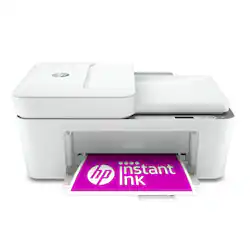
HP - DeskJet 4155e Wireless All-In-One Inkjet Printer with 3 months of Instant Ink Included with HP+ - White
- Key Specs
- Networking: Wireless
- ENERGY STAR Certified: true (Devices carrying the ENERGY STAR service mark, such as computer products and peripherals, kitchen appliances, and other products, generally use 20% to 30% less energy than required by federal standards.)
- Printer Type: All In One
- ISO Color Print Speed: 5.5 pages per minute (The number of color pages able to be printed per minute in the device's default single-side mode, as tested by the International Standards Organization (ISO).)
- ISO Mono Print Speed: 8.5 pages per minute (The number of black ink (grayscale) pages able to be printed per minute in the device's default single-side mode, as tested by the International Standards Organization (ISO).)
- Output Tray Capacity: 25
- Touch Screen: false (Touch-screen devices make navigating more intuitive. Using a touch-screen display, you can do things such as tap to select, hold and drag to move items, swipe to scroll, and pinch to zoom.)
- General
- Brand: HP
- Model Number: DeskJet 4155e
- Product Name: DeskJet 4155e Wireless All-In-One Inkjet Printer with 3 months of Instant Ink Included with HP+
- Color: White
- Display Screen: true
- Display Screen Size: 1 inches
- Dimensions
- Product Height: 7.87 inches (The out of box height of the item. Height is measured as the vertical distance from the bottom of the item to the top as it would be primarily used or placed.)
- Product Width: 16.85 inches (The out of box width of the item. Width is measured as the horizontal distance from one side of the item to the other as it would be primarily used or placed.)
- Product Depth: 13.07 inches (The out of box depth of the item. Depth is measured as the distance from the front of the item to the back as it would be primarily used or placed.)
- Product Weight: 10.6 pounds (The out of box weight of the item.)
- Features
- Automatic Document Feeder: true
- Photo Printing: true
- Wide Format Printing: false (Machines with this function support printing on media with widths between 18 and 100 inches, such as posters, banners, canvases, and more.)
- Wide Format Scanning: false
- Monochromatic/Color: Color
- Automatic Reduction/Enlargement: true
- Automatic Two-Sided Printing: false
- Tray Capacity: 60
- Duty Cycle: Up to 1,000 (The maximum number of pages per month that the device can produce without failing, as specified by the manufacturer.)
- Certifications Listings & Approvals
- EPEAT Qualified: true (The Electronic Product Environmental Assessment Tool (EPEAT) was designed to provide an environmental assessment tool for purchasers. In order to qualify for EPEAT, a product must meet all 23 required criteria.)
- EPEAT Level: Silver (The Electronic Product Environmental Assessment Tool (EPEAT) was designed to provide an environmental assessment tool for purchasers. In order to qualify for EPEAT, a product must meet all 23 required criteria. Products are rated Bronze, Silver or Gold based on how many of 28 optional criteria they meet (below 50%, 50%, 75%).)
- Scanner Info
- Scanner Type: Flatbed
- Scanner Resolution: Up to 1200 x 1200 (Refers to the number of pixels/dots, both horizontally and vertically, of the image produced by the scanner. Generally, the higher the resolution, the sharper and cleaner the produced image.)
- Ink
- Compatible Cartridges: HP 67 Black Original Ink Cartridge (~120 pages yield) 3YM56AN, HP 67XL Black High Yield Original Ink Cartridge (~240 pages yield) 3YM57AN, HP 67XXL Black Extra High-Yield Original Ink Cartridge (~400 pages yield) 3YM59AN, HP 67 Tri-Color Original Ink Cartridge (~100 pages yield) 3YM55AN, HP 67XL Tri-Color High-Yield Original Ink Cartridge (~200 pages yield) 3YM58AN, HP 67XXL Tri-Color Extra High-Yield Original Ink Cartridge (~330 pages yield) 6ZA16AN
- Ink Subscription Service Available: true (The printer monitors ink usage and alerts the subscription provider when levels are low. A purchased subscription provides refills of ink based on usage.)
- Memory
- Memory Card Slot: false
- Paper Info
- Automatic Document Feeder Capacity: 35 sheets
- Supported Paper Sizes: Letter; legal; 4 x 6 in; 5 x 7 in; 8 x 10 in; No. 10 envelopes
- Paper Feeder: Bottom loader, Top loader
- Paper Handling: Input Capacities: Up to 60 sheets Standard; Up to 5 envelopes; Output Capacities: Up to 25 sheets Standard; Up to 5 envelopes
- Compatible Media Types: Plain paper, photo paper, brochure paper, envelopes and other specialty inkjet papers
- Performance
- First Page Out Time: 15 seconds (The time it takes the printer to print and deliver the first page in the output tray. May depend on the complexity of the copy being printed.)
- Printer Resolution (Black): Up to 1200 x 1200 (Refers to the number of pixels/dots, both horizontally and vertically, of the image produced by the printer in black ink. Generally, the higher the resolution, the sharper and cleaner the produced image.)
- Printer Resolution (Color): Up to 4800 x 1200 (Refers to the number of pixels/dots, both horizontally and vertically, of the image produced by the printer in colored ink. Generally, the higher the resolution, the sharper and cleaner the produced image.)
- Approximate Page Yield (Black): 120
- Approximate Page Yield (Color): 100
- Copier Info
- Copier Resolution (Black): Up to 300 x 300 (Refers to the number of pixels/dots, both horizontally and vertically, of the image produced by the copier in black ink. Generally, the higher the resolution, the sharper and cleaner the produced image.)
- Copier Resolution (Color): Up to 300 x 300 (Refers to the number of pixels/dots, both horizontally and vertically, of the image produced by the copier in colored ink. Generally, the higher the resolution, the sharper and cleaner the produced image.)
- Connectivity
- Minimum System Requirements: PC: Windows 10, 7: 32-bit or 64-bit, 2 GB available hard disk space, Internet connection, Internet Explorer.; Mac: macOS v10.14 Mojave, macOS v10.15 Catalina, macOS v11 Big Sur; 2 GB HD; Internet required
- Other
- UPC: 195161618147
The HP DeskJet 4155e has the essential features you need to print basic color documents like recipes and forms. Print, copy and scan with ease, print from your phone and get easy setup. Includes the optional HP+ Smart Printing System that keeps itself up to date and ready to print from virtually anywhere at any time—at no additional cost.
- Best for basic printing: Print basic color documents like recipes, forms and travel documents
- Key features: Print, copy and scan in color, auto document feeder, mobile fax, mobile and wireless printing
- HP+ Smart Printing System: The optional HP+ system enables your printer to think ahead so it's more secure, more productive and ready when you are. Requires an HP account, internet connection and use of only Original HP Ink for the life of the printer.
- Easy setup: Get started fast on any device with the HP Smart app that guides you step by step
- HP Smart app: Simple setup that guides you through each step, using HP Smart app. Print, scan and copy everyday documents from your phone—from anywhere. Get advanced features with HP+ in the Smart app including mobile fax and advanced scanning features such as multi-item recognition.
- Worry-free wireless: Get better range and more reliable connections using dual-band Wi-Fi with self-reset
- 3 months of Instant Ink included with HP+: Print up to 700 pages a month and get ink delivered only when you need it. After 3 months, monthly fee applies unless cancelled, and you'll save up to 50% on ink.
- Best for basic printing: Print basic color documents like recipes, forms and travel documents
- Key features: Print, copy and scan in color, auto document feeder, mobile fax, mobile and wireless printing
- HP+ Smart Printing System: The optional HP+ system enables your printer to think ahead so it's more secure, more productive and ready when you are. Requires an HP account, internet connection and use of only Original HP Ink for the life of the printer.
- Easy setup: Get started fast on any device with the HP Smart app that guides you step by step
- HP Smart app: Simple setup that guides you through each step, using HP Smart app. Print, scan and copy everyday documents from your phone—from anywhere. Get advanced features with HP+ in the Smart app including mobile fax and advanced scanning features such as multi-item recognition.
- Worry-free wireless: Get better range and more reliable connections using dual-band Wi-Fi with self-reset
- 3 months of Instant Ink included with HP+: Print up to 700 pages a month and get ink delivered only when you need it. After 3 months, monthly fee applies unless cancelled, and you'll save up to 50% on ink.
Whats Included
- HP DeskJet 4155e All-in-One Printer
- HP 67 Setup Black Cartridge
- HP 67 Setup Tri-Color Cartridge
- Regulatory flyer
- Setup guide
- Reference guide
- Power cord
- HP DeskJet 4155e All-in-One Printer
- HP 67 Setup Black Cartridge
- HP 67 Setup Tri-Color Cartridge
- Regulatory flyer
- Setup guide
- Reference guide
- Power cord
Q: Does this printer not come with ink cartridges?
A: It comes with two ink cartridges
Q: Does this printer offer 2 sided printing?
A: The HP Deskjet Plus 4155 printer does not have duplex printing (2 sided). You would have to manually turn the paper over.
A: This printer takes the #67 ink cartridges and the combo pack (1black/1color cartridge) is $29.99. No, your cartridges will not dry out if you use your printer 3 or 4 times a month.
A: The paper feeds from the back tray of the HP Deskjet Plus 4155. If you want a printer with a paper tray that feeds from the front, we recommend looking at the HP Envy 6055, Envy Photo 6255, 7155, 7855, Envy Pro 6455 or Officejet Pro 8025, 8035, 9015 or 9025 printers.
Q: Does this printer have a slot for a USB cable?
A: This printer will work with a USB printer cable.
Q: Can you use the document feeder to scan or must you place the document directly on the glass?
A: Yes, you can scan through the document feeder.
Q: What is the difference between 2755e and 4155e?
A: Hello, the differences are listed as: 2755e has no automatic document feeder whereas the 4155e does. 4155e has slightly better photo quality. The 2755e and the 4155e have the same cost per print. The 2755e is an inch and a half smaller in height, and approximately 3lbs lighter in weight. Both have flatbed scanners, both are in white, both have a printer cable port for hard wiring if desired. Both offer WiFi Direct connection for printing. Both offer the HP Smart App for operating. The 2755e is less expensive in cost due to not having the automatic document feeder. Thank you for being an HP customer.
Q: Is the 4155 compatible with HP Chromebook?
A: Yes, the HP - DeskJet Plus 4155 printer is compatible with the HP Chromebook. Once you connect the printer to your wireless network, then you can set up the printer on the Chromebook. Here are some instructions on how to connect the printer to the Chromebook: https://support.hp.com/us-en/document/c04122530











