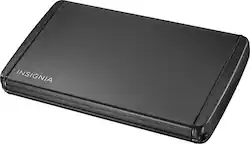
Insignia™ - 2.5" Serial ATA Hard Drive Enclosure - Black
- Key Specs
- Drive Form Factor: 2.5 in.
- Operating System Compatibility: Windows
- External Interface: USB Type B
- Internal Interface: Serial
- General
- Brand: Insignia™
- Model Number: NS-PCHD235
- Product Name: 2.5" Serial ATA Hard Drive Enclosure
- Color: Black
- Material: Aluminum
- Compatibility
- Drive Form Factor: 2.5 in.
- Operating System Compatibility: Windows
- Connectivity
- External Interface: USB Type B
- Internal Interface: Serial
- USB Generation: USB 3.0 (The specification (generation) of the USB standard. Generations are backwards compatible with previous specifications (provided that those devices have the necessary adapter to accommodate the connection type).)
- Number of Bays: 1 (Each bay, or enclosure, holds an individual drive.)
- Power
- Power Source: Plug-in
- AC Adapter Included: false (An external power adapter is included for operation.)
- Other
- UPC: 600603163517
Constructed from aluminum material, this Insignia™ NS-PCHD235 enclosure helps protect your 2.5" Serial ATA hard drive against damage, allowing safe external use. The plug-and-play design facilitates setup.
- Compatible with most 2.5" Serial ATA hard drives: To convert an internal hard drive for external use. Also PC and Mac compatible
- Aluminum construction: Provides a durable design to safeguard your hard drive
- USB 3.0 compatible: Backward compatible with USB 2.0 and 1.1. USB-powered, so there's no need for power cords or adapters
Whats Included
- Insignia 2.5" Serial ATA Hard Drive Enclosure
- Owner's manual
- Screwdriver
- SuperSpeed USB 3.0 cable, AC adapter
Q: My hard drive doesn't slide into the enclosure easily. Should I return my product?
A: Most factory hard drives on Macintosh computers have mounting pegs on one or both sides of the drive. These will need to be removed for the drive to fit this case. Be sure you keep the pegs safe, as you may need them to re-install in your Macintosh.
Q: Will this transfer data from hard drive to new laptop?
A: Put your old drive in this case and plug it in, all that it takes. Then leave the old hard drive there for a nice external backup drive. Yes, it should work for you.
Q: How many GB of storage does the device have?
A: The device does not have any storage capacity. It is an empty hard drive caddy which can be used to transfer files between hard drives by turning the laptop hard drive into an external drive.
Q: is it compatible with Windows 10?
A: Yes it is - I use it daily on my laptop with Windows 10 Home.
A: It sounds like you could use some soft rubber bushings to fill in the gaps. You should not have any issues going with rubber fillers.
A: One way to tell is to google the model number of the drive. Usually it will say the size in the description. A 2.5 inch drive is a laptop hard drive and a 3.5 inch drive is a desktop hard drive. It sounds like from what you are describing you have a 3.5 inch drive. The board that you are referring to is going to be the same size on a desktop drive as it is on a laptop drive because the sata power and data connections are the same on both laptop and desktop drives. But like I said earlier just Google the model number and that should tell you what size drive you have. Hope this helps.
A: Hi Scooter. My advice would be to use an Installation image to format the new SSD appropriately. This is because even if you make an exact mirror copy of the old hard drive Boot Sectors could be a problem later. For more information about this matter, you can check this article: http://tips4pc.com/computer_tips_and_tricks/ssd-boot-sector.htm Charles V. - Insignia Support https://www.insigniaproducts.com/contact-us
A: Not on their own. This enclosure takes your old hard drive and basically makes it a folder you can access from another computer. So you can open the 'folder', find your old excel documents or photos and then go put them into the folders on your new computer and they should work just fine. Might have a compatibility problem if it's different software versions, but that would happen regardless, and has nothing to do with this piece of hardware.
People also viewed
 $48.99The price was $51.26
 $232.49The price was $294.14

Today's top picks
 $199.99The price was $249.99
 $2,449.99The price was $3,199.99
 $449.99The price was $829.99
 $999.98The price was $1,639.98
 $789.99The price was $1,049.99









