Keychron - M6 Ergonomic Wired & Wireless Laser Mouse w/ Macro Button & Fast-Scrolling Metal Wheel, For Windows PC & Mac - Wired - Black
Keychron - M6 Ergonomic Wired & Wireless Laser Mouse w/ Macro Button & Fast-Scrolling Metal Wheel, For Windows PC & Mac - Wired - Black

Specifications
- Lighting TypeNoneConnection TypeWired, Wireless
- Key Specs
- Lighting Type: None
- Connection Type: Wired, Wireless
- General
- Brand: Keychron
- Model Number: M6S-A1
- Product Name: M6 Ergonomic Wired & Wireless Laser Mouse w/ Macro Button & Fast-Scrolling Metal Wheel, For Windows PC & Mac
- Color: Black
- Features
- Mouse Type: Standard
- Lighting Type: None
- Performance
- Tracking Method: Laser (There are several types of computer mice, optical and laser being among the most common. Optical mice detect less detail and provide more precise and accurate movement. Laser mice detect more detail and can be used on a wider variety of surfaces, but are more sensitive to small movements.)
- Connectivity
- Connection Type: Wired, Wireless
- Wireless Connectivity: Bluetooth, Radio Frequency (RF - 2.4 Ghz/Low Latency) (The manner in which a device sends data to another device over a short distance without the use of wires or cables.)
- Maximum Wireless Range: 10 feet
- Operating System Compatibility: Windows, Mac, Linux, Universal
- Plug and Play Operation: true
- Number of Devices Connectable Simultaneously: 3
- Dimensions
- Product Height: 1.96 inches (The out of box height of the item. Height is measured as the vertical distance from the bottom of the item to the top as it would be primarily used or placed.)
- Product Length: 4.82 inches (The out of box length of the item. Length is measured as the longest dimension of the item.)
- Product Width: 2.96 inches (The out of box width of the item. Width is measured as the horizontal distance from one side of the item to the other as it would be primarily used or placed.)
- Product Weight: 0.18 grams (The out of box weight of the item.)
- Warranty
- Warranty - Parts: 1 year
- Warranty - Labor: 1 year
- Other
- UPC: 4894979048257
The Keychron M6 Ergonomic Wireless Mouse offers a high-performance, dual-mode pointing solution that blends wired precision with wireless freedom. Whether you prefer the rock-solid stability of USB-C tethering or the flexibility of 2.4 GHz or Bluetooth connection, the M6 delivers seamless switching to suit your setup. Its PixArt 3395 sensor provides exceptional tracking with high DPI and IPS values, while the ergonomic design—including a thumb-wheel and dual scroll modes—ensures comfort and productivity over long sessions. Fully programmable via companion software, you can tailor buttons, DPI settings and macros to your workflow or gameplay. Lightweight yet robust, the M6 is crafted for those who demand both performance and versatility from their mouse.
- Dual Wired & Wireless Connectivity: Use seamlessly in wired mode via USB-C or go wireless with 2.4 GHz and Bluetooth for flexible setups and devices.
- Premium Sensor & Performance: Equipped with a PixArt 3395 sensor (up to 26,000 DPI and 650 IPS) for accurate tracking whether gaming or working.
- Ergonomic Design with Thumb Wheel & Dual Scroll Modes: Designed for right-hand ergonomics, it features a side thumb-wheel for horizontal scrolling, and a top wheel that toggles between notched and infinite scroll.
- Fully Programmable Macro Button & Software Support: Customize buttons, DPI, profiles and macros with comp-pat software on both Windows and macOS.
- Lightweight yet Durable Build: At ~78 g and featuring Huano micro-switches rated for tens of millions of clicks, it’s built for extended use in both work and play.
Whats Included
- 1x Mouse
- Cable & Adapter 1x, Type-C to Type-C Cable 1x, Type-A to Type-C Adapter 1x, Extension Adapter For Receiver
- Receiver 1x Type-A 2.4 GHz Receiver
Q: Does this mouse has silent clicks?
A: Yes very quiet
Q: Is it metal or rubber wheel?
A: Plastic
Compare similar products

The Keychron M6 Ergonomic Wireless Mouse offers a high-performance, dual-mode pointing solution that blends wired precision with wireless freedom. Whether you prefer the rock-solid stability of USB-C tethering or the flexibility of 2.4 GHz or Bluetooth connection, the M6 delivers seamless switching to suit your setup. Its PixArt 3395 sensor provides exceptional tracking with high DPI and IPS values, while the ergonomic design—including a thumb-wheel and dual scroll modes—ensures comfort and productivity over long sessions. Fully programmable via companion software, you can tailor buttons, DPI settings and macros to your workflow or gameplay. Lightweight yet robust, the M6 is crafted for those who demand both performance and versatility from their mouse.

Logitech MX Master 3S Bluetooth Edition – productivity and precision mouse. With Quiet Clicks and 8K DPI any-surface tracking for more feel and performance.

acer Ergonomic Mouse Wireless, 1000/1200/1600 Adjustable DPI Vertical Mouse with 6 Buttons, Rechargeable Ergo Mice with 2.4GHz USB Receiver for Computer, Laptop, PC, iMac and Desktop
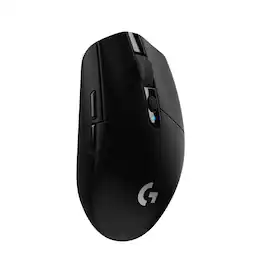
G305 features the next-gen HERO sensor with 12,000 DPI sensitivity and LIGHTSPEED wireless 1 ms performance. It’s long-lasting with 250 gaming hours from one AA battery (an indicator light reminds you before you need a new AA), ultra-portable with built-in nano receiver storage, lightweight weighing in at 99 grams, and ready to game with 6 programmable buttons. G305 is the LIGHTSPEED wireless mouse for all.
| Pros for Keychron - M6 Ergonomic Wired & Wireless Laser Mouse w/ Macro Button & Fast-Scrolling Metal Wheel, For Windows PC & Mac - Wired - Black | |||
|---|---|---|---|
| Weight, Build Quality | Overall Performance, Battery Life, Ergonomics, Button Functionality, Connectivity | Battery Life, Weight, Design, Comfort | Overall Performance, Weight, Battery Life, Ease of use, Price |
| Cons for Keychron - M6 Ergonomic Wired & Wireless Laser Mouse w/ Macro Button & Fast-Scrolling Metal Wheel, For Windows PC & Mac - Wired - Black | |||
| There were no cons for this product— | Weight | There were no cons for this product— | Lag, Scroll Wheel, Side Buttons, Ergonomics |
Specs
Reviews
Customer Images
The vast majority of our reviews come from verified purchases. Reviews from customers may include My Best Buy members, employees, and Tech Insider Network members (as tagged). Select reviewers may receive discounted products, promotional considerations or entries into drawings for honest, helpful reviews.
- Rated 5 out of 5 stars
Great Value - would buy even if it wasn't
I recently purchased the Keychron M6 ergo mouse because I am a fan of the brand and use a K2 HE keyboard at home. I stand by their software as one of the best. I have to say... I am really impressed! I use an MX Master 2s at the office and purchased this to compare. It's been absolutely great so far. Feels good in the hand - softer material and a bit lighter when comparing. I don't think that I can go ever back from the fast-scrolling wheel. Good experience so far - recommend!
CoffeeCam Posted
- Rated 5 out of 5 stars
M6 is Underpriced
Comfortable, lightweight, easy to use software, and satisfying click action. This mouse could sell at twice the cost.
AValle Posted
- Rated 5 out of 5 stars
Keuchron mouse wireless
I love this mouse. It is extremely versatile. Instead of using my mouse to slide left to right but I can use my thumb section for this option. Actually my 2 co workers went to get the mouse as soon as they tried my mouse out.
EricN Posted