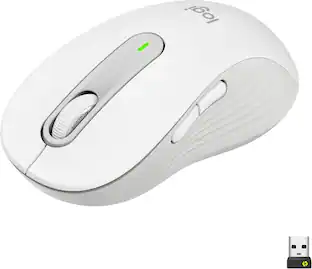
Lenovo - ThinkPad Essential Wireless Mouse - Wireless - Black
About this product
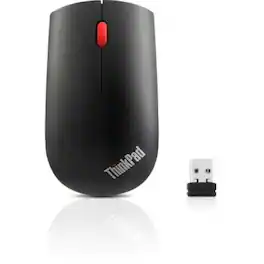
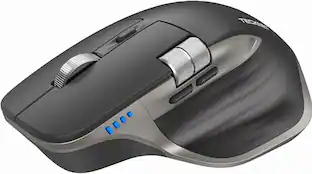
Lenovo ThinkPad Essential Wireless Mouse
Lenovo ThinkPad Essential Wireless Mouse
This sleek and stylish full-size mouse design offers exceptional quality in a modern wireless solution. The compact ambidextrous mouse provides excellent portability and perfect ergonomics. Complete tasks with ease using the precise 1200 DPI optical sensor. Connect compatible Lenovo devices with just one nano receiver.
- Connection TypeWireless
Reviews
This product doesn't have any reviews yet.

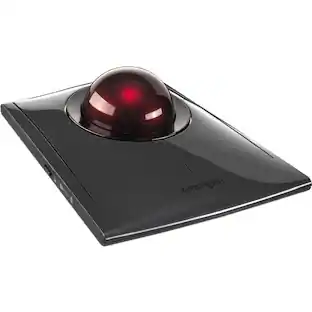
Compare similar products
Lenovo ThinkPad Essential Wireless Mouse
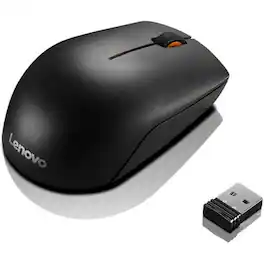
The Lenovo 300 Wireless Compact Mouse is designed to offer the best balance between mobility and function. The mouse features a 1000 dpi sensor, 3 buttons and a unique ergonomic contour to give you the freedom to create whenever and wherever. It boasts a 12-month battery life from a single AA battery and 10 million clicks lifecycle buttons to offer Super portable design.

Whether you're in the office or on the go, the ThinkPad USB-C Wireless Compact Mouse is the perfect partner. Compact, comfortable, and able to work on most surfaces, it offers seamless 4-way precision scrolling, while its wireless plug-and-play USB-C receiver allows you to pair with up to eight devices. With a long battery life, blue optical sensor, and up to 2400 on-the-fly DPI adjustment, this pocket-friendly mouse enhances your productivity anywhere, anytime.

Eliminate the most common computer mouse issue—the cord. With the Best Buy Essentials Wireless Mouse with USB Receiver, you can navigate the web with speed and accuracy. Compatible with both Windows and Mac computers, simply insert the included nano receiver into one of your computer’s USB ports to wirelessly connect the mouse. It has just 3 buttons and an ambidextrous design for simple control. Optical technology detects when the mouse moves to deliver an accurate 1600 DPI response. We also included a AA battery, so you won’t have to worry about keeping the mouse powered until the LED indicator starts to blink. Let us improve your computer navigation by going wireless with this Best Buy-backed mouse.
| Pros for Lenovo - ThinkPad Essential Wireless Mouse - Wireless - Black | |||
|---|---|---|---|
| There were no pros for this product— | There were no pros for this product— | There were no pros for this product— | Ease of use, Overall Performance, Price, Size, Wireless |
| Cons for Lenovo - ThinkPad Essential Wireless Mouse - Wireless - Black | |||
| There were no cons for this product— | There were no cons for this product— | There were no cons for this product— | Click Sound, Grip |
Specs
Be the first to ask a question.
We’ll try to get your question answered within 24 hours by a Best Buy customer or brand representative.
Customers often buy these together
Computer Keyboards

![esc ~ ! 1 tab caps lock shift ctrl F2 Fl # 2 3 Q W A S Z start opt L F3 $ 4 E D X alt cmd3 ) FS F4 A % 5 6 R T F G V C logi 44 HI & F9 FID FB F7 F6 * ) - - & 0 8 9 7 O P U I Y K L H J > < N M 1 B PM + = { [ : I ; ? I alt cmd D 2 4 300 3 1 F12 . * page I insert home up clear backspace 8 9 + 7 page A pg up end down home } I delete ] / 6 4 5 4 enter 2 3 enter 1 dn Pg end shift = 0 del ins etrl fn opt](https://pisces.bbystatic.com/image2/BestBuy_US/images/products/6539/6539505_sd.jpg;maxHeight=232;maxWidth=233?format=webp)
![Esc F1 F2 F3 F4 F5 F6 F7 F8 F9 F10 F11 F12 Print Screen Scroll Lock Pause Break 1 2 3 4 5 6 7 8 9 0 - + = Backspace Insert Home H Page Up A Num Look 1 I Tab Q W E R T Y U I o P { [ } ] I I Delete End IN Page Down 7 Home 8 9 Pg Up Caps A Lock A S D F G H J K L ; : DE g Enter 4 5 6 Shift Z X C V N M < > ? I Shift 1 End 2 3 Pp Dn Enter Ctrl Alt Alt Ctrl 0 Ins Del](https://pisces.bbystatic.com/image2/BestBuy_US/images/products/a588d446-5678-40ae-86b8-1f15e0026e66.jpg;maxHeight=232;maxWidth=233?format=webp)








Customers ultimately bought

Explore tech essentials Sponsored


Keep exploring
 $79.95The price was $109.95
 $32.49The price was $39.94
 $79.95The price was $119.95
 $119.95The price was $199.95