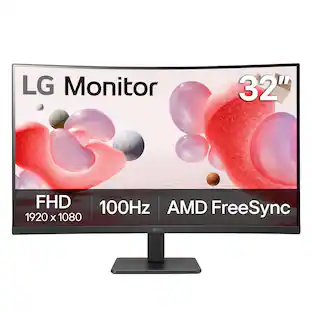
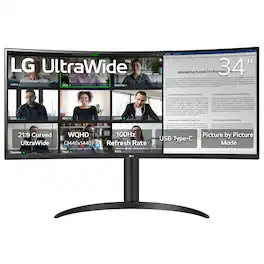
LG - UltraWide 34" VA Curved WQHD 100Hz Monitor with HDR 10 (HDMI, DisplayPort, USB-C) - Black

Key Accessories:
- Logitech - MX Master 4 Wireless Laser Ergonomic Mouse with Advanced Performance Haptic Feedback - Wireless - Pale Gray$119.99

Related Item

Highlights
- Key Specs
- Refresh Rate: 100Hz (The number of frames per second the device can produce natively without enhancement. Higher rates help produce smooth, seamless pictures.)
- Maximum Resolution: 3440 x 1440 (Maximum resolution refers to the highest number of pixels that a screen can process and display. Higher resolution signals produce more detailed images.)
- Response Time: 5 milliseconds (The speed at which pixels can change colors is called response time. It is measured in milliseconds (ms).)
- Panel Type: VA (Technology that affects response time and image quality.)
- Synchronization Technology: Not Applicable, Not Applicable (Generally, these technologies allow syncing between a computer/console game's frame rate and the device's refresh rate for a smoother display without tearing.)
- Screen Size: 34 inches (Size of the screen, measured diagonally from corner to corner.)
- Display Connector(s): 1 x DisplayPort, 2 x HDMI (The number and type of connectors used to connect to an external display.)
- General
- Brand: LG
- Model Number: 34WR55QK-B
- Product Name: UltraWide 34" VA Curved WQHD 100Hz Monitor with HDR 10 (HDMI, DisplayPort, USB-C)
- Color: Black
- Operating System Compatibility: Not Applicable, Not Applicable, Not Applicable, Not Applicable, Not Applicable
- Display
- Refresh Rate: 100Hz (The number of frames per second the device can produce natively without enhancement. Higher rates help produce smooth, seamless pictures.)
- Maximum Resolution: 3440 x 1440 (Maximum resolution refers to the highest number of pixels that a screen can process and display. Higher resolution signals produce more detailed images.)
- Native Resolution: 3440 x 1440 (Native resolution of a screen refers to its single, fixed resolution. Sometimes screens must scale an image up or down in order to fit the native resolution. This can cause a loss of resolution or detail.)
- Contrast Ratio: 3000:1 (Measured difference between a displayed image's brightest whites and darkest blacks. The larger the first number, the more detail and color that can be displayed.)
- Response Time: 5 milliseconds (The speed at which pixels can change colors is called response time. It is measured in milliseconds (ms).)
- Display Type: LED
- Panel Type: VA (Technology that affects response time and image quality.)
- Synchronization Technology: Not Applicable, Not Applicable (Generally, these technologies allow syncing between a computer/console game's frame rate and the device's refresh rate for a smoother display without tearing.)
- Aspect Ratio: 21:9 (The measurement of the width of a screen compared to the height of a screen, expressed as a ratio.)
- Curved Screen: true
- Brightness: 300 candela per square meter (A measure of the total light output.)
- Screen Size: 34 inches (Size of the screen, measured diagonally from corner to corner.)
- High Dynamic Range (HDR): true (An HDR-compatible 4K TV or other HDR-compatible product displays HDR video content when it's available from sources like 4K Ultra HD Blu-ray Discs and 4K streaming services.)
- High Dynamic Range Format: HDR 10 (There are a few HDR formats that tell the TV or other HDR-compatible product how to best utilize its capabilities to display HDR content. HDR technology can support one or multiple formats, each with various benefits to picture quality.)
- Horizontal Viewing Angle: 178 degrees (The maximum angle at which the display can be viewed with acceptable visual performance from either side.)
- Vertical Viewing Angle: 178 degrees (The maximum angle at which the display can be viewed with acceptable visual performance from above or below.)
- Touch Screen: false (Touch-screen devices make navigating more intuitive. Using a touch-screen display, you can do things such as tap to select, hold and drag to move items, swipe to scroll, and pinch to zoom.)
- On-Screen Display Languages: English (The available language options for displayed text.)
- Color Gamut (Standard RGB): 99 percent
- Connectivity
- Number of DisplayPort Inputs (Total): 1
- Number of HDMI Inputs (Total): 2
- Display Connector(s): 1 x DisplayPort, 2 x HDMI (The number and type of connectors used to connect to an external display.)
- Number of USB Ports (Total): 2
- Number of USB-C Charging Ports: 1
- Compatibility
- Wall Mountable: true (The product is able to be secured to a wall. Some products are designed ready to mount, while others may require additional hardware/accessories for installation.)
- VESA Wall Mount Standard: 100mm x 100mm (VESA wall mount standards refer to the spacing of screw holes built into a TV in order to fit with standard TV wall mounts. These standards are implemented into most TVs and monitors.)
- Features
- Tiltable: true
- Adjustable Stand Height: true
- Anti-Glare: false (Product has features, such as a matte finish, that reduce the likelihood for screen glare.)
- Built-In Webcam: false
- Integrated Speaker(s): false
- Dimensions
- Product Height With Stand: 22.4 inches
- Product Height Without Stand: 14.1 inches
- Product Width: 31.9 inches (The out of box width of the item. Width is measured as the horizontal distance from one side of the item to the other as it would be primarily used or placed.)
- Product Depth (With Stand): 10.2 inches
- Product Depth Without Stand: 3.6 inches
- Product Weight: 15.2 pounds (The out of box weight of the item.)
- Stand Included: true
- Power
- Power Saving/Off Mode: 0.5 watts (This mode will turn the display and/or the device off, or into a standby mode, after a preset length of time with no activity to conserve power.)
- Certifications Listings & Approvals
- ENERGY STAR Certified: false (Devices carrying the ENERGY STAR service mark, such as computer products and peripherals, kitchen appliances, and other products, generally use 20% to 30% less energy than required by federal standards.)
- EPEAT Qualified: false (The Electronic Product Environmental Assessment Tool (EPEAT) was designed to provide an environmental assessment tool for purchasers. In order to qualify for EPEAT, a product must meet all 23 required criteria.)
- Warranty
- Warranty - Parts: 1 year
- Warranty - Labor: 1 year
- Other
- UPC: 195174097533
For work or even play, see the big picture with the LG UltraWIde 34" WQHD curved monitor, the ultimate screen space upgrade for those who crave more screen space. The wide 21:9 aspect ratio and 3440 x 1440 resolution offer a crisp, immersive workspace—perfect for those whose work demands lots of screen space to see multiple windows all at once. Enjoy smoother performance with a 100Hz refresh rate and the convenience of USB Type-C connectivity, delivering power and data through a single cable. The height and tilt-adjustable stand ensures ergonomic comfort, while the 3-side virtually borderless design keeps your focus where it matters. Multitasking and managing large projects on one display has never been easier.
- More Space for Multi-Tasking: The 21:9 UltraWide WQHD (3440 x 1440) monitor is great for work. The widescreen allows you to see everything you're working on, with multiple windows open, all on one screen.
- Pictures That Pop: Immerse yourself in a world of brilliant color from HDR10 that helps enhance picture quality and up to 99% sRGB color gamut expression to make games pop.
- Easier User Interface: You can customize the workspace by splitting the display or adjusting basic monitor options with just a few mouse clicks.¹
- Multi-Tasking Evolved: OnScreen Control supports Picture-by-Picture (PbP) allowing you to configure your monitor to show content from two separate input sources. Play, watch, stream or work from multiple input sources at the same time, on one screen.¹
- Multiple Devices-One Cable: Seamlessly connect to external devices or charge your laptop with the convenience of USB Type-C with up to 65W power delivery.
- Easy Viewing, Comfortable Reading: Watch your monitor for longer periods of time. Reader Mode provides optimal conditions for reading by reducing blue light.
- Versatile Connectivity: Connect with confidence. Along with USB Type C, this UltraWide monitor has two HDMI ports, two USB ports, a DisplayPort and headphone jack.
- Easy and Comfortable: The ergonomic stand makes it easy to flexibly adjust the height and tilt of the screen in the optimal position for you.
Whats Included
- Monitor
- Power Cable
- HDMI Cable
- USB Type-C Cable
Product Manuals
Disclaimers
- ¹OnScreen Control software installation required. Visit Support on LG.com to download.
Q: What is the refresh rate of the monitor?
A: The refresh rate of this LG UltraWide monitor is 100Hz.
Q: Can the monitor be wall-mounted?
A: This monitor is wall-mountable.
Q: How many HDMI inputs does the monitor have?
A: This monitor has two HDMI inputs.
Q: What is the maximum resolution of the monitor?
A: The maximum resolution of this monitor is 3440 x 1440.
Q: Does the monitor have built-in speakers?
A: This monitor does not have built-in speakers.
Q: Is the monitor ENERGY STAR certified?
A: This monitor is not ENERGY STAR certified.
Q: Does this monitor with built-in dock? E.g. connect to a thinkpad with a single USB-C cable? Thx.
A: Hello, Mike. As implied in its title, the LG 34" UltraWide™ WQHD HDR 10 100Hz Curved Monitor with USB Type-C, Model # 34WR55QK-B, has a USB Type-C port that has a Power Delivery of 65W and can be connected to Laptops/Pcs with a single USB-C cable. The USB Type-C port is part of a built-in hub that can be connected to a host Laptop or PC to activate the two USB downstream ports on the monitor, which can be used with peripheral devices like a mouse, keyboard, or camera...^Ivan.
Q: Does this monitor support Windows Snap functionality?
A: Windows Snap is a built-in multitasking feature in Windows 10/11 that automatically resizes and organizes windows into predefined screen areas—such as side-by-side or corners (up to four)—by dragging them, using keyboard shortcuts, or hovering over the maximize button. Windows Snap works with any monitor connected to a PC or laptop that supports Windows Snap. The functionality operates independently on each screen, allowing you to snap, resize, and arrange windows on primary and secondary displays. It works on external monitors, TVs, or projectors connected via HDMI, USB-C, or wireless displays...^Ivan.
Compare similar products
For work or even play, see the big picture with the LG UltraWIde 34" WQHD curved monitor, the ultimate screen space upgrade for those who crave more screen space. The wide 21:9 aspect ratio and 3440 x 1440 resolution offer a crisp, immersive workspace—perfect for those whose work demands lots of screen space to see multiple windows all at once. Enjoy smoother performance with a 100Hz refresh rate and the convenience of USB Type-C connectivity, delivering power and data through a single cable. The height and tilt-adjustable stand ensures ergonomic comfort, while the 3-side virtually borderless design keeps your focus where it matters. Multitasking and managing large projects on one display has never been easier.
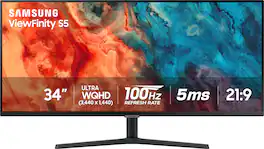
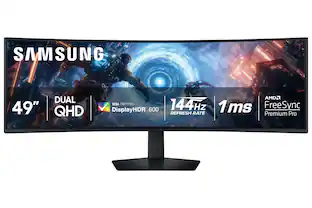
Samsung's 34" ViewFinity S50GC offers a wider workspace featuring a 21:9 ratio and lifelike detail with Ultra-WQHD resolution. AMD FreeSync and 100Hz refresh rate allow an ultra-smooth user experience. Avoid eyestrain with TUV-certified Intelligent Eye Care that automatically adjusts brightness. With HDR10 that displays over 1 billion colors compared to 16.7 million for typical SDR technology, dark colors are darker and the brightest are even brighter.

Samsung's Ultra-WQHD Monitor with a 34" 1000R curved display surrounds you with a 21:9 aspect ratio to maximize your screen's real estate. Featuring Thunderbolt 4 connectivity and multiple ports, you can power your devices while transmitting data. Experience 1 billion vivid colors with HDR10, providing near limitless hues, with darker darks and brighter brights. Built-in speakers minimize connections and free up desk space, while 100Hz refresh rate and AMD FreeSync keep the screen smooth across all applications and diminish screen stuttering and image tearing. With KVM Switch, Easy Setting Box, Picture-By-Picture, and Picture-In-Picture, you can play games while connecting with friends, watching movies, or working on projects. The ergonomically designed height-adjustable monitor creates a customized, comfortable environment in which to work and play, and TÜV-certified technology reduces eye strain.
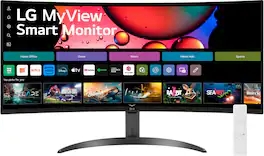
One screen. Endless possibilities. The 21:9 ultra-wide 34” curved Smart monitor offers stunning widescreen visuals and a sleek design that's perfect for work, play, cinematic viewing, and everything in between. Experience vivid color with up to sRGB 99% coverage, HDR10 support and impeccable clarity with the 21:9 WQHD (3440x1440) screen, bringing every detail to life. Thanks to LG’s streaming platform webOS23¹, find your favorites fast with built-in access to Netflix, Prime Video, the Apple TV app, Disney+, HBO Max and instant access to over 300+ free LG Channels with everything from comedy to movies to sports. Apple AirPlay 2 & HomeKit compatibility² allow you to wirelessly control your monitor plus cast and mirror content from iOS or MacOS devices, no Apple TV necessary. Gaming on the monitor’s wide screen with the 100Hz refresh rate assures ultra-smooth action.
| Pros for LG - UltraWide 34" VA Curved WQHD 100Hz Monitor with HDR 10 (HDMI, DisplayPort, USB-C) - Black | |||
|---|---|---|---|
| Screen Size, Connectivity, Resolution, USB-C, Port Count | Screen Size, Overall Performance, Resolution, Refresh Rate, Ease of use | Screen Size, Overall Performance, Connectivity, Design | Screen Size, Overall Performance, Resolution, Refresh Rate, Smart Features |
| Cons for LG - UltraWide 34" VA Curved WQHD 100Hz Monitor with HDR 10 (HDMI, DisplayPort, USB-C) - Black | |||
| There were no cons for this product— | Speakers, Stand | Port Quality | Connectivity, Controls |
Specs

Reviews
Rating 4.7 out of 5 stars with 31 reviews
- Screen Size (10)
- Connectivity (4)
- USB-C (4)
- Port Count (3)
- Resolution (3)
Customer Images
The vast majority of our reviews come from verified purchases. Reviews from customers may include My Best Buy members, employees, and Tech Insider Network members (as tagged). Select reviewers may receive discounted products, promotional considerations or entries into drawings for honest, helpful reviews.
Explore tech essentials Sponsored
 $279.99The price was $369.99