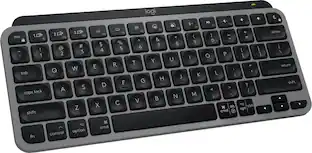
Logitech - MX Keys Mini TKL Bluetooth Scissor Mini MX Keys Switch Keyboard for Apple mac OS, iPad OS with Backlit Keys - Pale Gray
Customers are saying
Customers often highlight the excellent keyboard quality and impressive battery life as standout features of this product. Users also frequently praise the device for its ease of use, comfortable key feel, and compact size that fits well in minimal workspaces. While the connectivity to Apple devices is highly regarded, some users feel that the build quality could be more premium and note that the price point is slightly high.
Features
Mastered for Mac
MX Keys Mini for Mac is optimized for macOS, iPadOS(2), and iOS(2) and features a keyboard with a layout for Mac for maximum productivity. ¹
Designed for Mac
Compatible with Apple MacBook Pro, MacBook Air, iMac & iPad models.
Perfect Stroke Typing with Smart Keys
Type on keys shaped for your fingertips, with voice to text Dictation, Mic Mute/Unmute, and Emoji keys. ²
Mini Size, Mighty Powerful
A layout designed for effortless precision, with a minimalist form for an ergonomic keyboard that's portable and can travel wherever you get work done.
Smart Illumination
The wireless keyboard's backlit keys light up the moment your hands approach, and automatically adjust to suit changing lighting conditions.
Multi Mac Connectivity
Pair MX Keys Mini for Mac compact keyboard with multiple Mac computers and iPads via Bluetooth Low Energy and switch between them seamlessly.
USB-C Rechargeable
MX Keys Mini for Mac Bluetooth keyboard stays powered up to 10 days on a full charge or up to 5 months with the backlighting turned off.³
Made with recycled plastic
Plastic parts in MX Keys Mini for Mac include certified post consumer recycled plastic (Pale Gray: 12%); product carbon footprint: 9.96 kg CO2e.⁴
Specifications
- Lighting TypeSingle colorForm FactorTenkeyless (TKL)Keyboard TechnologyScissorConnection TypeWireless
Reviews
Rating 4.7 out of 5 stars with 265 reviews
- Keyboard Quality (112)
- Battery Life (51)
- Ease of use (36)
- Key Feel (20)
- Size (19)
- Price (5)
- Weight (5)
Customer Images
The vast majority of our reviews come from verified purchases. Reviews from customers may include My Best Buy members, employees, and Tech Insider Network members (as tagged). Select reviewers may receive discounted products, promotional considerations or entries into drawings for honest, helpful reviews.

Compare similar products

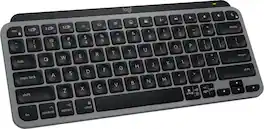
Introducing MX Keys Mini for Mac, a smaller, smarter, and mightier minimalist wireless keyboard with a layout for Mac made for creators. The minimalist form factor provides improved ergonomics by aligning your shoulders and allowing you to place your mouse closer to your keyboard for less arm reaching, more comfort, and better body posture. Perfect Stroke keys are shaped for your fingertips with optimal key stability and tactile responsiveness to keep you oriented and in your flow. The backlit keys light up the moment your hands approach, and automatically adjust to suit changing lighting conditions. Smart Dictation, Mic Mute/Unmute and Emoji keys streamline your workflow even further.
Introducing MX Keys Mini for Mac, a smaller, smarter, and mightier minimalist wireless keyboard with a layout for Mac made for creators. The minimalist form factor provides improved ergonomics by aligning your shoulders and allowing you to place your mouse closer to your keyboard for less arm reaching, more comfort, and better body posture. Perfect Stroke keys are shaped for your fingertips with optimal key stability and tactile responsiveness to keep you oriented and in your flow. The backlit keys light up the moment your hands approach, and automatically adjust to suit changing lighting conditions. Smart Dictation, Mic Mute/Unmute and Emoji keys streamline your workflow even further.

Magic Keyboard delivers a remarkably comfortable and precise typing experience for Mac and Apple Vision Pro. It’s also wireless and rechargeable, with an incredibly long-lasting internal battery that will power your keyboard for about a month or more between charges. It pairs automatically with your Mac, so you can get to work right away. It features a USB-C port and includes a woven USB-C Charge Cable that lets you pair and charge by connecting to a USB-C port on your Mac. If you would like to pair Magic Keyboard with your Apple Vision Pro, click to see supported languages.
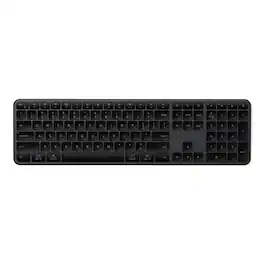
The Satechi Slim EX3 Wireless Keyboard is a full-size professional keyboard built for fluid, cross-platform productivity. Featuring a dedicated numeric keypad, navigation cluster, and quiet low-profile scissor keys, the EX3 delivers clarity, comfort, and complete control. Connect up to 4 devices simultaneously via 3 Bluetooth 5.3 channels plus a 2.4GHz USB dongle for instant switching between Mac, Windows, and Android. The physical OS key remap switch ensures shortcuts feel native on any platform. Powered by a USB-C rechargeable 450mAh battery lasting up to 5 weeks per charge, the EX3 combines a sleek aluminum finish with sustainable design featuring a removable battery that meets EU 2027 replaceability standards. Compatible with: MacBook Pro 14/16-inch (2026 M5/M4/M3/M2/M1), MacBook Air 13/15-inch (2026 M5/M4/M3/M2/M1), MacBook Neo 13-inch (2026), iPad Pro 11/13-inch (2025 M5/M4/M3/M2/M1), iPad Air 11/13-inch (2026 M4/M3/M2/M1), iPad Mini (A17 Pro/6), iPad (A16/10th Gen), iPad Pro 12.9-inch (6th/5th/4th/3rd/2nd/1st gen), Mac Mini (2026 M6, M5 Pro, M4 Pro, M4), iMac (2024 M4/M3/M1), Mac Studio (2026 M5 Max/Ultra, M4 Max, M3 Ultra M2, M1), Thinkpad Series, Surface Series, Windows laptop (Dell, HP), iPhone Duo, iPhone 18 Pro, iPhone 18 Pro Max, iPhone 17, iPhone Air, iPhone 17 Pro, iPhone 17 Pro Max, iPhone 16/15/14/13/12 series, Galaxy S26/S25/S24/Z Fold/Z Flip series, Pixel 10/9/8/7 series.
| Pros for Logitech - MX Keys Mini TKL Bluetooth Scissor Mini MX Keys Switch Keyboard for Apple mac OS, iPad OS with Backlit Keys - Pale Gray | |||
|---|---|---|---|
| Keyboard Quality, Battery Life, Ease of use, Key Feel, Size | Keyboard Quality, Battery Life, Ease of use, Key Feel, Size | Battery Life, Overall Performance, Connectivity, Ease of Use, Design | There were no pros for this product— |
| Cons for Logitech - MX Keys Mini TKL Bluetooth Scissor Mini MX Keys Switch Keyboard for Apple mac OS, iPad OS with Backlit Keys - Pale Gray | |||
| Price, Weight | Price, Weight | There were no cons for this product— | There were no cons for this product— |
Specs
Customers often buy these together

Logitech - MK270 Full-size Wireless Membrane Keyboard and Mouse Bundle for PC - Black
$26.99The price was $29.99


![esc 1 ! 2 @ 3 # 4 $ 5 % 6 ^ 7 & 8 * 9 ( 0 ) - = | F1 F2 F3 F4 F5 F6 F7 F8 F9 F10 F11 F12 tab Q W E R T Y U I O P [ ] { } | caps A S D F G H J K L : : enter shift Z X C V B N M , < > ? shift ctrl alt fn ctrl](https://pisces.bbystatic.com/image2/BestBuy_US/images/products/bc5bce35-ca08-45da-bcc3-8d6fb215154b.jpg;maxHeight=232;maxWidth=233?format=webp)



![Sure, here is the corrected and grouped text from the image:
**Top Row:**
- ESC
- F1
- F2
- F3
- F4
- F5
- F6
- F7
- F8
- F9
- F10
- F11
- F12
- PRTSC
- DEL
**Number Row:**
- 1
- 2
- 3
- 4
- 5
- 6
- 7
- 8
- 9
- 0
- -
- =
- \
**Letter Row:**
- TAB
- Q
- W
- E
- R
- T
- Y
- U
- I
- O
- P
- [
- ]
- \
**Letter Row:**
- CAPS
- A
- S
- D
- F
- G
- H
- J
- K
- L
- ;
- '
**Letter Row:**
- SHIFT
- Z
- X
- C
- V
- B
- N
- M
- ,
- .
- /
**Function Row:**
-](https://pisces.bbystatic.com/image2/BestBuy_US/images/products/9be10b95-8e90-4a5d-b85f-cbc6a7d8e8df.png;maxHeight=232;maxWidth=233?format=webp)



![esc ~ ! 1 tab caps lock shift ctrl F2 Fl # 2 3 Q W A S Z start opt L F3 $ 4 E D X alt cmd3 ) FS F4 A % 5 6 R T F G V C logi 44 HI & F9 FID FB F7 F6 * ) - - & 0 8 9 7 O P U I Y K L H J > < N M 1 B PM + = { [ : I ; ? I alt cmd D 2 4 300 3 1 F12 . * page I insert home up clear backspace 8 9 + 7 page A pg up end down home } I delete ] / 6 4 5 4 enter 2 3 enter 1 dn Pg end shift = 0 del ins etrl fn opt](https://pisces.bbystatic.com/image2/BestBuy_US/images/products/6539/6539505_sd.jpg;maxHeight=232;maxWidth=233?format=webp)

![Esc F1 F2 F3 F4 F5 F6 F7 F8 F9 F10 F11 F12 Print Screen Scroll Lock Pause Break 1 2 3 4 5 6 7 8 9 0 - + = Backspace Insert Home H Page Up A Num Look 1 I Tab Q W E R T Y U I o P { [ } ] I I Delete End IN Page Down 7 Home 8 9 Pg Up Caps A Lock A S D F G H J K L ; : DE g Enter 4 5 6 Shift Z X C V N M < > ? I Shift 1 End 2 3 Pp Dn Enter Ctrl Alt Alt Ctrl 0 Ins Del](https://pisces.bbystatic.com/image2/BestBuy_US/images/products/a588d446-5678-40ae-86b8-1f15e0026e66.jpg;maxHeight=232;maxWidth=233?format=webp)
![Sure, here is the corrected and grouped text:
```
ESC F1 F2 F3 F4 F5 F6 F7 F8 F9 F10 F11 F12 1 2 3 logitech - - 1 2 # $ 4 % 5 6 & 7 8 9 0 - - back insert home page up num lock clear / . tab Q W E R T Y U I O P { [ } ] / delete end page down 7 home 8 A 9 P9 up + caps lock A S D F G H J K L : ; a enter 4 5 6 shift Z X C V B N M < > ? shift 1 end 2 3 pg dn enter ctrl fn start alt opt alt crnd x alt cmd x fn ctrl alt opt 0 ins del 1 logitech
```](https://pisces.bbystatic.com/image2/BestBuy_US/images/products/5761/5761911_sd.jpg;maxHeight=232;maxWidth=233?format=webp)
Customers ultimately bought
Explore tech essentials Sponsored
 Top Deal$129.99The price was $159.99







Discover related products
 $249.00The price was $275.00
 $12.99The price was $13.99











Keep exploring
 $71.99The price was $89.99
 $59.99The price was $69.99
 $37.99The price was $40.00