Magic Keyboard with Touch ID and Numeric Keypad for Mac models with Apple silicon (USB-C) - White Keys
Magic Keyboard with Touch ID and Numeric Keypad for Mac models with Apple silicon (USB-C) - White Keys
Color
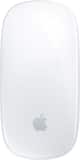
White Keys- Apple - Magic Mouse - Multi-Touch Surface (USB-C) - Wireless - White Multi-Touch Surface$79.99

More Buying Options

Specifications
- Form FactorFull-sizeConnection TypeWireless
- Key Specs
- Form Factor: Full-size (The size, arrangement, and physical configuration of the product.)
- Connection Type: Wireless
- General
- Brand: Apple
- Model Number: MXK73LL/A
- Product Name: Magic Keyboard with Touch ID and Numeric Keypad for Mac models with Apple silicon (USB-C)
- Color: White Keys
- Functions
- Form Factor: Full-size (The size, arrangement, and physical configuration of the product.)
- Connectivity
- Connection Type: Wireless
- Wireless Connectivity: Bluetooth (The manner in which a device sends data to another device over a short distance without the use of wires or cables.)
- Compatibility
- Operating System Compatibility: Mac
- System Requirements: Mac with Apple silicon using macOS 11.4 or later (The software that a product must have for it to be able to integrate with another product.)
- Power
- Rechargeable Battery: true
- Battery Chemistry: Lithium-ion
- Dimensions
- Product Height: 0.43 inches (The out of box height of the item. Height is measured as the vertical distance from the bottom of the item to the top as it would be primarily used or placed.)
- Product Width: 16.48 inches (The out of box width of the item. Width is measured as the horizontal distance from one side of the item to the other as it would be primarily used or placed.)
- Product Depth: 4.52 inches (The out of box depth of the item. Depth is measured as the distance from the front of the item to the back as it would be primarily used or placed.)
- Product Weight: 12.96 ounces (The out of box weight of the item.)
- Mouse
- Mouse Included: false
- Warranty
- Warranty - Parts: Apple One (1) Year Limited Warranty
- Warranty - Labor: Apple One (1) Year Limited Warranty
- Other
- UPC: 195949654954
Magic Keyboard is available with Touch ID, providing fast, easy, and secure authentication for logins and purchases. Magic Keyboard with Touch ID and Numeric Keypad delivers a remarkably comfortable and precise typing experience. It features an extended layout, with document navigation controls for quick scrolling and full-size arrow keys, which are great for gaming. The numeric keypad is also ideal for spreadsheets and finance applications. It’s wireless and features a rechargeable battery that will power your keyboard for about a month or more between charges. It pairs automatically with your Mac, so you can get to work right away. It features a USB-C port and includes a woven USB-C Charge Cable that lets you pair and charge by connecting to a USB-C port on your Mac.
- Mac Models: MacBook Air (2020 and later), MacBook Pro 14-inch (2021 and later), MacBook Pro 16-inch (2019 and later), MacBook Pro 13-inch (2020 and later), iMac 24-inch (2021 and later), iMac 27-inch (5K Retina, 2019-2020), iMac Pro (2017), Mac Studio (2022 and later), Mac mini (2018 and later), Mac Pro (2019 and later)
- iPad Models: iPad Pro 13-inch (M4), iPad Pro 11-inch (M4), iPad Pro 12.9-inch (3rd to 6th generation), iPad Pro 11-inch (1st to 4th generation), iPad Pro 10.5-inch, iPad Pro 9.7-inch, iPad Air 13-inch (M3), iPad Air 13-inch (M2), iPad Air 11-inch (M3), iPad Air 11-inch (M2), iPad Air (3rd to 5th generation), iPad Air 2, iPad (A16), iPad (5th to 10th generation), iPad mini (A17 Pro), iPad mini (5th and 6th generation), iPad mini 4
- iPhone Models: iPhone 16 Pro, iPhone 16 Pro Max, iPhone 16, iPhone 16 Plus, iPhone 16e, iPhone 15 Pro, iPhone 15 Pro Max, iPhone 15, iPhone 15 Plus, iPhone 14 Pro, iPhone 14 Pro Max, iPhone 14, iPhone 14 Plus, iPhone 13 Pro, iPhone 13 Pro Max, iPhone 13 mini, iPhone 13
Whats Included
- Magic Keyboard with Touch ID and Numeric Keypad
- USB-C Charging Cable
Disclaimers
- 1Testing conducted by Apple in March and April 2021 using preproduction Magic Keyboard with Touch ID and Numeric Keypad units, firmware, and software paired with preproduction 24-inch iMac systems with Apple M1 chip. Testing consisted of full battery discharge while engaging the device on a paired iMac using automated equipment. Battery life depends on device settings, usage, and other factors.
- 2Weight varies by configuration and manufacturing process.
Q: How long does the battery last?
A: The rechargeable battery will power your keyboard for about a month or more between charges.
Q: What is the purpose of the Touch ID feature?
A: Touch ID provides fast, easy, and secure authentication for logins and purchases.
Q: Is the numeric keypad included in the keyboard's dimensions?
A: The keyboard has an extended layout, and the numeric keypad is specifically mentioned as part of this layout.
Q: Does the keyboard have dedicated media keys?
A: This keyboard features an extended layout, with document navigation controls for quick scrolling and full-size arrow keys.
Q: What are the keyboard's dimensions?
A: The keyboard has a width of 16.48 inches, a height of 0.43 inches, and a depth of 4.52 inches.
Q: How long does the battery last?
A: The rechargeable battery will power your keyboard for about a month or more between charges.
Q: What is the purpose of the Touch ID feature?
A: Touch ID on the Magic Keyboard provides fast, easy, and secure authentication for logins and purchases.
Q: Is the numeric keypad full-sized?
A: The keyboard features an extended layout and a full-size numeric keypad.
Compare similar products
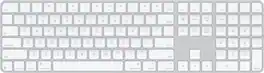
Magic Keyboard is available with Touch ID, providing fast, easy, and secure authentication for logins and purchases. Magic Keyboard with Touch ID and Numeric Keypad delivers a remarkably comfortable and precise typing experience. It features an extended layout, with document navigation controls for quick scrolling and full-size arrow keys, which are great for gaming. The numeric keypad is also ideal for spreadsheets and finance applications. It’s wireless and features a rechargeable battery that will power your keyboard for about a month or more between charges. It pairs automatically with your Mac, so you can get to work right away. It features a USB-C port and includes a woven USB-C Charge Cable that lets you pair and charge by connecting to a USB-C port on your Mac.

Magic Keyboard with Numeric Keypad features an extended layout, with document navigation controls for quick scrolling and full-size arrow keys for gaming. A scissor mechanism beneath each key allows for increased stability, while optimized key travel and a low profile provide a comfortable and precise typing experience. The numeric keypad is also great for spreadsheets and finance applications. And the built-in, rechargeable battery is incredibly long-lasting, powering your keyboard for about a month or more between charges.

Magic Keyboard is now available with Touch ID, providing fast, easy, and secure authentication for logins and purchases. Magic Keyboard with Touch ID delivers a remarkably comfortable and precise typing experience. It’s also wireless and rechargeable, with an incredibly long-lasting internal battery that will power your keyboard for about a month or more between charges. It pairs automatically with your Mac, so you can get to work right away. It features a USB-C port and includes a woven USB-C Charge Cable that lets you pair and charge by connecting to a USB-C port on your Mac.

Magic Keyboard delivers a remarkably comfortable and precise typing experience for Mac and Apple Vision Pro. It’s also wireless and rechargeable, with an incredibly long-lasting internal battery that will power your keyboard for about a month or more between charges. It pairs automatically with your Mac, so you can get to work right away. It features a USB-C port and includes a woven USB-C Charge Cable that lets you pair and charge by connecting to a USB-C port on your Mac. If you would like to pair Magic Keyboard with your Apple Vision Pro, click to see supported languages.
| Pros for Magic Keyboard with Touch ID and Numeric Keypad for Mac models with Apple silicon (USB-C) - White Keys | |||
|---|---|---|---|
| Keyboard Quality, Touch ID, Battery Life, Ease of Use, Design | Battery Life, Overall Performance, Numeric Keypad, Ease of use, Wireless | Keyboard Quality, Touch ID, Battery Life, Connectivity, Fingerprint Reader | Overall Performance, Ease of Use, Battery Life, Connectivity, Size |
| Cons for Magic Keyboard with Touch ID and Numeric Keypad for Mac models with Apple silicon (USB-C) - White Keys | |||
| Adjustability | Price, Key Travel | Size | There were no cons for this product— |
Specs
Reviews
Customers are saying
Customers value the Magic Keyboard for its sleek design, excellent keyboard quality, and seamless connectivity with Apple devices. The Touch ID feature and fingerprint reader are also highly appreciated for their convenience and ease of use. Many users praise the amazing battery life and the comfortable feel of the keys. However, some customers have noted the lack of adjustability as a potential drawback.
Customer Images
The vast majority of our reviews come from verified purchases. Reviews from customers may include My Best Buy members, employees, and Tech Insider Network members (as tagged). Select reviewers may receive discounted products, promotional considerations or entries into drawings for honest, helpful reviews.
- Rated 5 out of 5 stars
Perfect Keyboard for Everyday Use
This keyboard has been a great addition to my setup. From the first use, it felt comfortable and responsive, making typing smooth and consistent. The keys are well-spaced and quiet, which is ideal for both work and everyday use. I also appreciate the solid build quality. It feels sturdy without taking up too much space on my desk. Setup was quick and straightforward, and it worked perfectly right out of the box with no extra steps needed. After using it regularly, I can confidently say it delivers reliable performance and good value. If you’re looking for a simple, comfortable keyboard that does exactly what it’s supposed to do, this is a great choice.
This review is from Magic Keyboard with Touch ID and Numeric Keypad for Mac models with Apple silicon (USB-C) - Black Keys
RogelioC Posted
- Rated 4 out of 5 stars
Sleek and Functional: A Solid Choice for Typists
The Apple Keyboard is a good choice for anyone looking for a reliable and easy-to-use typing experience. Its sleek design and lightweight build make it a perfect companion for both home and office settings. The functionality is impressive, providing a smooth and responsive typing experience that enhances productivity. However, there are a couple of downsides worth mentioning. Firstly, the lack of backlighting can be a bit of a drawback for those who often work in low-light environments. Additionally, the keyboard is quite thin, which might not be ideal for everyone. Lastly, the absence of an adjustable angle , potentially affecting ergonomics. Overall, while the Apple Keyboard shines in its design and functionality, it could benefit from a few enhancements to improve user comfort.
KemFi Posted
- Rated 5 out of 5 stars
Sleek
The keyboard is very sleek and stays charged for sometime. Perfect for work