Plugable - DisplayLink Monitor Adapter - USB 3.0 to HDMI 2.0 for Windows/Mac - Black

About This Item
Reviews
The vast majority of our reviews come from verified purchases. Reviews from customers may include My Best Buy members, employees, and Tech Insider Network members (as tagged). Select reviewers may receive discounted products, promotional considerations or entries into drawings for honest, helpful reviews.
Compare similar products

Performance Featuring the DisplayLink DL-3500 chipset, the Plugable UGA-2KHDMI graphics adapter lets you connect an additional HDMI display up to 2560x1440@50Hz (lower resolutions at 60Hz) to your Windows-based laptop, desktop, tablet, or Mac 10.14+ systems via USB 3.0 to enable multitasking with ease. Compatibility Drivers available for Windows 11/10/8.1/7 (Drivers can be automatically installed via Windows Update or downloaded direclty from Plugable.) Supports Intel and M1 / M2 / M3 Macs on macOS 10.14+ with driver installation Dual Core Intel or AMD CPU, 2GHz or better recommended and at least 2GB of RAM Non-Compatible Systems Cannot be mixed with non-DisplayLink USB graphics adapters and drivers (e.g. MCT, j5, or SMSC). Linux/Unix not supported. Monitor Compatibility Supports HDMI displays up to 2560x1440/2K at 50Hz. 1920x1080 (1080P) and lower modes refresh at 60Hz. Using a "High Speed" HDMI 1.4 cable is recommended Application Compatibility Does not support HDCP, and will not allow for playback of encrypted Bluray disks or copy-protected content. Video playback at 1080P and above requires playback software that supports GPU acceleration. Not recommended for gaming. In the Box USB 3.0 UGA-2KHDMI graphics adapter with robust, built-in USB 3.0 cable, driver CD, quick install guide.

This USB 3.0 to Dual HDMI Multi-Monitor Adapter acts as an external video card for your MacBook or Windows computers. It allows you to add two additional displays through your USB 3.0 port, boosting your productivity by giving you more screen space to work from. One of the HDMI ports can output resolutions up to 4K, while the other can output resolutions up to 2048 x 1152. This is the perfect alternative to a costly video card. With this USB 3.0 Multi-Monitor Adapter, you can quickly install the driver with a simple USB plug-in. Afterwards, connect the device to your monitors using HDMI cables and then you will have a dual-display workstation!
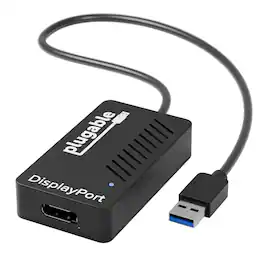
Performance Featuring the highest-performance DisplayLink DL-5500 chipset, the Plugable UGA-4KHDMI graphics adapter lets you connect an additional HDMI display up to 3840x2160@30Hz (4K/UHD/2160p) to your Windows-based laptop, desktop, or tablet and Mac 10.14+ via USB 3.0. This makes it an excellent choice for those needing a USB 3.0 to DisplayPort 4K UHD video graphics adapter for multiple monitors that utilize cutting-edge computer graphics cards. Compatibility Drivers available for Windows 11 / 10 / 8.1 / 7 / XP and Mac 10.14+ systems. Supports Intel, M1 (Pro, Max), M2 (Pro, Max), M3 (Pro, Max) Macs on macOS 10.14+ with the installation of the DisplayLink Manager Application available on Plugable's website. For optimal performance and compatibility please ensure your Graphics processing unit(GPU) and USB 3.0 host controller drivers are up to date. Non-Compatible Systems Not compatible with ARM-based Windows(Surface RT) Linux/Unix is not supported. Monitor Compatibility Supports DisplayPort displays up to 3840x2160/4K. 3840x2160 mode has a refresh rate of 30Hz, while 3440x1440 supports 50Hz. 2560x1600, 2560x1440, 2560x1080, 1920x1080 (1080P) and lower modes refresh at 60Hz. 4K/UHD output requires compatible 4K monitor and UHD display. Audio outputs in stereo format; 5.1 output not supported. If connecting a 4K HDMI display, an HDMI 1.4 "active" adapter such as the "Plugable DP-HDMI" must be used. Passive adapters and all DVI adapters will limit output to 2048x1152. Dual-link DVI monitors (Qnix, Yamakasi) not supported. Application Compatibility Does not support HDCP, and will not allow for playback of encrypted Bluray disks or copy-protected content. Not recommended for rendering, video editing or gaming. Video playback at 1080P and above requires playback software that supports GPU acceleration. For those who frequently use docking stations and rely on additional connectivity, this adapter offers robust support for expanding your workstation's display capabilities.

The JUA254 USB to HDMI Multi-Monitor Adapter works as an external video card, instantly allowing users to attach additional displays via HDMI connection without the hassle of a lengthy setup or having to install additional hardware. The USB 3.0 Display Adapter can support up to four displays running on the same computer, turning your workstation into a fully-functioning, multi-display powerhouse. This USB adapter works as an external video card, instantly allowing additional displays without the hassle of opening the computer casing and installing an external graphics card. You can have a second monitor with an extended display, a mirrored display, a rotational display (rotation mode not available for Mac), or make it your primary monitor. Now enjoy true 1080p HD resolution through any Windows or Mac computer with a USB 3.0 port. These adapters are also backwards compatible with USB 2.0 resolutions and playback, which are ideal for office applications. The simple plug-and-play function allows you to connect your computer to a second monitor or projector within seconds to create a new visual environment on Windows 10.
| Pros for Plugable - DisplayLink Monitor Adapter - USB 3.0 to HDMI 2.0 for Windows/Mac - Black | |||
|---|---|---|---|
| There were no pros for this product— | Overall Performance, Ease of use, HDMI, Compatibility, Connectivity | There were no pros for this product— | Overall Performance, Functionality, USB |
| Cons for Plugable - DisplayLink Monitor Adapter - USB 3.0 to HDMI 2.0 for Windows/Mac - Black | |||
| There were no cons for this product— | Price, Driver, Lag, Resolution, Heat | There were no cons for this product— | There were no cons for this product— |