Plugable - USB 3.0 to DVI/VGA/HDMI Video Graphics Adapter for Multiple Monitors up to 2048x1152 - TAA Compliant - Black
Related Item

About This Item
- Key Specs
- Connector Type (End 1): USB-A
- Gender (End 1): Male
- Connector Type (End 2): HDMI Type A
- Gender (End 2): Female
- General
- Brand: Plugable
- Model Number: UGA-3000
- Product Name: USB 3.0 to DVI/VGA/HDMI Video Graphics Adapter for Multiple Monitors up to 2048x1152 - TAA Compliant
- Color: Black
- Quantity: 1
- Compatibility: Windows XP and Above|macOS 10.14 (Mojave) or later|v100 or Later
- Connectivity
- Cable Type: USB
- Product Type: Adapter
- Connector Type (End 1): USB-A
- Gender (End 1): Male
- Connector Type (End 2): HDMI Type A
- Gender (End 2): Female
- Environmental
- Indoor Or Outdoor Use: Indoor (Indicates the appropriate environment product was designed to be used in.)
- Warranty
- Warranty - Parts: 2 year limited
- Warranty - Labor: 2 year limited
- Other
- UPC: 649241921080
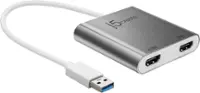
Featuring the DisplayLink DL-3100 USB 3.0 graphics chipset, the Plugable UGA-3000 enables multiple monitors with your Windows laptop, tablet, or desktop (one adapter required per monitor). Multitask with a dedicated monitor for each document or application. Supports resolutions up to 2048x1152. Performance USB graphics adapters work by utilizing your computer's CPU and GPU, and then compressing and transmitting the output via USB. Dual core or 2GHz+ CPU & 2GB RAM recommended. Best suited for web and productivity software, not 3D gaming or HD video playback. Compatibility Compatible with Windows 11 / 10 / 8.1 / 7 / XP and Mac 10.14+ systems. Drivers can be automatically installed via Windows Update or downloaded from plugable.com/drivers. Dual core or 2 GHz+ CPU & 2GB RAM recommended. Non-Compatible Systems Cannot be mixed with non-DisplayLink USB graphics adapters and drivers (e.g. MCT, j5, or SMSC). Monitor Compatibility Supports monitors and compatible TVs up to 2048x1152/1920x1200. Dual-Link DVI not supported. If converting DVI output to HDMI, signal will carry video only, not audio. Application Compatibility WDDM-compatible graphics drivers required (most recent Intel/AMD/Nvida graphic chips meet this requirement) Does not support HDCP, and will not allow for playback of encrypted Bluray disks or copy-protected content. Not recommended for gaming. In the Box UGA-3000 graphics adapter with robust, built-in USB 3.0 cable (USB 2.0 backwards compatible), passive adapters for the different connector types (DVI-I to VGA/D-Sub and DVI-I to HDMI).
- Multiple Displays: Connect multiple USB 3.0 display adapters to your computer to expand your screen space with up to 6 additional 2048x1152 HDMI, DVI, or VGA displays on Windows and ChomeOS (1920x1080p with analog VGA). One adapter per display, with up to 4 external displays on macOS. TAA Compliant.
- Boost Productivity: Maximize your productivity and workspace with the USB to DVI Adapter; with multiple displays, you're able to get more done in less time, especially on tasks that have you working across a handful of windows and tabs. The USB 3.0 to DVI adapter for monitor is the perfect solution for expanding your screen real estate effortlessly.
- Compact and Portable: Easily stow in any backpack or laptop bag, taking up roughly the same space as a pack of playing cards; no external power adapter needed. This USB to VGA adapter for monitor is perfect for on-the-go productivity.
- Windows, ChromeOS, and macOS Compatibility: Drivers for Windows 11 / 10 / 8.1 / 7 / XP are available via Windows Update or directly from Plugable; drivers for macOS 10.14+ are available for download from Plugable, ensuring seamless use of the 3.0 to DVI VGA adapter across platforms. Plug-and-play on ChromeOS version 100 or later.
- Enhance Your Work Setup: Transform your workspace with seamless connectivity and increased screen real estate for efficient multitasking using the USB to DVI Adapter 3.0 for monitor.
- Multiple Displays: Connect multiple USB 3.0 display adapters to your computer to expand your screen space with up to 6 additional 2048x1152 HDMI, DVI, or VGA displays on Windows and ChomeOS (1920x1080p with analog VGA). One adapter per display, with up to 4 external displays on macOS. TAA Compliant.
- Boost Productivity: Maximize your productivity and workspace with the USB to DVI Adapter; with multiple displays, you're able to get more done in less time, especially on tasks that have you working across a handful of windows and tabs. The USB 3.0 to DVI adapter for monitor is the perfect solution for expanding your screen real estate effortlessly.
- Compact and Portable: Easily stow in any backpack or laptop bag, taking up roughly the same space as a pack of playing cards; no external power adapter needed. This USB to VGA adapter for monitor is perfect for on-the-go productivity.
- Windows, ChromeOS, and macOS Compatibility: Drivers for Windows 11 / 10 / 8.1 / 7 / XP are available via Windows Update or directly from Plugable; drivers for macOS 10.14+ are available for download from Plugable, ensuring seamless use of the 3.0 to DVI VGA adapter across platforms. Plug-and-play on ChromeOS version 100 or later.
- Enhance Your Work Setup: Transform your workspace with seamless connectivity and increased screen real estate for efficient multitasking using the USB to DVI Adapter 3.0 for monitor.
Reviews
This product doesn't have any reviews yet.
Compare similar products
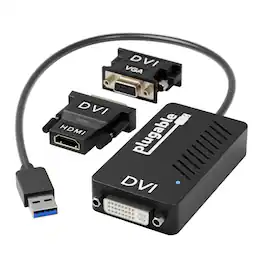
Featuring the DisplayLink DL-3100 USB 3.0 graphics chipset, the Plugable UGA-3000 enables multiple monitors with your Windows laptop, tablet, or desktop (one adapter required per monitor). Multitask with a dedicated monitor for each document or application. Supports resolutions up to 2048x1152. Performance USB graphics adapters work by utilizing your computer's CPU and GPU, and then compressing and transmitting the output via USB. Dual core or 2GHz+ CPU & 2GB RAM recommended. Best suited for web and productivity software, not 3D gaming or HD video playback. Compatibility Compatible with Windows 11 / 10 / 8.1 / 7 / XP and Mac 10.14+ systems. Drivers can be automatically installed via Windows Update or downloaded from plugable.com/drivers. Dual core or 2 GHz+ CPU & 2GB RAM recommended. Non-Compatible Systems Cannot be mixed with non-DisplayLink USB graphics adapters and drivers (e.g. MCT, j5, or SMSC). Monitor Compatibility Supports monitors and compatible TVs up to 2048x1152/1920x1200. Dual-Link DVI not supported. If converting DVI output to HDMI, signal will carry video only, not audio. Application Compatibility WDDM-compatible graphics drivers required (most recent Intel/AMD/Nvida graphic chips meet this requirement) Does not support HDCP, and will not allow for playback of encrypted Bluray disks or copy-protected content. Not recommended for gaming. In the Box UGA-3000 graphics adapter with robust, built-in USB 3.0 cable (USB 2.0 backwards compatible), passive adapters for the different connector types (DVI-I to VGA/D-Sub and DVI-I to HDMI).

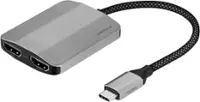
You can have an easy and hassle-free connection from your laptop or tablet to your video display with USB Power Delivery at the same time. The plug-and-play compatibility works with Mac and Windows laptops and other USB-C devices. You can charge while you’re using your video display with pass-through USB Power Delivery up to 60W. This cable supports HD-quality resolution up to 3840x2160 at 60Hz, so the video on the compatible display will look as good as on your device.

This 2-meter charge cable is made with a woven design — with USB-C connectors on both ends — and is ideal for charging, syncing, and transferring data between USB-C devices. It supports charging of up to 240 watts and transfers data at USB 2 rates. Pair the USB-C Charge Cable with a compatible USB-C power adapter to conveniently charge your devices from a wall outlet and take advantage of fast-charging capabilities. USB-C power adapters sold separately.

This 1-meter charge cable is made with a woven design with USB-C connectors on both ends, and is ideal for charging, syncing, and transferring data between USB-C devices. Pair the USB-C Woven Charge Cable with a compatible USB-C power adapter to conveniently charge your devices from a wall outlet and take advantage of fast-charging capabilities. USB-C power adapters sold separately.
| Pros for Plugable - USB 3.0 to DVI/VGA/HDMI Video Graphics Adapter for Multiple Monitors up to 2048x1152 - TAA Compliant - Black | |||
|---|---|---|---|
| There were no pros for this product— | There were no pros for this product— | Overall Performance, Cable Length, Flexibility, Compatibility | Durability, Charging Speed, USB-C, Price |
| Cons for Plugable - USB 3.0 to DVI/VGA/HDMI Video Graphics Adapter for Multiple Monitors up to 2048x1152 - TAA Compliant - Black | |||
| There were no cons for this product— | There were no cons for this product— | Connectivity, Heat Dissipation | Heat |