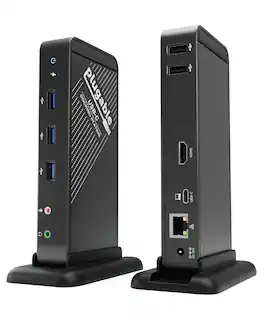
Plugable - USB-C Dock with 4K HDMI 60W Charging Ethernet - 3x USB 3.0 Ports - TAA Compliant - Black
More Buying Options from Marketplace sellers
Related Item

About This Item
- Key Specs
- Maximum Number of Displays Supported: 1
- Maximum Supported Resolution: 4K (2160p)
- Number of DisplayPort Outputs (Total): 0
- Passthrough Power: true (Indicates whether the device allows power to passthrough, possibly with some loss, to another device, typically to charge that other device.)
- General
- Brand: Plugable
- Model Number: UD-CA1A
- Product Name: USB-C Dock with 4K HDMI 60W Charging Ethernet - 3x USB 3.0 Ports - TAA Compliant
- Color: Black
- Display
- Maximum Number of Displays Supported: 1
- Maximum Supported Resolution: 4K (2160p)
- Ports
- Display Connector(s): 1 x HDMI 1.4 (The number and type of connectors used to connect to an external display.)
- Number of DisplayPort Outputs (Total): 0
- Number of HDMI Ports (Total): 1
- Number of VGA Ports: 0 (VGA (Video Graphics Adapter or Video Graphics Array) is a display standard that transmits via analog signals. This type of interface is typically used to connect a computer to a display device such as a monitor, projector, or TV.)
- Number Of Ethernet Ports: 1
- Number of USB Ports (Total): 5
- USB Ports: 3 x USB-A 3.0, 2 x USB-A 2.0 (The number and type of USB ports the product has.)
- Headphone Jack: true (The device features an interface that allows for the connection of headphones.)
- Microphone Input: true (The device features an input for connecting an external microphone.)
- Power
- Powered: true
- Power Supply Included: true
- Maximum Input Power: 80 watts (The maximum amount of power allowed to come into the device.)
- Maximum Input Voltage: 20 volts
- Maximum Input Amperage: 4 amperes (The maximum amount of amperage allowed to come into the device.)
- Passthrough Power: true (Indicates whether the device allows power to passthrough, possibly with some loss, to another device, typically to charge that other device.)
- Maximum Output Power: 60 watts (The maximum amount of power produced or allowed to flow through the device.)
- Maximum Output Voltage: 20 volts
- Maximum Output Amperage: 3 amperes (The maximum amount of amperage produced or allowed to flow through the device.)
- Compatibility
- System Requirements: macOS Not Supported; Windows 10 and Above (The software that a product must have for it to be able to integrate with another product.)
- Brand Compatibility: Windows, macOS, ChromeOS, Lenovo, Dell, HP
- Model Compatibility: Compatibility - Works seamlessly with USB-C, Thunderbolt, USB4 devices running Windows, macOS, ChromeOS, and Linux. True plug-and-play - no driver required. Not compatible with iOS and iPadOS
- Dimensions
- Product Height: 6.7 inches (The out of box height of the item. Height is measured as the vertical distance from the bottom of the item to the top as it would be primarily used or placed.)
- Product Length: 3 inches (The out of box length of the item. Length is measured as the longest dimension of the item.)
- Product Width: 1.1 inches (The out of box width of the item. Width is measured as the horizontal distance from one side of the item to the other as it would be primarily used or placed.)
- Product Weight: 8.4 ounces (The out of box weight of the item.)
- Warranty
- Warranty - Parts: 2 year limited
- Warranty - Labor: 2 year limited
- Other
- UPC: 819927011675
Streamline your workstation with the Plugable UD-CA1A USB-C Docking Station—a compact, versatile 9-in-1 solution that expands your connectivity through a single USB-C cable. This dock adds essential ports to your setup, including a 4K HDMI video output (up to 30Hz), Gigabit Ethernet, headphone and microphone jacks, three USB 3.0 ports, two USB 2.0 ports, and up to 60W of USB-C Power Delivery to charge your compatible device. The UD-CA1A is designed for a seamless setup experience. It offers driverless, plug-and-play functionality, meaning no additional software or drivers are needed to begin using it. Simply connect the dock to a compatible USB-C port on your device, and its full range of features becomes immediately accessible, including HDMI video output, USB ports, Ethernet, and audio connections. Its compact vertical stand, which can also be removed for horizontal use, provides flexible placement options to suit your workspace. This docking station is intended for laptops, tablets, and phones that support both USB-C Power Delivery and DisplayPort Alternate Mode (Alt Mode), which are required for video output and charging. Compatible systems include MacBook Air and Pro (M1, M2, M3), iPad Pro, iPhone 16 models, Dell XPS, HP Spectre, Lenovo ThinkPad, and other Alt Mode and Power Delivery-enabled devices. It is important to note that the UD-CA1A supports only a single HDMI display output and is not compatible with DisplayPort monitors or systems that lack Alt Mode or Power Delivery, such as many legacy USB 3.0 laptops. For setups requiring dual HDMI outputs, a different Plugable dock may be more suitable. The HDMI port provides native-level video output, supporting up to 4K resolution at 30Hz or 2560x1600 and lower resolutions at 60Hz. This makes the dock well-suited for productivity tasks and everyday use, though it is not recommended for high-frame-rate gaming or applications that require fast refresh rates. With up to 60W of USB-C Power Delivery, the dock helps keep your device charged during use. However, devices that require more than 60W may charge more slowly or not at all. If full-speed charging is critical for your setup, consider one of Plugable’s docking stations with higher power delivery support. Included in the box are the UD-CA1A docking station, a stand, a 1-meter USB-C cable, an 80W power adapter with a US plug, and a quick start guide. The dock is TAA compliant and backed by Plugable’s 2-Year Warranty and lifetime support from our US-based team.
- 10-in-1 Dock: Use a single USB-C port with this USB C dock that delivers a single 4K HDMI output Gigabit Ethernet, 3.5mm headphone and mic ports, 3x USB 3.0, 2x USB 2.0 ports, and laptop charging. Engineered for both home offices and professional IT setups, with TAA compliance for secure applications.
- USB-C Docking Station: Single-Monitor HDMI 4K Support- Delivers full, native graphics performance with support for one external display and no drivers required on supported OS. Supports up to 4K at 30Hz (60Hz at 2560×1600 and below) via a direct USB-C video connection.
- Space-Saving Versatility with Efficient Charging: Designed to adapt, the dock can be placed vertical with the stand or be positioned horizontally, making it easy to fit into any workspace. This versatile laptop docking station with power provides up to 60W of USB-C power delivery to keep your devices charged while maintaining a clean layout.
- Compatibility: Works seamlessly with USB-C, Thunderbolt, USB4 devices running Windows, macOS, ChromeOS, and Linux. True plug-and-play - no driver required. Not compatible with iOS and iPadOS
- Lifetime Support: Every Plugable product, including this docking station with laptop charging, comes with lifetime support. If you ever have questions, contact our North American-based team - even before purchase
Whats Included
- USB-C to USB-C Cable, 80W Power Adapter, Detachable Stand, Quick Start Guide
Reviews
This product doesn't have any reviews yet.
Compare similar products
Streamline your workstation with the Plugable UD-CA1A USB-C Docking Station—a compact, versatile 9-in-1 solution that expands your connectivity through a single USB-C cable. This dock adds essential ports to your setup, including a 4K HDMI video output (up to 30Hz), Gigabit Ethernet, headphone and microphone jacks, three USB 3.0 ports, two USB 2.0 ports, and up to 60W of USB-C Power Delivery to charge your compatible device. The UD-CA1A is designed for a seamless setup experience. It offers driverless, plug-and-play functionality, meaning no additional software or drivers are needed to begin using it. Simply connect the dock to a compatible USB-C port on your device, and its full range of features becomes immediately accessible, including HDMI video output, USB ports, Ethernet, and audio connections. Its compact vertical stand, which can also be removed for horizontal use, provides flexible placement options to suit your workspace. This docking station is intended for laptops, tablets, and phones that support both USB-C Power Delivery and DisplayPort Alternate Mode (Alt Mode), which are required for video output and charging. Compatible systems include MacBook Air and Pro (M1, M2, M3), iPad Pro, iPhone 16 models, Dell XPS, HP Spectre, Lenovo ThinkPad, and other Alt Mode and Power Delivery-enabled devices. It is important to note that the UD-CA1A supports only a single HDMI display output and is not compatible with DisplayPort monitors or systems that lack Alt Mode or Power Delivery, such as many legacy USB 3.0 laptops. For setups requiring dual HDMI outputs, a different Plugable dock may be more suitable. The HDMI port provides native-level video output, supporting up to 4K resolution at 30Hz or 2560x1600 and lower resolutions at 60Hz. This makes the dock well-suited for productivity tasks and everyday use, though it is not recommended for high-frame-rate gaming or applications that require fast refresh rates. With up to 60W of USB-C Power Delivery, the dock helps keep your device charged during use. However, devices that require more than 60W may charge more slowly or not at all. If full-speed charging is critical for your setup, consider one of Plugable’s docking stations with higher power delivery support. Included in the box are the UD-CA1A docking station, a stand, a 1-meter USB-C cable, an 80W power adapter with a US plug, and a quick start guide. The dock is TAA compliant and backed by Plugable’s 2-Year Warranty and lifetime support from our US-based team.
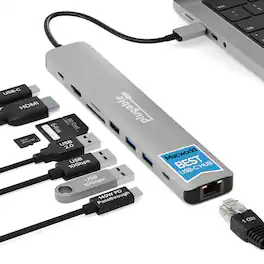
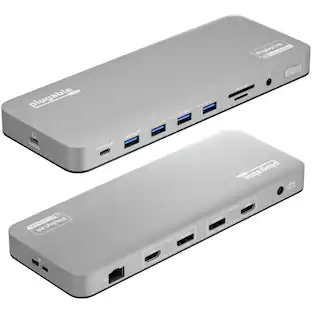
Whether you’re working in a cushy office, a cramped home workspace, or on the go, the Plugable USBC-9IN1E is the preferred USB C hub for productive people. This versatile USB dock expands your laptop’s capabilities by offering a 4K 60Hz HDMI port, a high-speed 10Gbps USB-C port, two 10Gbps USB-A ports (one with BC 1.2 charging), a dedicated USB 2.0 port for input devices, SD and MicroSD (UHS-II) card readers, Gigabit Ethernet, and an impressive 140W (125W to host) EPR pass-through charging, all in a portable package. Designed for maximum flexibility, this USB-C hub works with most USB-C, USB4, and Thunderbolt laptops including MacBook Pro/Air, Dell XPS, Lenovo, HP, Surface, and Chromebooks. As a powerful MacBook dock, it offers reliable charging, data, and display support when connected to compatible MacBooks and other leading devices. For full charging and 4K video, your laptop’s USB-C port must support Power Delivery and DisplayPort Alt Mode.
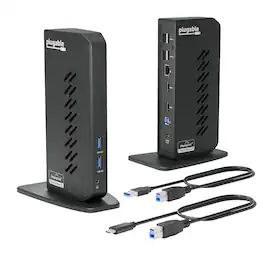
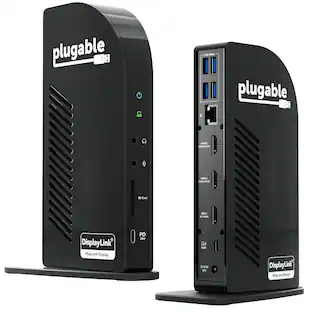
The Plugable UD-3900Z USB 3.0 and USB-C docking station is a reliable USB docking station designed for standardized workstation deployments across Windows, macOS, and ChromeOS environments. As a universal docking station, it enables consistent desk setups across mixed device fleets, expanding laptops and desktops with dual monitors, wired networking, audio, and USB peripherals through a single connection. This USB docking station dual monitor solution supports two HDMI displays up to 1920x1200 @ 60Hz and uses DisplayLink technology to enable extended or mirrored desktops on compatible Windows and ChromeOS systems, as well as on Apple Silicon MacBooks including M1, M2, M3, M4, M5, and MacBook Neo models, even on systems that are typically limited to a single native external display. The UD-3900Z provides 10 expansion ports, including 2 HDMI outputs, 2 USB 3.0 ports for high-speed devices, 4 USB 2.0 ports for keyboards, mice, and receivers, Gigabit Ethernet for stable wired network connectivity, and 3.5mm audio input/output. Both USB-C and USB-A host cables are included, allowing this USB A docking station to support legacy systems while also functioning as a modern USB C docking station. The compact vertical design helps reduce cable clutter and fits easily between monitors, making it well suited for hot-desking and shared workspace environments. This dock is HDMI-only and does not support DisplayPort. HDCP is not supported, so encrypted content such as Netflix, Hulu, or Blu-ray will not play. Designed for business applications rather than GPU-intensive workloads, it is not recommended for gaming or full-screen video playback. The included 24W external power supply powers connected accessories but does not charge the host laptop. In the box: UD-3900Z dock (7.5” x 2.8” x 5.3”), 24W power adapter with US wall plug (100-240V, 50/60Hz, 1.5m / 5ft), USB-A (USB 3.0) to USB-B cable (0.9m / 2.95 ft), USB-C to USB-B host cable (2.9m / 9.5 ft), and quick-install guide.

This compact multi-port dock is ideal for office application, featuring everything from the essential two HDMI outputs, USB ports, Gigabit Ethernet, SD/microSD card reader, Audio Jack and an upgraded Power Delivery 3.1 specification. It comes with a mount for saving-space vertical placement and gives you the ability to connect your MacBook or other USB-C compatible laptops to a 4K monitor or TV. With USB Power Delivery 3.1 it’ll take you to a new flexible power application, you'll be able to charge your laptop and power your peripherals with a single USB-C power adapter even if your laptop only has one USB-C port. The top of the dock functions as a wireless charging pad that supports up to 15W fast charging. Access a wired network through the Gigabit Ethernet port for a fast and stable network connection. It is also equipped with a cable storage compartment which ensures an easy connection regardless of your USB-C port’s location. Power Adapter to support Wireless Charging Sold Separately.
| Pros for Plugable - USB-C Dock with 4K HDMI 60W Charging Ethernet - 3x USB 3.0 Ports - TAA Compliant - Black | |||
|---|---|---|---|
| There were no pros for this product— | There were no pros for this product— | There were no pros for this product— | Wireless Charging, Ease of use, Overall Performance, Ports, HDMI |
| Cons for Plugable - USB-C Dock with 4K HDMI 60W Charging Ethernet - 3x USB 3.0 Ports - TAA Compliant - Black | |||
| There were no cons for this product— | There were no cons for this product— | There were no cons for this product— | Compatibility, Noise Level, Power Supply, Price |
Specs
Customers often buy these together
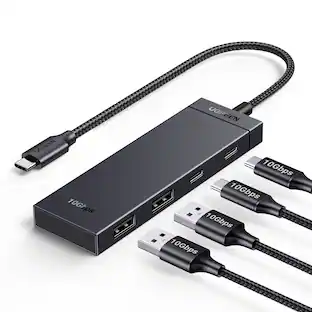 $17.99The price was $21.99
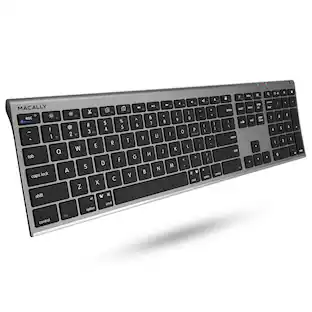 $49.99The price was $59.99





More to consider

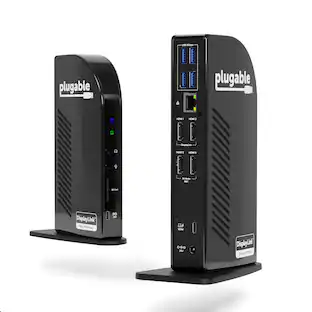
Plugable - USB 3.0 and USB-C Universal Laptop Docking Station for Windows, Mac, ChromeOS | Dual HDMI
$112.95The price was $135.35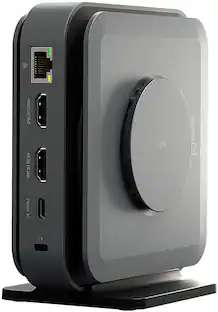 Tech Fest Deal$99.99The price was $129.99



Explore tech essentials Sponsored
Plugable - USB 3.0 and USB-C Universal Laptop Docking Station for Windows, Mac, ChromeOS | Dual HDMI
$112.95The price was $135.35

Discover related products
 $13.99The price was $19.99
 Tech Fest Deal$11.99The price was $14.99







Keep exploring
 $17.99The price was $19.99
 $179.99The price was $245.49
Acer - 5 in 1 USB C Hub with 4K HDMI, 100W Power Delivery, 3 USB A Data Ports, USB C to HDMI Adapter
$14.99The price was $16.99 $25.99The price was $27.99